
1. Introduzzjoni
This manual provides essential instructions for the installation, operation, and maintenance of your Xigmatek Vanguard Plus PC Case. This full tower case is designed to accommodate ATX, Micro ATX, and Mini ITX motherboards and comes with a pre-installed 600W 80PLUS Active PFC power supply. It features convenient front panel connectivity including USB 3.0 and USB 2.0 ports, along with audio jacks, and includes LED fans for enhanced cooling and aesthetics.
2. Setup u Installazzjoni
Before beginning installation, ensure your workspace is clean and static-free. Refer to your motherboard and component manuals for specific installation details.
2.1. Il-Ftuħ tal-Każ
Carefully remove the side panels of the case. Typically, this involves unscrewing thumbscrews at the rear and sliding the panels backward.
2.2. Installazzjoni tal-Motherboard
Install the I/O shield provided with your motherboard into the rear opening of the case. Align your ATX, Micro ATX, or Mini ITX motherboard with the standoffs inside the case. Secure the motherboard using the appropriate screws. Ensure all standoffs are correctly aligned to prevent damage.

Immaġni: Interna view of the Xigmatek Vanguard Plus PC case, illustrating the motherboard mounting area and drive bays.
2.3. Unità tal-Provvista tal-Enerġija (PSU)
The 600W 80PLUS Active PFC power supply is pre-installed in the lower section of the case. Connect the necessary power cables to your motherboard, CPU, graphics card, and storage devices. Route cables through the designated cutouts for optimal airflow and a tidy build.
2.4. Installazzjoni tad-Drajv tal-Ħażna
Install your 2.5-inch SSDs or 3.5-inch HDDs into the available drive bays. Secure them with screws or tool-less mechanisms if provided. Connect SATA data and power cables.
2.5. Karti ta' Espansjoni
Remove the necessary expansion slot covers at the rear of the case. Insert your graphics card or other expansion cards into the PCIe slots on your motherboard and secure them with screws.
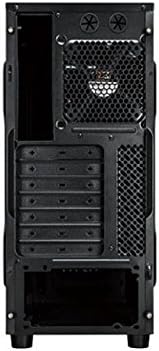
Immaġni: Wara view of the Xigmatek Vanguard Plus PC case, highlighting the expansion slots and rear fan mounting area.
2.6. Konnessjonijiet tal-Panel ta' Quddiem
Connect the front panel cables (USB 3.0, USB 2.0, HD Audio, Power Switch, Reset Switch, Power LED, HDD LED) to the corresponding headers on your motherboard. Refer to your motherboard manual for header locations.

Immaġni: Quddiem view of the Xigmatek Vanguard Plus PC case, showcasing the front panel design and an illuminated LED fan.
3. Istruzzjonijiet Operattivi
Once all components are installed and cables are connected, replace the side panels. Connect your monitor, keyboard, mouse, and power cable to the rear of the PC. Press the power button on the front panel to start your system.
3.1. Portijiet tal-Panel ta' Quddiem
- Portijiet USB 3.0 (x2): Għal trasferiment ta' dejta b'veloċità għolja ma' apparati kompatibbli.
- Port tal-USB 2.0 (x1): Għal apparati USB standard.
- Microphone Input (x1): Qabbad il-mikrofonu tiegħek.
- Speaker Output (x1): Qabbad il-headphones jew il-kelliema tiegħek.
3.2. LED Fans
The case includes LED fans that provide cooling and visual effects. These fans typically draw power directly from the power supply or motherboard fan headers and operate automatically based on system temperature or a fixed speed.
4. Manutenzjoni
Manutenzjoni regolari tgħin biex tiżgura prestazzjoni ottimali u lonġevità tal-komponenti tal-PC tiegħek.
- Filtri tat-Trab: Periodically check and clean any removable dust filters (e.g., on the front, top, or bottom of the case) to maintain good airflow. Use compressed air or a soft brush.
- Tindif ta 'ġewwa: Every few months, open the case and use compressed air to remove dust buildup from fans, heatsinks, and other components. Hold fan blades gently to prevent over-spinning during cleaning.
- Tindif ta' barra: Imsaħ l-uċuħ ta 'barra b'artab, damp drapp. Evita kimiċi ħarxa.
5 Issolvi l-problemi
Din it-taqsima tindirizza kwistjonijiet komuni li tista’ tiltaqa’ magħhom.
- Ebda Qawwa:
- Kun żgur li l-kejbil tal-enerġija huwa konness sew kemm mal-PSU kif ukoll mas-sokit tal-ħajt.
- Iċċekkja li s-swiċċ tal-enerġija fuq wara tal-PSU jkun fil-pożizzjoni 'ON'.
- Verify all internal power cables (24-pin ATX, 8-pin CPU, GPU power) are correctly seated.
- Ikkonferma li l-kejbil tas-swiċċ tal-enerġija tal-pannell ta' quddiem huwa konness sew mal-header tal-motherboard.
- Fans Not Spinning / No LED Lights:
- Check fan power connections to the motherboard or PSU.
- Ensure LED cables (if separate) are connected.
- Il-USB/Awdjo tal-Pannell ta' Quddiem Mhux Jaħdem:
- Verify that the USB 3.0, USB 2.0, and HD Audio cables from the front panel are correctly connected to the corresponding headers on your motherboard.
- Iċċekkja s-settings tal-BIOS/UEFI tal-motherboard tiegħek biex tiżgura li l-awdjo/USB tal-pannell ta' quddiem huwa attivat.
- Kwistjonijiet ta' Adattament tal-Komponenti:
- Ensure all components, especially large graphics cards or CPU coolers, are compatible with the case dimensions.
- Some larger gaming motherboards or specific cooler designs may require careful planning for exhaust fan placement.
6. Speċifikazzjonijiet
| Karatteristika | Dettall |
|---|---|
| Brand | Xigmatek |
| Numru tal-Mudell | Vanguard Plus |
| Tip ta' Każ | Torri sħiħ |
| Kompatibbiltà tal-motherboard | ATX, Mikro ATX, Mini ITX |
| Provvista ta 'Enerġija Inkluża | 600W 80PLUS Active PFC |
| Portijiet tal-Panew ta' Quddiem | 2x USB 3.0, 1x USB 2.0, 1x Microphone, 1x Speaker |
| Metodu tat-tkessiħ | Air (includes LED fans) |
| Piż tal-Prodott | 6.82 Kilogrammi |
| Pajjiż ta' Oriġini | Iċ-Ċina |
7. Informazzjoni dwar Garanzija
The Xigmatek Vanguard Plus PC Case comes with a Garanzija ta' 2 snin mill-manifattur from the date of purchase. This warranty covers defects in materials and workmanship under normal use. Please retain your proof of purchase for warranty claims. The warranty does not cover damage caused by misuse, accident, modification, or unauthorized repair.
8. Appoġġ
For technical assistance, troubleshooting beyond this manual, or warranty inquiries, please contact Xigmatek customer support through their official website or the retailer where the product was purchased. Have your product model number (Vanguard Plus) and proof of purchase ready when contacting support.