
1. Introduzzjoni
This manual provides essential instructions for the proper use and care of your Yamaha RAV536 (Part # ZP601100) OEM remote control. This remote is designed to operate specific Yamaha A/V receiver models, ensuring seamless control over your audio and video system. Please read this manual thoroughly before use to ensure optimal performance and longevity of your remote control.
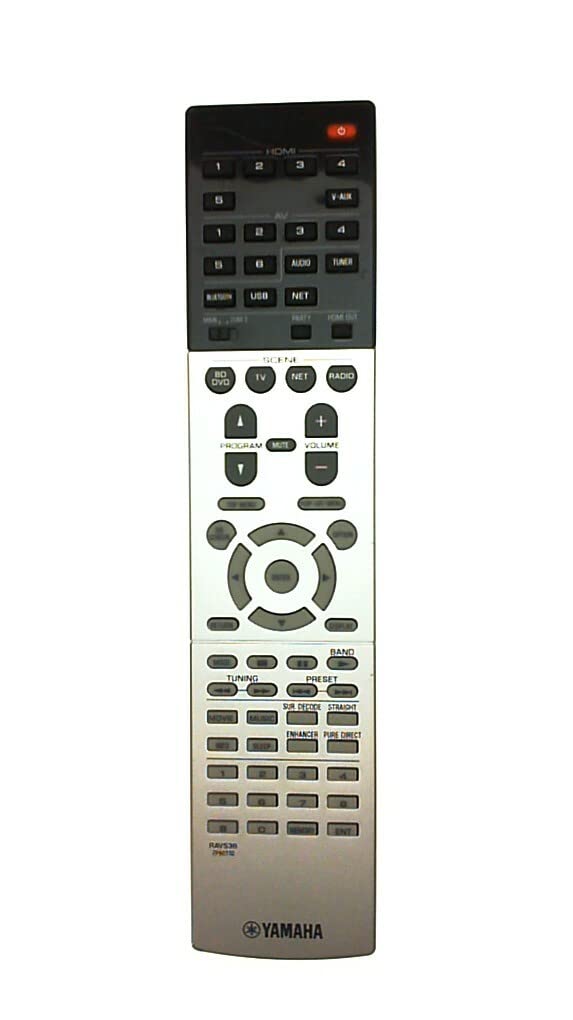
Figure 1: Yamaha RAV536 Remote Control. This image displays the front view of the remote, highlighting its button layout and ergonomic design.
2. Mudelli Kompatibbli
The Yamaha RAV536 (ZP601100) remote control is specifically designed for use with the following Yamaha A/V receiver models:
- TSR-7790
- RX-V679BL
- HTR-6068
- TSR-7790BL
- RX-A750
- RX-V679
- RX-V779
Importanti: This is an OEM remote control and is not universal. It is intended to replace the original remote supplied with the listed models only. Compatibility with other models is not guaranteed.
3. Konfigurazzjoni: Installazzjoni tal-Batterija
To begin using your Yamaha RAV536 remote control, you must install batteries. The remote requires two (2) AAA batteries (not included).
- Iftaħ il-Kompartiment tal-Batterija: Sib l-għatu tal-kompartiment tal-batterija fuq wara tal-kontroll remot. Żerżaq l-għatu 'l isfel jew agħfas il-lukkett u erfa' biex tiftaħ.
- Daħħal Batteriji: Insert two new AAA batteries into the compartment. Ensure that the positive (+) and negative (-) terminals of the batteries align correctly with the polarity indicators inside the compartment. Incorrect installation can prevent the remote from functioning.
- Agħlaq il-Kompartiment tal-Batterija: Erġa’ poġġi l-għatu tal-kompartiment tal-batterija billi tiżżerżaqha lura f’postu sakemm tikklikkja sew.
Nota: Always use new batteries for optimal performance. Do not mix old and new batteries, or different types of batteries, as this can lead to leakage or malfunction.
4. Operazzjoni
Once batteries are installed, the Yamaha RAV536 remote control is ready for use with your compatible Yamaha A/V receiver. No additional programming is typically required for OEM remotes.
- Pointing the Remote: Point the remote control directly towards the infrared (IR) sensor on your Yamaha A/V receiver. Obstructions between the remote and the receiver can block the signal.
- Funzjonijiet tal-buttuna: Each button on the remote corresponds to a specific function on your A/V receiver (e.g., Power, Volume, Input Selection, Menu Navigation). Refer to the owner's manual of your specific Yamaha A/V receiver model for a detailed explanation of each button's function and how to operate your system.
- Firxa: The remote operates effectively within a range of approximately 10 meters (33 feet) from the receiver, provided there are no significant obstructions.
For advanced features and specific operational procedures, consult the comprehensive owner's manual that came with your Yamaha A/V receiver.
5. Manutenzjoni
Manutenzjoni xierqa tiżgura l-lonġevità u l-prestazzjoni affidabbli tal-kontroll remot tiegħek.
- Sostituzzjoni tal-batterija: Ibdel il-batteriji meta r-rispons tar-remote isir kajman jew jieqaf jaħdem. Dejjem ibdel iż-żewġ batteriji simultanjament b'oħrajn ġodda tal-istess tip (AAA).
- Tindif: To clean the remote, gently wipe it with a soft, dry cloth. For stubborn dirt, slightly dampNaddaf id-drapp bl-ilma jew b'tindif ħafif u mhux abrażiv. Evita li tuża kimiċi ħarxa, solventi, jew materjali abrażivi, għax dawn jistgħu jagħmlu ħsara lill-wiċċ jew lill-komponenti interni tar-remote.
- Ħażna: If the remote will not be used for an extended period, remove the batteries to prevent potential leakage and damage. Store the remote in a cool, dry place away from direct sunlight and extreme temperatures.
- Evita l-waqgħat u l-impatti: Protect the remote from physical shocks, drops, and impacts, which can damage internal circuitry.
6 Issolvi l-problemi
If you experience issues with your Yamaha RAV536 remote control, refer to the following common troubleshooting steps:
- Remote Mhux Jirrispondi:
- Check if the batteries are inserted correctly, observing polarity (+/-).
- Ibdel il-batteriji qodma b'batteriji AAA ġodda.
- Ensure there are no obstructions between the remote's IR emitter and the receiver's IR sensor.
- Verify that you are pointing the remote directly at the receiver.
- Firxa Limitata jew Operazzjoni Intermittenti:
- Ibdel il-batteriji b'oħrajn ġodda.
- Ensure the remote's IR emitter and the receiver's IR sensor are clean and free from dust or smudges.
- Reduce the distance between the remote and the receiver.
- Check for strong light sources (e.g., direct sunlight, fluorescent lights) that might interfere with the IR signal.
- Funzjonijiet Speċifiċi Mhux Jaħdmu:
- Confirm that your A/V receiver is powered on and functioning correctly.
- Refer to your A/V receiver's owner's manual to ensure you are using the correct buttons for the desired functions.
If the problem persists after trying these steps, contact Yamaha customer support or refer to your receiver's manual for further assistance.
7. Speċifikazzjonijiet
| Brand | Yamaha |
| Isem tal-Mudell | RAV536 |
| Numru tal-Parti | ZP601100 |
| Kulur | Iswed |
| Teknoloġija tal-Konnettività | Infra-aħmar (IR) |
| Medda Massimu | 10 Metri (madwar 33 pied) |
| Tip ta 'batterija | 2 x AAA (mhux inklużi) |
| Tip ta' Kontrollur | Kontroll tal-buttuna |
| Karatteristika Speċjali | Disinn ergonomiku |
| Kompatibilità tad-Dar Intelliġenti | Not Smart Home Compatible |
8. Appoġġ & Garanzija
For detailed support regarding the functions of your Yamaha A/V receiver, please refer to the owner's manual provided with your original receiver unit. This remote control is an OEM replacement part.
Warranty information for this replacement remote control is typically covered under the terms of purchase from your retailer. Please retain your proof of purchase for any warranty claims. For direct support, you may visit the official Yamaha websit jew ikkuntattja lid-dipartiment tas-servizz tal-konsumatur tagħhom.
Tista' ssib aktar informazzjoni u riżorsi ta' appoġġ fuq Ħanut Yamaha fuq Amazon.