
1. Introduzzjoni
The ZEBRONICS ZEB-DB250JP is a versatile Bluetooth wireless gamepad designed for an enhanced gaming experience across multiple platforms. It features 17 buttons, dual analog sticks, dual vibration motors, and quad front triggers for precise control. This gamepad is compatible with Android smartphones, tablets, Android TV boxes, Android TVs, and PCs running Windows 98 / 2000 / ME / XP / NT / VISTA / 7 / 8 / 10. It also supports PS3 consoles. The ergonomic design ensures comfortable use, and a phone mount is included for mobile gaming.
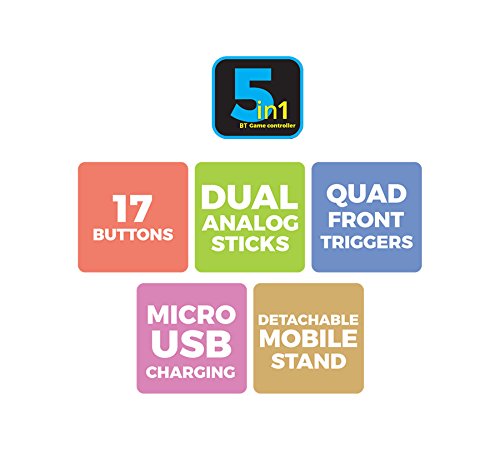
Immaġni 1: Fuqview of ZEB-DB250JP key features including 17 buttons, dual analog sticks, quad front triggers, micro USB charging, and a detachable mobile stand.
2. X'hemm fil-Kaxxa
- 1 x ZEB-DB250JP Joypad
- 1 x Cable tal-Iċċarġjar Mikro USB
- 1 x Muntatura tat-Telefon li Tinqala'
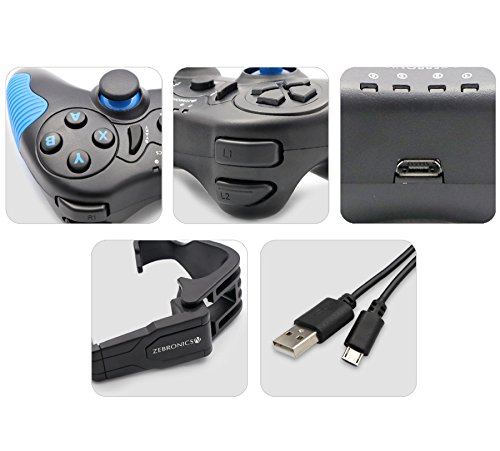
Image 2: A collage showing the ZEB-DB250JP gamepad, its triggers, micro USB port, detachable phone mount, and charging cable.
3. Setup
3.1 Iċċarġjar tal-Gamepad
Before initial use, fully charge the gamepad. Connect the provided Micro USB cable to the gamepad's charging port and the other end to a USB power source (e.g., computer USB port, USB wall adapter). The built-in 300mAh battery provides extended playtime.

Immaġni 3: Fuq view of the ZEB-DB250JP gamepad, highlighting the Micro USB charging port located between the L1/R1 and L2/R2 triggers.
3.2 Bluetooth Pairing (Android Devices & PS3)
- Kun żgur li l-gamepad huwa ċċarġjat.
- Agħfas u żomm il- HOME buttuna flimkien mal- X button simultaneously until the indicator lights on the gamepad begin to flash, indicating it is in pairing mode.
- On your Android smartphone, tablet, Android TV box, or Android TV, navigate to the Bluetooth settings.
- Fittex għal available devices and select "ZEB-DB250JP" (or similar name) from the list.
- Once connected, the indicator light on the gamepad will become solid. The Bluetooth range is approximately 8 meters.
- For PS3, connect the gamepad via USB cable first, then follow the console's instructions for pairing a new controller.
3.3 Konnessjoni tal-PC
For PC gaming, the ZEB-DB250JP can be connected via the provided USB cable. Simply plug the Micro USB end into the gamepad and the USB-A end into an available USB port on your computer. The gamepad is compatible with Windows 98 / 2000 / ME / XP / NT / VISTA / 7 / 8 / 10 and should be recognized automatically.
3.4 Attaching the Phone Mount
To use the gamepad with your smartphone, attach the included phone mount to the designated slot on the gamepad. Secure your smartphone firmly into the mount.
4. Istruzzjonijiet Operattivi
4.1 Button Layout
The ZEB-DB250JP features a standard gamepad layout with 17 buttons, including:
- Sticks Analogiċi Doppji: Għal moviment preċiż u kontroll tal-kamera.
- D-Pad: Kuxxinett direzzjonali għan-navigazzjoni tal-menu u inputs speċifiċi tal-logħba.
- Buttuni ta' Azzjoni (A, B, X, Y): Għal azzjonijiet fil-logħba.
- Quad Front Triggers (L1, L2, R1, R2): For additional actions, often used for shooting or accelerating.
- Buttuna HOME: For power on/off and system functions.
- SELECT/BACK and START/MENU Buttons: For game menus and options.


Image 4: Left side of the ZEB-DB250JP gamepad showing the D-pad and left analog stick. Image 5: Right side of the ZEB-DB250JP gamepad showing the action buttons (A, B, X, Y) and right analog stick.
4.2 Power On/Off
- Biex tixgħel, agħfas il- HOME buttuna.
- Biex tintefa, agħfas u żomm il-buttuna HOME button for a few seconds until the gamepad shuts down.
4.3 Logħob
Once connected, the gamepad should be recognized by compatible games. Refer to your game's settings for controller configuration and button mapping. The dual vibration motors provide haptic feedback for an immersive gaming experience.
5. Manutenzjoni
- Tindif: Uża drapp artab u niexef biex tnaddaf il-gamepad. Evita li tuża kimiċi ħarxa jew materjali li joborxu.
- Ħażna: Aħżen il-gamepad f'post frisk u niexef 'il bogħod mix-xemx diretta u minn temperaturi estremi.
- Kura tal-batterija: Biex ittawwal il-ħajja tal-batterija, evita li tiċċarġja kompletament il-batterija ta' spiss. Iċċarġja l-gamepad regolarment, anke jekk ma tkunx qed tużah għal perjodi twal.
6 Issolvi l-problemi
- Il-gamepad mhux qed jikkonnettja permezz tal-Bluetooth:
- Ensure the gamepad is charged.
- Make sure the gamepad is in pairing mode (HOME + X).
- Itfi u ixgħel il-Bluetooth fuq l-apparat tiegħek.
- Forget the device from your Bluetooth settings and try pairing again.
- Ensure your device is within the 8-meter Bluetooth range. - Buttons unresponsive or delayed input:
- Check battery level and charge if low.
- Ensure there are no obstructions between the gamepad and the connected device.
- For PC, try connecting via USB cable to rule out wireless interference.
- Restart the gamepad and the connected device. - Il-gamepad mhux qed jiċċarġja:
- Verify the Micro USB cable is securely connected to both the gamepad and the power source.
- Try a different Micro USB cable or power adapter.
- Ensure the power source is functional. - Il-vibrazzjoni ma taħdimx:
- Check if the game supports vibration feedback.
- Ensure vibration settings are enabled in the game or device settings.
7. Speċifikazzjonijiet
| Brand | ŻEBRONIKA |
| Isem tal-Mudell | stick analogu |
| Apparati Kompatibbli | Android, PC, PS3 |
| Tip ta' Kontrollur | Gamepad |
| Teknoloġija tal-Konnettività | Bluetooth (v3.0) |
| Karatteristiċi tal-Prodott | Wireless, Dual Vibration Motors |
| Kwantità tal-Buttuni | 17 |
| Tip ta 'Sors ta' Enerġija | Mħaddma bil-batterija |
| Batterija | Built-in 300mAH |
| Medda Bluetooth | 8m |
| Piż tal-oġġett | 370 Gramm |
| Dimensjonijiet tal-oġġett | 17 x 12 x 6 Ċentimetru |
| Kulur | Red (as per product details, though main image shows black/red) |
| Numru tal-Mudell | DB250JP |
8. Garanzija u Appoġġ
The ZEBRONICS ZEB-DB250JP Bluetooth Gamepad Joystick comes with a 1 Snin Garanzija. For any warranty claims or service, please carry the product to an authorized ZEBRONICS Service Center. For a list of service centers, refer to the product information provided at the time of purchase or visit the official ZEBRONICS websit.
For further assistance or technical support, please contact ZEBRONICS customer service.