
1. Introduzzjoni
The VisionTek VT1000 Universal Dual Full HD USB 3.0 Laptop Monitor Docking Station is designed to expand the connectivity of your laptop, whether it runs Windows, macOS, or Chrome OS. This docking station allows you to connect to dual displays and a variety of peripherals through a single USB connection, transforming your laptop into a complete workstation.
Prodott Overview
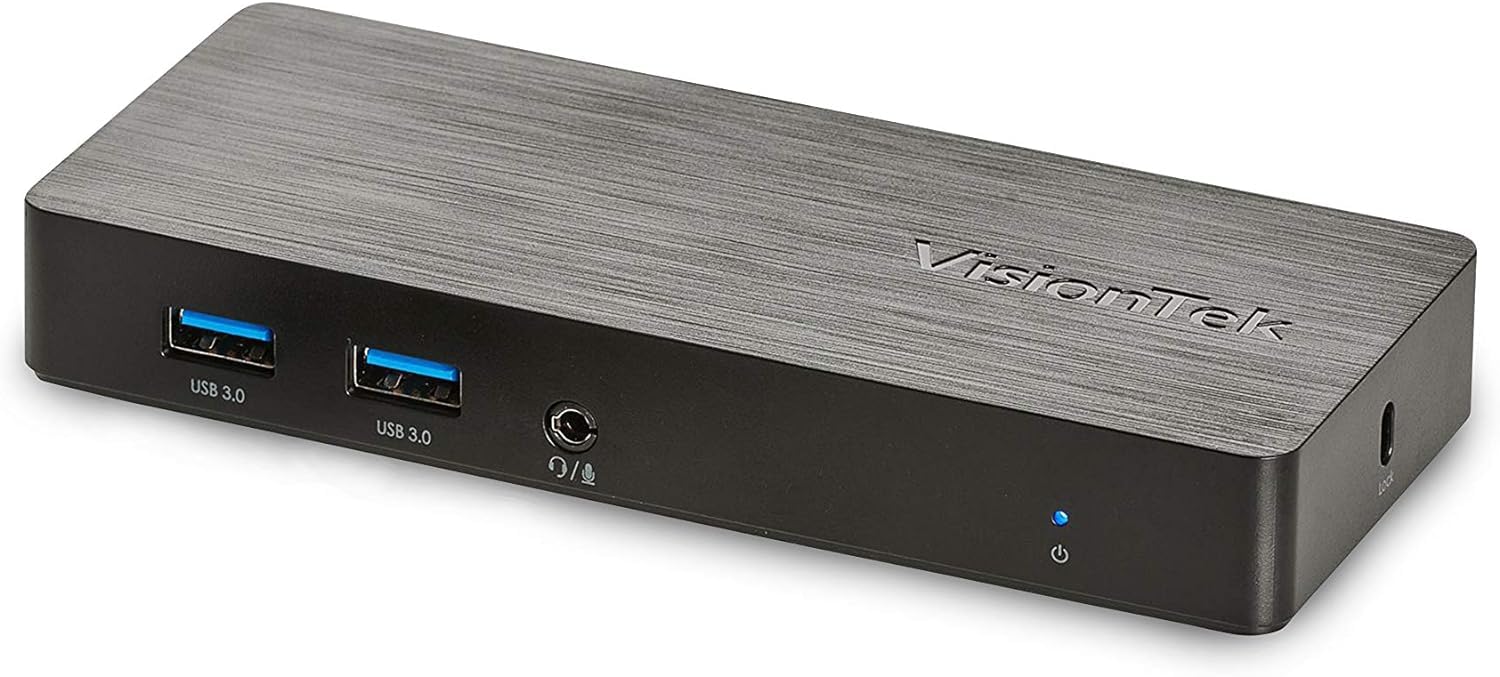
Immaġni: Quddiem view of the VisionTek VT1000 docking station.
X'hemm fil-Kaxxa
- VT1000 Wiri Doppju Universali USB 3.0 Docking Station
- Kejbil USB 3.0
- User Manual (Quick Installation Guide)
- Adapter tal-Enerġija

Image: The VisionTek VT1000 docking station and its included accessories.
2. Karatteristiċi ewlenin
- Wirjiet Doppji Full HD: Connect two monitors to your laptop with full HD resolution (1920 x 1080 @ 60Hz) via 1x DisplayPort, 1x HDMI, and 1x 1080P VGA.
- Konnettività Estiża: Features 3x USB 3.0 ports (5 Gbps transfer speed), 1x RJ45 (10/100/1000) Gigabit Ethernet port, and a headphone audio line in/out jack.
- Plug and Display: Utilizes DisplayLink drivers for plug-and-play functionality, simplifying setup for various workspaces.
- Kompatibilità Wiesgħa tas-Sistema Operattiva: Compatible with Ultrabook, MacBook, Microsoft Surface Pro, Chromebook, Windows 11, Windows 10, Windows 8.1, Windows 7, and Mac OS 10.13 and up operating systems.
- Disinn kompatt: Designed to be compact, taking up minimal desk space while providing extensive functionality.
3. Portijiet u Indikaturi
The VT1000 docking station provides a comprehensive set of ports for various connectivity needs. Refer to the video below for a visual guide to the ports.
Front Panel
- 2x Portijiet USB 3.0: Għall-konnessjoni ta' apparati USB b'veloċità għolja.
- Ħruġ tal-Awdjo (Jack tal-Headphone): Għall-konnessjoni ta' headphones jew kelliema esterni.
- Mic In: Għall-konnessjoni ta 'mikrofonu.
- LED Indikatur tal-Enerġija: Illuminates when the dock is powered on.
Panel ta' wara
- 1x VGA Port: For connecting a VGA monitor.
- 1x HDMI Port: For connecting an HDMI monitor.
- 1x DisplayPort: For connecting a DisplayPort monitor.
- 1x RJ45 Gigabit Ethernet Port: Għal konnessjoni ta' netwerk bil-fili.
- 1x Port USB 3.0: Għall-konnessjoni ta' apparati USB b'veloċità għolja.
- USB-B Port (Upstream): For connecting the dock to your laptop via the included USB 3.0 cable.
- Input ta' Enerġija DC 5V: Għall-konnessjoni tal-adapter tal-enerġija.
- Slott tas-Serratura tas-Sigurtà: For securing the docking station.
Official Product Video: VisionTek VT1000 Universal Dual Display USB 3.0 Dock
Video: This official VisionTek video provides a visual overview of the VT1000 docking station, highlighting its features, ports, and connectivity options. It demonstrates how the dock can expand your laptop's capabilities into a full workstation.
4. Istruzzjonijiet ta' Setup
- Qabbad l-Enerġija: Plug the included power adapter into the DC 5V input port on the rear of the VT1000 docking station, then plug the adapter into a power outlet. The power indicator LED on the front of the dock should illuminate.
- Qabbad mal-Laptop: Use the provided USB 3.0 cable to connect the USB-B port on the rear of the docking station to an available USB 3.0 port on your laptop.
- Qabbad Moniters: Connect your external monitors to the desired video output ports on the rear of the docking station (HDMI, DisplayPort, or VGA). The VT1000 supports dual displays.
- Ikkonnettja l-Periferali: Connect your keyboard, mouse, external hard drives, printers, webcams, or other USB devices to the USB 3.0 ports on the front and rear of the docking station.
- Qabbad in-Netwerk (Mhux obbligatorju): For a wired internet connection, connect an Ethernet cable from your router or network switch to the RJ45 Gigabit Ethernet port on the rear of the docking station.
- Qabbad Awdjo (Mhux obbligatorju): If desired, connect headphones or speakers to the audio out jack and a microphone to the mic in jack on the front of the docking station.
- Installazzjoni tas-sewwieq: The VT1000 features DisplayLink Plug and Play technology, typically requiring no manual driver installation on compatible operating systems. If prompted, follow on-screen instructions or visit the VisionTek support website for the latest DisplayLink drivers.
5. Istruzzjonijiet Operattivi
Once the VT1000 docking station is set up, it operates seamlessly with your connected laptop.
- Konfigurazzjoni tal-Wiri: After connecting your monitors, your operating system should automatically detect them. You can configure display settings (e.g., extend, duplicate, primary display) through your computer's display settings.
- Użu ta' Apparat USB: Connected USB devices will function as if directly connected to your laptop.
- Aċċess għan-Netwerk: The Gigabit Ethernet port provides a stable and fast wired network connection.
- Funzjonalità tal-Awdjo: The audio ports allow for external audio output and microphone input. Ensure your operating system's sound settings are configured to use the docking station's audio device.
- Ġestjoni tal-Enerġija: The docking station requires external power and does not supply power to your laptop. Ensure your laptop's power adapter is connected for charging.
6. Speċifikazzjonijiet
| Karatteristika | Dettall |
|---|---|
| Brand | VisionTek |
| Numru tal-Mudell | 901147 (VT1000 Series) |
| Kompatibilità tas-Sistema Operattiva | Windows 11, Windows 10, Windows 8.1, Windows 7, macOS 10.13 and later, Chrome OS |
| Piż tal-oġġett | 8 uqija |
| Dimensjonijiet tal-Prodott (LxWxH) | 5.95 x 2.8 x 0.8 pulzieri |
| Interface tal-Ħardwer | DisplayPort, Ethernet, HDMI, USB, USB 3.0, VGA |
| Apparati Kompatibbli | Laptop |
| Portijiet USB totali | 3 (USB 3.0) |
| Portijiet HDMI totali | 1 |
| Wattage | 20 Watts |
7 Issolvi l-problemi
- L-ebda Output tal-Wiri:
- Ensure the docking station's power adapter is securely connected and the power indicator LED is on.
- Verify that the USB 3.0 cable connecting the dock to your laptop is firmly seated at both ends.
- Check that monitor cables (HDMI, DisplayPort, VGA) are securely connected to both the dock and the monitors.
- Ikkonferma li l-monitors tiegħek huma mixgħula u ssettjati għas-sors tad-dħul korrett.
- Erġa' ibda l-laptop tiegħek u d-docking station.
- Ensure DisplayLink drivers are installed and up-to-date, if necessary. Although typically plug-and-play, some systems may benefit from manual driver installation from the DisplayLink websit.
- Apparati USB Mhux Jaħdmu:
- Kun żgur li l-istazzjon tad-docking huwa mixgħul u konness mal-laptop tiegħek.
- Try connecting the USB device to a different USB port on the dock or directly to your laptop to rule out device issues.
- Some high-power USB devices may require their own external power supply.
- Kwistjonijiet ta' Konnessjoni man-Netwerk:
- Verify the Ethernet cable is securely connected to both the dock and your network.
- Check your laptop's network settings to ensure the Ethernet adapter is enabled.
- Restart your router/modem, the docking station, and your laptop.
- L-Awdjo Mhux Jaħdem:
- Check your laptop's sound settings to ensure the docking station's audio output is selected as the default playback device.
- Ensure headphones/speakers are properly connected to the audio out jack.
- Adjust volume levels on both your laptop and the connected audio device.
8. Manutenzjoni
- Tindif: Use a soft, dry cloth to clean the exterior of the docking station. Avoid using liquid cleaners or solvents.
- Ħażna: Store the docking station in a cool, dry place away from direct sunlight and extreme temperatures when not in use for extended periods.
- Ġestjoni tal-Kejbil: Ensure cables are not excessively bent or tangled to prevent damage.
9. Garanzija u Appoġġ
The VisionTek VT1000 Universal Dual Full HD USB 3.0 Laptop Monitor Docking Station comes with a Garanzija limitata ta 'sena. To ensure coverage, register your product with VisionTek within 30 days of purchase.
VisionTek offers excellent US-based customer support for any technical assistance or inquiries you may have. For support, please visit the official VisionTek webis-sit jew irreferi għall-informazzjoni ta' kuntatt ipprovduta fl-imballaġġ tal-prodott tiegħek.
For further information and driver downloads, please visit: Appoġġ VisionTek