
Introduzzjoni
This manual provides detailed instructions for the installation, operation, and maintenance of your BONTEC MFS001 Gas Spring Single Monitor Mount. Designed for screens ranging from 13 to 36 inches and supporting weights up to 12 kg (26.5 lbs), this monitor arm offers ergonomic adjustments to enhance your viewing comfort and optimize desk space. Please read this manual thoroughly before installation and use to ensure proper setup and safe operation.
Informazzjoni dwar is-Sigurtà
- Kun żgur li l-komponenti kollha huma preżenti u mhux imħassra qabel l-assemblaġġ. Tużax jekk xi partijiet huma neqsin jew difettużi.
- Verify that your monitor's weight and VESA pattern are within the specified limits of this mount.
- Always follow the installation steps carefully. Improper installation can result in equipment damage or personal injury.
- Tissikkax iżżejjed il-viti, għax dan jista' jikkawża ħsara.
- Keep children away from the assembly area. Small parts may be a choking hazard.
- Adjust the gas spring tension only after the monitor is mounted to prevent the arm from springing up or down unexpectedly.
Kontenut tal-Pakkett
Before proceeding with installation, please ensure all the following components are present:
- Assemblea tad-Driegħ tal-Monitor
- C-Clamp Bażi
- Komponenti tal-Bażi tal-Grommet
- Pjanċa VESA
- Kit tal-Ħardwer (viti, woxers, spacers)
- Allen Keys (for adjustments)
- Manwal ta' Istruzzjoni
Speċifikazzjonijiet
| Karatteristika | Speċifikazzjoni |
|---|---|
| Numru tal-Mudell | MFS001 |
| Daqs tal-Iskrin Kompatibbli | 13 - 36 pulzieri |
| Kapaċità tal-piż | Sa 12 kg (26.5 lbs) |
| Kompatibilità VESA | 75x75mm, 100x100mm |
| Medda Mejjel | +85° sa -50° |
| Medda li ddur | ± 90° |
| Rotazzjoni | 360° (Portrait to Landscape) |
| Aġġustament Għoli | 7.1" sa 19.1" (180mm sa 485mm) |
| Estensjoni Max | 23.3" (588mm) |
| Ħxuna tal-iskrivanija (C-Clamp) | 10mm - 80mm (0.39" - 3.15") |
| Ħxuna tal-Iskrivanija (Grommet) | 10mm - 70mm (0.39" - 2.76") |
| Dijametru tat-Toqba tal-Grommet | 10mm - 60mm (0.39" - 2.36") |
| Materjal | High-grade Zinc Alloy, Metal |
Setup u Installazzjoni
The BONTEC MFS001 monitor arm offers two installation methods: C-Clamp and Grommet Base. Choose the method best suited for your desk.
1. C-Clamp Immuntar
- Waħħal is-C-clamp base to the edge of your desk. Ensure the desk thickness is between 10mm and 80mm.
- Issikka l-C-clamp screw firmly until the base is stable and secure.
- Slide the main arm pole onto the C-clamp il-bażi u waħħalha bil-kamin provdut.
2. Immuntar tal-grommet
- Ensure your desk has a grommet hole with a diameter between 10mm and 60mm, and the desk thickness is between 10mm and 70mm.
- Insert the grommet bolt through the desk hole.
- Secure the grommet base plate and nut from underneath the desk, tightening until stable.
- Slide the main arm pole onto the grommet base and secure it with the provided screw.
3. Twaħħil tal-Monitor
- Attach the VESA plate to the back of your monitor using the appropriate screws and spacers from the hardware kit. Ensure the VESA pattern is 75x75mm or 100x100mm.
- Slide the VESA plate with the attached monitor onto the arm's mounting head. Ensure it clicks securely into place.
- Tighten any security screws on the VESA plate to prevent accidental detachment.

Image: Illustration of C-Clamp and Grommet mounting options, showing desk thickness and hole diameter requirements.

Image: A user working at a desk with a monitor mounted on the BONTEC arm, highlighting its compatibility with various screen sizes and VESA standards.
Tħaddim u Aġġustamenti
The BONTEC MFS001 monitor arm provides full motion adjustability for optimal ergonomic positioning.
1. Aġġustament tal-Għoli
The gas spring arm allows for smooth vertical movement. Gently push or pull the monitor to the desired height. The arm supports a height range from 7.1 inches to 19.1 inches.
2. Aġġustament tal-Mejjel
The monitor can be tilted +85° upwards and -50° downwards. Loosen the tilt screw slightly with the provided Allen key, adjust the monitor to your preferred angle, and then retighten the screw to secure it.
3. Aġġustament tad-dawrien
The arm allows for a ±90° swivel movement. You can rotate the monitor horizontally to share your screen or adjust your viewangolu tal-ing.
4. Rotation Adjustment
The VESA plate allows for a full 360° rotation, enabling you to switch your monitor between landscape and portrait orientations without removing it.
5. Aġġustament tat-Tensjoni tal-Mola tal-Gass
If the monitor arm does not hold its position or is difficult to move, you may need to adjust the gas spring tension. Use the provided Allen key to turn the adjustment screw located on the arm. Turn clockwise to increase tension for heavier monitors, and counter-clockwise to decrease tension for lighter monitors. Adjust only after the monitor is mounted.
6. Ġestjoni tal-Kejbil
Utilize the integrated cable management clips along the arm to route and conceal your power, HDMI, and other cables for a tidy workspace.
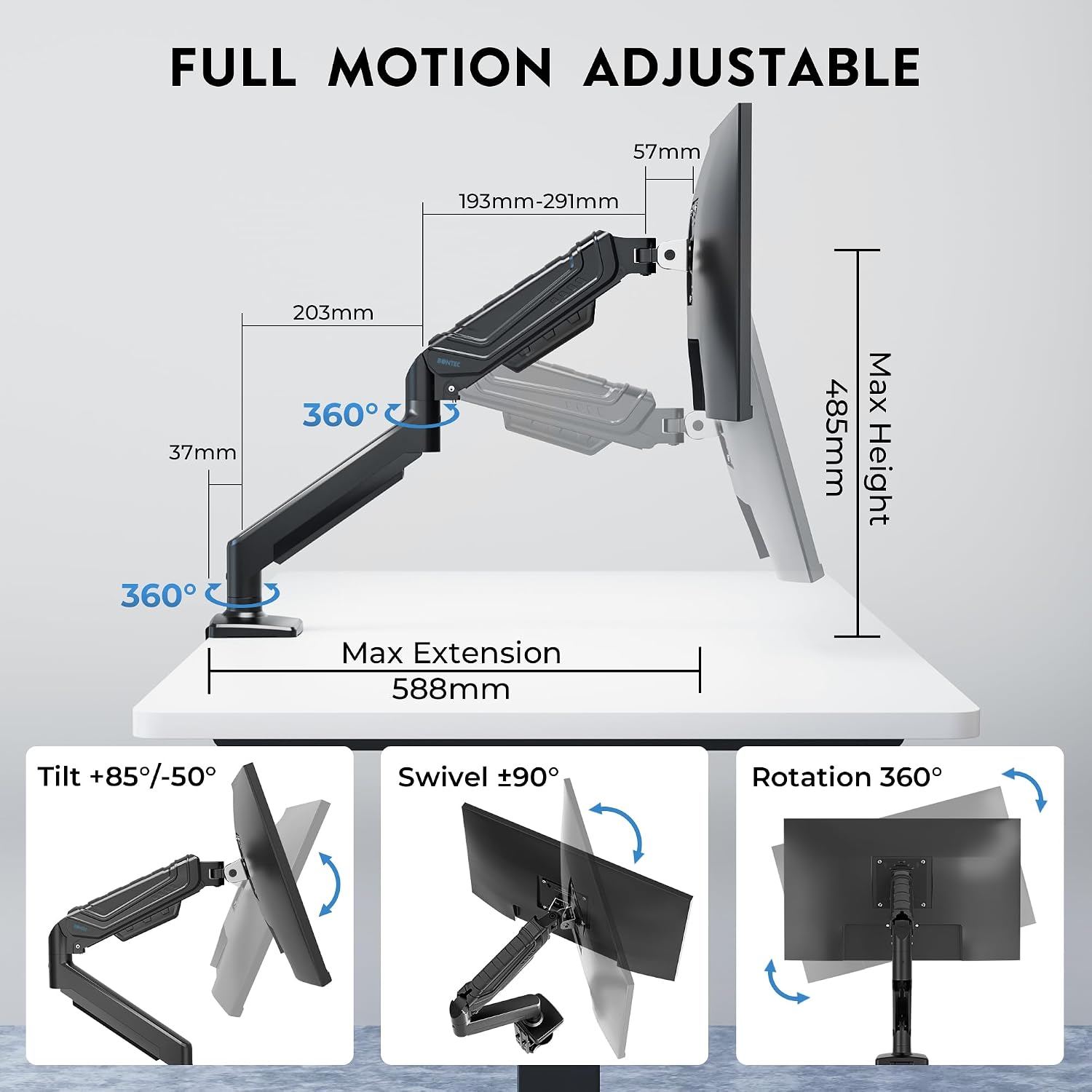
Image: Detailed illustration of the monitor arm's full motion capabilities, including tilt, swivel, rotation, and maximum extension and height.

Image: Visual representation of key features such as smooth rotation, adjustable swivel resistance, weight capacity, cable management, and the multi-position C-clamp.
Manutenzjoni
- Tindif: Imsaħ id-driegħ tal-monitor b'ċarruta ratba uamp drapp. Evita li tuża prodotti tat-tindif jew solventi li joborxu li jistgħu jagħmlu ħsara lill-finitura.
- Kontrolli perjodiċi: Regularly check all screws and connections to ensure they remain tight and secure. Retighten if necessary.
- Rebbiegħa tal-Gass: The gas spring is designed for long-lasting performance. No specific lubrication is required. If adjustments become difficult, refer to the 'Gas Spring Tension Adjustment' section.
Issolvi l-problemi
- Problem: Monitor arm sags or does not stay at the desired height.
- Soluzzjoni: The gas spring tension may be too low for your monitor's weight. Increase the gas spring tension by turning the adjustment screw clockwise with the provided Allen key. Ensure the monitor is mounted before adjusting.
- Problem: Monitor arm is difficult to move or too stiff.
- Soluzzjoni: The gas spring tension may be too high. Decrease the gas spring tension by turning the adjustment screw counter-clockwise with the provided Allen key. Ensure the monitor is mounted before adjusting.
- Problem: Monitor wobbles or feels unstable.
- Soluzzjoni: Check all mounting screws for the C-clamp or grommet base, and the VESA plate attachment to the monitor. Ensure they are securely tightened. Also, verify that your desk surface is stable.
- Problem: Monitor does not fit the VESA plate.
- Soluzzjoni: Confirm your monitor's VESA pattern is either 75x75mm or 100x100mm. If it differs, your monitor is not compatible with this mount. Ensure you are using the correct screws and spacers from the hardware kit.
Garanzija
The BONTEC MFS001 Monitor Arm comes with a 2-Sena Garanzija from the date of purchase. This warranty covers manufacturing defects and material flaws under normal use. It does not cover damage caused by improper installation, misuse, accidents, modifications, or unauthorized repairs. Please retain your proof of purchase for warranty claims.
Appoġġ għall-Klijent
If you have any questions, require assistance with installation, or encounter any issues not covered in this manual, please contact BONTEC customer support. Refer to the product packaging or the official BONTEC websit għad-dettalji tal-kuntatt.