
Introduzzjoni
This manual provides comprehensive instructions for the setup, operation, maintenance, and troubleshooting of your Summer Infant Panorama Digital Color Video Monitor. Please read this manual thoroughly before using the product to ensure safe and optimal performance.
Prodott Overview
The Summer Infant Panorama Digital Color Video Monitor offers advanced features for monitoring your baby, including a 5-inch high-resolution color LCD display, remote-controlled pan/tilt camera, two-way talk-back, digital zoom, and automatic night vision.
Karatteristiċi Ewlenin
- 5" full color digital flat screen display
- Remote control pan and tilt camera
- Two-way talk-back to baby
- Digital zoom functionality
- Built-in 2-color soft-glow nursery nightlight
- Automatic black & white night vision
- Dwal LED attivati bil-ħoss
- Firxa sa 800 pied
- Power save button
- Low battery and out of range indicators
- Expandable system, up to 4 cameras
- Tabletop or wall mount camera option
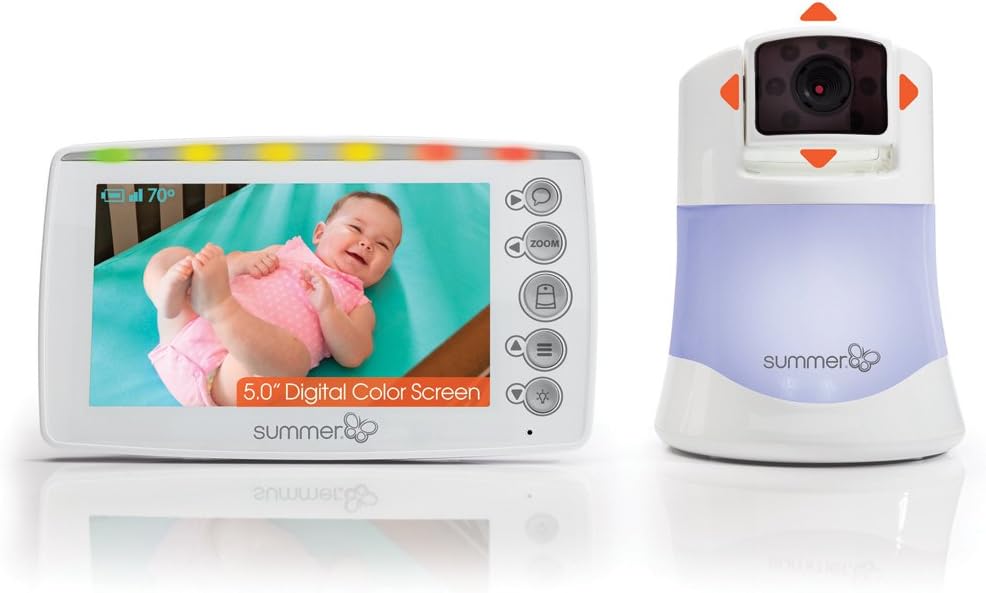
Figura 1: Summer Infant Panorama Digital Color Video Monitor, showing the parent unit and camera.
Setup
Kontenut tal-Pakkett
Kun żgur li l-komponenti kollha jkunu preżenti:
- Unità tal-Ġenituri (Monitor)
- Baby Unit (Kamera)
- Adapters tal-AC (2)
- Wall mounting hardware (screws, anchors, cable clips)
Iċċarġjar tal-Parent Unit
- Connect one AC adapter to the Parent Unit and plug it into a standard electrical outlet.
- Charge the Parent Unit for at least 8 hours before first use to ensure optimal battery performance.
- L-indikatur tal-batterija fuq l-iskrin se juri l-istatus tal-iċċarġjar.
Positioning the Baby Unit (Camera)
- Place the Baby Unit on a flat surface, such as a dresser or shelf, at least 3 feet (1 meter) away from the baby's crib.
- Ensure the camera has a clear line of sight to the baby.
- For wall mounting, use the provided hardware. Secure the camera to the wall at a height that provides a good view of the crib, ensuring the power cord is out of reach of children.
- Connect the second AC adapter to the Baby Unit and plug it into a standard electrical outlet.

Figura 2: Proper placement of the camera and parent unit for optimal monitoring.
Tqabbil Inizjali
The Parent Unit and Baby Unit are pre-paired at the factory. If re-pairing is needed or additional cameras are added:
- Turn on both the Parent Unit and Baby Unit.
- On the Parent Unit, navigate to the menu and select the "Pairing" option.
- Segwi l-istruzzjonijiet fuq l-iskrin biex tibda l-akkoppjar.
- Press the pairing button on the Baby Unit (refer to the camera diagram for location).
- The units will automatically connect.
Istruzzjonijiet Operattivi
Kontrolli tal-Unità Ġenitur
The Parent Unit features a 5-inch display and various control buttons:
- Buttuna tal-Qawwa: Ixgħel / itfi l-unità.
- Buttuni tal-Volum: Jaġġusta l-volum tas-smigħ.
- Kontroll tal-luminożità: Jaġġusta l-luminożità tal-iskrin.
- Buttuna Żum: Activates digital zoom.
- Talk-Back Button: Press and hold to speak to your baby through the camera.
- Buttuna tal-menu: Aċċessa s-settings u l-għażliet.
- Buttuni tan-Navigazzjoni: Used to pan/tilt the camera and navigate menus.

Figura 3: The 5.0" handheld parent unit in use.
Camera Control (Pan & Tilt)
Use the navigation buttons on the Parent Unit to remotely adjust the camera's view:
- Agħfas il- 'l fuq/' l isfel arrows to tilt the camera vertically.
- Agħfas il- Xellug/Lemin arrows to pan the camera horizontally.

Figura 4: The camera unit demonstrating pan and tilt capabilities.
Zoom Diġitali
Agħfas il- Zoom button on the Parent Unit to digitally zoom in on the image. Press again to zoom out.
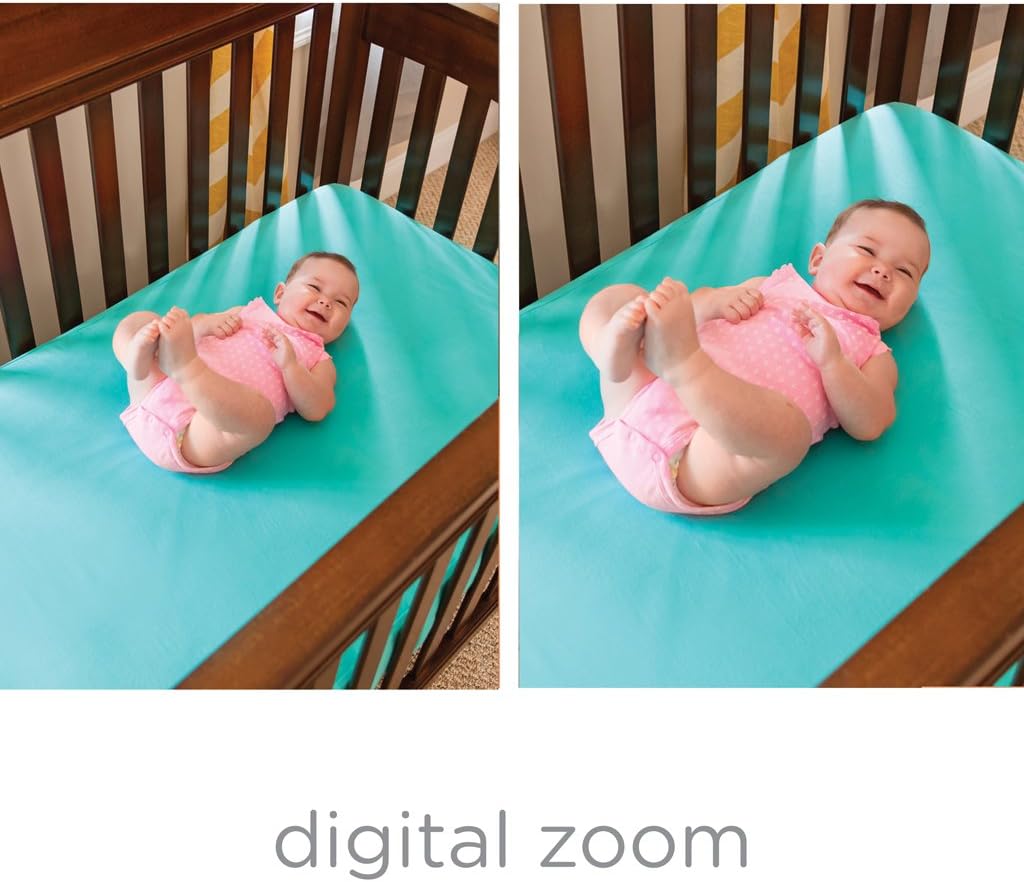
Figura 5: Paragun tan-normal view u zoom diġitali.
Viżjoni bil-lejl
The monitor automatically switches to black and white night vision in low light conditions, providing a clear view of your baby without disturbing them.

Figura 6: Viżjoni bil-lejl view of a baby in a crib.
Two-Way Talk-Back
Press and hold the talk-back button on the Parent Unit to speak to your baby. Release the button to hear your baby.
Dawl bil-lejl
The Baby Unit includes a soft-glow nightlight. Access the menu on the Parent Unit to turn the nightlight on/off or change its color.
Manutenzjoni
Tindif
- Wipe the Parent Unit and Baby Unit with a dry, soft cloth.
- Tużax sprejs tat-tindif jew cleaners likwidi.
Kura tal-batterija
- To preserve battery life, fully charge the Parent Unit before each use.
- If the unit will not be used for an extended period, remove the battery.
Issolvi l-problemi
| Problema | Soluzzjoni |
|---|---|
| No picture/sound on Parent Unit | Ensure both units are plugged in and turned on. Check battery level of Parent Unit. Ensure units are within range. |
| "Out of Range" indicator | Move the Parent Unit closer to the Baby Unit. Reduce obstacles between units. |
| Kwalità fqira tal-istampa | Adjust the camera angle. Ensure adequate lighting for color vision or check night vision activation. |
| Statika jew interferenza | Move units away from other electronic devices (cordless phones, Wi-Fi routers). |
| Il-batterija tal-Unità tal-Ġenituri tixxotta malajr | Ensure the unit is fully charged before use. Reduce screen brightness. Use power save mode if available. |
Speċifikazzjonijiet
- Numru tal-Mudell: 29593
- Daqs tal-iskrin: 5 Pulzier
- Teknoloġija tal-Komunikazzjoni mingħajr Fili: Wi-Fi
- Teknoloġija tal-Konnettività: Wireless
- Karatteristika Speċjali: Viżjoni bil-lejl
- Sors tal-Enerġija: Battery Powered (AC adapter included)
- Ħajja tal-batterija: Up to 10 Hours (Parent Unit)
- Firxa: Sa 800 pied
- Dimensjonijiet (L x W x H): 22.2 x 30.5 x 11.7 Ċentimetri
- Piż tal-oġġett: 793 g
- Tip ta 'Immuntar: Wall Mount, Mejda
Garanzija u Appoġġ
For warranty information and customer support, please refer to the official Summer Infant webis-sit jew ikkuntattja lid-dipartiment tas-servizz tal-konsumatur tagħhom. Żomm l-irċevuta tax-xiri tiegħek bħala prova tax-xiri.
Manifattur: Trabi tas-Sajf
Post tan-Negozju: Mississauga, ON L4Y 3Y4, CA
Data L-Ewwel Disponibbli: 30 ta’ Settembru, 2018
Informazzjoni Importanti dwar is-Sigurtà
- Keep all cords out of reach of children (at least 3 feet / 1 meter away).
- Never place the camera or cords inside the crib or playpen.
- Dan il-prodott mhuwiex sostitut għas-superviżjoni tal-adulti.
- Tużax ħdejn l-ilma.
- Uża biss l-AC adapters ipprovduti.
Videos Relatati
No official product videos from the seller are available for direct embedding in this manual based on the provided criteria.