
1. Prodott Aktarview
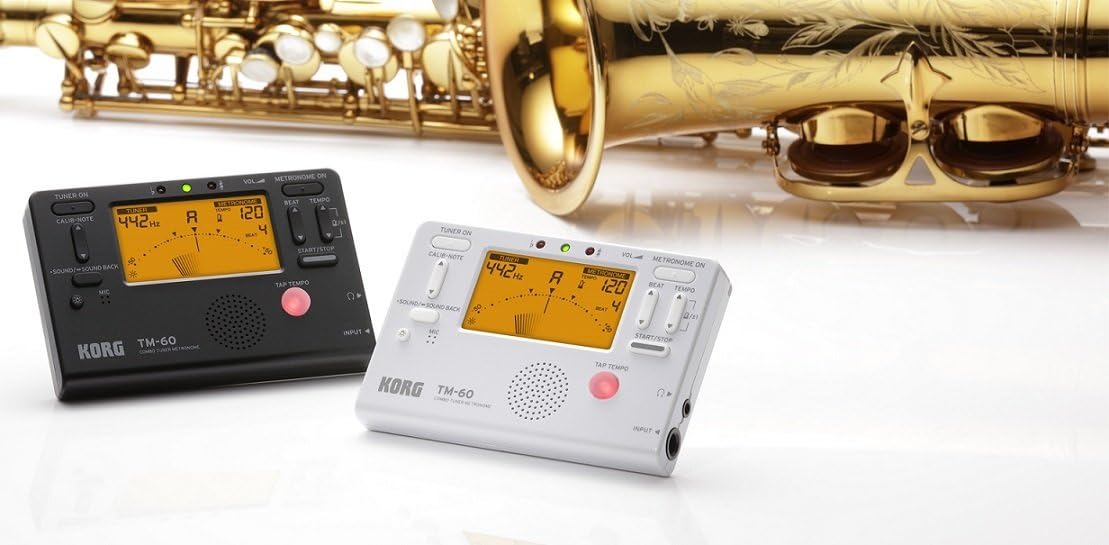
The KORG TM60CBK is a versatile combo tuner and metronome designed for musicians. It features a high-precision tuner function and a metronome function that can be used simultaneously. This model includes a CM-200 Contact Clip-on Microphone for enhanced tuning accuracy, especially in noisy environments. The large screen displays both tuner and metronome functions clearly, making it an essential tool for practicing.
- Funzjonalità Doppju: High-precision tuner and metronome functions can be used concurrently.
- Mikrofonu inkluż: Comes with a CM-200 Contact Clip-on Microphone for direct instrument tuning.
- Wirja ċara: Features a new, larger screen for simultaneous display of tuner and metronome.
- Kulur: Iswed.
2. Setup
2.1 Installazzjoni tal-batterija
The KORG TM60CBK operates on AAA batteries. To install or replace batteries:
- Iftaħ l-għatu tal-kompartiment tal-batterija li jinsab fuq wara tal-unità.
- Insert the AAA batteries, ensuring correct polarity (+/-).
- Agħlaq l-għatu tal-kompartiment tal-batterija sew.
2.2 Connecting the CM-200 Contact Clip-on Microphone
For precise tuning, especially with acoustic instruments or in loud settings, connect the included clip-on microphone:
- Plug the microphone's 1/4-inch (6.35mm) jack into the INPUT jack on the side of the TM60CBK unit.
- Attach the clip to the headstock or bell of your instrument. Ensure the clip is securely fastened and the microphone is positioned to pick up vibrations effectively.
3. Istruzzjonijiet Operattivi
3.1 Modalità Tuner
To use the tuner function:
- Press the 'TUNER ON' button to activate the tuner.
- Select the desired instrument mode (Chromatic, Guitar, Bass, Violin, Ukulele) using the 'ITEM' button.
- Adjust the A4 calibration pitch (default 440Hz) using the 'CALIB./NOTE' buttons if needed.
- Play a single note on your instrument. The display will show the detected note and indicate if it is sharp, flat, or in tune using the needle-style meter and LED indicators.
3.2 Modalità Metronomu
To use the metronome function:
- Press the 'METRONOME ON' button to activate the metronome.
- Set the desired tempo (BPM) using the 'TEMPO' buttons.
- Adjust the beat (time signature) using the 'BEAT' buttons.
- Select different rhythm patterns using the 'RHYTHM' button.
- Press 'START/STOP' to begin or pause the metronome.
- Adjust the volume using the 'VOL' slider on the side of the unit.
- For private practice, plug headphones into the 3.5mm headphone jack.
- Use the 'TAP TEMPO' button to set the tempo by tapping along to a desired rhythm.
3.3 Ġeneratur tat-Ton
The TM60CBK can also generate reference tones:
- In Tuner Mode, press the 'SOUND/SOUND BACK' button to activate the tone generator.
- Use the 'CALIB./NOTE' buttons to select the desired reference note.
- Listen to the generated tone and tune your instrument by ear.
4. Stampi tal-Prodott



5. Speċifikazzjonijiet
| Karatteristika | Dettall |
|---|---|
| Isem tal-Mudell | TM60 |
| Numru tal-Mudell | TM60C-BK |
| Kulur | Iswed |
| Dimensjonijiet tal-oġġett (L x W x H) | 4.37 x 2.91 x 0.71 pulzieri |
| Piż tal-oġġett | 0.16 Gramm |
| Komponenti Inklużi | Borża |
| Tip ta' Konnettur | USB (for power, not data) |
6. Manutenzjoni
To ensure the longevity and optimal performance of your KORG TM60CBK:
- Tindif: Imsaħ l-unità b'ċarruta ratba u niexfa. Evita li tuża prodotti tat-tindif jew solventi li joborxu.
- Kura tal-batterija: Neħħi l-batteriji jekk l-unità ma tkunx se tintuża għal perjodu estiż biex tevita t-tnixxija.
- Ħażna: Aħżen l-unità f'post frisk u niexef 'il bogħod mix-xemx diretta u minn temperaturi estremi.
7 Issolvi l-problemi
- L-unità ma tixgħelx: Iċċekkja l-installazzjoni tal-batterija u kun żgur li l-batteriji mhumiex eżawriti.
- Tuner is inaccurate: Ensure the CM-200 microphone is securely attached to the instrument. Verify the correct instrument mode is selected. Check the A4 calibration pitch.
- No sound from metronome: Check the volume level. Ensure headphones are not plugged in if you intend to use the internal speaker.
8. Garanzija u Appoġġ
For warranty information, technical support, or service inquiries, please refer to the official KORG website or contact KORG customer service directly. Keep your purchase receipt as proof of purchase for warranty claims.


