
1. Introduzzjoni
Thank you for choosing the Car and Driver CDC-632 Dash Cam. This device is designed to record your journeys in high definition, providing security and peace of mind on the road. It features 2K Ultra HD video recording, built-in Wi-Fi, GPS tracking, and app connectivity for convenient operation and file ġestjoni.
2. Kontenut tal-Pakkett
Jekk jogħġbok immarka l-kaxxa għall-oġġetti li ġejjin:
- Car and Driver CDC-632 Dash Cam
- Immuntar tal-Ġbid tal-Windskrin
- Adapter tal-Karozza
- Karta Mikro-SD ta' 8GB

Image: The retail packaging for the Car and Driver CDC-632 Dash Cam, highlighting key features like G-sensor, 1080P Full HD HDR, Wi-Fi, Loop Recording, and GPS Tracking. An 8GB memory card is also indicated as included.
3. Prodott Aktarview
Familiarize yourself with the components of your dash cam.

Image: The Car and Driver CDC-632 Dash Cam attached to its suction mount. The 2.4-inch LCD screen is visible, displaying a road view with recording indicators, resolution (1920x1080 P60), and current date/time.
Quddiem View

Immaġni: Veduta mill-qrib minn quddiem view of the Car and Driver CDC-632 Dash Cam, highlighting the central camera lens and ventilation grilles on the sides.
Wara View (Skrin LCD)

Immaġni: In-naħa ta' wara view of the Car and Driver CDC-632 Dash Cam, featuring the 2.4-inch LCD screen displaying a road scene with HDR indicator, exposure value, and battery status. Control buttons are visible below the screen.
4. Installazzjoni
4.1 Immuntar tad-Dash Cam
- Naddaf iż-żona tal-windskrin fejn bi ħsiebek twaħħal id-dash cam.
- Waħħal il-muntatura tal-ġbid mal-kamera tad-dashboard.
- Agħfas it-tazza tal-ġbid sew mal-windskrin u aqleb il-lieva biex twaħħalha.
- Aġġusta l-angolu tad-dash cam biex tiżgura ċara view tat-triq 'il quddiem.
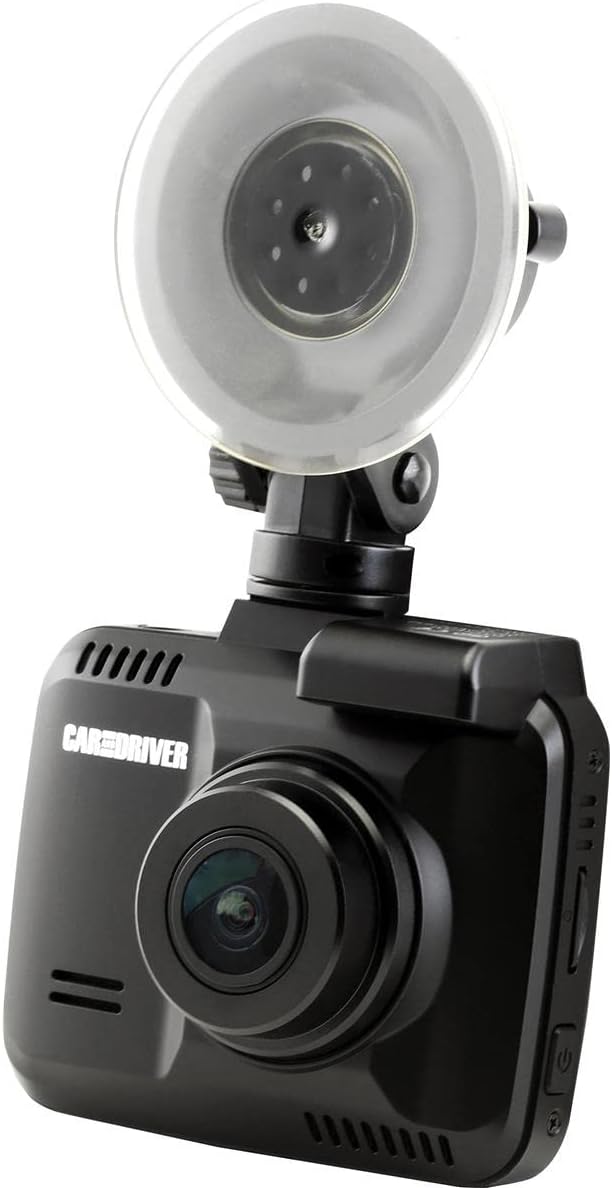
Image: The Car and Driver CDC-632 Dash Cam is shown mounted on a car's windshield using its suction cup. The camera is angled to capture the road ahead, with the power cable connected.
4.2 It-Tħaddim tal-Apparat
- Connect the car adapter to the dash cam's power input port.
- Plug the car adapter into your vehicle's 12V power outlet (cigarette lighter socket).
- The dash cam will typically power on automatically when the vehicle's ignition is turned on and begin recording.
5. Setup Inizjali
5.1 Inserting the Micro-SD Card
The dash cam supports Micro-SD cards up to 64GB. An 8GB Micro-SD card is included.
- With the dash cam powered off, locate the Micro-SD card slot on the side of the device.
- Insert the Micro-SD card with the gold contacts facing the back of the dash cam until it clicks into place.
- Biex tneħħiha, imbotta l-karta bil-mod 'il ġewwa sakemm toħroġ 'il barra.
5.2 Formatting the Micro-SD Card
It is recommended to format the Micro-SD card before first use and periodically thereafter to ensure optimal performance and prevent data corruption.
- Ixgħel il-kamera tad-daxxbord.
- Navigate to the 'Settings' menu using the control buttons.
- Select 'Format SD Card' and confirm the action. All data on the card will be erased.
5.3 Issettjar tad-Data u l-Ħin
Ensure the correct date and time are set for accurate timestampreġistrazzjonijiet.
- Access the 'Settings' menu.
- Locate 'Date/Time' settings.
- Aġġusta s-sena, ix-xahar, il-jum, is-siegħa, u l-minuta billi tuża l-buttuni tan-navigazzjoni.
- Ikkonferma l-għażliet tiegħek.
6. Operazzjoni Bażika
6.1 Reġistrazzjoni Awtomatika
Once powered on, the dash cam will automatically begin recording in a continuous loop. The recording indicator (usually a red dot or icon) will appear on the screen.
6.2 Loop Recording
The dash cam records video in segments (e.g., 1, 3, or 5 minutes). When the Micro-SD card is full, the oldest unlocked files will be overwritten by new recordings. This ensures continuous recording without manual intervention.
6.3 G-Sensor Protection
The built-in G-sensor detects sudden impacts or collisions. When triggered, the current video segment will be automatically locked and saved to a protected folder, preventing it from being overwritten by loop recording. The sensitivity of the G-sensor can usually be adjusted in the settings menu.
6.4 NiteVision Recording
The dash cam features NiteVision technology with intelligent IR for enhanced recording clarity in low-light conditions or at night.
7. Karatteristiċi Avvanzati
7.1 Wi-Fi Connectivity and App Control
The dash cam features 802.11 B/G/N 2.4GHZ Wi-Fi connectivity, allowing you to connect your smartphone via the Car and Driver App.
- Download the Car and Driver App from your smartphone's app store.
- Ippermetti l-Wi-Fi fuq id-dash cam tiegħek permezz tal-menù tas-settings.
- On your smartphone, connect to the dash cam's Wi-Fi network (SSID and password typically displayed on the dash cam screen).
- Open the Car and Driver App to access live view, playback recordings, download files, u aġġusta s-settings mill-bogħod.
7.2 Traċċar tal-GPS
The built-in GPS module accurately records your driving location and speed. This data can be viewed during video playback using the dedicated Car and Driver App or compatible desktop software, providing crucial information for incident analysis.
8. Daqq u File Ġestjoni
8.1 On-Device Playback
- Stop recording (if active).
- Enter playback mode via the menu buttons.
- Browse through recorded videos. Locked files are usually in a separate folder.
- Select a video to play it on the 2.4-inch LCD screen.
8.2 App Playback and Download
Using the Car and Driver App, you can wirelessly view, download, and manage recorded videos on your smartphone. This is the most convenient method for accessing files.
8.3 Daqq tal-Kompjuter
You can also remove the Micro-SD card and insert it into a computer's card reader to access files directly. Dedicated player software may be required to view GPS data alongside the video.
9. Manutenzjoni
9.1 Tindif tad-Dash Cam
- Ensure the device is powered off and disconnected from power.
- Use a soft, dry cloth to wipe the dash cam body.
- Għal-lenti, uża drapp u soluzzjoni speċjalizzati għat-tindif tal-lentijiet biex tevita l-grif.
- Tużax kimiċi ħarxa jew tindif li joborxu.
9.2 Micro-SD Card Care
- Periodically format the Micro-SD card (monthly is recommended) to maintain optimal performance and prevent file żbalji.
- Use high-quality, reputable brand Micro-SD cards designed for dash cam use (Class 10 or higher).
10 Issolvi l-problemi
- Id-Dash Cam mhux qed tixgħel: Ensure the car adapter is securely plugged into both the dash cam and the vehicle's 12V power outlet. Check if the vehicle's power outlet is functional.
- Ir-reġistrazzjoni tieqaf jew tiffriża: Format the Micro-SD card. Ensure you are using a high-speed (Class 10 or higher) Micro-SD card. Try a different Micro-SD card.
- Kwalità fqira tal-vidjo: Clean the camera lens. Ensure the protective film has been removed from the lens. Check video resolution settings.
- Kwistjonijiet ta' konnessjoni Wi-Fi: Ensure Wi-Fi is enabled on the dash cam. Restart both the dash cam and your smartphone. Make sure you are within close proximity to the dash cam.
- Il-GPS mhux qed jaħdem: Kun żgur li l-kamera tad-daxxbord għandha viżibilità ċara view of the sky. It may take a few minutes for the GPS signal to be acquired after powering on.
- Buttuni ma jirrispondux: Try resetting the device (if a reset button is available, use a thin object to press it).
11. Speċifikazzjonijiet
| Karatteristika | Dettall |
|---|---|
| Isem tal-Mudell | Kamera tad-Dash Ultra HD |
| Numru tal-Mudell | CDC-632 |
| Riżoluzzjoni tal-Qbid tal-Vidjo | 2K |
| Qasam Ta ' View | 130 Grad |
| Daqs tal-Iskrin | 2.4 Pulzier |
| Teknoloġija tal-Konnettività | Wi-Fi (802.11 B/G/N 2.4GHZ) |
| Karatteristiċi Speċjali | Built-In WiFi, Night Vision (NiteVision), Built-in G-sensor, GPS Tracking |
| Tip ta 'Immuntar | Suction Mount |
| Tip ta' Memorja Flash | MicroSD (sa 64GB) |
| Frame Rata | 30 FPS |
| Metodu ta' Kontroll | Touch (via physical buttons) |
| Piż tal-oġġett | 10.4 uqija |
12. Informazzjoni dwar Garanzija
This Car and Driver CDC-632 Dash Cam comes with a Garanzija tal-manifattur ta 'sena from the date of purchase. Please retain your proof of purchase for warranty claims. The warranty covers defects in materials and workmanship under normal use. It does not cover damage caused by misuse, accidents, unauthorized modifications, or natural disasters.
13. Appoġġ għall-Klijent
If you encounter any issues or have questions not covered in this manual, please contact Car and Driver customer support. Refer to the product packaging or the official Car and Driver websit għad-dettalji tal-kuntatt.