
1. Introduzzjoni
This manual provides detailed instructions for the installation, operation, and maintenance of the Aiphone IX-MV IP Video Master Station. The IX-MV is an IP addressable video and audio master station designed for use with Aiphone IX Systems, offering both handset and hands-free communication capabilities.
Please read this manual thoroughly before attempting to install or operate the unit to ensure correct usage and to prevent damage.
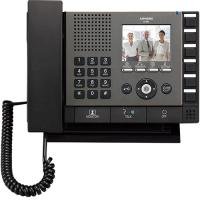
Figura 1: Quddiem view of the Aiphone IX-MV IP Video Master Station, showing the display, buttons, and handset.
2. Informazzjoni dwar is-Sigurtà
Observe the following safety precautions to prevent injury, damage to the product, or property damage.
- Sigurtà Elettrika: Ensure all power connections are made according to local electrical codes. Disconnect power before servicing.
- Ambjent: Do not expose the unit to water, high humidity, extreme temperatures, or direct sunlight. Install in a well-ventilated area.
- Immaniġġjar: Immaniġġja l-unità b'attenzjoni. Evita li twaqqagħha jew li tissottomettiha għal impatti qawwija.
- Modifiki: Do not attempt to modify or disassemble the unit. Refer all servicing to qualified personnel.
- Tindif: Uża drapp artab u niexef għat-tindif. Evita prodotti tat-tindif jew solventi li joborxu.
3. Kontenut tal-Pakkett
Ivverifika li l-oġġetti kollha huma preżenti fil-pakkett qabel ma tipproċedi bl-installazzjoni.
- Aiphone IX-MV IP Video Master Station
- Parentesi tal-immuntar u viti
- Manwal tal-installazzjoni (dan id-dokument)
- Network cable (may be sold separately)
4. Setup
4.1 Installazzjoni Fiżika
- Agħżel Post: Select a suitable indoor location, away from direct heat sources, moisture, and strong electromagnetic fields. Ensure adequate space for wiring and operation.
- Immuntar:
- Secure the mounting bracket to a wall using appropriate screws and anchors.
- Ensure the bracket is level and securely fastened.
- Attach the IX-MV unit to the mounting bracket.
- Wiring:
- Connect a standard Ethernet cable (Cat5e or higher) from your network switch/router to the LAN port on the back of the IX-MV unit.
- If using Power over Ethernet (PoE), no separate power adapter is needed. Otherwise, connect the appropriate DC power adapter (sold separately) to the power input.
4.2 Konfigurazzjoni Inizjali
After physical installation and power-up, the unit will attempt to obtain an IP address via DHCP. For detailed network configuration and system integration, refer to the Aiphone IX System programming manual or consult a qualified installer.
- Aċċess Web Interface: Uża a web browser to access the unit's IP address for advanced settings. The default IP address or method to discover it can be found in the Aiphone IX System documentation.
- Integrazzjoni tas-Sistema: The IX-MV must be registered with an Aiphone IX System server for full functionality. Follow the server's configuration guide.
5. Istruzzjonijiet Operattivi
5.1 Funzjonijiet Bażiċi tas-Sejħiet
- Tweġiba għal Sejħa: When an incoming call is received, the unit will ring and display the caller's information on the screen.
- To answer hands-free, press the TALK buttuna.
- To answer using the handset, lift the handset.
- Tagħmel Sejħa:
- Use the keypad or directory function to select the desired station or contact.
- Agħfas il- SEJĦA buttuna biex tibda s-sejħa.
- Tmiem Sejħa:
- If using hands-free, press the TMIEM buttuna.
- If using the handset, replace the handset in its cradle.
5.2 Wiri tal-Vidjo
During a video call, the caller's video feed will be displayed on the IX-MV screen. The video quality depends on network conditions and the camera capabilities of the calling station.
5.3 Door Release (if configured)
If connected to a door station with door release functionality, a dedicated ĦRUĠ TAL-BIEB button may be available on the screen or physical panel. Press this button during a call with a door station to activate the door release mechanism.
6. Manutenzjoni
6.1 Tindif
To clean the unit, gently wipe the surfaces with a soft, dry cloth. For stubborn marks, slightly dampen the cloth with water. Do not use harsh chemicals, abrasive cleaners, or solvents, as these can damage the finish and electronic components.
6.2 Aġġornamenti tas-Software
Periodically check the Aiphone website or consult your system administrator for available firmware updates. Keeping the software updated ensures optimal performance, security, and access to new features. Firmware updates are typically performed via the system server or the unit's web interface.
7 Issolvi l-problemi
| Problema | Kawża Possibbli | Soluzzjoni |
|---|---|---|
| Ebda enerġija/L-unità ma tixgħelx. | No power supply; faulty power adapter; PoE issue. | Check power cable connection. Verify PoE switch is active. Test power adapter if not using PoE. |
| Ma nistax nikkonnettja man-netwerk. | Network cable disconnected; incorrect IP settings; network switch issue. | Ensure Ethernet cable is securely connected. Verify network settings (DHCP/Static IP). Check network switch status. |
| No audio during calls. | Microphone/speaker issue; volume too low; network latency. | Adjust volume settings. Check for physical obstructions. Verify network connection stability. |
| No video display. | Camera issue at calling station; network bandwidth; display settings. | Ensure calling station's camera is operational. Check network bandwidth. Adjust display settings on IX-MV. |
| Unit unresponsive. | Problema fis-softwer; problema tal-enerġija. | Perform a power cycle (disconnect and reconnect power). If issue persists, contact technical support. |
If the problem persists after attempting these solutions, please contact Aiphone technical support or your system integrator.
8. Speċifikazzjonijiet
| Karatteristika | Dettall |
|---|---|
| Brand | Aiphone |
| Numru tal-Mudell | IX-MV.M |
| Dimensjonijiet tal-oġġett (L x W x H) | 9.81 x 7.44 x 2.31 pulzieri |
| Piż tal-oġġett | 3.3 Liri |
| Konnettività | IP (Ethernet) |
| Provvista tal-Enerġija | PoE (Power over Ethernet) or external DC power supply (not included) |
| Tip ta ’Komunikazzjoni | Video and Audio, Handset / Hands-free |
9. Garanzija u Appoġġ
9.1 Informazzjoni dwar Garanzija
Aiphone products are typically covered by a limited warranty against defects in materials and workmanship. The specific warranty period and terms may vary by region and product. Please refer to the official Aiphone warranty statement available on their website or contact your local distributor for details.
This warranty does not cover damage caused by improper installation, misuse, unauthorized modification, or acts of nature.
9.2 Appoġġ Tekniku
For technical assistance, troubleshooting beyond this manual, or warranty claims, please contact Aiphone technical support. You can find contact information, including phone numbers and online support resources, on the official Aiphone websit:
https://www.aiphone.com/support
When contacting support, please have your product model number (IX-MV.M) and a detailed description of the issue ready.