
Introduzzjoni
This manual provides essential instructions for the safe and effective use of the MSA Altair 4X Multigas Detector and its accompanying calibration kit. Please read this manual thoroughly before operating the device to ensure proper function and safety.
Prodott Overview
The MSA Altair 4X Multigas Detector is a portable device designed to simultaneously measure up to four gases: combustible gases (LEL), oxygen (O2), carbon monoxide (CO), and hydrogen sulfide (H2S). It features XCell sensor technology and Bluetooth connectivity, allowing information to be viewed on an Android device.
Il-karatteristiċi ewlenin jinkludu:
- Large buttons and a bright display for clear operation, even with gloves.
- MotionAlert sensor: Activates an alarm if the user becomes immobile for 30 seconds.
- InstantAlert feature: Allows users to manually trigger an alarm in dangerous situations.
- Compatibility with Galaxy Test System and Altair 4 QuickCheck Station.
- MSA Link software readiness for data management.

Figura 1: MSA Altair 4X Multigas Detector. This image shows the front view of the black, rugged gas detector with its digital display showing gas readings and control buttons.
Setup
Spakkjar u Spezzjoni
- Carefully unpack all components from the calibration kit case.
- Inspect the detector, calibration gas cylinder, and flow control regulator for any visible damage. Do not use if damaged.
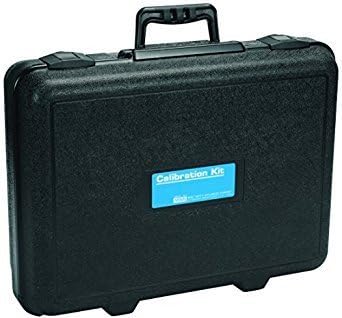
Figura 2: Black calibration kit case. This image displays a black, rectangular carrying case with a handle and latches, designed to protect the detector and calibration components.
Installazzjoni tal-batterija
The device is battery-powered. Ensure batteries are correctly installed according to the markings inside the battery compartment. (Note: Batteries are not included with the product.)
Calibration Kit Assembly
- Attach the flow control regulator to the calibration gas cylinder. Ensure a secure, leak-free connection.
- Connect the tubing from the regulator to the detector's calibration port.

Figura 3: Calibration gas cylinder. This image shows a silver gas cylinder with a blue and white label, containing calibration check gas.
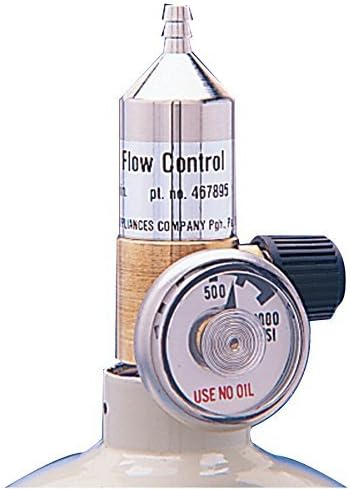
Figura 4: Flow control regulator. This image displays a metallic flow control regulator with a pressure gauge, used to regulate gas flow from the cylinder.
Istruzzjonijiet Operattivi
Tixgħel/Jitfi
- Biex tixgħel, agħfas u żomm il-buttuna tal-qawwa sakemm id-displej jixgħel.
- To power off, press and hold the power button until the shutdown sequence completes.
Kontrolli ta' Qabel l-Użu
- Verify battery level is sufficient for the intended use period.
- Perform a bump test daily or before each use to confirm sensor response.
- Ensure all sensor readings are stable and within acceptable limits in fresh air.
Monitoring Gases
The detector continuously displays real-time gas concentrations for LEL, O2, CO, and H2S. Alarms will activate if gas levels exceed preset thresholds.
MotionAlert and InstantAlert
- MotionAlert: If the detector remains motionless for 30 seconds, a pre-alarm will sound, followed by a full alarm if no movement is detected.
- InstantAlert: Press the designated button to manually activate an audible and visual alarm to alert others of a hazardous situation.
Manutenzjoni
Kalibrazzjoni
Regular calibration is crucial for accurate readings. Refer to the detector's on-screen prompts and the calibration kit instructions for detailed steps. Calibration frequency should adhere to local regulations and company policies, typically every 3-6 months.
Ħajja tas-Sensor
The XCell sensors have an approximate four-year lifespan. Replace sensors as indicated by the device or during routine maintenance if performance degrades.
Tindif u Ħażna
- Clean the exterior of the detector with a damp drapp. Tużax kimiċi ħarxa jew materjali li joborxu.
- Store the detector and calibration kit in a cool, dry place away from direct sunlight and extreme temperatures.
Issolvi l-problemi
Kwistjonijiet Komuni u Soluzzjonijiet
| Ħruġ | Kawża Possibbli | Soluzzjoni |
|---|---|---|
| Detector not powering on | Batteriji baxxi jew mejta; installazzjoni ħażina tal-batterija. | Ibdel il-batteriji; kun żgur li l-polarità hija korretta. |
| Inaccurate gas readings | Detector requires calibration; sensor failure; blocked sensor inlet. | Perform calibration; replace faulty sensor; clear any obstructions. |
| Falliment fil-kalibrazzjoni | Incorrect gas flow; expired calibration gas; faulty regulator. | Check regulator connection and flow; use fresh calibration gas; inspect regulator. |
| MotionAlert false alarms | Detector left stationary for too long. | Ensure detector is moved periodically or placed in a stable, non-hazardous location when not in active use. |
If issues persist after attempting these solutions, contact MSA customer support for further assistance.
Speċifikazzjonijiet
- Ditta: MSA
- Numru tal-Mudell: 10110488
- Sors tal-Enerġija: Imħaddem bil-batterija (Batteriji mhux inklużi)
- Gassijiet Individwati: Combustible (LEL), Oxygen (O2), Carbon Monoxide (CO), Hydrogen Sulfide (H2S)
- Tip ta' Sensor: Gas (XCell sensors)
- Tip ta' Allarm: Audible, Visual (InstantAlert, MotionAlert)
- Kulur: Black, Blue, Gold
- Piż tal-oġġett: Approximately 11 Pounds (for the kit)
- Kwantità tal-Pakkett: 1 (includes detector and calibration kit components)
- Numru ta' Biċċiet: 3 (detector, gas cylinder, regulator)
- L-Ewwel Data Disponibbli: 6 ta’ Novembru, 2017
Garanzija u Appoġġ
Specific warranty details are not provided within this document. For warranty information, technical support, or service inquiries, please refer to the official MSA website or contact MSA customer service directly. Keep your purchase receipt for warranty claims.
Uffiċjal tal-MSA Websit: www.msasafety.com