
1. Introduzzjoni
This manual provides comprehensive instructions for the safe and efficient installation, operation, and maintenance of your ONKRON Full Motion TV Wall Mount, model M4-WHT. Please read all instructions carefully before installation to ensure proper setup and to prevent damage or injury.
2. Informazzjoni Importanti dwar is-Sigurtà
- Kapaċità tal-piż: Teċċedix il-kapaċità massima tal-piż ta' 77 lbs (35 kg). Jekk taqbeż dan il-limitu jista' jirriżulta fi korriment serju jew ħsara lill-proprjetà.
- Daqs tal-iskrin: Dan il-muntatura huwa ddisinjat għal televiżjonijiet bejn 32 u 65 pulzier.
- Kompatibbiltà VESA: Ensure your TV's VESA pattern (100x100mm to 400x400mm) is compatible with this mount.
- Tip ta' Ħajt: This mount is suitable for installation on solid concrete walls, brick walls, and wood stud walls. Do not install on drywall alone.
- Installazzjoni professjonali: If you have any doubts about the installation process or the suitability of your wall, consult a qualified professional.
- Għodod: Use appropriate tools and follow all safety precautions when drilling and tightening fasteners.
- Tfal: Żomm it-tfal 'il bogħod miż-żona tal-installazzjoni waqt is-setup.
3. Kontenut tal-Pakkett
Verify that all components are present and undamaged before beginning installation. If any parts are missing or defective, contact ONKRON customer support.
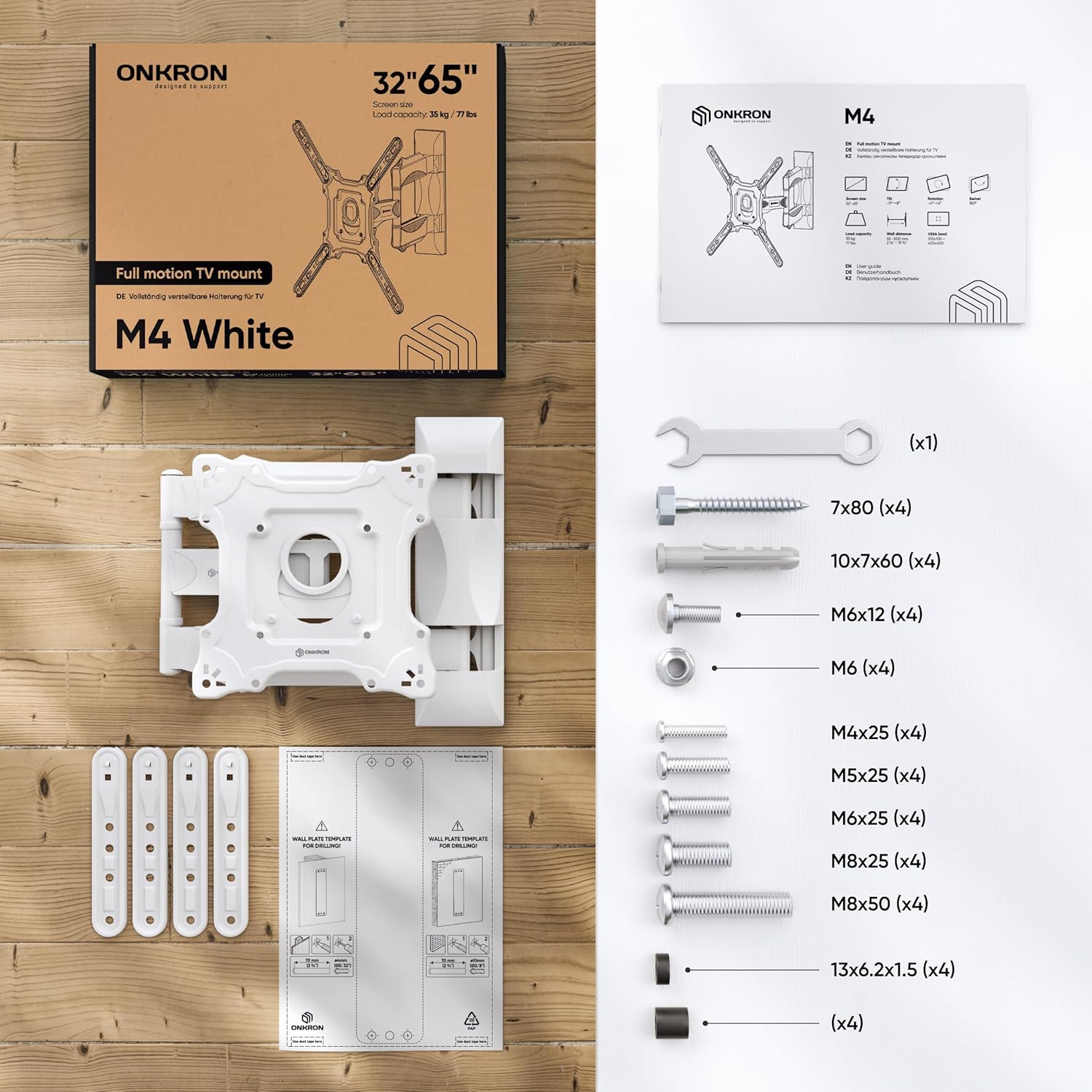
Figure 1: All necessary fasteners and a clear manual are included in the TV mounting kit.
- Wall Plate Assembly (pre-assembled)
- Panel VESA
- VESA Extenders (4 pieces)
- Plastic Covers for cable management
- Hardware Kit (various screws, washers, anchors, wrench)
- Mudell tat-Tħaffir
4. Għodod Meħtieġa (Mhux Inklużi)
- Lapes
- Martell
- Tornavit tar-ras Phillips
- Drill Elettriku
- Drill Bits (specific sizes depending on wall type)
- Livell
- Stud Finder (għall-installazzjoni ta' studs tal-injam)
5. Gwida għall-Installazzjoni
Watch the official ONKRON M4 Assembly and Configuration Instructions video for a visual guide:
Video 1: ONKRON M4 Assembly and Configuration Instructions. This video demonstrates the step-by-step process of installing the M4 TV wall mount.
5.1. Prepare the Mount
- Use the provided wrench to unscrew the nuts and detach the VESA panel from the main mount assembly.
- Carefully detach the plastic covers from the mount arms. These will be reattached later for cable management.
5.2. Mark Drill Holes on the Wall
Determine your desired TV height and position on the wall.
- Għal Ħitan bi Studs tal-Injam:
- Use a stud finder to locate the center of a wood stud.
- Place the drilling template against the wall at the desired height, ensuring it is level.
- Mark the drill hole locations with a pencil.
- Drill pilot holes with a 5/32" (4mm) drill bit to a minimum depth of 3.1" (80mm). No dowels are needed for wood studs.
- Għal Ħitan tal-Konkrit/Briks:
- Place the drilling template against the wall at the desired height, ensuring it is level.
- Mark the drill hole locations with a pencil.
- Drill holes with a 3/8" (10mm) drill bit to a minimum depth of 3.1" (80mm).
- Insert the provided concrete anchors (dowels) into the drilled holes. Tap gently with a hammer until flush with the wall.
5.3. Install the Wall Plate
- Align the main wall plate assembly with the drilled holes.
- Secure the wall plate to the wall using the appropriate screws and washers from the hardware kit. Tighten firmly with the wrench.
5.4. Attach VESA Panel to TV
The ONKRON M4-WHT supports VESA patterns from 100x100mm to 400x400mm.

Figure 2: The VESA panel can be extended to fit larger VESA patterns.
- Poġġi t-TV tiegħek wiċċu 'l isfel fuq wiċċ artab u nadif biex tevita l-grif.
- Identify your TV's VESA mounting holes.
- If your TV's VESA pattern is 100x100, 100x200, or 200x200, you may not need the VESA extenders. Attach the VESA panel directly to the TV using the correct screws and plastic spacers (if needed to compensate for bolt length or curved screens).
- If your TV's VESA pattern is larger (e.g., 200x300, 200x400, 300x200, 300x300, 300x400, 400x200, 400x300, 400x400), attach the VESA extenders to the VESA panel first, then secure the entire assembly to the TV using the appropriate screws and spacers.
- Issikka l-viti kollha sew, imma tissikkax iżżejjed.
5.5. Hang Your TV onto the Mount
- With assistance, carefully lift your TV and align the VESA panel (attached to the TV) with the mounting plate on the wall arm.
- Hook the VESA panel onto the mount.
- Secure the TV to the mount by tightening the safety screws located on the VESA panel.
5.6. Ġestjoni tal-Kejbil
- Route your TV cables through the designated channels on the mount arms.
- Reattach the plastic covers to conceal the cables and provide a clean appearance.
6. It-tħaddim tal-muntatura tat-TV
The ONKRON M4-WHT offers versatile adjustments for optimal viewing.
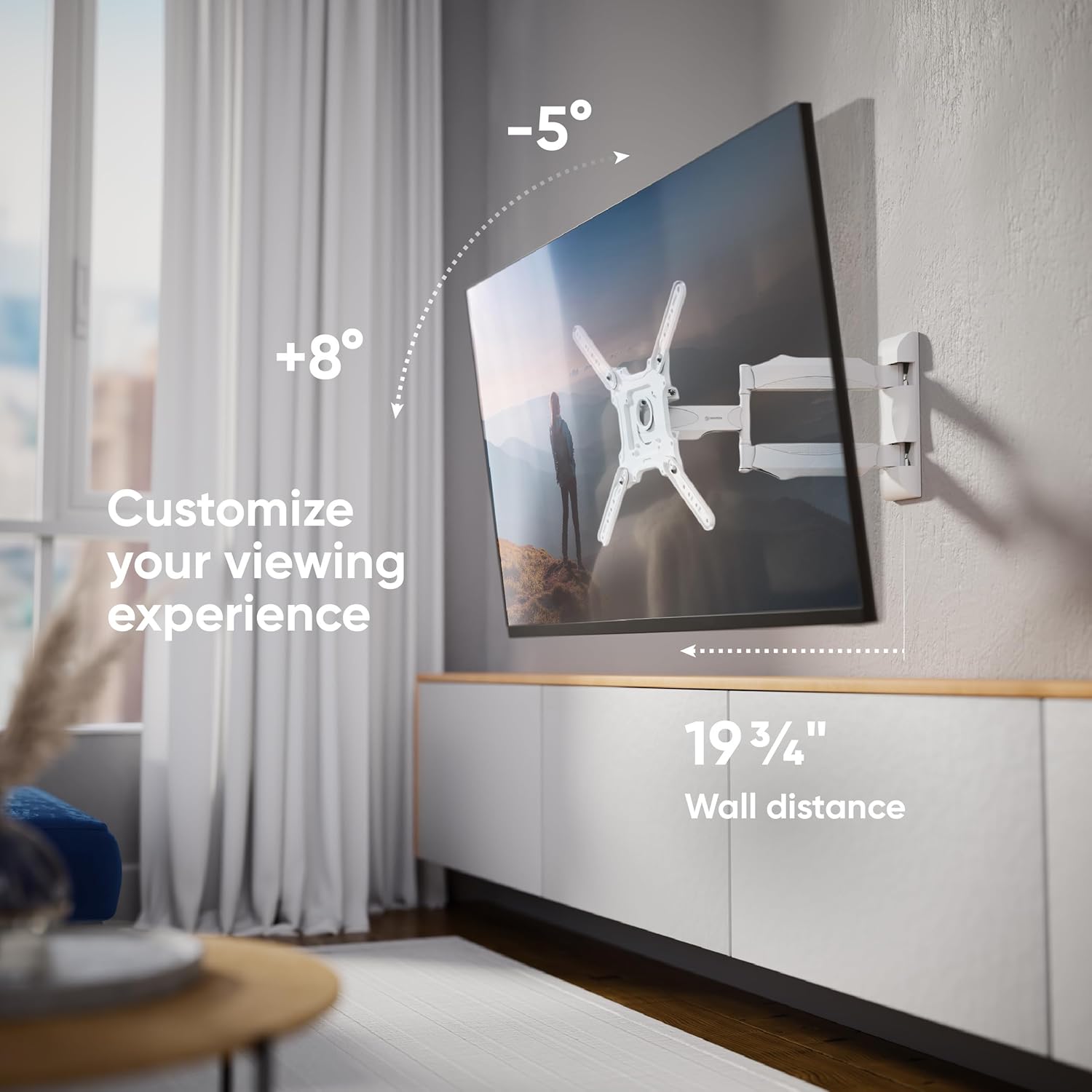
Figure 3: Customize your viewing experience with tilt and extension.
- Aġġustament tal-inklinazzjoni: The mount allows for a tilt range of -5° to +8°. Loosen the tilt adjustment screws on the VESA panel, adjust the screen to your desired angle, and then re-tighten the screws to secure the position.
- Aġġustament tad-dawran: The articulating arm allows the TV to swivel up to 180° (depending on TV size and wall distance). Gently push or pull the TV to achieve the desired viewangolu tal-ing.
- Estensjoni: The mount can extend from a minimum distance of 2.1 inches (55mm) from the wall to a maximum of 19.7 inches (500mm).
- Livellar tal-Iskrin: After installation, the screen can be aligned horizontally by slightly rotating the VESA panel before tightening the final screws.

Figure 4: Achieve a perfect view from anywhere with the 180-degree swivel.
7. Manutenzjoni
- Tindif: Naddaf il-muntatura b'ċarruta ratba u niexfa. Evita prodotti tat-tindif jew solventi li joborxu.
- Spezzjoni Perjodika: Iċċekkja l-viti u l-konnessjonijiet kollha perjodikament biex tiżgura li jibqgħu ssikkati u siguri. Erġa' ssikka jekk meħtieġ.
- Partijiet li jiċċaqilqu: The articulating arms are designed for smooth movement. No lubrication is typically required.
8 Issolvi l-problemi
- TV Mhux Livell: If the TV appears unlevel after installation, slightly loosen the screws connecting the VESA panel to the mount, adjust the TV to be level, and then re-tighten the screws.
- Il-Muntanja Tħossha Laxka: Check all wall mounting screws and TV attachment screws. Ensure they are securely tightened. If the issue persists, re-evaluate your wall type and installation method.
- Diffikultà fl-Aġġustament tal-Inklinazzjoni/Dawwar: Ensure no cables are obstructing movement. For tilt, loosen the adjustment screws before attempting to change the angle, then re-tighten.
9. Speċifikazzjonijiet
| Karatteristika | Speċifikazzjoni |
|---|---|
| Numru tal-Mudell | M4-WHT |
| Kompatibbiltà tad-Daqs tal-Iskrin | 32 - 65 pulzieri |
| Kapaċità massima tat-Tagħbija | 77 lbs (35 kg) |
| Kompatibilità VESA | 100x100mm sa 400x400mm |
| Angolu Mejjel | -5° sa +8° |
| Angolu li jdur | Up to 180° (screen size dependent) |
| Estensjoni mill-Ħajt | 2.1" (55mm) sa 19.7" (500mm) |
| Materjal | Azzar Liga |
| Kulur | Abjad |
| Dimensjonijiet tal-Prodott | 16 x 13 x 3 pulzieri (mitwija) |
| Piż tal-oġġett | 8.1 liri |
10. Garanzija u Appoġġ
ONKRON products undergo multi-stage quality control. For any questions, technical assistance, or warranty claims, please contact ONKRON customer support. Refer to your product packaging or the official ONKRON webis-sit għall-aktar informazzjoni ta' kuntatt aġġornata.
All necessary fasteners and a clear manual are included in the TV mounting kit. ONKRON full motion TV wall mounts undergo multi-stage quality control and feature sturdy packaging, with expert support ready to assist when needed.