
1. Introduzzjoni
The DoorBird IP Video Intercom Door Station D2101V is an advanced communication device designed to enhance security and convenience at your entrance. This device allows you to see, speak with, and open your door for visitors from anywhere in the world using your smartphone. Manufactured in Germany, it integrates innovative technology with a durable stainless steel design.
This manual provides essential information for the proper installation, operation, and maintenance of your DoorBird D2101V. Please read it thoroughly before proceeding with installation or use.
2. Kontenut tal-Pakkett
Jekk jogħġbok ivverifika li l-komponenti kollha huma preżenti fil-pakkett tiegħek:
- DoorBird IP Video Intercom Door Station D2101V
- Ħardwer tal-immuntar (viti, ankri)
- Gwida Quick Start
Items NOT included (purchased separately):
- Flush mount box
- Kaxxa tal-immuntar tal-wiċċ
- 2-wire Power Over Ethernet (POE) converter (e.g., DoorBird A1071)
- External door chime
- Power supply (if not using POE)
3. Informazzjoni dwar is-Sigurtà
Osserva l-linji gwida tas-sigurtà li ġejjin waqt l-installazzjoni u t-tħaddim:
- Installation should be performed by a qualified professional, especially when dealing with electrical wiring.
- Ensure power is disconnected before performing any wiring or installation procedures.
- Do not expose the device to extreme temperatures outside its operating range (-13°F to 131°F / -25°C to 55°C).
- The device is rated IP65 for protection against dust and water jets, but avoid direct high-pressure water exposure.
- Uża biss aċċessorji u provvisti tal-enerġija approvati mill-manifattur.
4. Setup
4.1 Installazzjoni Fiżika
The DoorBird D2101V is designed for either flush or surface mounting. The appropriate back box must be purchased separately. The unit measures approximately 9.96 inches (25.3 cm) long by 5.16 inches (13.1 cm) wide by 1.92 inches (4.9 cm) deep.
It is recommended to mount the unit at a height of at least 49 inches (124.5 cm) from the ground to ensure optimal camera view and accessibility for visitors.

Figura 1: Quddiem view of the DoorBird D2101V IP Video Intercom Door Station.
4.2 Wajers u Qawwa Elettrika
The D2101V primarily uses a wired connection for both data and power. It features an RJ45 connector for LAN/POE (Power Over Ethernet).
- Power Over Ethernet (POE): Connect a CAT5/6 Ethernet cable from a POE-enabled switch or POE injector to the RJ45 port on the DoorBird unit. This provides both network connectivity and power.
- Alternative 2-Wire Connection: If running a new Ethernet cable is not feasible, an optional 2-wire POE converter kit (e.g., DoorBird A1071) can be used with existing doorbell wires to provide data and power. This converter is not included and must be purchased separately.
- Traditional Power Supply: The device can also be powered by an AC/DC transformer (not included). Consult the wiring diagram in the Quick Start Guide for correct connections.
4.3 Network and App Configuration
After physical installation and wiring, connect the DoorBird to your local network. The device supports Wi-Fi connectivity, but a wired Ethernet connection is recommended for optimal performance and reliability.
- Download the official DoorBird app from your smartphone's app store (available for iOS and Android).
- Follow the in-app instructions to add your DoorBird device. This typically involves scanning a QR code or entering a device ID.
- Configure network settings, user access, and notification preferences within the app.
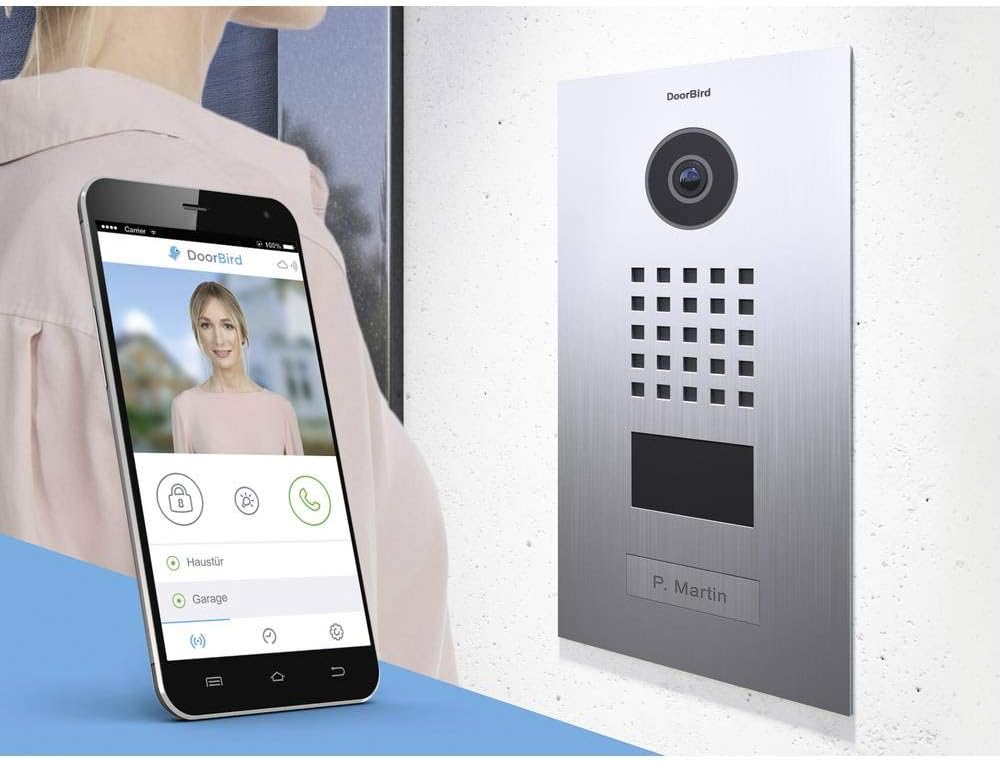
Figure 2: The DoorBird D2101V integrated with the smartphone application, showing live video and control options.
4.4 Smart Home System Integration
The DoorBird D2101V offers integration capabilities with various smart home systems and NVRs (Network Video Recorders). It supports ONVIF for camera streams and is compatible with control systems such as Control4, Crestron, Savant, URC, Elan, Homeseer, and Vera.
Refer to the DoorBird developer documentation or your smart home system's integration guide for specific instructions on connecting your D2101V.
5. Operazzjoni
5.1 Receiving Calls and Notifications
When a visitor presses the call button on the DoorBird unit, or if motion is detected (if configured), you will receive a notification on your smartphone via the DoorBird app.

Figura 3: Eżample of a DoorBird notification received on a smartphone.
5.2 Komunikazzjoni f'żewġ direzzjonijiet
Upon receiving a notification, open the DoorBird app to establish a live video and audio connection with your visitor. You can speak with them and hear their responses in real-time.
5.3 Door/Gate Opening (Lock Strike Integration)
The D2101V includes built-in lock strike capabilities, allowing you to remotely open a connected door or gate directly from the DoorBird app. Ensure your lock strike system is properly wired and configured with the DoorBird unit.
5.4 Qarrej tal-Kard RFID
The unit features an integrated RFID card reader for access control. Authorized users can gain entry by presenting a registered RFID card or tag to the device. RFID cards are typically configured and managed through the DoorBird app.
6. Manutenzjoni
6.1 Aġġornamenti tal-Firmware
DoorBird provides automatic firmware updates to ensure your device operates with the latest features and security enhancements. Ensure your device is connected to the internet for these updates to be applied automatically and free of charge.
6.2 Tindif
To clean the stainless steel surface, use a soft, damp cloth. Avoid abrasive cleaners or solvents that could damage the finish or electronic components. Regularly clean the camera lens and microphone/speaker grilles to maintain optimal performance.
7 Issolvi l-problemi
If you encounter issues with your DoorBird D2101V, consider the following:
- Ebda Qawwa: Verify all power connections. If using POE, ensure the POE source is active. If using a transformer, check its output.
- L-ebda Konnessjoni man-Netwerk: Check the Ethernet cable connection. Ensure your router/switch is functioning correctly. If using Wi-Fi, confirm the network credentials in the app.
- Ebda Awdjo/Vidjo: Check app settings for microphone and speaker permissions. Ensure network bandwidth is sufficient.
- App Not Receiving Notifications: Verify app notification settings on your smartphone and within the DoorBird app. Check internet connectivity.
- Door/Gate Not Opening: Confirm the lock strike wiring and configuration in the app. Ensure the lock strike itself is functional.
For persistent issues, consult the DoorBird support website or contact their technical support for assistance.
8. Speċifikazzjonijiet
| Numru tal-Mudell | D2101V |
| Materjal | Stainless Steel |
| Kulur | Stainless Steel |
| Dimensjonijiet (L x W x H) | 9.96 x 5.16 x 1.92 pulzieri (25.3 x 13.1 x 4.9 ċm) |
| Piż tal-oġġett | 2.42 liri (1.1 kg) |
| Sors tal-Enerġija | AC/DC, Power Over Ethernet (POE) |
| Wattage | 10 watt |
| Teknoloġija tal-Konnettività | Bil-fili (Ethernet), Wi-Fi |
| Protokoll tal-Konnettività | Wi-Fi |
| Riżoluzzjoni tal-Qbid tal-Vidjo | 720p |
| Riżoluzzjoni tal-Vidjo Effettiva | 720 |
| Format tal-Qbid tal-Vidjo | MPEG-4 |
| Tip ta 'Focus | Auto Focus |
| Teknoloġija tad-Dawl Baxx | Kulur bil-lejl |
| Klassifikazzjoni tal-Protezzjoni Internazzjonali | IP65 |
| Tip ta 'Immuntar | Flush Mount (requires separate box) |
| Apparati Kompatibbli | Smartphone |
| Tip ta' Kontrollur | Control4, Vera, URC, RTI, Savant, Crestron, Elan, Homeseer |
| Numru ta' Identifikazzjoni tal-Kummerċ Globali (GTIN) | 04260423860414 |
9. Garanzija u Appoġġ
DoorBird products are designed for durability and performance. The manufacturer typically offers a warranty period, which is often 2 years from the date of purchase. Please refer to your purchase documentation or the official DoorBird websit għal termini u kundizzjonijiet speċifiċi tal-garanzija.
For technical support, product registration, or to access additional resources, please visit the official DoorBird support portal. Professional integrator installation is recommended for optimal setup and performance.