
1. Introduzzjoni u Fuqview
The Lenovo Legion M200 RGB Gaming Mouse (Model GX30P93886) is engineered for an enhanced gaming experience. It features a responsive 5-button design, adjustable DPI settings up to 2400, and a dynamic 7-color circulating RGB backlight. Designed for comfort and durability, this mouse includes an ambidextrous shape, textured side grips, and a robust braided USB cable.

Image: Lenovo Legion M200 RGB Gaming Mouse, highlighting its precision and style.

Immaġni: Dettaljata view of the mouse, illustrating its customizable 5-button layout including left click, right click, scroll wheel, DPI button, and two side buttons.

Image: The mouse showcasing its vibrant 7-color circulating backlight for immersive gaming aesthetics.
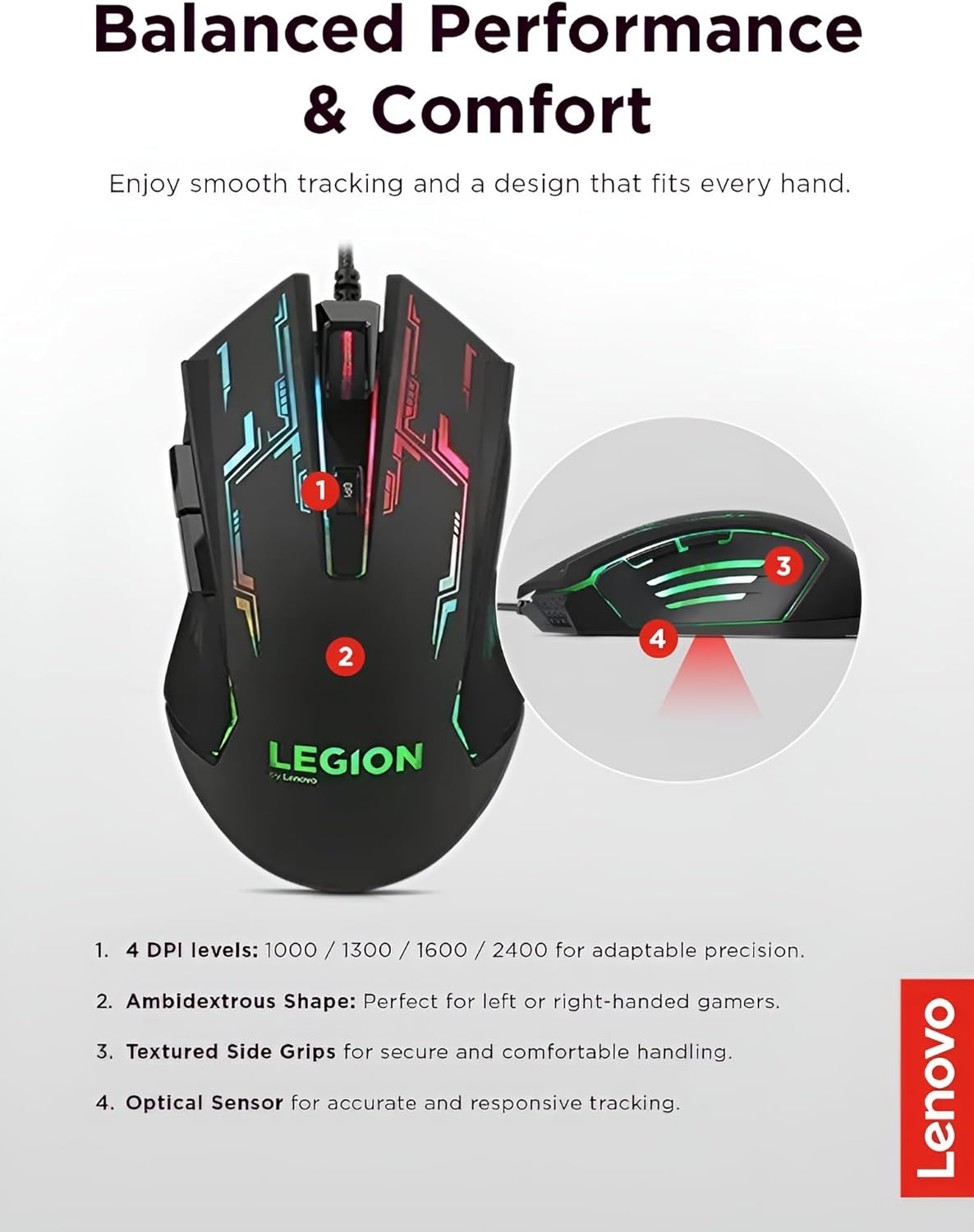
Image: Features such as 4 DPI levels, ambidextrous shape, textured side grips, and optical sensor are highlighted for balanced performance and comfort.
2. Setup
- Spakkjar: Carefully remove the Lenovo Legion M200 RGB Gaming Mouse from its packaging. Ensure all components are present.
- Konnessjoni: Locate an available USB port on your computer. Plug the USB connector of the mouse firmly into the port.
- Installazzjoni tas-sewwieq: The mouse is designed for plug-and-play functionality. Your operating system (Windows 7, 8, 8.1, 10) will typically detect and configure the device automatically without requiring additional driver installation.
3. Istruzzjonijiet Operattivi
Funzjonijiet Bażiċi
- Buttuna tal-Ikklikkjar tax-Xellug: Performs primary actions such as selecting items, opening files, or firing in games.
- Buttuna tal-Ikklikkjar bil-Lemin: Activates secondary functions, often displaying context-sensitive menus.
- Scroll Wheel: Użat għall-iscrolljar vertikali fid-dokumenti u web pages. It also functions as a clickable middle button for additional commands.
- Buttuni tal-ġenb: The two side buttons are typically used for forward/backward navigation in web browsers or can be assigned to specific in-game actions or shortcuts.
Aġġustament DPI
The Lenovo Legion M200 features a dedicated DPI switch button, located near the scroll wheel. Press this button to cycle through four preset DPI (Dots Per Inch) levels: 1000, 1300, 1600, and 2400. This allows for quick sensitivity adjustments to suit different tasks, game genres, or personal preferences.
Backlight RGB
The mouse is equipped with a dynamic 7-color circulating RGB backlight. This feature automatically cycles through various colors, providing an aesthetic enhancement to your gaming setup. The backlight is active whenever the mouse is connected to a powered USB port.
4. Manutenzjoni
Tindif
- Skonnettja: Always disconnect the mouse from your computer before cleaning.
- Tindif tal-wiċċ: Use a soft, dry cloth to gently wipe the surface of the mouse. For more persistent dirt, slightly dampen the cloth with water or a mild, non-abrasive cleaning solution. Avoid using harsh chemicals or solvents.
- Sensor and Wheel: Use a cotton swab or a can of compressed air to carefully clean around the optical sensor on the underside and the scroll wheel to remove dust and debris.
Kura tal-Cable
To ensure the longevity of the braided USB cable, avoid sharp bends, kinks, or excessive pulling. Store the cable neatly when not in use to prevent damage.
5 Issolvi l-problemi
- Il-Maws Mhux Jirrispondi:
Ensure the USB cable is securely plugged into an active USB port on your computer. Try plugging the mouse into a different USB port. Restart your computer to refresh the connection. - DPI Mhux qed Jinbidel:
Press the DPI switch button firmly. Confirm the mouse is connected and receiving power. - Backlight Mhux Taħdim:
Verify that the mouse is properly connected to a powered USB port. The backlight should activate automatically upon connection. - Moviment Erratiku tal-Kurser:
Clean the optical sensor on the underside of the mouse. Ensure you are using the mouse on a suitable, non-reflective surface; a mouse pad is highly recommended. - Buttuni Mhux Jaħdmu:
Check if any software or game-specific settings are overriding the default button functions. Test the mouse on another computer to determine if the issue is with the mouse hardware or your computer's configuration.
6. Speċifikazzjonijiet

Image: Physical dimensions, cable length, and weight of the mouse.
| Karatteristika | Dettall |
|---|---|
| Teknoloġija tas-Sensers | Ottiċi |
| Riżoluzzjoni tas-Sensor | 1000 DPI (Default) / 1300 DPI / 1600 DPI / 2400 DPI (4 levels) |
| Skrollja Rota | Iva |
| Report Frame Rate | 500 fps |
| Maximum Moving Speed | 30 pulzieri/sek |
| Aċċelerazzjoni Massima | 10 g |
| Sistemi Operattivi Appoġġjati | Windows 10 / Windows 8.1 / Windows 8 / Windows 7 |
| Dimensjonijiet (W x L x H) | 71.3 mm x 123 mm x 40.4 mm (2.81" x 4.84" x 1.59") |
| Piż | 0.15 kg (0.33 lbs) / 5.3 ounces |
| Kulur | Iswed |
| Dawl ta' wara | 7-color Circulating RGB |
| Interface | Wired via USB (Braided Cable) |
| Tul tal-Cable | 1.8-il metru |
| Numru tal-Mudell tal-Oġġett | GX30P93886 |
| Manifattur | Lenovo (l-Istati Uniti), Inc. |
7. Garanzija u Appoġġ
The Lenovo Legion M200 RGB Gaming Mouse is covered by a standard manufacturer's warranty. For comprehensive details regarding warranty terms, service options, and technical support, please refer to the official documentation included with your product packaging. You may also visit the official Lenovo support webis-sit għall-aktar informazzjoni u assistenza aġġornata.
For further inquiries or to access support resources, please visit: www.lenovo.com/support