
Kaiser MSA-9908BT
Kaiser MSA-9908BT Bluetooth AmpSpeaker kwalifikat
Manwal ta' Istruzzjoni
Informazzjoni Importanti dwar is-Sigurtà
Jekk jogħġbok aqra u ifhem l-istruzzjonijiet kollha tas-sigurtà qabel ma tuża dan il-prodott. Żomm dawn l-istruzzjonijiet għal referenza futura.
- Tesponix l-ispiker għax-xita jew għall-umdità biex tevita nar jew xokk elettriku.
- Timblokkax il-fetħiet tal-ventilazzjoni. Installa skont l-istruzzjonijiet tal-manifattur.
- Ipproteġi l-korda tad-dawl milli timxi fuqha jew maqrusa, partikolarment fil-plakek, ir-reċipjenti tal-konvenjenza, u l-punt fejn joħorġu mill-apparat.
- Uża biss aċċessorji/aċċessorji speċifikati mill-manifattur.
- Aqla’ dan l-apparat waqt maltempati tas-sajjetti jew meta ma jintużax għal perjodi twal ta’ żmien.
- Irreferi l-manutenzjoni kollha lil persunal tas-servizz kwalifikat. Il-manutenzjoni hija meħtieġa meta l-apparat ikun sar xi ħsara.
- Do not open the speaker enclosure. There are no user-serviceable parts inside.
Kontenut tal-Pakkett
Iċċekkja li l-oġġetti kollha elenkati hawn taħt huma inklużi fil-pakkett tiegħek:
- Kaiser MSA-9908BT AmpSpeaker kwalifikat
- 1 x Mikrofonu bil-fili
- 1 x Kontroll mill-bogħod
- 1 x Power Adapter/Charging Cable

Image showing the Kaiser MSA-9908BT speaker along with its included wired microphone, remote control, and power cable.
Prodott Overview
Familiarize yourself with the main components and controls of your Kaiser MSA-9908BT speaker.
Quddiem View

The front of the speaker features a protective metal grille with the Kaiser logo at the bottom.
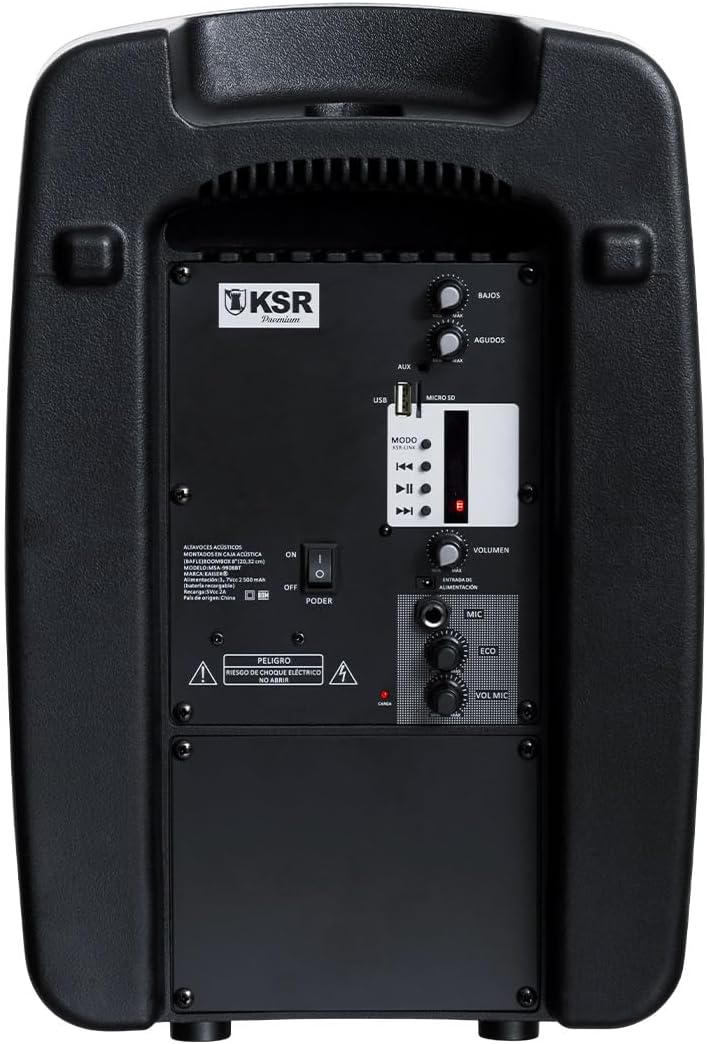
Rear Panel Controls and Ports

Dettaljati view of the rear control panel, including audio inputs, volume controls, and media playback options.
- BASS / AGUDOS (Treble) Knobs: Adjust bass and treble levels.
- Port USB: Għall-plejbek ta' flash drive tal-USB.
- MICRO SD Slot: Għall-plejbek ta' kard Micro SD.
- Input AUX: Input awżiljarju ta' 3.5mm għal apparati awdjo esterni.
- Buttuna MODE: Switches between input modes (Bluetooth, USB, Micro SD, FM).
- Kontrolli tal-daqq: Daqq/Pawża, Trakka Preċedenti, Trakka Li Jmiss.
- VOLUMEN Knob: Kontroll tal-volum ewlieni għall-ispiker.
- Input tal-MIC (6.3mm): For connecting the wired microphone.
- ECO Knob: Jaġġusta l-effett tal-eku għall-mikrofonu.
- VOL MIC Knob: Adjusts the microphone volume independently.
- Swiċċ POWER: Turns the speaker On or Off.
- Port tal-Iċċarġjar: For connecting the power adapter to charge the internal battery.
Setup
Iċċarġjar Inizjali
Before first use, it is recommended to fully charge the speaker's internal battery. This typically takes approximately 4 hours.
- Connect the provided power adapter to the charging port on the rear panel of the speaker.
- Ipplaggja l-adapter f'sokit elettriku standard.
- The charging indicator light (usually red) will illuminate during charging and may change color or turn off when fully charged.
- Ċarġ sħiħ jipprovdi madwar 6 sigħat ta' ħin ta' daqq.

The rear panel showing the charging port and an important reminder to charge the unit for 4 hours before initial use.
Tixgħel/Jitfi
- To turn on the speaker, slide the QAWWA is-swiċċ fuq il-pannell ta' wara għall-pożizzjoni 'ON'.
- To turn off the speaker, slide the QAWWA is-swiċċ għall-pożizzjoni 'MITFI'.
Istruzzjonijiet Operattivi
Konnettività Bluetooth
- Turn on the Kaiser MSA-9908BT speaker. It will automatically enter Bluetooth pairing mode, indicated by a flashing light or an audible prompt.
- Fuq l-ismartphone, it-tablet, jew apparat ieħor li jaħdem bil-Bluetooth tiegħek, attiva l-Bluetooth u fittex apparati disponibbli.
- Select "MSA-9908BT" from the list of found devices.
- Ladarba jkun imqabbad b'suċċess, l-ispiker se jipprovdi konferma li tinstema', u d-dawl indikatur tal-Bluetooth se jixgħel b'mod solidu.
- Issa tista' ddoqq l-awdjo mit-tagħmir tiegħek permezz tal-ispiker.
USB / Micro SD Playback
- Daħħal USB flash drive fil- Port USB or a Micro SD card into the MICRO SD Slot on the rear panel. Ensure the media contains compatible audio files (eż., MP3).
- The speaker should automatically switch to USB or Micro SD mode and begin playing audio. If not, press the MODALITÀ buttuna biex tagħżel l-input korrett.
- Use the Play/Pause, Previous Track, and Next Track buttons on the speaker or remote control to manage playback.
Operazzjoni tar-Radju FM
- Agħfas il- MODALITÀ button repeatedly until you select FM radio mode.
- The speaker will automatically scan and save available FM stations.
- Use the Previous Track and Next Track buttons to navigate between saved stations.
Bl-użu tal-Mikrofonu bil-Wired
- Qabbad il-mikrofonu bil-fili mal- MIC Input (6.3mm) fuq il-pannell ta’ wara.
- Aġġusta l-volum tal-mikrofonu billi tuża l- VOL MIC pum.
- Uża l- ECO knob to add or reduce the echo effect for the microphone.

Detail of the 6.3mm microphone input jack and its dedicated volume and echo controls.
Funzjonijiet ta 'Kontroll mill-bogħod
Il-kontroll remot inkluż jipprovdi aċċess konvenjenti għal diversi funzjonijiet:

The remote control allows for convenient operation of playback, volume, and mode selection.
- DABBA/PAWŻA: Ibda jew waqqaf id-daqq.
- QABEL / JMISS: Aqbeż għat-trakka/stazzjon ta' qabel jew li jmiss.
- VOL-/VOL+: Decrease or increase the master volume.
- CH-/CH+: Change FM radio channels.
- EQ: Ċiklu bejn il-presets tal-ekwalizzatur.
- MODALITÀ: Switch between input sources (Bluetooth, USB, Micro SD, FM, AUX).
- Buttuni Numeriċi (0-9): Għall-għażla diretta tat-track jew input tal-frekwenza FM.
Manutenzjoni
- Tindif: Uża drapp artab u niexef biex tnaddaf il-barra tal-ispiker. Tużax prodotti tat-tindif, xama', jew solventi li joborxu.
- Kura tal-batterija: To prolong battery life, avoid fully discharging the battery frequently. If storing the speaker for an extended period, charge it to about 50% every few months.
- Ħażna: Aħżen l-ispiker f'post frisk u niexef 'il bogħod mix-xemx diretta u minn temperaturi estremi.
Issolvi l-problemi
| Problema | Kawża Possibbli | Soluzzjoni |
|---|---|---|
| L-ispeaker ma jixgħelx. | Il-batterija hija eżawrita; Is-swiċċ tal-enerġija huwa mitfi. | Charge the speaker for at least 4 hours. Ensure the POWER switch is in the 'ON' position. |
| L-ebda ħoss mill-ispiker. | Il-volum huwa baxx wisq; Modalità ta' input mhux korretta; Apparat mhux konness. | Żid il- VOLUMEN knob. Press MODALITÀ to select the correct input. Ensure your device is properly connected (Bluetooth paired, USB/SD inserted). |
| Tqabbil Bluetooth ifalli. | L-ispiker mhux fil-modalità ta' tqabbil; L-apparat wisq 'il bogħod; Interferenza. | Ensure speaker is in Bluetooth mode. Move device closer to speaker. Turn off other Bluetooth devices. Try restarting both speaker and device. |
| Il-mikrofonu mhux qed jaħdem. | Microphone not connected; VOL MIC knob is low. | Ensure microphone is fully plugged into the 6.3mm MIC input. Increase the VOL MIC pum. |
| Riċeviment ħażin tar-radju FM. | Sinjal dgħajjef; Interferenza ambjentali. | Reposition the speaker to improve reception. Extend any external antenna if available. |
Speċifikazzjonijiet
| Karatteristika | Dettall |
|---|---|
| Mudell | MSA-9908BT |
| Brand | Kaiser |
| Output tal-Qawwa (RMS) | 30W RMS |
| Daqs tal-Kelliem | 8 pulzieri |
| Konnettività | Bluetooth, USB, Micro SD, AUX (3.5mm), Wired Microphone (6.3mm) |
| Ħajja tal-batterija | Sa 6 sigħat |
| Ħin tal-Iċċarġjar | Appross. 4 sigħat |
| Dimensjonijiet (D x W x H) | 33 x 27 x 48 ċm (madwar 13 x 10.6 x 18.9 pulzieri) |
| Piż | 5.4 kg (madwar 11.9 lbs) |
| Materjal | Plastik |
| Komponenti Inklużi | Speaker, Wired Microphone, Remote Control, Power Adapter |
The speaker's dimensions are approximately 38.5 cm (height), 25.5 cm (width), and 20.5 cm (depth).
Garanzija u Appoġġ
This product is covered by a limited warranty provided by Kaiser. For specific warranty terms and conditions, please refer to the documentation included with your purchase or visit the official Kaiser websit.
For technical support, troubleshooting assistance, or warranty claims, please contact Kaiser customer service through their official channels. Keep your purchase receipt as proof of purchase.
- Appoġġ onlajn: Visit the Kaiser official websit għal FAQs u riżorsi ta' appoġġ.
- Servizz tal-Klijent: Refer to your product packaging or the Kaiser websit għal informazzjoni ta' kuntatt.
Ask a question about this manual
Ask about setup, troubleshooting, compatibility, parts, safety, or missing instructions. Manuals+ will review the question and use this page’s manual context to help answer it.