
1. Introduzzjoni
This manual provides essential information for setting up, operating, and maintaining your Lenovo ThinkCentre M93P Tiny Desktop PC. This compact business computer features an Intel i5-4570T processor, 8GB RAM, and a 128GB Solid State Drive, running Windows 10 Pro 64-bit. It is designed for efficient performance in a small form factor.
Important Note: This machine does not support Windows 11 upgrade.
2. Gwida ta' Setup
2.1 Kif Tneħħi l-Apparat mill-Ippakkjar
Neħħi l-komponenti kollha mill-imballaġġ bir-reqqa. Kun żgur li l-oġġetti li ġejjin huma preżenti:
- Lenovo ThinkCentre M93P Tiny Desktop PC
- Adapter tal-Enerġija
- Tastiera
- Ġurdien
- Any included cables (e.g., DisplayPort to HDMI adapter if provided)
2.2 Konnessjoni tal-Periferali
- Qabbad il-Monitor(s): Use the DisplayPort or VGA ports on the rear of the PC to connect your monitor(s). If your monitor uses HDMI, use the provided DisplayPort to HDMI adapter.
- Qabbad it-Tastiera u l-Maws: Plug the USB keyboard and mouse into any available USB ports on the front or rear of the PC.
- Qabbad man-Netwerk: For a wired connection, plug an Ethernet cable into the RJ45 LAN port on the rear. For wireless, ensure the Wi-Fi adapter is connected (if external) or configured (if internal).
- Qabbad l-Enerġija: Plug the power adapter into the DC-in port on the rear of the PC, then plug the adapter into a power outlet.

Figura 1: Quddiem u ġenb view of the Lenovo ThinkCentre M93P Tiny Desktop PC, showing its compact design.
3. Istruzzjonijiet Operattivi
3.1 Tixgħel/Jitfi
- Biex Tixgħel: Press the power button located on the front of the PC.
- Biex Tifi:
- Click the Start button (Windows icon) in the bottom-left corner of the screen.
- Click the Power icon.
- Select "Shut down" from the options.
3.2 Konfigurazzjoni Inizjali (Windows 10 Pro)
Upon first boot, you will be guided through the Windows 10 Pro setup process. Follow the on-screen prompts to:
- Agħżel ir-reġjun u d-disinn tat-tastiera tiegħek.
- Connect to a network (if not already connected via Ethernet).
- Aċċetta l-ftehim tal-liċenzja.
- Oħloq kont ta' utent jew idħol b'kont ta' Microsoft.
- Aġġusta s-settings tal-privatezza.
The operating system supports English, Spanish, and French languages.
4. Portijiet u Konnessjonijiet
4.1 Front Panel Ports

Figura 2: Vertikali view of the PC, highlighting the front panel ports.
- Buttuna tal-Qawwa: Biex tixgħel jew titfi l-PC.
- Portijiet USB 3.0 (x2): Għall-konnessjoni ta' apparati USB b'veloċità għolja.
- Jack tal-headphone: Għall-konnessjoni ta' headphones jew kelliema esterni.
- Mikrofonu Jack: Għall-konnessjoni ta 'mikrofonu.
4.2 Portijiet tal-Panel ta' Wara
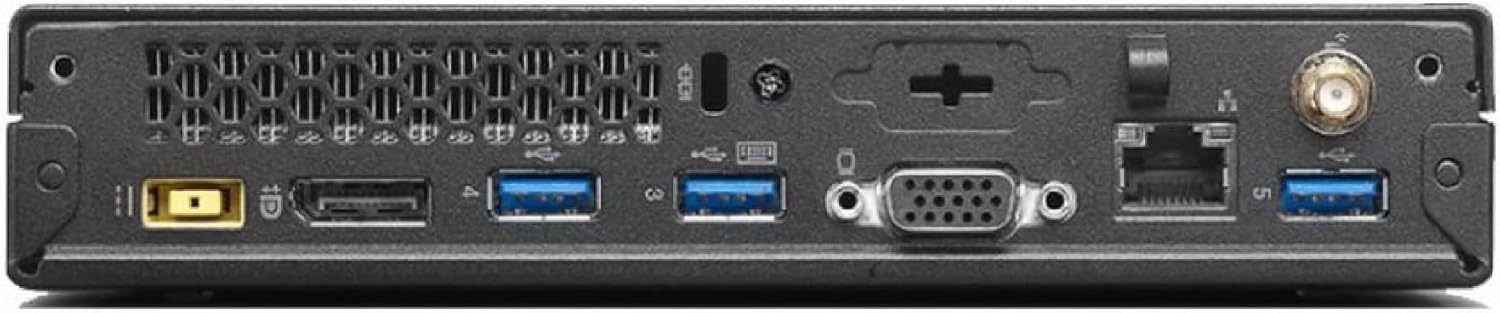
Figura 3: Wara view of the PC, detailing the available ports.
- DisplayPort (x2): For connecting monitors, supporting resolutions up to 1920x1080.
- Port VGA: For connecting older monitors.
- Portijiet USB 3.0 (x4): Għall-konnessjoni ta' apparati USB b'veloċità għolja.
- Port tal-LAN RJ45: Għal konnessjoni ta' netwerk bil-fili (Gigabit Ethernet).
- Port tad-dħul tad-DC: Għall-konnessjoni tal-adapter tal-enerġija.
- Konnettur tal-antenna: For Wi-Fi antenna (if applicable).
5. Speċifikazzjonijiet Tekniċi
| Karatteristika | Speċifikazzjoni |
|---|---|
| Brand | Lenovo |
| Mudell | ThinkCentre M93p |
| Proċessur | Intel Dual-Core i5-4570T (up to 3.60 GHz) |
| RAM | 8 GB DDR3 (1333 MHz) |
| Ħażna | SSD ta' 128 GB (Serial ATA) |
| Koproċessur tal-Grafika | Grafika Intel HD (Integrata) |
| Sistema Operattiva | Windows 10 Pro 64 Bit (Multi-Language: English/Spanish/French) |
| Tip bla fili | 802.11abg |
| Riżoluzzjoni Massima tal-Iskrin | 1920x1080 |
| Piż tal-oġġett | 6 liri |
| Dimensjonijiet tal-Prodott | 20 x 14 x 3 pulzieri |
6. Manutenzjoni
- Żomm Nadif: Regularly clean the exterior of the PC with a soft, dry cloth. Ensure air vents are free from dust and obstructions to maintain optimal cooling.
- Aġġornamenti tas-Software: Żomm is-sistema operattiva u d-drivers tal-Windows tiegħek aġġornati biex tiżgura s-sigurtà u l-prestazzjoni.
- Dejta tal-Backup: Agħmel backup tad-dejta importanti regolarment fuq drajv estern jew ħażna fil-cloud biex tevita t-telf tad-dejta.
- Evita Likwidi: Keep liquids away from the PC to prevent damage.
7 Issolvi l-problemi
- Ebda Qawwa:
- Check if the power adapter is securely connected to both the PC and a working power outlet.
- Kun żgur li l-buttuna tal-qawwa hija ppressata sew.
- Ebda Display:
- Verify that the monitor cables are securely connected to both the PC and the monitor.
- Kun żgur li l-monitor ikun mixgħul u ssettjat għas-sors tad-dħul korrett.
- Ipprova qabbad ma' display port jew monitor differenti jekk disponibbli.
- Prestazzjoni bil-mod:
- Agħlaq l-applikazzjonijiet bla bżonn.
- Iċċekkja u installa kwalunkwe aġġornament pendenti tal-Windows.
- Run a disk cleanup and defragmentation (for HDD, less critical for SSD).
- Skennja għal malware jew viruses.
- Kwistjonijiet ta' Konnettività Wi-Fi:
- Ensure the Wi-Fi antenna (if external) is properly connected.
- Erġa' ibda r-router u l-modem tiegħek.
- Check Wi-Fi settings in Windows to ensure it's enabled and connected to the correct network.
8. Garanzija u Appoġġ
This Certified Refurbished product is tested and certified to look and work like new. The refurbishing process includes functionality testing, basic cleaning, inspection, and repackaging. The product ships with all relevant accessories and a minimum 90-day warranty.
For further assistance or technical support, please refer to the seller's contact information or the Amazon Renewed Store for warranty claims.