
Introduzzjoni
This manual provides instructions for the iClebo YCR-M05 Series Robotic Vacuum Cleaner Mop Set. This set includes two microfiber mop pads designed for effective cleaning of hard floors. These pads are consumable items and require proper installation, use, and maintenance to ensure optimal performance of your robotic vacuum cleaner.

Image: Two purple microfiber mop pads, ready for use with the iClebo YCR-M05 Series robotic vacuum cleaner.
Setup u Installazzjoni
Follow these steps to properly install the microfiber mop pads onto your iClebo YCR-M05 Series robotic vacuum cleaner.
- Prepare the Mop Pad and Tray: Ensure both the mop pad and the mop tray are clean and free of debris. The mop pad attaches to the tray via a hook-and-loop fastening system.
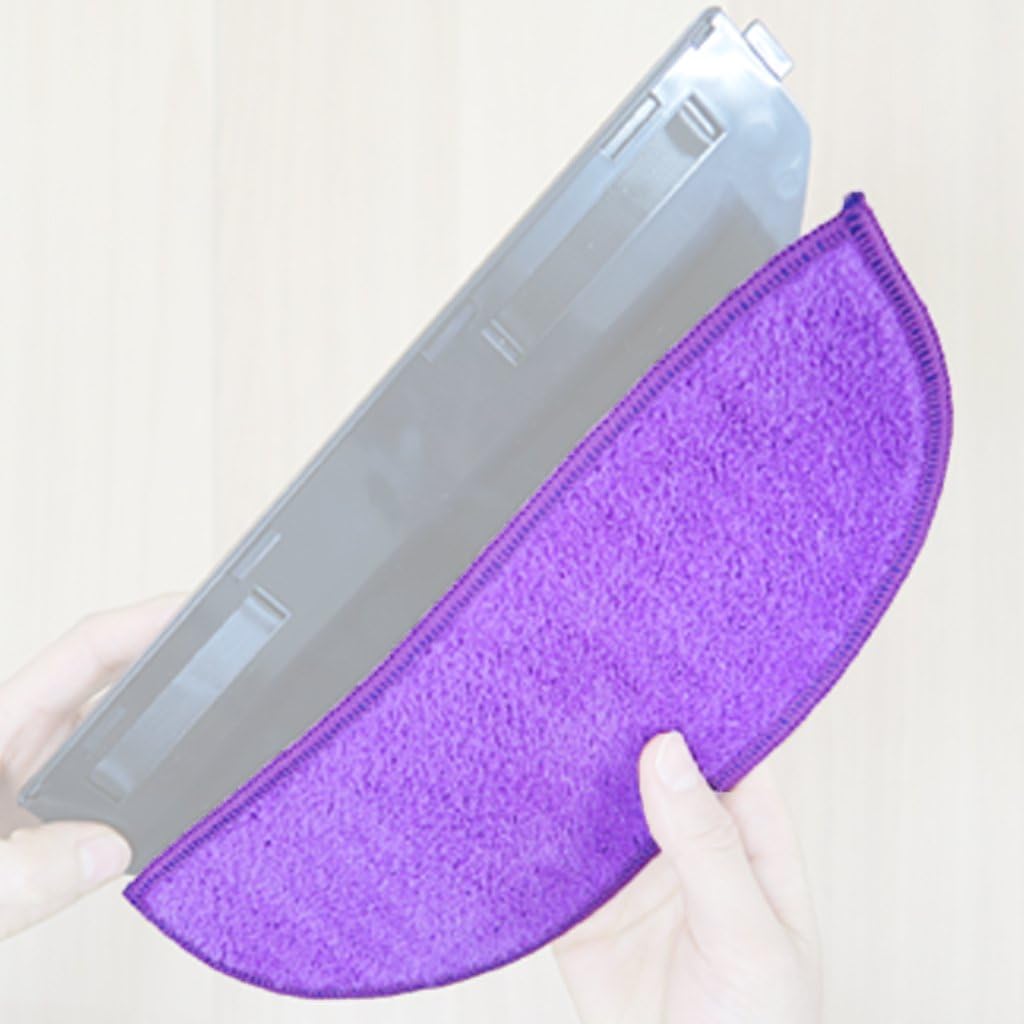
Image: A person's hands are shown attaching a purple microfiber mop pad to the grey mop tray component of the robotic vacuum cleaner.
- Attach Mop Pad to Tray: Align the mop pad with the mop tray and firmly press it into place, ensuring the entire surface of the pad is securely fastened to the tray.
- Install Tray onto Robotic Vacuum: Turn the robotic vacuum cleaner upside down. Locate the designated slot for the mop tray. Slide the assembled mop tray with the pad into this slot until it clicks securely into place.

Image: A person's hands are shown installing the mop pad and tray assembly onto the underside of the iClebo robotic vacuum cleaner, demonstrating the attachment process.
Operazzjoni
Once the mop pads are installed, the iClebo YCR-M05 Series robotic vacuum cleaner can be operated according to its main instruction manual for cleaning hard floors. The mop pads are designed to effectively wipe and clean surfaces as the robot navigates.
- For optimal mopping performance, ensure the mop pad is slightly damp before starting a cleaning cycle, especially for dry mopping or light spills.
- Avoid using the mop function on carpets or rugs.
- Monitor the mop pad's saturation during extended cleaning sessions and re-dampen if necessary.
Manutenzjoni
Regular maintenance of the mop pads and other consumables is essential for the longevity and efficiency of your iClebo robotic vacuum cleaner. The mop pads should be cleaned after each use and replaced periodically.
Tindif tal-Mop Pads
- After each cleaning cycle, remove the mop pad from the tray.
- Rinse the mop pad thoroughly under running water until all dirt and debris are removed.
- For heavily soiled pads, hand wash with a mild detergent.
- Allow the mop pad to air dry completely before reattaching or storing. Do not tumble dry.
Consumable Replacement Cycle
Refer to the table below for recommended replacement cycles for various consumable parts of your iClebo robotic vacuum cleaner, including the mop pads.

Image: A table detailing the recommended replacement frequency for various parts of the robotic vacuum, such as the HEPA filter (4 weeks), mop (3 months or when worn out), main brush (if damaged), side brush (if damaged), battery (1 year), and blade (if torn).
| Tip | Ċiklu ta' Sostituzzjoni Rakkomandat | Reference Contents |
|---|---|---|
| filtru HEPA | 4 ġimgħat | Disposable. Not reusable. |
| Mop | 3 xhur | Or if badly soiled, please replace when worn out. |
| Pinzell Prinċipali | Jekk meħtieġ | If the brush is damaged or warped, replace it. |
| Pinzell tal-Ġenb | Jekk meħtieġ | If the brush is damaged or warped, replace it. |
| Batterija | 1 sena | Replace if charging time and cleaning time are shortened. (Battery warranty period is 6 months) |
| Xafra | Jekk meħtieġ | Replace if torn, worn or bent. |
Issolvi l-problemi
If you encounter issues with the mop pads, consider the following common solutions:
- Il-mopp mhux qed inaddaf b'mod effettiv:
- Ensure the mop pad is clean and not overly saturated or too dry.
- Check if the mop pad is securely attached to the mop tray.
- Verify that the mop tray is correctly installed on the robot.
- The mop pad may be worn out and require replacement. Refer to the maintenance section.
- Mop pad detaching during operation:
- Ensure the hook-and-loop fasteners on both the pad and the tray are clean and not worn.
- Press the mop pad firmly onto the tray during installation to ensure a secure fit.
Speċifikazzjonijiet
| Karatteristika | Dettall |
|---|---|
| Tip ta' Prodott | Robotic Vacuum Cleaner Mop Set (2pcs) |
| Brand | iClebo |
| Isem tal-Mudell | YCR-M05 Series |
| Materjal | Mikrofibra |
| Kompatibilità | iClebo YCR-M05 Series Robotic Vacuum Cleaners |
| Dimensjonijiet tal-Prodott | 11.81 x 0.39 x 3.94 pulzieri |
| Filter Type (related product) | Cartridge, Cloth, Foam |
| Form Factor (related product) | Robotika |
Garanzija u Appoġġ
This product is a consumable accessory. For specific warranty information regarding the iClebo YCR-M05 Series Robotic Vacuum Cleaner or its accessories, please refer to the main product manual or contact iClebo customer support.
- Politika ta' Ritorn: A 30-day return policy typically applies from the date of purchase for new items. Please check with your retailer for specific return conditions.
- Garanzija tal-batterija: While this product is a mop set, it's important to note that the battery of the iClebo YCR-M05 Series robotic vacuum cleaner typically has a warranty period of 6 months.
- For further assistance or technical support, please visit the official iClebo websit jew ikkuntattja lid-dipartiment tas-servizz tal-konsumatur tagħhom.