
Introduzzjoni
This manual provides detailed instructions for the safe and effective use of your Unbranded XM-L T6 10000 Lumens Zoomable Tactical LED Flashlight, Model S2. Designed for durability and high performance, this flashlight features a powerful LED, zoomable optics, and multiple lighting modes. Please read this manual thoroughly before operating the device.

Image: Two XM-L T6 flashlights, highlighting their robust design and zoom feature.
Karatteristiċi tal-Prodott
- Kostruzzjoni Durabbli: Built with top-grade aluminum casing, offering impact resistance and lightweight design.
- LED ta' luminożità għolja: Features an ultra-strong LED light with up to 10000 lumens, providing a transmission distance of up to 500 meters.
- Zoomable Optic System: An outstanding focusing optic system allows for seamless transition from a spot beam to a flood beam, enhancing versatility.
- Modi tad-Dawl Multipli: Equipped with a quick-click switch to cycle through 5 distinct lighting modes.
- Portabbiltà: Compact size and includes a convenient carrying strap for easy transport.
- Konsum Effiċjenti tal-Enerġija: Designed for low power consumption, ensuring a long running time.

Image: The flashlight's powerful beam illuminating distant objects and wide areas.
Speċifikazzjonijiet
| Brand | Mhux immarkat |
| Mudell | S2 |
| Kulur | Iswed |
| Emitter BIN | T6 |
| Output Lumen | 10000 Lumens |
| Materjal | Liga tal-aluminju |
| Color BIN | Abjad |
| Qawwa | 10W |
| Konfigurazzjonijiet tal-batterija | 1 x 18650 Battery (Not Included) or 3 x AAA Batteries (Not Included) |
| Distanza tad-Dawl | 500m |
| Tip ta' Swiċċ | Ikklikkja |
| Iswiċċ Post | Qiegħ |
| Modi | 5 |
| Memorja tal-Modalità | Nru |
| Lenti | Coated Glass Lens |
| Ċinga tal-Ġarr | Strap Included |
| Dimensions (L x Dia.) | (5.31 x 1.38)" / (13.5 x 3.5)cm |
| Piż | 5.29oz / 150g |
| Livell ta 'Reżistenza għall-Ilma | Mhux Reżistenti għall-Ilma |
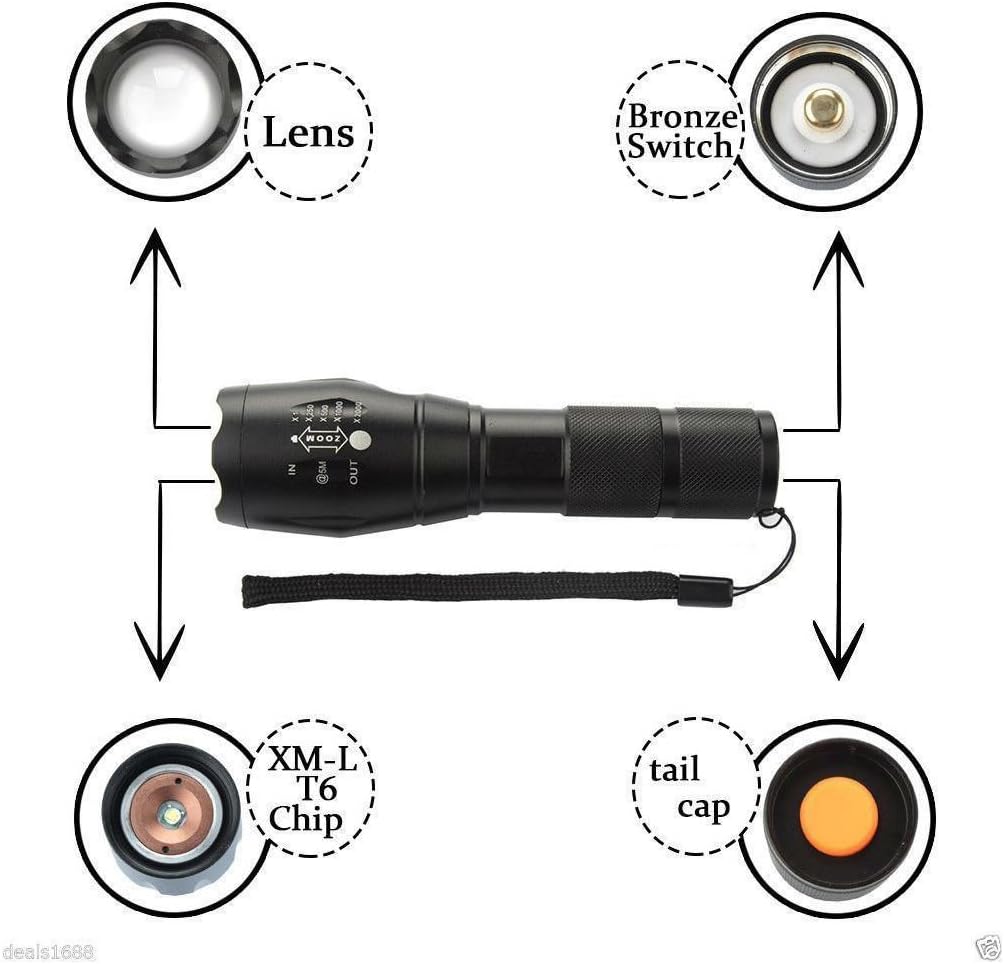
Immaġni: Splodiet view of the flashlight components, including the lens, switch, LED chip, and tail cap.
Setup
- Installazzjoni tal-batterija:
- Ħoll l-għatu tad-denb tal-flashlight.
- Insert one 18650 battery or three AAA batteries (using an adapter, not included) into the battery compartment with the positive (+) end facing towards the head of the flashlight.
- Invita l-għatu tad-denb lura sew.

Image: Illustration of battery insertion, showing compatibility with both 18650 and AAA batteries.
Istruzzjonijiet Operattivi
- Power On/Off: Press the quick-click switch located on the bottom (tail cap) of the flashlight to turn the light on or off.
- Modi taċ-ċiklu: With the flashlight on, lightly press the quick-click switch (without fully clicking) to cycle through the 5 available lighting modes. The modes typically include High, Medium, Low, Strobe, and SOS.
- Funzjoni Żum: To adjust the beam focus, slide the head of the flashlight forward or backward.
- Slide the head forward (IN) for a narrower, more focused beam (spotlight).
- Slide the head backward (OUT) for a wider, less focused beam (floodlight).

Image: Visual representation of the flashlight's zoom function, from narrow spot to wide flood.
Manutenzjoni
- Tindif: Imsaħ il-qafas tal-flashlight b'ċarruta ratba u damp drapp. Tużax tindif jew solventi li joborxu.
- Kura tal-Lenti: Keep the lens clean to ensure optimal light output. Use a lens cleaning cloth and solution if necessary.
- Kura tal-batterija: Remove batteries if the flashlight will not be used for an extended period to prevent leakage. Store batteries in a cool, dry place.
- Lubrikazzjoni: Applika griż tas-silikon perjodikament fuq l-O-rings u l-ħjut biex iżżomm ir-reżistenza għall-ilma u t-tħaddim bla xkiel.
Issolvi l-problemi
| Problema | Kawża Possibbli u Soluzzjoni |
|---|---|
| Il-flashlight ma tixgħel. |
|
| Id-dawl huwa baxx jew jitteptep. |
|
| Zoom function is stiff. |
|
Garanzija u Appoġġ
This product is subject to a 30-day return policy from the date of purchase. For any issues, questions, or support inquiries beyond this period, please contact the seller directly through your purchase platform. Keep your proof of purchase for any warranty claims.