
1. Introduzzjoni
Grazzi tax-xiriasing the Kaiser MSA-5708GY Professional 8-inch Amplified Wireless Speaker. This device is designed to provide high-quality audio with versatile connectivity options, including Bluetooth, USB, SD card, and AUX input. It also features a microphone input for public address or karaoke, and dynamic multicolor LED lights. Please read this manual thoroughly before operating the speaker to ensure proper use and to maximize its performance and longevity.
2. Informazzjoni dwar is-Sigurtà
- Sors tal-Enerġija: Use only the provided charging cable and adapter. Ensure the power supply matches the speaker's requirements.
- Ilma u Umdità: Do not expose the speaker to water, rain, or excessive moisture. Avoid placing liquid-filled objects on or near the speaker.
- Sħana: Keep the speaker away from heat sources such as radiators, heat registers, stoves, or other heat-producing appliances.
- Ventilazzjoni: Timblokkax xi fetħiet tal-ventilazzjoni. Kun żgur li jkun hemm fluss tal-arja adegwat madwar l-ispiker.
- Tindif: Skonnettja l-provvista tal-enerġija qabel it-tindif. Uża drapp niexef u artab. Tużax prodotti tat-tindif likwidi jew prodotti tat-tindif bl-ajrusol.
- Servizzi: Tippruvax isservi dan il-prodott int stess. Irreferi l-manutenzjoni kollha lil persunal tas-servizz kwalifikat.
- Batterija: The speaker contains a rechargeable battery. Do not expose the battery to excessive heat or direct sunlight. Dispose of batteries according to local regulations.
3. Kontenut tal-Pakkett
Ivverifika li l-oġġetti kollha huma preżenti fil-pakkett:
- Kaiser MSA-5708GY Amplified Wireless Speaker
- Mikrofonu bil-fili
- Kontroll mill-bogħod
- Charging Cable / Power Adapter
4. Prodott Aktarview
Familiarize yourself with the main components and controls of your speaker.
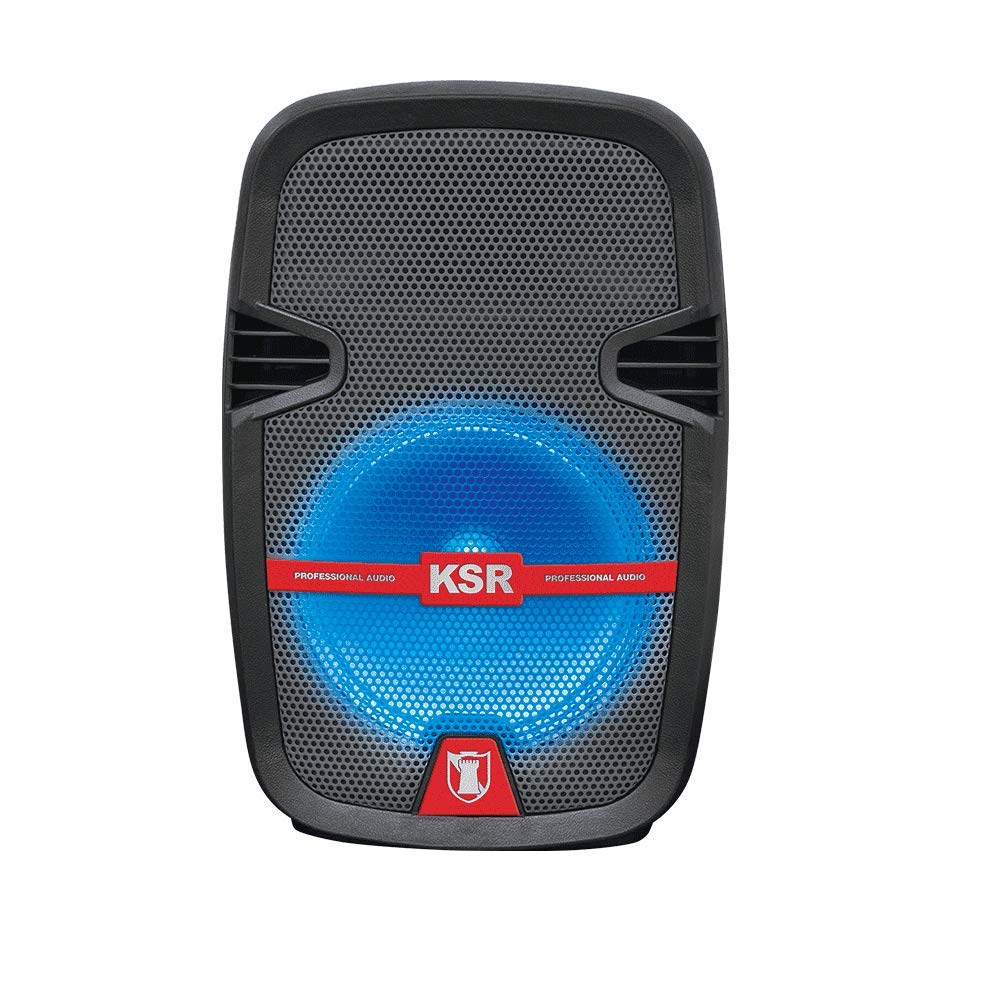
Figura 1: Quddiem view of the Kaiser MSA-5708GY speaker, showing the 8-inch woofer with multicolor LED lights and the control panel.
Karatteristiċi tal-Panew tal-Kontroll:
- Wiri: Juri l-modalità attwali, in-numru tat-trakka, jew il-frekwenza tal-FM.
- Buttuna tal-Modalità: Switches between Bluetooth, USB, SD, AUX, and FM Radio modes.
- Buttuna Play/Pause: Jibda jew iwaqqaf il-plejbek.
- Buttuni Preċedenti/Li Jmiss: Navigates tracks or FM stations.
- Buttuna tal-Volum: Jaġġusta l-volum kaptan.
- Pum tal-Volum tal-Mikrofonu: Jaġġusta l-volum tad-dħul tal-mikrofonu.
- Microphone Bass/Treble Knobs: Adjusts bass and treble for the microphone input.
- Swiċċ tad-Dawl LED: Toggles the multicolor LED lights on/off.
Rear Panel / Side Connections:
- Port USB: Għal flash drives tal-USB.
- Slot tal-Kard SD: For SD memory cards.
- Input AUX (3.5mm): Għal apparati awdjo esterni.
- Microphone Input (6.3mm): For connecting a wired microphone.
- Port tal-Iċċarġjar: Għall-konnessjoni tal-adapter tal-enerġija.
- Swiċċ tal-Enerġija: Ixgħel jew jitfi l-kelliem.
- Stand Mount Socket: For mounting the speaker on a compatible stand.
5. Setup
5.1 Iċċarġjar tal-batterija
- Qabbad il-kejbil tal-iċċarġjar ipprovdut mal-port tal-iċċarġjar tal-ispiker.
- Ipplaggja t-tarf l-ieħor tal-kejbil f'sokit tal-enerġija adattat.
- The charging indicator light (if present) will illuminate, indicating that the battery is charging.
- Allow approximately 3-4 hours for a full charge. The indicator light may change or turn off when fully charged.
- Disconnect the charger once fully charged to preserve battery life.
Nota: For optimal battery performance, fully charge the speaker before first use.
5.2 Tixgħel/Jitfi
- To power on, locate the Power Switch on the speaker and toggle it to the "ON" position.
- To power off, toggle the Power Switch to the "OFF" position.
5.3 Mounting on a Stand
The speaker features a rear knob and a socket for mounting on a compatible speaker stand.
- Ensure the speaker stand is stable and rated for the speaker's weight (4 kg).
- Carefully place the speaker onto the stand's pole, aligning it with the stand mount socket.
- Tighten the rear knob on the speaker to secure it firmly to the stand.
6. Istruzzjonijiet Operattivi
6.1 Konnettività Bluetooth
- Power on the speaker. The speaker will typically enter Bluetooth pairing mode automatically, indicated by a flashing Bluetooth icon or a voice prompt. If not, press the "Mode" button until "Bluetooth" is selected.
- Fuq l-apparat mobbli tiegħek (smartphone, tablet, eċċ.), attiva l-Bluetooth u fittex apparati disponibbli.
- Select "MSA-5708GY" from the list of devices.
- Once paired, the speaker will confirm the connection, and the Bluetooth indicator will stop flashing.
- You can now play audio from your device through the speaker. Control playback and volume from your device or the speaker's controls.
Nota: The Bluetooth range is up to 10 meters (33 feet) in open areas.
6.2 Daqq tal-Karta USB/SD
- Insert a USB flash drive or an SD card (pre-loaded with MP3 audio files) fil-port/slott rispettiv fuq l-ispiker.
- The speaker should automatically switch to USB or SD mode and begin playing audio. If not, press the "Mode" button to select "USB" or "SD".
- Use the Play/Pause, Previous, and Next buttons on the speaker or remote control to manage playback.
6.3 Radju FM
- Power on the speaker and press the "Mode" button until "FM" mode is selected.
- Press and hold the Play/Pause button to initiate an automatic scan for FM stations. The speaker will scan and save available stations.
- Use the Previous and Next buttons to navigate through the saved FM stations.
6.4 Input AUX
- Qabbad tarf wieħed ta' kejbil awdjo ta' 3.5mm (mhux inkluż) mal-port tad-dħul AUX fuq l-ispiker.
- Connect the other end of the cable to the headphone jack or audio output of your external audio device (e.g., MP3 player, laptop).
- Press the "Mode" button until "AUX" mode is selected.
- Play audio from your external device. Adjust volume from both the external device and the speaker.
6.5 Użu tal-Mikrofonu
- Connect the wired microphone to the 6.3mm microphone input jack on the speaker.
- Adjust the "MIC VOL" knob to control the microphone's volume.
- Use the "MIC BASS" and "MIC TREBLE" knobs to fine-tune the microphone's sound.
6.6 Dwal LED Multicolor
The speaker features integrated multicolor LED lights that illuminate the woofer.
- To activate or deactivate the LED lights, use the dedicated LED Light Switch on the control panel.
6.7 Operazzjoni tal-Kontroll mill-bogħod
The included remote control allows for convenient operation from a distance. Ensure the remote control has working batteries and is pointed towards the speaker's IR receiver.
- Buttuna tal-Qawwa: Jixgħel/jitfi l-ispiker (standby).
- Buttuna tal-Modalità: Switches input modes.
- Volum +/-: Jaġġusta l-volum prinċipali.
- Play/Pawsa: Jibda/twaqqaf il-daqq.
- Preċedenti/Li jmiss: Jaqbeż it-traċċi jew l-istazzjonijiet tal-FM.
- EQ: (If available) Cycles through equalizer presets.
- Buttuni tan-Numru: (If available) Direct track selection in USB/SD mode or FM station input.
7. Manutenzjoni
7.1 Tindif
- Dejjem skonnettja l-ispiker mis-sors tal-enerġija qabel ma tnaddaf.
- Uża drapp artab, niexef u mingħajr suf biex timsaħ l-uċuħ ta’ barra tal-ispiker.
- Tużax prodotti tat-tindif, xama', jew solventi li joborxu għax jistgħu jagħmlu ħsara lill-finitura.
- Evita li tidħol l-umdità fi kwalunkwe fetħiet.
7.2 Kura tal-Batterija
- Biex ittawwal il-ħajja tal-batterija, evita li l-batterija tinżel kompletament ta' spiss.
- If the speaker will not be used for an extended period, charge it to about 50% and store it in a cool, dry place. Recharge every 3-6 months to prevent deep discharge.
- Tesponix il-batterija għal temperaturi estremi.
8 Issolvi l-problemi
| Problema | Kawża Possibbli | Soluzzjoni |
|---|---|---|
| Ebda qawwa | Battery is drained; Power switch is off; Charging cable not connected properly. | Charge the battery; Ensure power switch is ON; Check charging cable connection. |
| L-ebda ħoss | Volume is too low; Incorrect input mode selected; Device not connected properly (Bluetooth, AUX, USB/SD). | Increase master volume; Select correct input mode; Reconnect device or re-pair Bluetooth. |
| Il-Bluetooth mhux qed jgħaqqad | Speaker not in pairing mode; Device Bluetooth is off; Speaker is too far from device; Interference. | Ensure speaker is in Bluetooth mode; Enable Bluetooth on device; Move device closer to speaker (within 10m); Avoid obstacles. |
| Il-plejbek tal-USB/SD mhux qed jaħdem | Skorretta file format; USB/SD card corrupted; Incorrect mode selected. | Tiżgura filehuma f'format MP3; Ipprova kard USB/SD differenti; Agħżel il-modalità USB/SD. |
| Mikrofonu mhux qed jaħdem | Microphone not connected; MIC VOL knob is low; Microphone is faulty. | Ensure microphone is securely connected; Increase MIC VOL; Test with another microphone if available. |
9. Speċifikazzjonijiet
| Mudell: | MSA-5708GY |
| Ditta: | Kaiser |
| Qawwa Awdjo: | 2,500W PMPO / 8W RMS |
| Daqs tal-woofer: | 8 pulzieri (20.32 ċm) |
| Konnettività: | Bluetooth, USB, SD, AUX (3.5mm), Microphone (6.3mm) |
| Medda Bluetooth: | Sa 10 metri |
| Batterija: | Rechargeable, up to 4 hours continuous music playback |
| Radju: | Radju FM |
| Impedenza: | 4 Ohms |
| Dimensjonijiet (L x W x H): | 30 x 44 x 25 ċm |
| Piż: | 4 kg |
| Apparati Kompatibbli: | Laptop, Smartphone |
10. Informazzjoni dwar Garanzija
This Kaiser MSA-5708GY speaker comes with a 3-il xahar garanzija from the date of purchase. This warranty covers manufacturing defects under normal use. It does not cover damage caused by misuse, accidents, unauthorized modifications, or normal wear and tear. Please retain your proof of purchase for warranty claims.
11. Appoġġ għall-Klijent
If you encounter any issues or have questions regarding your Kaiser MSA-5708GY speaker that are not addressed in this manual, please contact Kaiser customer support. Refer to the product packaging or the official Kaiser webis-sit għall-aktar informazzjoni ta' kuntatt aġġornata.
When contacting support, please have your product model number (MSA-5708GY) and proof of purchase readily available.