
1. Introduzzjoni
This manual provides comprehensive instructions for the safe and effective use of your Digitek DFL-200T PRO-089IRT-C Flash. Please read this manual thoroughly before operating the device and retain it for future reference. This flash unit is designed to provide versatile lighting solutions for various photographic needs, compatible with Canon cameras.
2. Informazzjoni dwar is-Sigurtà
- Do not disassemble or modify the flash unit. This may cause electric shock or damage the product.
- Żomm l-unità tal-flash niexfa. Tesponihiex għax-xita, umdità, jew umdità għolja.
- Avoid direct eye exposure to the flash light, especially at close range, as it can impair vision.
- Use only specified batteries (4xAA Alkaline / Rechargeable Ni-MH). Incorrect battery types may cause leakage or explosion.
- Ensure the flash is securely mounted to the camera hot shoe to prevent accidental detachment.
- Tħaddimx il-flash fil-preżenza ta' gassijiet jew likwidi fjammabbli.
3. Kontenut tal-Pakkett
Ivverifika li l-oġġetti kollha huma preżenti fil-pakkett tiegħek:
- Digitek DFL-200T PRO-089IRT-C Flash Unit
- Manwal ta' Istruzzjoni

Image 3.1: The Digitek DFL-200T PRO-089IRT-C flash unit shown with its included soft case and a mini stand.
4. Prodott Aktarview
Familiarize yourself with the components and controls of your Digitek DFL-200T PRO-089IRT-C Flash.

Stampa 4.1: Quddiem view of the flash unit, displaying the large LCD panel, control buttons (MODE, Fn, CLEAR, ZOOM, ON/OFF, LOCK), and the flash head.
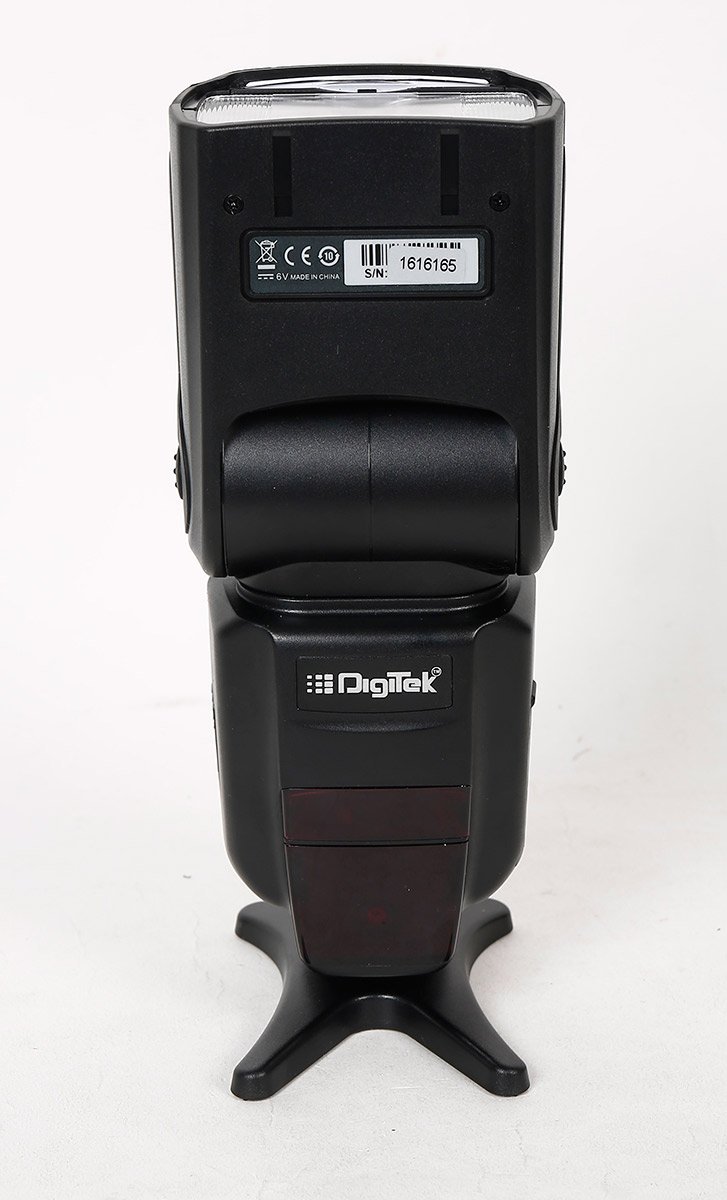
Stampa 4.2: Wara view of the flash unit, showing the battery compartment cover and product identification labels including the serial number.

Immaġni 4.3: Angolata view of the flash unit, demonstrating the adjustable flash head in a tilted position.
5. Setup
5.1. Installazzjoni tal-batterija
- Open the battery compartment cover located on the back of the flash unit.
- Insert four (4) AA alkaline or Ni-MH rechargeable batteries, ensuring correct polarity (+/-).
- Agħlaq l-għatu tal-kompartiment tal-batterija sew.
5.2. Immuntar tal-Unità tal-Flash
- Slide the metal hot shoe of the flash unit into the hot shoe mount on your camera.
- Rotate the locking ring or lever on the flash unit clockwise until it is securely fastened to the camera.
- To remove, rotate the locking mechanism counter-clockwise and slide the flash off.
6. Istruzzjonijiet Operattivi
6.1. Power On/Off
Agħfas u żomm il- ON/OFF button to power the flash unit on or off. The large LCD panel will illuminate upon power-on.
6.2. Modi tal-Flash
Agħfas il- MODALITÀ button to cycle through available flash modes:
- TTL (Through-The-Lens): Automatic flash exposure control.
- Manwal: Manually set flash power output (1/128 to 1/1).
- Multi (Stroboscopic): Fires a series of rapid flashes for multiple exposures in a single frame.
- S1 & S2 (Optical Slave): Triggered by another flash. S1 fires on the first flash, S2 ignores the pre-flash.
6.3. Zoom Position
Agħfas il- ZOOM button to adjust the flash coverage. The zoom position can be set manually or automatically (24-28-35-50-70-85-105mm) to match the lens focal length.
6.4. Aġġustament tar-Ras tal-Flash
The flash head can be rotated horizontally from 0 to 270 degrees and vertically from 0 to 90 degrees for bounce flash photography.
6.5. Sinkronizzazzjoni b'Veloċità Għolja (HSS)
The flash supports High-Speed Sync up to 1/8000s, allowing for flash photography with fast shutter speeds.
6.6. Operazzjoni bla fili
The flash unit supports wireless triggering with an indoor range of 20-30 meters and an outdoor range of 10-15 meters.
7. Manutenzjoni
- Naddaf l-unità tal-flash b'ċarruta ratba u niexfa. Tużax solventi jew prodotti tat-tindif li joborxu.
- Remove batteries if the flash unit will not be used for an extended period to prevent leakage.
- Aħżen il-flash f'post frisk u niexef, 'il bogħod mix-xemx diretta u minn temperaturi estremi.
- Protect the hot shoe contacts from dust and moisture.
8 Issolvi l-problemi
| Problema | Kawża Possibbli | Soluzzjoni |
|---|---|---|
| Il-flash ma jaħdimx. | Low battery power; incorrect mode; flash not securely mounted. | Replace batteries; check flash mode settings; ensure flash is firmly attached to camera hot shoe. |
| Il-ħin tar-riċiklaġġ tal-flash huwa bil-mod. | Qawwa baxxa tal-batterija. | Ibdel jew iċċarġja mill-ġdid il-batteriji. |
| L-output tal-flash mhux konsistenti. | Dirty hot shoe contacts; flash head not properly positioned. | Clean hot shoe contacts on both flash and camera; adjust flash head for direct or bounce lighting. |
| Il-protezzjoni kontra s-sħana żejda hija attivata. | Tisparar kontinwu eċċessiv. | Allow the flash unit to cool down. The unit will resume normal operation once cooled. |
9. Speċifikazzjonijiet
| Karatteristika | Dettall |
|---|---|
| Mudell | DFL-200T PRO-089IRT-C |
| Gwida Nru. | 60 (ISO 100, 105mm Zoom) |
| Temperatura tal-Kulur | 5500 ± 100K |
| Veloċità ta' Sinkronizzazzjoni tal-Flash | High Speed Sync up to 1/8000s, Rear Curtain Sync |
| Zoom Pożizzjoni | 24-28-35-50-70-85-105mm (Auto/Manual) |
| Angolu ta 'Rotazzjoni Orizzontali | 0 ~ 270 Gradi |
| Angolu ta 'Rotazzjoni Vertikali | 0 ~ 90 Gradi |
| Modi tal-Flash | TTL / Manual / Multi / S1 & S2 |
| Kontroll tal-Flash | 8 Grade Hi-Speed control (1/128-1/1) |
| Distanza bla fili | Indoor 20-30 Mtrs. & Outdoor 10-15 Mtrs. |
| Slav ottiku | Instant Sync Mode S1 & S2 |
| Flash Recycle Time | Appross. 0.5-3.2 sekondi |
| Karatteristiċi Addizzjonali | FEC, AEB, Manual & Auto Zoom, Over Heating Protection |
| Interface Periferali | Metal Hotshoe, PC Sync Port |
| Sors tal-Enerġija | 4xAA Alkaline / Rechargeable (Ni-MH) Battery |
| Ħin tad-Dawl | 100-1500 times (Using AA Alkaline Cells) |
| Piż tal-oġġett | 454 g |
| Tip ta 'Immuntar | Hot Shoe Mount |
| Muntaturi Kompatibbli | Kanonku |
10. Garanzija u Appoġġ
For warranty information or technical support, please refer to the warranty card included with your product or contact Digitek customer service. Keep your purchase receipt as proof of purchase.
You can visit the official Digitek store for more information: Digitek Store on Amazon