
Comix CS-3302
Comix CS-3302 12-Digit Desktop Calculator User Manual
Model: CS-3302 (P/N: 11821063)
Brand: Comix
1. Introduzzjoni
This user manual provides comprehensive instructions for the Comix CS-3302 12-Digit Desktop Calculator. Please read this manual thoroughly before using the calculator to ensure proper operation and to maximize its lifespan. This calculator is designed for general office and school use, featuring a large LCD display, dual power source, and various calculation functions.
2. Informazzjoni dwar is-Sigurtà
- Do not expose the calculator to extreme temperatures, direct sunlight, or high humidity.
- Evita li twaqqa’ l-kalkulatur jew li tissottomettih għal impatti qawwija.
- Do not attempt to disassemble or modify the calculator. This will void the warranty.
- Use a soft, dry cloth for cleaning. Do not use liquid cleaners or abrasive materials.
- Żomm fejn ma jintlaħaqx mit-tfal żgħar.
3. Prodott Aktarview

Figura 3.1: Quddiem view of the Comix CS-3302 Desktop Calculator, showing the large LCD display and full keypad.
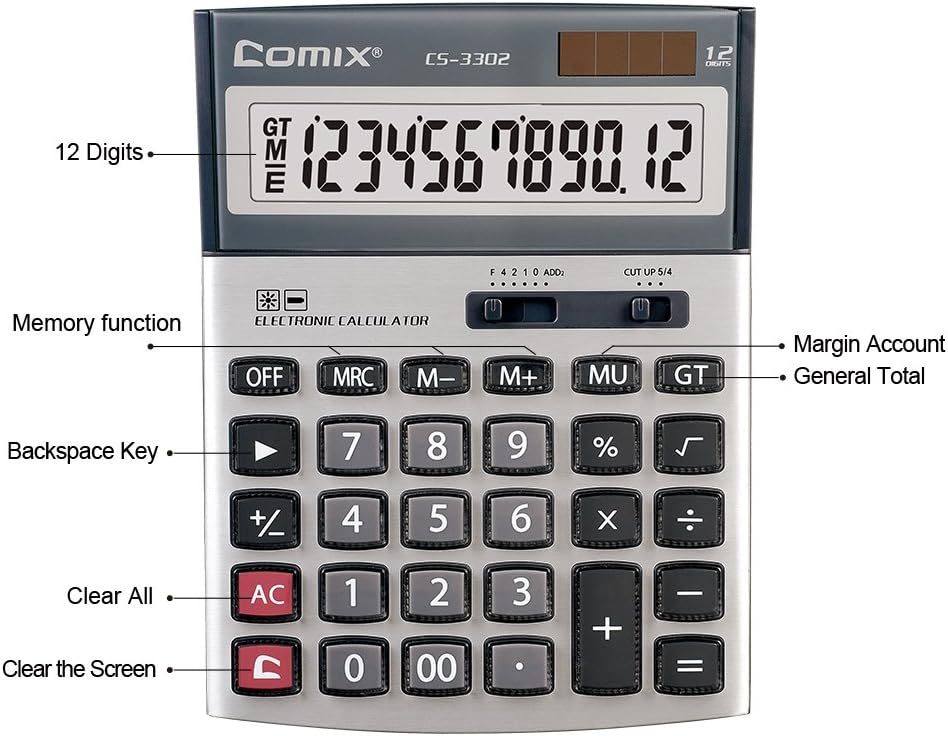
Figura 3.2: Key functions and display features of the Comix CS-3302 Calculator, including 12 digits display, memory functions, and clear keys.

Figura 3.3: Dimensions of the Comix CS-3302 Calculator, showing its compact and ergonomic design.

Figura 3.4: Angolat view of the Comix CS-3302 Calculator, highlighting its sleek profile u t-tqassim taċ-ċwievet.

Figura 3.5: Side profile of the Comix CS-3302 Calculator, showing its slim design.

Figura 3.6: Retail packaging of the Comix CS-3302 Calculator, highlighting key features like 12 digits, dual power, and acrylic keys.
4. Setup
4.1 Sors tal-Enerġija
The Comix CS-3302 calculator operates on a dual power system: solar and battery. The solar panel provides power in well-lit environments, while a single AA battery (not included) serves as an auxiliary power source for low-light conditions or when solar power is insufficient.
- Installazzjoni tal-batterija: Locate the battery compartment on the back of the calculator. Open the cover and insert one AA battery, ensuring correct polarity (+/-). Close the battery compartment cover securely.
- Qawwa Inizjali Mixgħula: The calculator should power on automatically when sufficient light is available or with the battery installed. If not, press the ON/AC buttuna.
5. Istruzzjonijiet Operattivi
5.1 Operazzjonijiet Bażiċi
- Żieda (+): Daħħal l-ewwel numru, agħfas +, daħħal it-tieni numru, imbagħad agħfas =.
- Tnaqqis (-): Daħħal l-ewwel numru, agħfas -, daħħal it-tieni numru, imbagħad agħfas =.
- Multiplikazzjoni (×): Daħħal l-ewwel numru, agħfas ×, daħħal it-tieni numru, imbagħad agħfas =.
- Diviżjoni (÷): Daħħal l-ewwel numru, agħfas ÷, daħħal it-tieni numru, imbagħad agħfas =.
- Perċenswalitage (%): Enter the number, press × (jew ÷), enter the percentage value, then press %. Per example, to calculate 10% of 200, enter 200 × 10 %.
- Għerq Kwadrat (√): Daħħal in-numru, imbagħad agħfas √.
5.2 Funzjonijiet Speċjali
- MITFI: Powers off the calculator.
- AC (Kull Ċari): Iħassar l-entrati u l-memorja kollha, u jirrisettja l-kalkulatur għall-istat inizjali tiegħu.
- C (Clear Entry): Clears the last entered number or the current display value without affecting previous calculations or memory.
- Backspace (►): Iħassar l-aħħar ċifra li daħħalt.
- M+ (Memory Plus): Iżżid il-valur muri mal-memorja.
- M- (Minus Memorja): Inaqqas il-valur muri mill-memorja.
- MRC (Memory Recall/Clear): Agħfas darba biex terġa' lura l-valur tal-memorja. Agħfas darbtejn biex tħassar il-memorja.
- MU (Mark Up / Margin Account): Used for profit margin calculations. Enter cost, press MU, enter selling price, then press = to get the profit margin.
- GT (Total Grand): Accumulates the results of all calculations. Pressing GT displays the grand total.
- +/- (Bidla tas-Sinjal): Jibdel is-sinjal tan-numru muri (pożittiv għal negattiv, jew negattiv għal pożittiv).
5.3 Decimal and Rounding Settings
The calculator features two slide switches at the top for controlling decimal places and rounding:
- Decimal Selector (F 4 2 1 0 ADD2):
- F (Floating Decimal): Displays all available decimal places.
- 4, 2, 1, 0: Sets the number of decimal places to 4, 2, 1, or 0 respectively.
- ADD2 (Add Mode): Automatically adds two decimal places to all results, useful for currency calculations.
- Rounding Selector (CUT UP 5/4):
- CUT (Cut Off): Truncates the number, discarding all digits beyond the set decimal places.
- UP (Round Up): Rounds up the last digit if there are any non-zero digits beyond the set decimal places.
- 5/4 (Round Half Up): Rounds up if the first discarded digit is 5 or greater, otherwise rounds down.
6. Manutenzjoni
- Tindif: Wipe the calculator surface with a soft, dry cloth. For stubborn dirt, slightly dampen the cloth with water, but ensure no liquid enters the calculator. Do not use chemical cleaners.
- Ħażna: When not in use for extended periods, store the calculator in a cool, dry place away from direct sunlight and extreme temperatures.
- Sostituzzjoni tal-batterija: If the display becomes dim or unresponsive in low light, replace the AA battery. Ensure the calculator is off before replacing the battery.
7 Issolvi l-problemi
| Problema | Kawża Possibbli | Soluzzjoni |
|---|---|---|
| Id-displej huwa vojt jew mudlam. | Dawl insuffiċjenti għall-enerġija solari, jew batterija baxxa. | Move to a brighter area or replace the AA battery. |
| Riżultati tal-kalkolu mhux korretti. | Incorrect input, incorrect decimal/rounding settings, or memory interference. | Agħfas AC to clear all and restart. Check decimal and rounding switch positions. Ensure correct key presses. |
| Iċ-ċwievet ma jirrispondux. | Calculator frozen or physical damage. | Ipprova ippressa OFF imbagħad ON/AC. If problem persists, remove and reinsert battery. If still unresponsive, contact support. |
8. Speċifikazzjonijiet
| Brand | Komix |
| Numru tal-Mudell | CS-3302 (P/N: 11821063) |
| Wiri | LCD b'12 ċifri |
| Sors tal-Enerġija | Dual Power (Solar & 1x AA Battery - not included) |
| Materjal | Acrylic, Metal |
| Dimensjonijiet (L x W x H) | Madwar 23.6 x 15.7 x 4.3 ċm (9.3 x 6.2 x 1.7 pulzieri) |
| Piż | Madwar 322 g (0.71 lbs) |
| Temperatura operattiva | -25 ℃ sa +60 ℃ (-13 ℉ sa +140 ℉) |
| UPC | 842064102524 |
9. Garanzija u Appoġġ
Comix products are designed for quality and durability. This product comes with a garanzija ta 'sena mid-data tax-xiri, li tkopri difetti fil-materjali u l-abbilità taħt użu normali.
For warranty claims, technical support, or any inquiries regarding your Comix CS-3302 calculator, please contact Comix customer service through their official website or the retailer where the product was purchased. Please have your proof of purchase and the product model number ready when contacting support.
For more information, visit the official Comix websit: www.comix.com
Ask a question about this manual
Ask about setup, troubleshooting, compatibility, parts, safety, or missing instructions. Manuals+ will review the question and use this page’s manual context to help answer it.