
1. Introduzzjoni
This manual provides essential information for setting up, operating, and maintaining your Lenovo ThinkCentre M710T desktop computer. Please read these instructions carefully before using your device to ensure optimal performance and longevity.
The Lenovo ThinkCentre M710T is designed to maximize productivity with independent display support for up to two monitors, offering an expanded work area and easier navigation between applications. This feature helps reduce errors and improve productivity by extending your desktop across multiple monitors.
2. Kontenut tal-Pakkett
Ivverifika li l-oġġetti kollha huma preżenti fil-pakkett:
- 1 x Lenovo ThinkCentre M710T Desktop Computer
- 1 x ġurdien
- 1 x Keyboard
- Kejbil tal-Enerġija
- Dokumentazzjoni (dan il-manwal tal-utent)
3. Prodott Aktarview
Familiarize yourself with the components of your ThinkCentre M710T desktop.
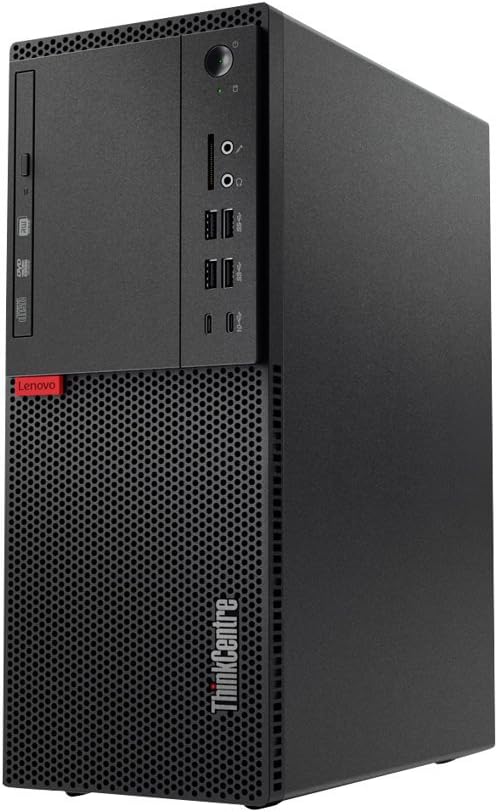
Figura 1: Quddiem view of the Lenovo ThinkCentre M710T desktop computer. This image displays the optical drive bay, various front-facing ports including USB and audio jacks, the power button, and the prominent ventilation grille at the bottom front.
3.1 Karatteristiċi tal-Panew ta 'quddiem
- Drive Ottiku: For reading and writing CDs/DVDs.
- Buttuna tal-Qawwa: To turn the computer on or off.
- Ġakki tal-Awdjo: Headphone and microphone ports.
- Portijiet USB: Multiple USB 3.0 ports for connecting peripherals.
- Qarrej tal-Karta: Għal karti tal-memorja.
- Gradilja tal-Ventilazzjoni: Jiżgura fluss tal-arja xieraq għat-tkessiħ.
3.2 Rear Panel Features (General)
The rear panel typically includes additional ports for display, network, USB, and power. Refer to the labels on your specific unit for exact port identification.
- Video Output Ports: DisplayPort, HDMI, or VGA for connecting monitors.
- Portijiet USB: Additional USB 2.0 and USB 3.0 ports.
- Port Ethernet: Għal konnessjoni ta' netwerk bil-fili.
- Portijiet tal-awdjo: Line-in, line-out, microphone.
- Konnettur tal-Qawwa: Għall-kejbil tad-dawl.
4. Setup
- Iftaħ il-Kompjuter mill-pakkett: Carefully remove the desktop computer, mouse, keyboard, and any other accessories from their packaging.
- Ikkonnettja l-Periferali:
- Connect the mouse and keyboard to the available USB ports.
- Connect your monitor(s) to the appropriate video output ports on the rear panel.
- If using a wired network, connect an Ethernet cable to the network port.
- Qabbad l-Enerġija: Plug the power cable into the power connector on the rear of the computer, then plug the other end into a grounded electrical outlet.
- Qawwa Mixgħul: Press the power button on the front panel of the computer. The system will boot up.
- Setup Inizjali: Follow the on-screen instructions to complete the Windows 10 Pro operating system setup, including language, region, and user account creation.
5. Istruzzjonijiet Operattivi
5.1 Operazzjoni Bażika
- Tixgħel/Jitfi: Press the power button to turn on. To turn off, click the Start button in Windows, then select Power > Shut down.
- Jibda mill-ġdid: Mill-menù Start, agħżel Power > Restart.
- Modalità Sleep: Mill-menù Start, agħżel Power > Sleep.
5.2 Konnessjoni mal-Internet
- Konnessjoni bil-fili: If an Ethernet cable is connected, your computer should automatically connect to the network.
- Konnessjoni bla fili (Bluetooth): This model supports Bluetooth. To connect to a Bluetooth device, go to Settings > Apparati > Bluetooth u apparati oħra u segwi l-istruzzjonijiet fuq l-iskrin.
5.3 Using Multiple Displays
The ThinkCentre M710T supports independent display output for up to two monitors. Connect your monitors to the available video output ports (e.g., DisplayPort, HDMI, VGA) on the rear of the computer. Windows will automatically detect the displays. You can configure display settings by right-clicking on the desktop and selecting "Display settings" to extend or duplicate your desktop.
6. Manutenzjoni
- Tindif: Use a soft, dry cloth to clean the exterior of the computer. For stubborn dirt, slightly dampLaħlaħ id-drapp bl-ilma. Evita li tuża kimiċi ħarxa jew prodotti tat-tindif li joborxu.
- Ventilazzjoni: Ensure that the ventilation openings are not blocked to prevent overheating. Regularly clean dust from the vents using compressed air.
- Aġġornamenti tas-Software: Aġġorna s-sistema operattiva u d-drivers tal-Windows tiegħek regolarment biex tiżgura s-sigurtà u l-aħjar prestazzjoni.
- Backup tad-Data: Agħmel backup tad-dejta importanti perjodikament fuq drajv estern jew ħażna fil-cloud biex tevita t-telf tad-dejta.
7 Issolvi l-problemi
| Problema | Soluzzjoni Possibbli |
|---|---|
| Il-kompjuter ma jixgħelx. |
|
| L-ebda wiri fuq il-monitor. |
|
| Peripherals (mouse/keyboard) not responding. |
|
| Is-sistema hija bil-mod jew ma tirrispondix. |
|
8. Speċifikazzjonijiet
| Karatteristika | Dettall |
|---|---|
| Mudell | Lenovo ThinkCentre M710T (10M9000RUS) |
| Proċessur | Intel Core i5-7400 (3 GHz) |
| RAM | 8 GB DDR4 (2400 MHz), Max Memory: 64 GB |
| Hard Drive | 1 TB HDD (Serial ATA-600, 7200 RPM) |
| Grafika | Integrated Intel HD Graphics 630 (1 GB RAM) |
| Sistema Operattiva | Windows 10 Pro x64 |
| Drive ottiku | DVD-RW |
| Portijiet USB | 6x USB 3.0, 2x USB 2.0 |
| Tip bla fili | Bluetooth |
| Dimensjonijiet (LxWxH) | 14.4 x 5.7 x 11.5 pulzieri |
| Piż tal-oġġett | 14.28 liri |
| Pjattaforma tal-Ħardwer | PC; Mac; Unix; Linux |
9. Garanzija u Appoġġ
Your Lenovo ThinkCentre M710T comes with a 3-Year Onsite Warranty. For warranty claims or technical support, please contact Lenovo customer service. Keep your purchase receipt and product serial number readily available when contacting support.
For further assistance, visit the official Lenovo support webis-sit jew irreferi għad-dokumentazzjoni inkluża mal-prodott tiegħek.