
1. Introduzzjoni
The AUTOPHIX OM126 is a versatile On-Board Diagnostics II (OBD2) scanner designed to help vehicle owners and technicians diagnose engine-related issues. This tool allows you to read and clear Diagnostic Trouble Codes (DTCs), view live data, and check I/M readiness status, providing essential information for maintaining your vehicle's performance and emissions compliance. This manual provides detailed instructions for the proper use and maintenance of your OM126 scanner.
2. Informazzjoni dwar is-Sigurtà
Always observe safety precautions when working on a vehicle. Improper use of diagnostic tools can lead to personal injury or damage to the vehicle. Read and follow all instructions carefully.
- Kun żgur li l-vettura tkun ipparkjata fuq wiċċ livellat bil-brejk tal-ipparkjar attivat.
- Turn off the ignition before connecting or disconnecting the scanner.
- Ilbes tagħmir protettiv personali xieraq, bħal nuċċalijiet tas-sigurtà.
- Evita kuntatt ma' komponenti sħan tal-magna jew partijiet li jiċċaqalqu.
- Do not operate the scanner while driving.
- Keep the scanner away from water, oil, and extreme temperatures.
3. Prodott Aktarview
The AUTOPHIX OM126 is a compact and user-friendly diagnostic tool. It features a clear display and intuitive buttons for easy navigation through its functions.
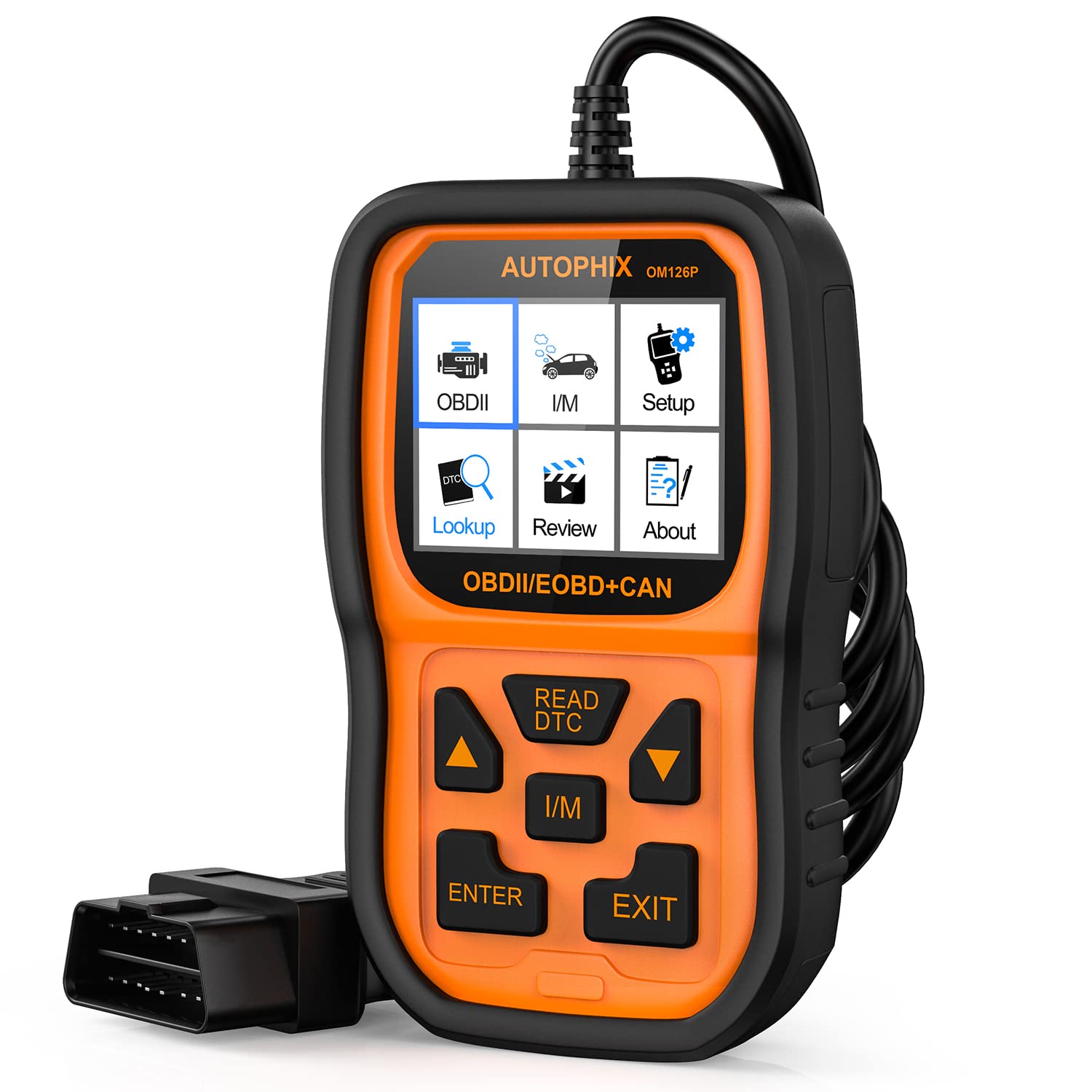
Figura 3.1: Quddiem view of the AUTOPHIX OM126 OBD2 Scanner, showing the display screen and control buttons.
Karatteristiċi ewlenin:
- Reads and clears generic and manufacturer-specific Diagnostic Trouble Codes (DTCs).
- Turns off Check Engine Light (MIL).
- Displays I/M readiness status.
- Jirkupra informazzjoni dwar il-vettura (VIN, CIN, CVN).
- Jappoġġja lingwi multipli.
- Plug-and-play operation.
4. Setup
4.1 Initial Software Update (Recommended)
Before first use, it is recommended to update the scanner's software to ensure compatibility with the latest vehicle models and diagnostic protocols. Visit the official AUTOPHIX website to download the update tool and follow the provided instructions. This typically involves connecting the scanner to a computer via a USB cable.
4.2 Konnessjoni mal-Vettura
- Locate the vehicle's 16-pin Data Link Connector (DLC). This port is usually found under the dashboard on the driver's side. Refer to your vehicle's owner's manual for the exact location.
- Kun żgur li l-ignition tal-vettura tkun fil-pożizzjoni OFF.
- Plug the OM126 scanner's OBD2 cable into the vehicle's DLC. Ensure a firm connection.
- Turn the vehicle's ignition to the ON position (engine off). The scanner will automatically power on and establish communication with the vehicle's onboard computer.
5. Istruzzjonijiet Operattivi
5.1 Navigazzjoni tal-Menu
Use the UP/DOWN arrow buttons to scroll through menu options. Press the ENTER button to select an option or confirm an action. The ESC/BACK button is used to return to the previous screen or cancel an operation.
5.2 Qari tal-Kodiċijiet ta' Problemi Dijanjostiċi (DTCs)
- Mill-menù prinċipali, agħżel "Aqra l-Kodiċijiet" u agħfas ENTER.
- The scanner will communicate with the vehicle and display any stored DTCs. Each code will typically include a numerical identifier and a brief description.
- Use the UP/DOWN buttons to scroll through multiple codes if present.
5.3 Tħassir tal-Kodiċijiet ta' Problemi Dijanjostiċi (DTCs)
Clearing DTCs will turn off the Check Engine Light (MIL) and erase all diagnostic data. Only clear codes after addressing the underlying issue, as they will reappear if the fault persists.
- Mill-menù prinċipali, agħżel "Ħassar Kodiċijiet" u agħfas ENTER.
- A confirmation message will appear. Select "Yes" and press ENTER to proceed.
- The scanner will confirm that the codes have been cleared.
5.4 Status ta' Prontezza tal-I/M
The I/M Readiness function checks if the various emissions-related systems on the vehicle are operating correctly and have completed their self-tests. This is useful for emissions inspections.
- From the main menu, select "I/M Readiness" and press ENTER.
- The display will show the status of various monitors (e.g., O2 Sensor, Catalyst, EVAP System) as either "OK" (complete) or "INC" (incomplete).
5.5 ViewInformazzjoni dwar il-Vettura
This function allows you to retrieve the Vehicle Identification Number (VIN), Calibration ID (CIN), and Calibration Verification Number (CVN).
- From the main menu, select "Vehicle Info" and press ENTER.
- The scanner will display the available vehicle information.
6. Manutenzjoni
- Tindif: Uża drapp artab u niexef biex tnaddaf iċ-ċ tal-iskanerasing and screen. Do not use abrasive cleaners or solvents.
- Ħażna: Store the scanner in a clean, dry environment, away from direct sunlight and extreme temperatures. Keep it in its original packaging or a protective case when not in use.
- Aġġornamenti tas-Software: Periodically check the AUTOPHIX official websit għal aġġornamenti tas-softwer biex tiġi żgurata prestazzjoni u kompatibilità ottimali.
7 Issolvi l-problemi
If you encounter issues while using the AUTOPHIX OM126, refer to the following common troubleshooting steps:
- L-iskaner ma jixgħelx:
- Ensure the OBD2 cable is securely connected to the vehicle's DLC.
- Ivverifika li l-ignition tal-vettura tkun fil-pożizzjoni ON (il-magna mitfija).
- Iċċekkja l-fjus tal-vettura għall-port OBD2 (ikkonsulta l-manwal tal-vettura tiegħek).
- Żball fil-komunikazzjoni mal-vettura:
- Confirm the vehicle supports the OBD2 protocol (most vehicles manufactured after 1996 in the US, 2001 in EU gasoline, 2004 in EU diesel).
- Ensure the ignition is ON and the engine is OFF.
- Try connecting the scanner to a different OBD2-compliant vehicle to rule out scanner malfunction.
- Check for any loose connections in the OBD2 cable.
- Codes cannot be cleared:
- Ensure the ignition is ON and the engine is OFF.
- If the underlying fault is still present, codes will not clear or will reappear immediately. Address the vehicle's issue first.
- Screen is blank after update:
- This can sometimes occur during the update process. Ensure the update process is completed fully as per the instructions on the AUTOPHIX websit.
- Skonnettja u erġa' qabbad l-apparat.
8. Speċifikazzjonijiet
| Karatteristika | Speċifikazzjoni |
|---|---|
| Mudell | OM126 |
| Piż tal-oġġett | 11.2 uqija |
| Dimensjonijiet tal-Prodott | 9 x 5 x 2.6 pulzieri |
| Voltage | 12 Volts |
| Daqs tal-Iskrin | 2.4 Pulzier |
| Sistema Operattiva | Windows 7 (for update software) |
| Sors tal-Enerġija | Battery Powered (via vehicle OBD2 port) |