
1. Introduzzjoni
The ELDES EKB3 is an advanced LED alarm keypad designed for seamless integration with ELDES alarm systems, specifically compatible with ESIM264 and ESIM364 panels. This keypad offers a user-friendly interface for managing your security system, featuring secure password access and clear operational feedback. This manual provides essential information for the proper installation, operation, and maintenance of your EKB3 keypad.
2. Karatteristiċi tal-prodott
- Wiri LED: Clear visual indicators for system status.
- Protezzjoni bil-Password: Supports two levels of access – User and Administrator – for enhanced security.
- Konfigurazzjoni Sistema: Allows configuration of the GSM panel using programming commands via the keypad.
- Integrated Sound Indicator: Provides audible feedback for correct/incorrect function execution and countdowns for entry/exit delays.
- Countdown Indicator: Visual and audible cues for arming and disarming delays.
- Konnettività bil-fili: Reliable wired connection to the alarm panel.
- Disinn Durabbli: Robust construction for long-term use.
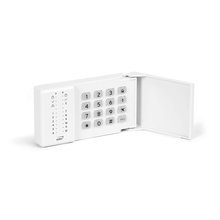
Figura 1: Quddiem view of the ELDES EKB3 LED Alarm Keypad. This image shows the sleek design with flat keys and LED indicators.
3. Setup u Installazzjoni
The EKB3 keypad requires a wired connection to your ELDES alarm system panel. Ensure all connections are secure and follow local electrical codes.
- Provvista tal-Enerġija: Connect the keypad to a 12-14 V DC power source, ensuring it can supply a maximum of 150 mA.
- Wiring: Use appropriate wiring for connection to the alarm panel. The maximum recommended cable length for the keypad connection is 100 meters to ensure optimal performance.
- Immuntar: Securely mount the keypad in a convenient location, typically near an entry/exit point.
- Qawwa Inizjali: Once wired, apply power to the system. The keypad should illuminate, indicating it is receiving power.
- Integrazzjoni tas-Sistema: Refer to your ELDES alarm panel's main manual for specific instructions on how to integrate and register the EKB3 keypad with the system.
Important: Installation should be performed by qualified personnel to ensure safety and proper functionality.
4. Istruzzjonijiet Operattivi
The EKB3 keypad allows for easy control and configuration of your ELDES alarm system.
- Password Entry: To operate the system, enter your User or Administrator password using the keypad buttons.
- Armar/Iżarma: Follow the specific commands provided in your alarm panel's manual for arming and disarming the system. The integrated sound indicator will confirm successful actions or alert you to errors.
- System Configuration (Administrator): As an administrator, you can access programming commands to configure the GSM panel. This typically involves entering the Administrator password followed by specific command sequences.
- Entry/Exit Delay: During entry and exit delays, the keypad's sound indicator will provide a countdown, allowing you sufficient time to arm/disarm the system.
- Nibdlu l-Passwords: Instructions for changing user and administrator passwords are typically found within the system's programming commands.
5. Manutenzjoni
The ELDES EKB3 keypad is designed for minimal maintenance. Follow these guidelines to ensure its longevity:
- Tindif: Gently wipe the keypad surface with a soft, dry cloth. Avoid using abrasive cleaners, solvents, or excessive moisture, which can damage the electronics.
- Kundizzjonijiet Ambjentali: Ensure the keypad is operated within its specified temperature range of -30 °C to +55 °C. Protect it from direct sunlight, extreme humidity, and physical impact.
- Integrità tal-Cable: Periodically inspect the connection cable for any signs of wear or damage. Ensure it remains securely connected to the alarm panel.
- Aġġornamenti tas-Software: If your ELDES alarm system supports firmware updates for connected devices, ensure your keypad's firmware is kept up-to-date as recommended by ELDES.
6 Issolvi l-problemi
If you encounter issues with your EKB3 keypad, consider the following common troubleshooting steps:
- It-tastiera ma tirrispondix:
- Check the power supply connection to ensure it is secure and providing the correct voltage (12-14 V DC).
- Verify the wiring connection to the alarm panel.
- Ensure the alarm panel itself is powered on and functioning correctly.
- Incorrect Password Entry:
- Double-check the password you are entering.
- If you have forgotten your password, refer to your alarm panel's manual for instructions on resetting or recovering access (typically requires Administrator access).
- No Sound Feedback:
- Ensure the sound indicator feature is enabled in your alarm system's settings (if configurable).
- Check for any physical obstructions or damage to the keypad's speaker area.
- Keypad Not Communicating with Panel:
- Inspect the wiring for breaks or loose connections.
- Ensure the cable length does not exceed 100 meters.
- Consult your ELDES alarm panel's manual for specific communication troubleshooting steps.
If the problem persists after attempting these steps, contact ELDES technical support or a certified installer.
7. Speċifikazzjonijiet
| Karatteristika | Speċifikazzjoni |
|---|---|
| Mudell | EKB3 |
| Brand | ELDES |
| Numru tal-Parti | 14147-DI |
| Pannelli Kompatibbli | ELDES ESIM264, ESIM364 |
| Tip ta' Dawl | LED |
| Provvista tal-Enerġija | 12-14 V DC, 150 mA max |
| Tip ta 'Sors ta' Enerġija | Elettriku bil-fili |
| Teknoloġija tal-Konnettività | Bil-fili |
| Tul Max Cable | 100-il metru |
| Temperatura operattiva | -30 °C sa +55 °C |
| Dimensjonijiet (L x W x H) | 140 x 100 x 18 mm |
| Piż tal-oġġett | 500 gramma |
| Batteriji Meħtieġa | Nru |
8. Garanzija u Appoġġ
Specific warranty information for the ELDES EKB3 keypad is typically provided at the point of purchase or within the packaging. Please retain your proof of purchase for warranty claims.
For technical support, product inquiries, or service, please contact your ELDES dealer or visit the official ELDES website for contact information and resources. Ensure you have your product model number (EKB3) and any relevant purchase details ready when seeking support.
Note: Software updates are guaranteed up to an unknown date, as per manufacturer information.