
ZACO V5sPro
ZACO V5sPro Robot Vacuum Cleaner User Manual
Model: V5sPro
Introduzzjoni
Thank you for choosing the ZACO V5sPro Robot Vacuum Cleaner. This 2-in-1 device is designed to provide efficient cleaning for your hard floors, offering both vacuuming and mopping functionalities. Its intelligent features, such as automatic charging, fall protection, and anti-collision sensors, ensure a thorough and safe cleaning experience. Please read this manual carefully before using the product to ensure proper operation and maintenance.

The ZACO V5sPro robot vacuum cleaner, showcasing its sleek gold and white design with the 'CLEAN' button visible on top.
Istruzzjonijiet tas-Sigurtà
- Always ensure the power adapter is compatible with your local power supply.
- Tużax ir-robot f'ambjenti mxarrbin jew ħdejn l-ilma.
- Keep the robot away from open flames and heat sources.
- Tħallix lit-tfal jew lill-annimali domestiċi jilagħbu bir-robot.
- Before cleaning, remove loose cables, small objects, and fragile items from the floor.
- Do not use the robot to clean sharp objects, burning materials, or liquids.
- Naddaf il-kontenitur tat-trab u l-filtri regolarment biex iżżomm prestazzjoni ottimali.
- If the robot is not in use for a long period, turn it off and store it in a cool, dry place.
X'hemm fil-Kaxxa
The ZACO V5sPro package includes the following components:
- ZACO V5sPro Robot Vacuum Cleaner
- Charging Station with Adapter Cable
- Li-Ion Battery (2600 mAh)
- Kontroll mill-bogħod (inklużi batteriji)
- 300ml Dustbin (pre-installed in the unit)
- 300ml Water Tank Module
- Microfiber Mopping Cloth (1 pre-installed, 1 additional)
- Side Brushes (1 pair pre-installed, 1 additional pair)
- Additional Fine Dust Filter (HEPA filter)
- Għodda tat-Tindif
- User Manual (German, but this is the English version)
Prodott Overview
Familiarize yourself with the main components of your ZACO V5sPro robot vacuum cleaner.

The ZACO V5sPro is designed to be ultra-flat (81mm), allowing it to clean effectively under furniture.
Fuq View
- Buttuna Naddaf: Jibda jew iwaqqaf it-tindif.
- Dustbin/Water Tank Cover: Access point for dustbin or water tank.
- Dwal indikaturi: Display status (charging, error, cleaning mode).
Qiegħ View
- Xkupilji tal-ġenb: Two rotating brushes to sweep debris into the suction path.
- Roti tas-Sewqan: Roti kbar għan-navigazzjoni ta' diversi tipi ta' pavimenti.
- Rota Universali: Jipprovdi moviment ta' 360 grad.
- Dħul tal-Ġbid: Where dirt and dust are vacuumed.
- Kuntatti tal-Iċċarġjar: Connects with the charging station.
- Sensuri tal-irdum: Detects drops and prevents falling down stairs.
- Mopping Cloth Attachment: Area for attaching the microfiber mopping cloth.
Setup
1. Iċċarġjar tar-Robot
- Poġġi l-istazzjon tal-iċċarġjar ma' ħajt f'żona miftuħa, u kun żgur li ma jkun hemm l-ebda ostaklu f'distanza ta' metru mal-ġnub u żewġ metri 'l quddiem.
- Qabbad l-adapter tal-enerġija mal-istazzjon tal-iċċarġjar u daħħalha f'sokit tal-enerġija.
- Place the robot on the charging station, ensuring the charging contacts align. The indicator light will show charging status.
- Allow the robot to fully charge before first use (approximately 4 hours). A full charge provides up to 120 minutes of operating time.

The ZACO V5sPro features automatic charging, returning to its station when the battery is low.
2. Installazzjoni ta' Xkupilji tal-Ġenb
Gently push the side brushes onto the square posts at the bottom of the robot until they click into place. Ensure they are securely fastened.
3. Tħejjija taż-Żona tat-Tindif
- Remove any loose cables, small rugs, or fragile items that could obstruct the robot's path or get tangled in its brushes.
- For mopping, ensure the water tank is filled and the microfiber cloth is attached.
It-tħaddim tar-Robot
The ZACO V5sPro offers various cleaning modes to suit your needs.

The ZACO V5sPro is a versatile 2-in-1 robot, capable of both vacuuming and mopping.
Modi tat-Tindif
- Tindif Awtomatiku: Press the "Clean" button on the robot or remote control. The robot will automatically clean the area using a random path until the battery is low, then return to the charging station.
- Tindif tal-Post: Place the robot near a specific dirty area and press the "Spot" button on the remote control. The robot will clean in a spiral pattern, covering an area of approximately 1.2 meters in diameter.
- Tindif tax-Xfer: Press the "Edge" button on the remote control. The robot will clean along walls and furniture edges.
- Max-Power Cleaning: While in Auto, Spot, or Edge mode, press the "Max" button on the remote control to increase suction power for deeper cleaning.
Bl-użu tal-Kontroll mill-bogħod
The remote control allows you to manage the robot's functions from a distance.

The remote control for the ZACO V5sPro, featuring buttons for various cleaning modes and scheduling.
- Buttuni Direzzjonali: Ikkontrolla l-moviment tar-robot manwalment.
- Buttuna Play/Pause: Start or pause cleaning.
- Buttuna tad-dar: Ibgħat ir-robot lura lejn l-istazzjon tal-iċċarġjar.
- Buttuna tal-Iskedar: Set a cleaning schedule for automatic operation. Refer to the detailed instructions in the full manual for setting schedules.
Switching Between Vacuuming and Mopping
The ZACO V5sPro is designed for either vacuuming or mopping, not simultaneously.
- Għall-vakwu: Ensure the dustbin is installed. The robot will use its suction and side brushes to collect debris.
- For Mopping: Remove the dustbin and insert the water tank module with a damp microfiber cloth attached. The robot will then perform a wet wipe. Ensure the floor type is suitable for wet cleaning.
Manutenzjoni
Regular maintenance ensures optimal performance and extends the lifespan of your ZACO V5sPro.
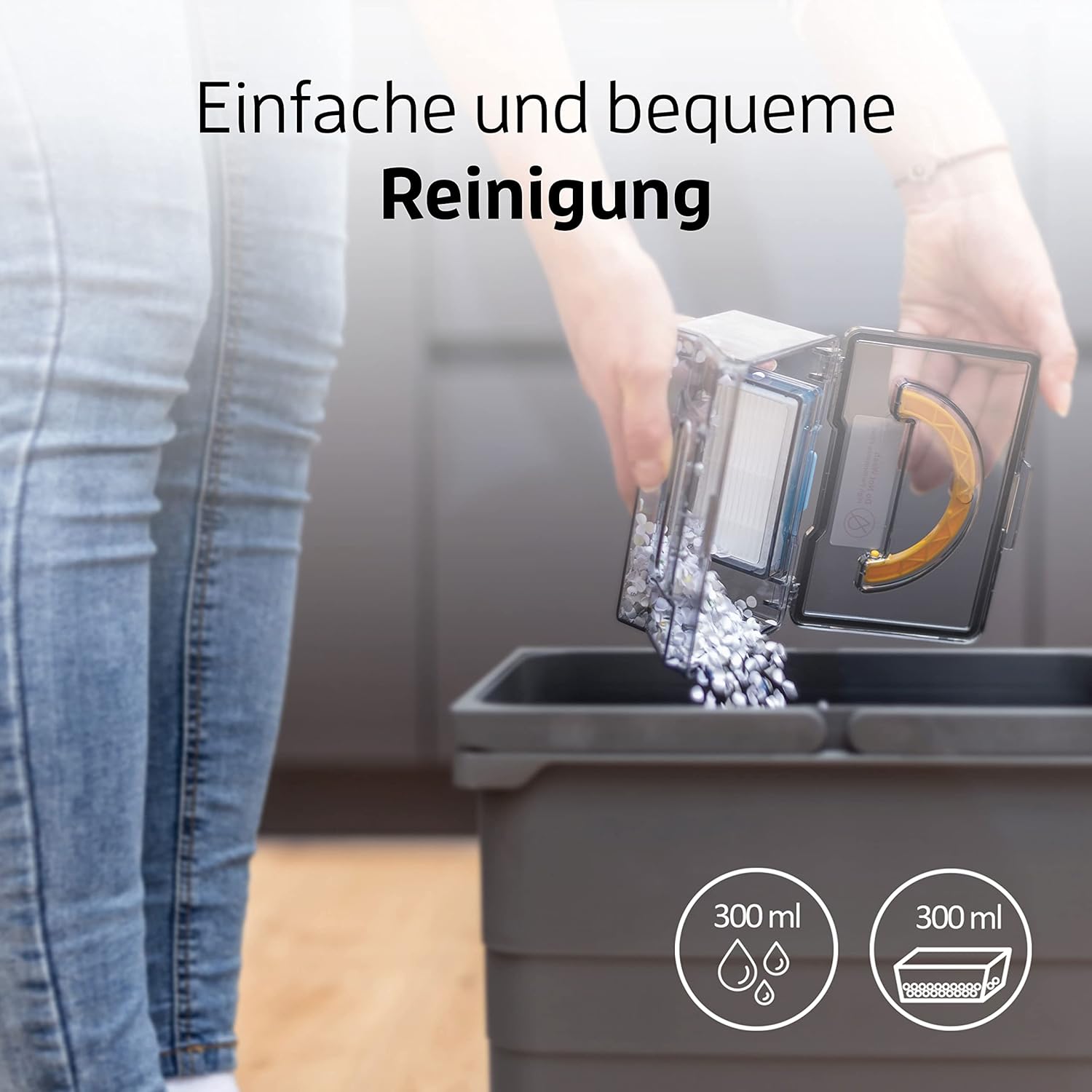
Emptying the dustbin of the ZACO V5sPro is a simple and convenient process.
1. Tbattil tal-kontenitur tat-trab u t-tindif tal-filtri
- Press the "PUSH" button on the top cover to open it and remove the dustbin.
- Iftaħ l-għatu tal-landa taż-żibel u vojta l-kontenut tagħha ġo landa taż-żibel.
- Remove the primary filter and HEPA filter. Tap them gently to remove dust. The primary filter can be rinsed with water, but ensure it is completely dry before re-installing. The HEPA filter should not be washed.
- Clean the dustbin with water if necessary and let it air dry completely.
- Erġa’ arma l-filtri u l-kontenitur tat-trab, imbagħad poġġih lura fir-robot.
- Huwa rakkomandat li l-filtru HEPA jinbidel kull 3-6-il xahar, skont l-użu.
2. Tindif ta 'Xkupilji tal-Ġenb
Check the side brushes regularly for tangled hair or debris. Pull them off their posts and remove any obstructions. If brushes are worn, replace them with new ones.
3. Cleaning the Water Tank and Mopping Cloth
- Wara li tnaddaf il-paviment, neħħi t-tank tal-ilma u vojta kwalunkwe ilma li jkun fadal.
- Detach the microfiber mopping cloth and rinse it thoroughly with water. It can also be machine washed. Allow it to air dry completely.
- Clean the water tank with water and let it air dry.
4. Tindif tas-Sensuri u l-Kuntatti tal-Iċċarġjar
Wipe the cliff sensors (located on the bottom of the robot) and the charging contacts (on both the robot and charging station) with a clean, dry cloth to ensure proper function.
Issolvi l-problemi
| Problema | Kawża Possibbli | Soluzzjoni |
|---|---|---|
| Robot ma jixgħelx. | Batterija baxxa; Mitfi l-iswiċċ tal-enerġija. | Charge the robot; Ensure the main power switch (usually on the side) is ON. |
| Ir-robot ma jiċċarġjax. | Charging contacts dirty; Charging station not powered. | Clean charging contacts on robot and station; Ensure charging station is plugged in and has power. |
| Ir-robot jeħel spiss. | Obstacles (cables, small rugs); Robot stuck under furniture. | Clear the cleaning area; Use boundary strips if available or block off problematic areas. |
| Prestazzjoni fqira tat-tindif. | Kontenitur tat-trab mimli; Filtri misduda; Xkupilji tal-ġenb mikulin. | Empty dustbin; Clean/replace filters; Clean/replace side brushes. |
| Robot jaqa' mit-taraġ. | Cliff sensors dirty. | Clean the cliff sensors on the bottom of the robot. |
| Il-funzjoni tat-tindif mhix effettiva. | Water tank empty; Mopping cloth dry or dirty. | Fill water tank; Dampen and clean mopping cloth. |
Speċifikazzjonijiet
| Karatteristika | Dettall |
|---|---|
| Brand | ZACO |
| Numru tal-Mudell | V5sPro |
| Kulur | Deheb |
| Dimensjonijiet tal-Prodott | 30 x 30 x 8.1 ċm |
| Piż | 2.5 Kilogrammi |
| Kapaċità ta 'Dustbin | 300 Millilitru |
| Kapaċità tat-Tank tal-Ilma | 300 Millilitru |
| Qawwa | 22 Watts |
| Voltage | 14V |
| Materjal | Plastik |
| Runtime | Sa 2 Sigħat (120 minuta) |
| Livell ta' Storbju | 60 dB |
| Karatteristiċi Speċjali | Automatic Cleaning, Edge Cleaning, Spot Cleaning, Max-Mode, Timer Control, Obstacle Detection, Anti-Drop Sensors, Automatic Return to Charging Station, Quiet Operation, Suitable for Pet Owners and Allergy Sufferers, Cordless, Bagless. |
Garanzija u Appoġġ
For warranty information and technical support, please refer to the official ZACO webis-sit jew ikkuntattja lis-servizz tal-konsumatur tagħhom direttament. Żomm l-irċevuta tax-xiri tiegħek bħala prova tax-xiri għal talbiet ta' garanzija.
This product is from a small or medium-sized company from Germany, Austria, or Switzerland, which is registered with its brand on Amazon.
Ask a question about this manual
Ask about setup, troubleshooting, compatibility, parts, safety, or missing instructions. Manuals+ will review the question and use this page’s manual context to help answer it.