
Introduzzjoni
This manual provides essential instructions for the setup, operation, and maintenance of your Fosmon TSA Approved 3-Digit Combination Luggage Lock. Designed for security and convenience, this lock ensures your belongings are protected while complying with travel security regulations.

Image: Fosmon TSA Approved 3-Digit Combination Luggage Lock with Pop-Up Indicator.
Prodott Overview
The Fosmon TSA Approved Luggage Lock features a robust design and user-friendly functionality. Key features include:
- TSA Accepted: Allows TSA agents to inspect your luggage without damaging the lock, ensuring it can be re-locked after inspection.
- Kostruzzjoni b'saħħitha u dejjiema: Crafted with a zinc alloy body and a hardened steel shackle, this lock is built to withstand the demands of travel and daily use.
- Kombinazzjoni ta' 3 Ċifri: Offers hundreds of possible combinations for enhanced security, eliminating the need for keys.
- Open Alert Indicator: A red pop-up indicator signals if the lock has been opened by a TSA agent, providing peace of mind.
- Kompatibilità Universali: Suitable for luggage, backpacks, gym lockers, gun cases, and other items requiring secure closure.

Image: The sturdy and durable design of the Fosmon TSA Approved Luggage Lock.
Konfigurazzjoni: Issettjar tal-Kombinazzjoni Tiegħek
Your lock is preset to open at 0-0-0. To set your personal combination, follow these steps:
- Ensure the lock is open by setting the dials to 0-0-0 and pulling up the shackle.
- Rotate the shackle 90 degrees counter-clockwise.
- Press the shackle down firmly. While holding it down, continue to rotate it another 90 degrees counter-clockwise (a total of 180 degrees from its original position).
- Set your desired 3-digit combination by turning the dials to align with the convex line.
- Release the shackle and turn it back to its normal closed position. Your new combination is now set.
Important: Make sure to write down your new combination and keep it in a safe place. Do not forget your combination.

Image: Step-by-step guide on how to set a new combination for the lock.
Vidjo: Overview of Fosmon travel necessities, including the luggage lock.
Istruzzjonijiet Operattivi
Ftuħ il-Lock
- Allinja t-tliet dials numeriċi mal-kombinazzjoni tas-sett tiegħek.
- Iġbed il-qajd 'il fuq biex tirrilaxxa s-serratura.
L-Għeluq tas-Serratura
- Daħħal is-shackle fil-korp tas-serratura.
- Scramble the numerical dials to secure the lock.
Using the Open Alert Indicator
The lock features a red pop-up indicator. If this indicator is visible, it means the lock has been opened by a TSA agent using their master key. To reset the indicator, simply open the lock with your combination and close it again.
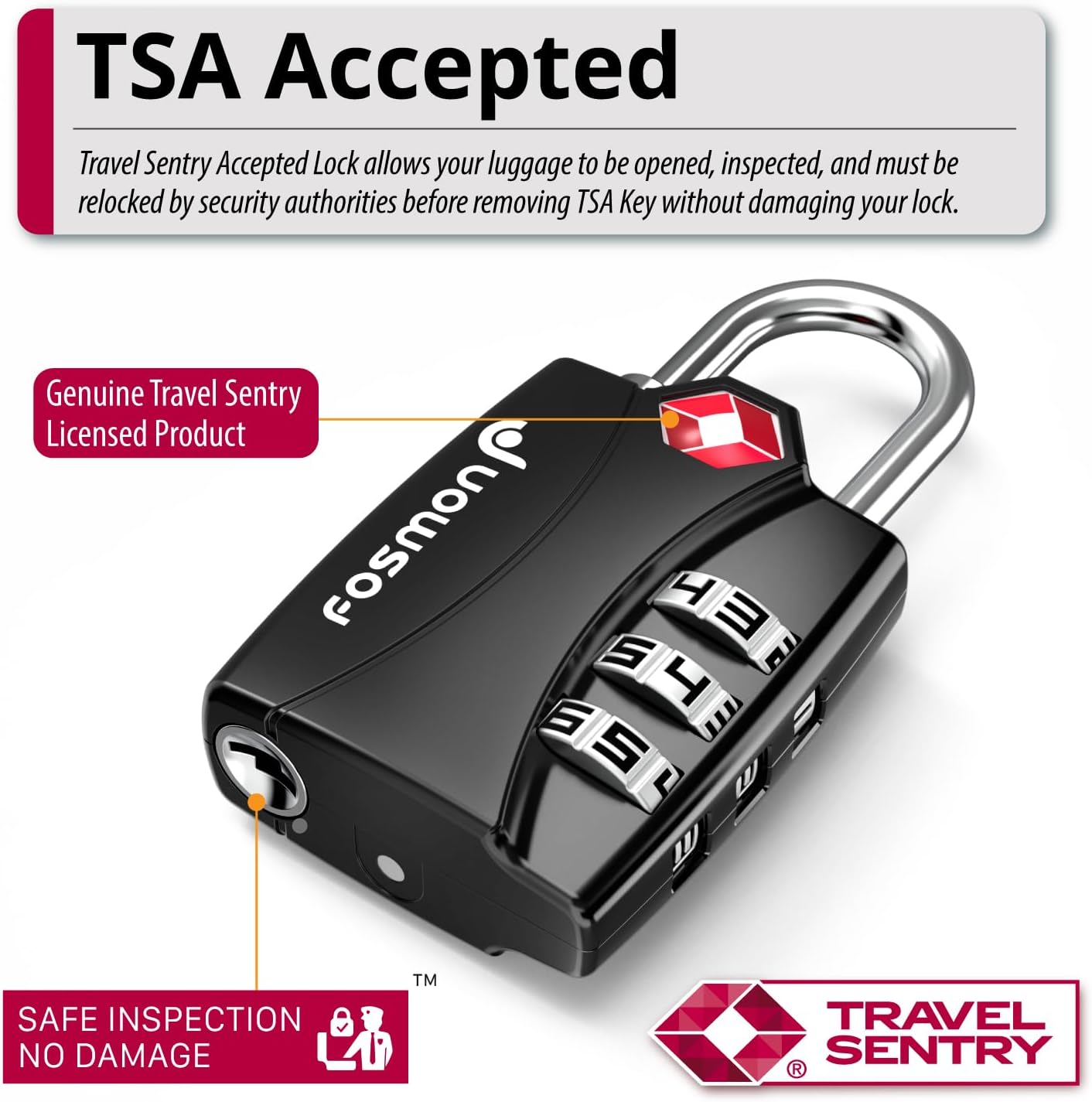
Image: Close-up of the Fosmon TSA Approved Lock, highlighting the open alert indicator.
Manutenzjoni
To ensure the longevity and smooth operation of your Fosmon TSA Approved Luggage Lock, consider the following maintenance tips:
- Keep the lock clean and free from dirt or debris, especially around the dials and shackle mechanism.
- Avoid exposing the lock to extreme temperatures or harsh chemicals, which could damage the alloy body or internal components.
- Periodically check the dials to ensure they rotate freely. If they become stiff, a small amount of lubricant designed for locks can be applied.
Issolvi l-problemi
Difficulty Setting Combination
If you encounter difficulty setting a new combination, ensure the shackle is fully pressed down and rotated correctly during the setting process. Sometimes, a slight jiggle or adjustment of the shackle while pressing down can help engage the mechanism properly. Refer to the "Setup: Setting Your Combination" section for detailed steps.
Lock Not Opening with Correct Combination
Verify that each dial is precisely aligned with your combination. Ensure no dirt or debris is obstructing the dials. If the issue persists, try resetting the lock to 0-0-0 and then re-setting your desired combination carefully.
Forgetting Your Combination
Unfortunately, if you forget your combination and have not recorded it, there is no master reset button or key provided for users to recover the combination. The TSA keyhole is for authorized security personnel only. It is crucial to keep a record of your combination in a secure, memorable location.
Speċifikazzjonijiet
| Karatteristika | Dettall |
|---|---|
| Brand | Fosmon |
| Numru tal-Mudell | 51015HOM |
| Tip Lock | Kombinazzjoni Lock |
| Materjal | Azzar Liga, Żingu |
| Dimensjonijiet tal-oġġett (L x W x H) | 5.1 x 3.5 x 0.5 pulzieri |
| Piż tal-oġġett | 3.1 uqija |
| Karatteristika Speċjali | Universal Compatibility, Open Alert Indicator |
| Numru ta' Biċċiet | 1 |

Image: Detailed dimensions and features of the luggage lock.
Garanzija u Appoġġ
Fosmon offers a Garanzija Limitata tul il-Ħajja for this product. This warranty covers defects in materials and workmanship under normal use. For any inquiries or support needs, please contact our dedicated USA-based customer service team. They are available to assist you with product questions, troubleshooting, and warranty claims.