
Introduzzjoni
The ASUS ROG Maximus IX Hero is an ATX motherboard designed for 7th generation Intel Core processors. It features an LGA1151 socket, DDR4 memory support, and various connectivity options including DisplayPort, HDMI, M.2 slots, and USB 3.1. This motherboard provides a robust foundation for building a high-performance personal computer.

Immaġni: Minn fuq għal isfel view of the ASUS ROG Maximus IX Hero motherboard, showcasing its layout, CPU socket, RAM slots, and various expansion slots.
X'hemm fil-Kaxxa
Iċċekkja li l-komponenti kollha elenkati hawn taħt huma inklużi fil-pakkett tiegħek:
- Gwida għall-utent
- DVD ta 'Appoġġ
- Tarka I / O
- 2-in-1 SATA 6Gb/s cables (2)
- SLI™ HB Bridge (2-way-M)
- Konnettur Q
- ROG Coaster
- 3D printing mount
- 10-in-1 ROG cable label
- Għodda tal-Installazzjoni tas-CPU
- 2-in-1 M.2 Screw set
- Stiker tar-ROG
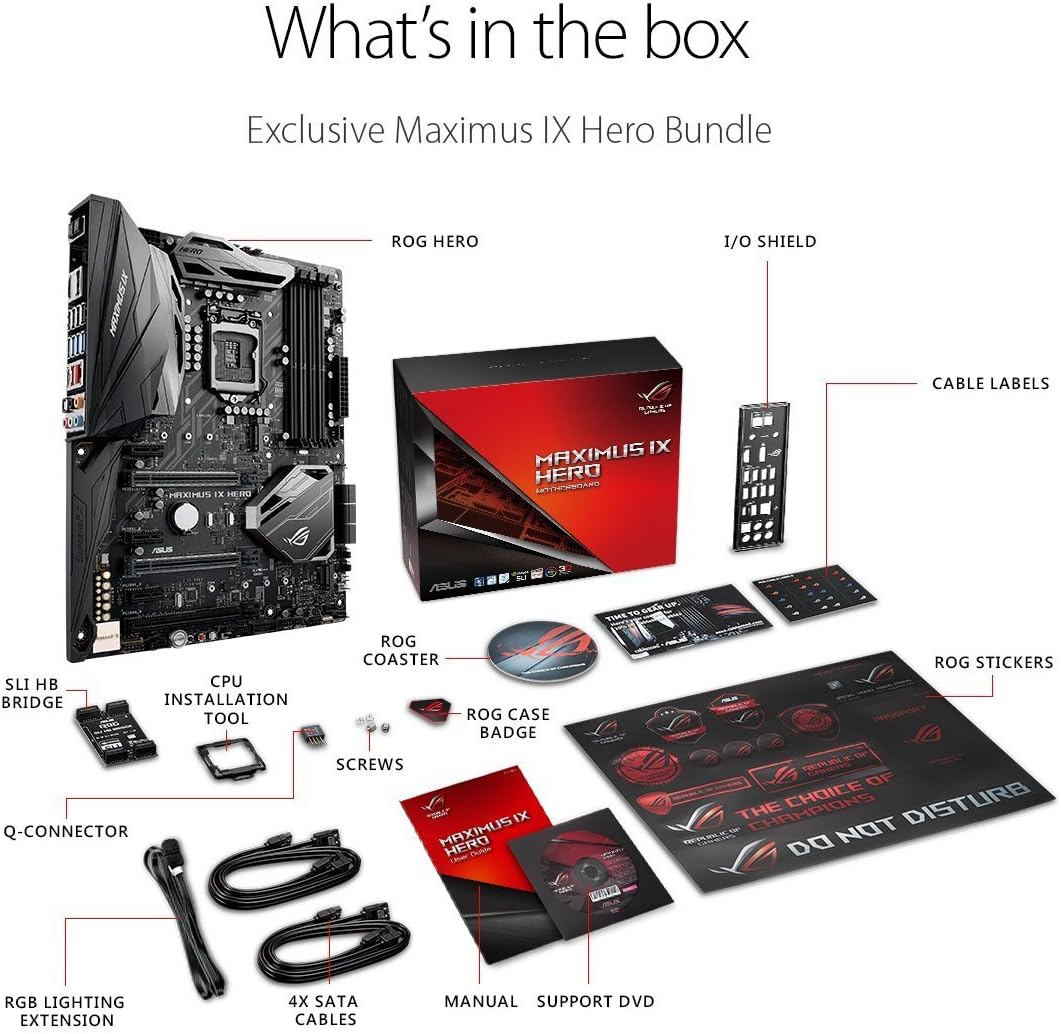
Image: A visual representation of the ASUS ROG Maximus IX Hero motherboard and its included accessories, such as cables, manuals, and installation tools.
Karatteristiċi Ewlenin
- Supports 7th generation Intel Core processors, enhancing connectivity and speed with Dual M.2 slots, front panel USB 3.1, and Intel Optane Memory compatibility.
- Includes 5-Way Optimization with Auto-Tuning and FanXpert 4 for automated overclocking profile adjustments and dynamic system cooling.
- Features ASUS AURA Sync RGB lighting and a 3D-printing friendly mount for customization.
- Equipped with two Patent-pending Safe Slots, which integrate metal framing for enhanced support and rigidity of large graphics processing units (GPUs).
- Provides industry-leading 8-channel HD audio through the ROG exclusive SupremeFX S1220, powered by Japanese capacitors.
Setup u Installazzjoni
This section provides general guidelines for installing your ASUS ROG Maximus IX Hero motherboard. Refer to the detailed user guide for specific instructions and safety precautions.
1. Spezzjoni Inizjali
Before installation, carefully inspect the motherboard for any physical damage. Ensure the CPU socket pins are not bent.
2. Installazzjoni tas-CPU (LGA1151)
- Iftaħ il-lieva tas-sokit tas-CPU.
- Align the notches on your 7th generation Intel Core processor with the socket.
- Poġġi s-CPU bil-mod fis-sokit mingħajr ma tisforzah.
- Agħlaq il-lieva tas-sokit biex twaħħal is-CPU.
3. Installazzjoni tar-RAM (DDR4)
- Iftaħ il-klipps fuq is-slots tad-DDR4 DIMM.
- Allinja l-islott fuq il-modulu tal-memorja DDR4 maċ-ċavetta fl-islott tad-DIMM.
- Agħfas sew 'l isfel fuq iż-żewġt itruf tal-modulu tal-memorja sakemm il-klipps jidħlu f'posthom.
- The motherboard supports up to 64GB of DDR4 memory across four slots.
4. Installazzjoni tal-SSD M.2
The motherboard features dual M.2 slots for high-speed storage. Refer to the user guide for specific M.2 slot locations and screw set usage.
- Sib slott M.2 disponibbli.
- Daħħal l-M.2 SSD fl-islott f'angolu.
- Imbotta bil-mod l-SSD 'l isfel u waħħalha bil-vit M.2 provdut.
5. PCIe Card Installation (Safe Slots)
The motherboard includes reinforced Safe Slots for graphics cards and other PCIe devices.
- Align your PCIe card with an available PCIe slot.
- Press down firmly until the card is fully seated and the retention clip engages.
6. Connecting Power and Front Panel Headers
Connect the 24-pin ATX power connector and the 8-pin CPU power connector from your power supply to the motherboard. Connect the front panel headers (power button, reset button, HDD LED, power LED, USB ports, audio) according to the motherboard manual's pinout diagram.
7. Konnessjonijiet tal-I/O ta' wara
Connect your peripherals to the rear I/O ports. This includes USB devices, display cables (HDMI, DisplayPort), Ethernet, and audio devices.

Immaġni: Close-up view of the rear input/output panel of the ASUS ROG Maximus IX Hero motherboard, showing various ports including USB, HDMI, DisplayPort, Ethernet, and audio jacks.
8. Konfigurazzjoni tad-Dawl RGB
The motherboard features integrated AURA Sync RGB lighting. Additional RGB LED strips can be connected to the dedicated RGB LED headers for expanded lighting control.
9. Liquid Cooling Integration
For custom liquid cooling setups, the motherboard includes H2O sensor headers to monitor temperature and flow within your cooling loop.
Prodott Overview Video
Vidjo: Overview of the ASUS ROG Maximus IX Hero motherboard, highlighting its key features, connectivity options, and design elements. This video provides a visual guide to the board's components and capabilities.
Istruzzjonijiet Operattivi
1. L-Ewwel Bidu
After completing hardware installation, connect your display, keyboard, and mouse. Power on your system. The system should display the BIOS/UEFI interface or begin the operating system installation process.
2. Konfigurazzjoni tal-BIOS/UEFI
Press the designated key (usually DEL or F2) during boot-up to enter the BIOS/UEFI setup. Here you can configure boot order, system time, enable/disable features, and apply overclocking settings. The 5-Way Optimization feature can assist with automated tuning.
3. Installazzjoni tas-sewwieq
Install all necessary drivers for the motherboard chipset, audio, LAN, and other integrated components. These can typically be found on the included Support DVD or downloaded from the ASUS official websit.
4. Utilitajiet tas-Softwer
Utilize ASUS software utilities such as AURA Sync for RGB lighting control and FanXpert 4 for fan speed management to optimize your system's performance and aesthetics.
Manutenzjoni
1. Żomm Nadif
Regularly clean dust from the motherboard and connected components using compressed air. Ensure the system is powered off and unplugged before cleaning.
2. Aġġornamenti tal-BIOS/UEFI
Iċċekkja l-appoġġ tal-ASUS perjodikament website for BIOS/UEFI updates. Updates can improve system stability, compatibility, and performance. Follow the update instructions carefully to avoid system damage.
3. Aġġornamenti tas-Sewwieqa
Keep your system drivers updated to ensure optimal performance and compatibility with new hardware and software.
Issolvi l-problemi
1. Ebda Qawwa/Ebda Boot
- Ivverifika li l-kejbils tal-enerġija kollha (24-pin ATX, 8-pin CPU) huma konnessi sew.
- Kun żgur li l-provvista tal-enerġija tkun mixgħula.
- Check front panel power button connection.
- Ipprova booting b'komponenti minimi (CPU, RAM stick wieħed, GPU jekk m'hemmx grafika integrata).
2. L-ebda Output tal-Wiri
- Ensure the monitor is connected to the correct graphics output (either motherboard or dedicated GPU).
- Erġa' poġġi l-karta grafika u l-moduli tal-memorja f'posthom.
- Ittestja b'kejbil jew monitor tad-displej differenti.
3. Instabbiltà/Ħabtiet tas-Sistema
- Iċċekkja t-temperaturi tas-CPU u l-GPU.
- Kun żgur li s-sewwieqa kollha huma aġġornati.
- Jekk tkun overclockjat, erġa' lura għas-settings default biex tittestja l-istabbiltà.
- Mexxi għodod dijanjostiċi tal-memorja biex tivverifika l-integrità tar-RAM.
Speċifikazzjonijiet
| Karatteristika | Dettall |
|---|---|
| Brand | ASUS |
| Isem tal-Mudell | ROG MAXIMUS IX HERO |
| Socket tas-CPU | LGA 1151 |
| Proċessuri Kompatibbli | 7 Ġenerazzjoni Intel Core |
| Tip ta' Ċipset | Intel Z270 |
| Teknoloġija tal-Memorja RAM | DDR4 |
| Slots tal-Memorja Disponibbli | 4 |
| Maximum RAM Size | 64 GB |
| Interface tal-Kard Grafika | PCI Express |
| Portijiet HDMI totali | 1 |
| Portijiet USB totali | 2 (USB 3.1 Type-A, USB 3.1 Type-C on rear I/O) |
| Standard tal-Bus tas-Sistema Appoġġjat | SATA 3 |
| Piż tal-oġġett | 2.9 Liri |
Garanzija u Appoġġ
Dan il-prodott jiġi ma 'a 3 Snin Garanzija from ASUS. For technical support, driver downloads, and further assistance, please visit the official ASUS support webis-sit jew l-ASUS Store.