
Introduzzjoni
This manual provides essential information for the proper installation, operation, and maintenance of the Golmar FA-372 Power Supply. Please read these instructions carefully before beginning installation or use to ensure safe and efficient performance of the device.
Informazzjoni dwar is-Sigurtà
- Periklu Elettriku: Installation and maintenance should only be performed by qualified personnel. Disconnect power before servicing.
- Voltage: Tiżgura l-input voltage matches the specifications of the FA-372 power supply.
- Ambjent: Do not expose the device to moisture, extreme temperatures, or corrosive environments. Install in a well-ventilated area.
- Immuntar: Securely mount the power supply according to local electrical codes and manufacturer guidelines.
Prodott Overview
The Golmar FA-372 is a dedicated power supply unit designed for use with Golmar intercom and door entry systems. It provides the necessary voltage and current to operate various components of the system, ensuring reliable communication and access control.
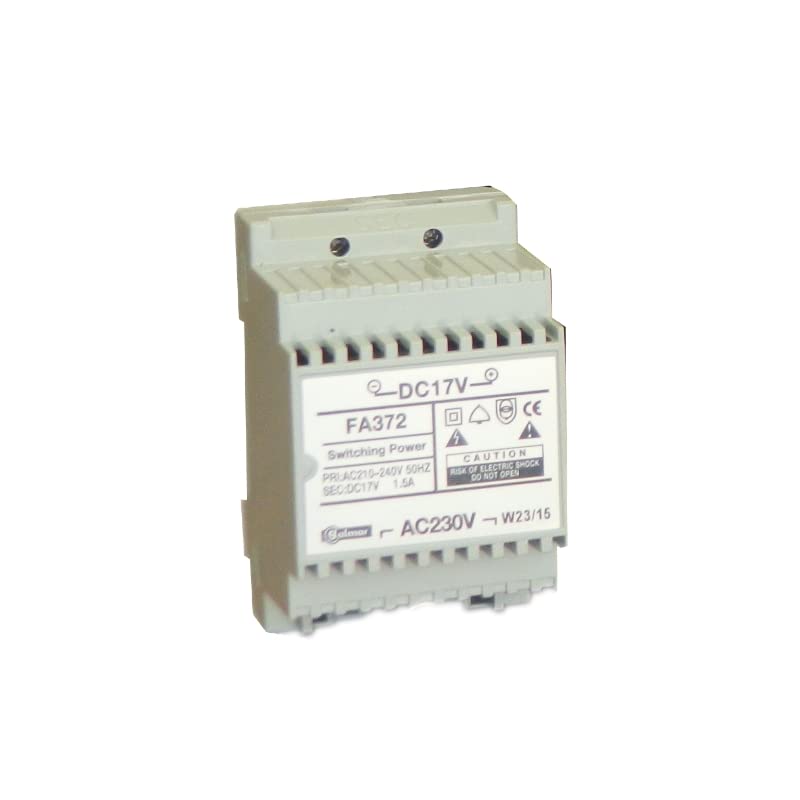
Figura 1: Quddiem view of the Golmar FA-372 Power Supply. This image shows the compact design and typical terminal block layout for connections.
Setup u Installazzjoni
- Skonnettjar tal-Enerġija: Before starting any installation, ensure that the main power supply to the installation area is disconnected at the circuit breaker.
- Immuntar: Choose a suitable location for the FA-372 power supply, typically near the main distribution board or the central unit of the intercom system. Mount the unit securely to a wall or DIN rail using appropriate fasteners.
- Input tal-Wiring: Connect the AC mains power supply (e.g., 230V AC) to the designated input terminals on the FA-372. Refer to the wiring diagram provided with your specific intercom system for correct terminal identification. Ensure proper grounding.
- Wiring Output: Connect the output terminals of the FA-372 to the intercom system's central unit or other components requiring power. Pay close attention to polarity (+/-) and voltage requirements as specified by your intercom system's manual.
- Verifika: Iċċekkja darbtejn il-konnessjonijiet tal-wajers kollha għall-korrettezza u s-sigurtà. Kun żgur li l-ebda wajers mikxufa ma jkunu esposti.
- Qawwa Mixgħul: Once all connections are verified, restore power at the circuit breaker. The power supply should now be active.
Istruzzjonijiet Operattivi
The Golmar FA-372 is designed for continuous operation once correctly installed. It functions as a dedicated power source for your intercom system. There are no user-adjustable controls on the unit itself.
- Indikatur tal-Enerġija: Most installations will have an indicator light (LED) on the power supply or the connected intercom system's central unit to confirm power is being supplied.
- Operazzjoni normali: The power supply will continuously provide the necessary voltage and current to the connected intercom components.
- Integrazzjoni tas-Sistema: The FA-372 works in conjunction with other Golmar intercom components. Refer to the specific manuals for those components for overall system operation.
Manutenzjoni
The Golmar FA-372 Power Supply requires minimal maintenance. Regular checks can help ensure its longevity and reliable performance.
- Tindif: Periodically clean the exterior of the unit with a dry, soft cloth. Do not use liquid cleaners or solvents. Ensure power is disconnected before cleaning.
- Ventilazzjoni: Ensure that the ventilation openings (if any) are not obstructed to prevent overheating.
- Konnessjonijiet: Annually, or if issues arise, inspect all wiring connections for tightness and signs of corrosion. Disconnect power before inspecting connections.
- Kontroll Ambjentali: Verify that the operating environment remains within the recommended temperature and humidity ranges.
Issolvi l-problemi
If you experience issues with your intercom system that you suspect are related to the power supply, refer to the following common troubleshooting steps:
| Problema | Kawża Possibbli | Soluzzjoni |
|---|---|---|
| No power to intercom system. |
|
|
| Intercom system functions intermittently. |
|
|
If the problem persists after attempting these solutions, contact a qualified technician or Golmar technical support.
Speċifikazzjonijiet
| Karatteristika | Dettall |
|---|---|
| Manifattur | Golmar |
| Numru tal-Mudell | FA-372 |
| Identifikatur tal-Prodott | FA-372 |
| Numru ta' Prodotti | 1 |
| ASIN | B01MUA690V |
| L-Ewwel Data Disponibbli | 12 ta’ Jannar 2017 |
| Input Voltage | (Typically 230V AC, consult product label for exact value) |
| Ħruġ Voltage | (Specific to Golmar intercom systems, consult product label/system manual) |
| Kurrent tal-Ħruġ | (Specific to Golmar intercom systems, consult product label/system manual) |
Note: For precise electrical specifications (input/output voltage, current), always refer to the label on the FA-372 unit itself or the comprehensive technical documentation provided by Golmar for your specific intercom system.
Informazzjoni dwar Garanzija
Golmar products are manufactured to high-quality standards. For specific warranty terms and conditions applicable to the FA-372 Power Supply, please refer to the warranty card included with your purchase or visit the official Golmar websit. Żomm il-prova tax-xiri tiegħek għal talbiet ta' garanzija.
Appoġġ Tekniku
Should you require technical assistance, have questions regarding installation, or need to report a fault, please contact Golmar technical support. Contact details can typically be found on the official Golmar website or in the documentation accompanying your intercom system.
Websit: www.golmar.es (This is a general example, please verify the official support websit)
When contacting support, please have your product model (FA-372) and serial number (if applicable) ready.