
1. Introduzzjoni
This manual provides comprehensive instructions for the installation, operation, and maintenance of your ASUS Prime Z270M-PLUS motherboard. Please read this manual thoroughly before installing or using the product to ensure correct setup and optimal performance.
2. Informazzjoni dwar is-Sigurtà
Observe the following safety precautions to prevent damage to the motherboard and injury to yourself:
- Dejjem skonnettja l-korda tal-enerġija mis-sokit tal-ħajt qabel ma tmiss xi komponenti.
- Ilbes ċinga tal-polz anti-statika jew tmiss spiss oġġett ertjat biex teħles mill-elettriku statiku qabel ma timmaniġġja l-komponenti.
- Immaniġġja l-komponenti mit-truf tagħhom biex tevita li tmiss partijiet sensittivi.
- Żgura ventilazzjoni xierqa fil-kaxxa tal-PC tiegħek biex tevita li tissaħħan iżżejjed.
- Żomm il-motherboard 'il bogħod mill-umdità u minn temperaturi estremi.
3. Kontenut tal-Pakkett
Ivverifika li l-oġġetti kollha huma preżenti fil-pakkett tiegħek:
- ASUS Prime Z270M-PLUS Motherboard
- SATA Cable(s)
- Manwal għall-Utent
4. Prodott Aktarview
The ASUS Prime Z270M-PLUS is a micro-ATX motherboard designed for Intel LGA 1151 socket processors. It features robust hardware safeguards, advanced cooling controls, and high-speed connectivity options.
Karatteristiċi ewlenin:
- Protezzjoni 5X III: Hardware-level safeguards to ensure component longevity and reliability against electrical overloads.
- Illuminazzjoni LED: Customizable lighting control for PCIe slots.
- Fan Xpert 4 Core: Advanced fan controls for optimized cooling and reduced noise.
- Dual Native M.2 and NVMe PCIe RAID Support: Provides high-speed storage solutions.
- USB Tip-Ċ: Convenient and reversible connectivity.
- Appoġġ DDR4: Supports memory speeds up to 3866 MHz.
- Awdjo: Realtek ALC887 8-channel high-definition audio.
- Appoġġ Multi-GPU: Features AMD CrossFireX Technology.

Figura 4.1: Minn fuq għal isfel view of the ASUS Prime Z270M-PLUS motherboard, highlighting the CPU socket, RAM slots, and PCIe slots.

Figura 4.2: Angolat view of the ASUS Prime Z270M-PLUS motherboard, showcasing its various components and heatsinks.
5. Setup
5.1. Installazzjoni tas-CPU
- Sib is-sokit LGA 1151 fuq il-motherboard.
- Iftaħ il-lieva tas-sokit tas-CPU u erfa' l-pjanċa tat-tagħbija.
- Allinja s-CPU bir-reqqa mas-sokit, filwaqt li tiżgura li t-trijangolu tad-deheb fuq is-CPU jaqbel mat-trijangolu fuq is-sokit.
- Poġġi s-CPU bil-mod fis-sokit mingħajr ma tisforzah.
- Agħlaq il-pjanċa tat-tagħbija u imbotta l-lieva 'l isfel sakemm tissakkar f'postha.
5.2. Installazzjoni tal-Memorja (RAM)
The motherboard supports DDR4 memory up to 64GB with speeds up to 3866 MHz.
- Iftaħ il-klipps fiż-żewġt itruf tas-slott tad-DIMM.
- Allinja l-islott fuq il-modulu tal-memorja DDR4 maċ-ċavetta fl-islott tad-DIMM.
- Daħħal il-modulu tal-memorja sew fl-islott sakemm il-klipps jidħlu f'posthom.
5.3. Installazzjoni ta' Apparat tal-Ħażna
The motherboard supports SATA III devices and NVMe PCIe M.2 drives.
- Apparati SATA: Connect SATA data cables from your storage drives (HDDs/SSDs) to the SATA III ports on the motherboard. Connect power cables from your power supply to the drives.
- M.2 Devices: Locate the M.2 slot. Insert the M.2 drive at an angle and secure it with the provided screw.
5.4. Installazzjoni tal-Karta tal-Espansjoni
The motherboard features PCIe 3.0 slots for graphics cards and other expansion cards.
- Align the expansion card with the appropriate PCIe slot.
- Press down firmly until the card is seated correctly and the retention clip locks.
- Waħħal il-kard mal-kaxxa tal-PC b'kamin.
5.5. Konnessjonijiet tal-Enerġija
Qabbad il-konnettur tal-enerġija ATX ta' 24 pin u l-konnettur tal-enerġija ATX ta' 8 pin 12V mill-provvista tal-enerġija tiegħek mal-portijiet korrispondenti fuq il-motherboard.
5.6. Konnessjonijiet tal-Panel ta' Quddiem
Connect the cables from your PC case's front panel (USB ports, audio jacks, power button, reset button, LED indicators) to the corresponding headers on the motherboard. Refer to the motherboard diagram in your physical manual for exact header locations.
5.7. Il-Panel tal-I/O ta' wara
The rear I/O panel provides various ports for connecting external devices.
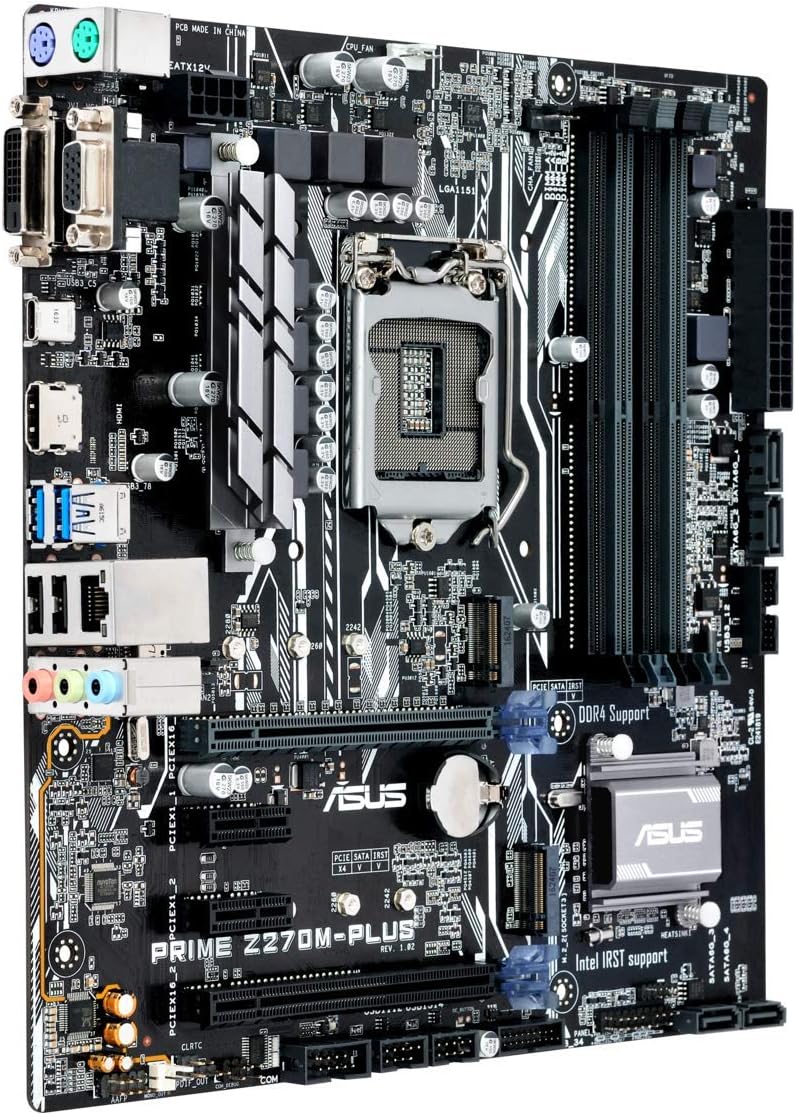
Figure 5.1: Rear I/O panel of the ASUS Prime Z270M-PLUS motherboard, showing various connectivity ports.
Common ports include:
- PS/2 Keyboard/Mouse Combo Port
- Port DVI-D
- Port VGA
- Port HDMI
- Portijiet USB 3.0
- Portijiet USB 2.0
- LAN (RJ-45) Port
- Ġakki tal-Awdjo (Input tal-Linja, Ħruġ tal-Linja, Mikrofonu)
6. Joperaw
6.1. L-Ibbutjar Inizjali u s-Setup tal-BIOS/UEFI
Upon the first power-on, the system will typically enter the BIOS/UEFI setup utility. Here you can configure system settings, boot order, and monitor hardware status. Press the DEL key during startup to enter the BIOS/UEFI.
6.2. Installazzjoni tas-sewwieq
After installing your operating system, install the necessary drivers for the motherboard components (chipset, audio, LAN, graphics, etc.). These drivers are typically provided on a support DVD or can be downloaded from the ASUS official websit.
6.3. System Boot
Once the operating system and drivers are installed, your system should boot normally. Ensure all peripherals are connected correctly.
7. Manutenzjoni
7.1. Tindif
Regularly clean your PC case and motherboard to prevent dust buildup, which can lead to overheating and component failure. Use compressed air to remove dust from fans, heatsinks, and other components. Ensure the system is powered off and unplugged before cleaning.
7.2. Aġġornamenti tal-BIOS
Iċċekkja l-appoġġ tal-ASUS perjodikament websit għal aġġornamenti tal-BIOS. L-aġġornamenti tal-BIOS jistgħu jtejbu l-istabbiltà tas-sistema, iżidu appoġġ għal ħardwer ġdid, jew jirranġaw bugs. Segwi l-istruzzjonijiet ipprovduti minn ASUS bir-reqqa meta twettaq aġġornament tal-BIOS biex tevita ħsara lis-sistema.
8 Issolvi l-problemi
If you encounter issues with your motherboard, consider the following general troubleshooting steps:
- Ebda Qawwa: Ensure all power cables (24-pin ATX, 8-pin CPU) are securely connected. Check your power supply unit (PSU) for functionality.
- Ebda Display: Verify that your graphics card is properly seated and connected to the monitor. If using integrated graphics, ensure your monitor is connected to the motherboard's video output. Try reseating RAM modules.
- Instabbiltà/Ħsarat tas-Sistema: Check for overheating. Ensure all drivers are up to date. Test memory modules individually.
- Komponent Mhux Rilevat: Kun żgur li l-komponent (eż., hard drive, card ta' espansjoni) huwa installat b'mod korrett u li l-kejbils kollha meħtieġa huma konnessi. Iċċekkja s-settings tal-BIOS biex tiżgura li l-komponent huwa attivat.
- Irrisettjar tal-BIOS: If system settings become unmanageable, you can clear the CMOS by removing the CMOS battery for a few minutes or using the Clear CMOS jumper (refer to your physical manual for location).
9. Speċifikazzjonijiet
| Karatteristika | Speċifikazzjoni |
|---|---|
| Isem tal-Mudell | Prime Z270M-PLUS |
| Socket tas-CPU | LGA 1151 |
| Proċessuri Kompatibbli | Celeron, Core i3, Core i5, Core i7, Pentium (14nm CPUs) |
| Chipset | Intel Z270 |
| Teknoloġija tal-Memorja | DDR4 |
| Kapaċità Massima tal-Memorja | 64 GB |
| Veloċità tal-Arloġġ tal-Memorja | Sa 3866 MHz |
| Interfejsijiet tal-Ħażna | SATA III, Dual Native M.2 (NVMe PCIe support) |
| Slots ta 'Espansjoni | PCIe 3.0 |
| Portijiet USB | USB 3.0, USB 2.0, USB Type-C |
| Output tal-vidjo | HDMI, DVI-D, VGA (via integrated graphics) |
| Awdjo | Realtek ALC887 8-Kanali Awdjo Definizzjoni Għolja |
| LAN | 1x Gigabit Ethernet |
| Fattur tal-Formola | mATX (23 x 20 x 2 cm) |
| Piż | 900 g |
| Numru tal-Mudell tal-Manifattur | B990M80 |
10. Informazzjoni dwar Garanzija
The product warranty for the ASUS Prime Z270M-PLUS motherboard is not applicable as per the provided product information. Please refer to your point of purchase or local ASUS support for specific warranty terms and conditions that may apply in your region.
11. Appoġġ
Għal aktar assistenza, appoġġ tekniku, jew downloads ta' sewwieqa, jekk jogħġbok żur is-sit uffiċjali tal-appoġġ tal-ASUS websit. Tista' ssib ukoll riżorsi addizzjonali u FAQs hemmhekk.
Uffiċjali tal-ASUS Websit: www.asus.com
Ħanut tal-Marka ASUS: ASUS Spain Store on Amazon