
1. Prodott Aktarview
The Müller SC 18.24 Easy is a digital timer designed for precise control of electrical circuits. It features an astronomical switching program, which automatically adjusts on and off times based on sunrise and sunset, recalculated daily. An offset function allows for programmable adjustments (up to ± 90 minutes) to these astronomical times.
Il-karatteristiċi ewlenin jinkludu:
- Full daily switching program display.
- Replaceable CR 2032 battery with a 10-year power reserve for settings.
- Optimized self-consumption: only 0.2 W in standby mode.
- Large, clear, and illuminated display with one text line.
- Interface faċli għall-utent.

2. Setup u Installazzjoni
2.1 Istruzzjonijiet tas-Sigurtà
- L-installazzjoni għandha titwettaq minn elettriċista kwalifikat skont ir-regolamenti nazzjonali tal-wajers.
- Kun żgur li l-provvista tal-enerġija hija skonnettjata qabel l-installazzjoni jew il-manutenzjoni.
- L-apparat huwa ddisinjat għall-użu fuq ġewwa biss.
2.2 Immuntar
The SC 18.24 Easy is designed for DIN rail mounting. Securely attach the device to a standard DIN rail within an electrical enclosure.
2.3 Wajers
Connect the power supply (230V AC, 50-60Hz) to the designated terminals (L and N). Connect the load to the switching contacts (1, 2, 3) as per your application requirements. Refer to the wiring diagram on the device or in the detailed technical documentation for specific connections.
2.4 L-Inizjali tal-Ixgħel u s-Settings Bażiċi
- After wiring, restore power to the device. The display should illuminate.
- If the display is blank, check the power supply and ensure the internal CR 2032 battery is correctly installed (see Maintenance section for battery replacement).
- Follow the on-screen prompts to set the current date and time. Use the navigation buttons (M, −, +, OK) to adjust values and confirm.
- For advanced programming, including the Astro function and offset, refer to the Operating section.
3. Istruzzjonijiet Operattivi
3.1 Kontroll Manwali
The device can be manually switched ON or OFF using the designated button (often labeled with a hand symbol or similar, or through the 'M' menu for manual override). This temporarily overrides any programmed switching times.
3.2 Programming the Astro Function
The Astro program automatically calculates sunrise and sunset times based on your geographical location. To set up the Astro function:
- Access the programming menu (typically by pressing 'M' for an extended period or navigating through the main menu).
- Select the 'Astro Program' option.
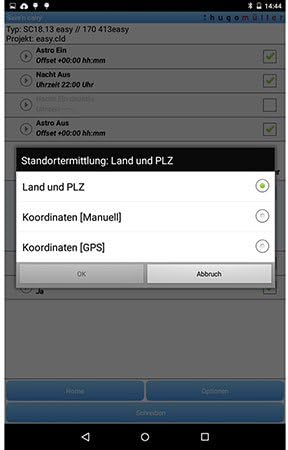
- Enter your geographical coordinates or select a predefined region/city. This allows the timer to accurately calculate local sunrise and sunset times.
- Confirm the settings. The timer will now switch loads based on these calculated times.
3.3 Using the Offset Function
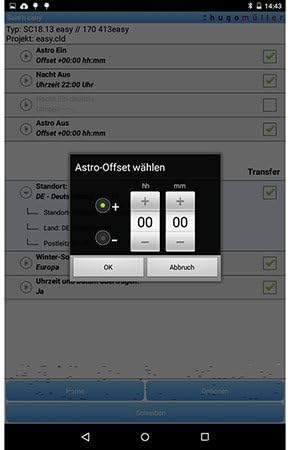
The offset function allows you to adjust the Astro switching times by a specific duration (up to ± 90 minutes). This is useful for fine-tuning the switching events relative to actual sunrise/sunset.
- Within the Astro program settings, locate the 'Offset' option.
- Select whether to apply a positive (+) or negative (−) offset.
- Enter the desired time difference in minutes (e.g., +15 minutes to switch on 15 minutes after sunset).
- Confirm the offset.

3.4 App-Based Programming (Save'n Carry)
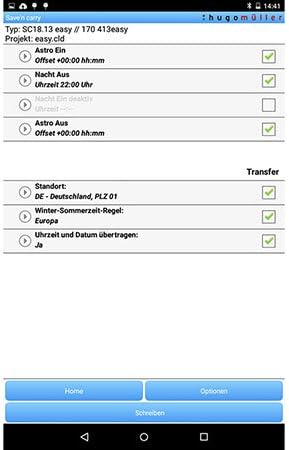
The Müller SC 18.24 Easy can be programmed using the 'Save'n Carry' mobile application, likely via NFC or Bluetooth. This offers a convenient way to configure complex switching programs.
- Download and install the 'Save'n Carry' app from your device's app store.
- Open the app and select 'New' to create a new program or 'Open' to load an existing one.
- Use the app interface to configure Astro times, offsets, and other switching schedules.
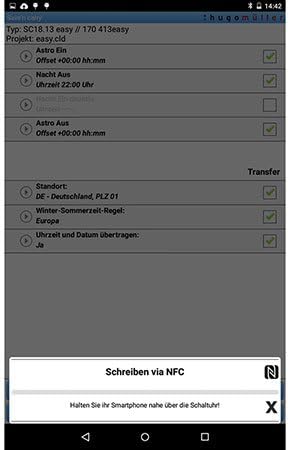
- To transfer the program to the timer, select 'Write via NFC' or 'Write via Bluetooth Adapter' within the app.
- For NFC transfer, hold your smartphone close to the timer's NFC interface as instructed by the app.
4. Manutenzjoni
4.1 Battery Replacement (CR 2032)
The SC 18.24 Easy uses a replaceable CR 2032 battery to maintain settings and timekeeping during power outages. The battery has a 10-year power reserve.
- Disconnect power to the device before replacing the battery.
- Locate the battery compartment, typically on the front or side of the device.
- Carefully remove the old CR 2032 battery.
- Insert a new CR 2032 battery, ensuring correct polarity.
- Close the battery compartment and restore power.
4.2 Tindif
Clean the device with a soft, dry cloth. Do not use abrasive cleaners, solvents, or allow moisture to enter the device.
5 Issolvi l-problemi
- Il-wiri huwa vojt: Check the main power supply to the device. Ensure the internal CR 2032 battery is correctly installed and not depleted.
- Program not executing: Verify that the current date and time are set correctly. Check if the Astro function's location settings are accurate. Ensure the manual override is not active.
- Incorrect switching times: Review the Astro program settings, including the geographical location and any applied offset. Ensure the daylight saving time rule is correctly configured if applicable.
- L-apparat ma jirrispondix: Disconnect power for a few minutes, then reconnect. If the issue persists, a factory reset might be necessary (refer to the detailed product manual for specific reset procedures, as this may erase all programmed settings).
6. Speċifikazzjonijiet
| Karatteristika | Speċifikazzjoni |
|---|---|
| Numru tal-Mudell | SC 18.24 faċli |
| Brand | Müller |
| Input Voltage | 230 V AC |
| Frekwenza | 50-60 Hz |
| Max. Kapaċità tal-Qlib | 4000 W |
| Dimensjonijiet tal-Prodott (L x W x H) | 6.3 x 3.58 x 9 ċm |
| Piż tal-oġġett | 140 Kilogrammi |
| Materjal | Plastik, Metall |
| Kulur | Iswed |
| Battery Type (for reserve) | CR 2032 (sostitwibbli) |
| Riżerva ta 'l-Enerġija | 10 years (with CR 2032 battery) |
| Konsum Standby | 0.2 W |
| Numru ta' Settings | 2 |
| Partijiet Inklużi | biċċa 1 |

7. Garanzija u Appoġġ
7.1 Informazzjoni dwar Garanzija
Spare parts for the Müller SC 18.24 Easy Digital Timer are available for a period of 1 year from the date of purchase. For detailed warranty terms and conditions, please refer to the documentation provided with your purchase or contact the manufacturer directly.
7.2 Appoġġ għall-Klijent
For technical assistance, troubleshooting beyond this manual, or warranty claims, please contact Müller customer support. Contact information can typically be found on the manufacturer's webis-sit jew fuq l-imballaġġ tal-prodott.