1. Introduzzjoni
The Viecar CY300 is a compact and efficient OBDII car diagnostic scanner designed to retrieve vehicle diagnostic information. This tool supports all OBD II protocols, including the Controller Area Network (CAN) protocol, making it compatible with most 1996 and newer vehicles.
This manual provides detailed instructions for the proper use and maintenance of your CY300 diagnostic scanner.
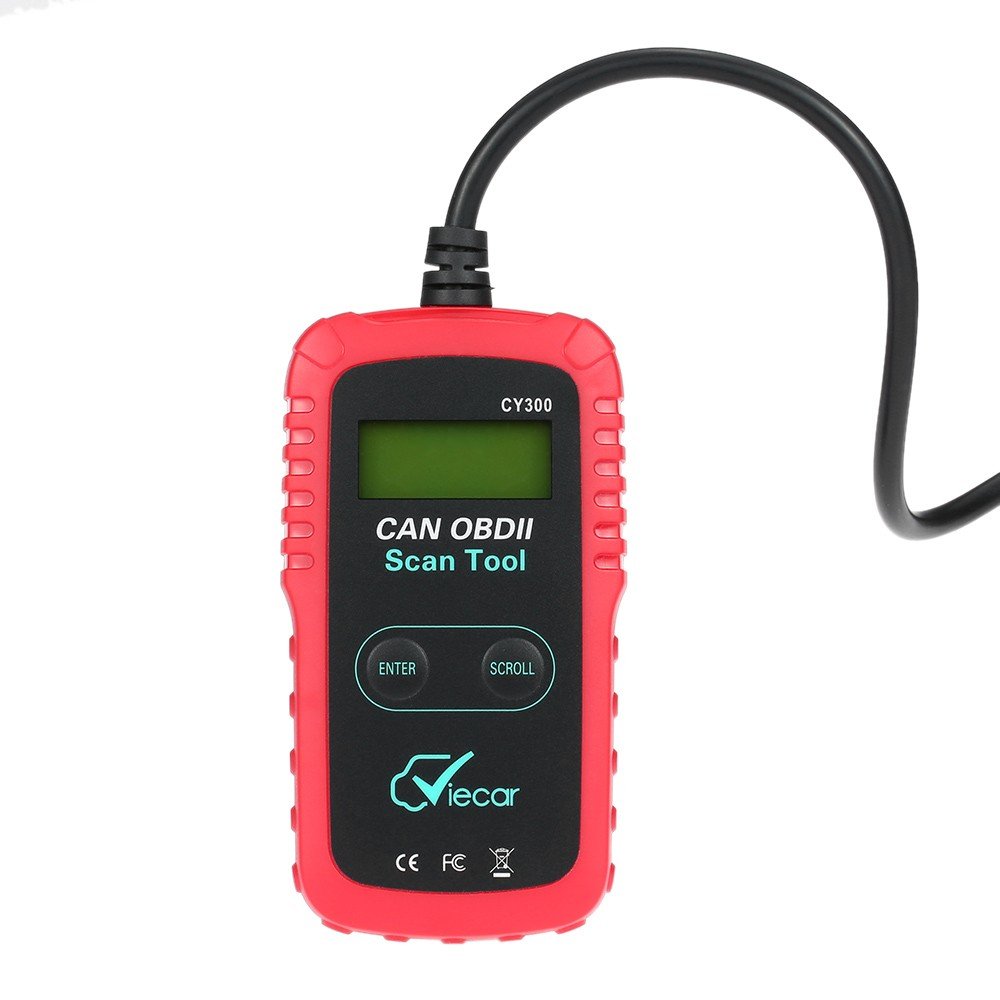
Figure 1.1: Viecar CY300 OBDII Car Diagnostic Scanner. The device is red and black with an integrated cable and OBDII connector.
2. Informazzjoni dwar is-Sigurtà
- Dejjem wettaq l-ittestjar tal-karozzi f'ambjent sigur.
- Ilbes protezzjoni għall-għajnejn li tissodisfa l-istandards ANSI.
- Żomm il-ħwejjeġ, ix-xagħar, l-idejn, l-għodda, it-tagħmir tat-test, eċċ., 'il bogħod mill-partijiet kollha tal-magna li jiċċaqalqu jew jaħarqu.
- Tħaddem il-vettura f'żona tax-xogħol b'ventilazzjoni tajba; il-gassijiet tal-egżost huma velenużi.
- Poġġi blokki quddiem ir-roti tas-sewqan u qatt tħalli l-vettura waħedha waqt li tkun qed tagħmel it-testijiet.
- Uża kawtela kbira meta taħdem madwar il-coil tat-tqabbid, it-tapp tad-distributur, il-wajers tat-tqabbid, u l-ispark. Dawn il-komponenti joħolqu voltages meta l-magna tkun qed taħdem.
- Żomm tifi tan-nar adattat għal nirien tal-gażolina/kimiċi/elettriku fil-qrib.
- Tqabbadx jew skonnettja l-ebda tagħmir tat-test waqt li l-ignition tkun mixgħula jew il-magna tkun qed taħdem.
3. Prodott Aktarview
The Viecar CY300 is designed for ease of use, featuring a clear display and intuitive buttons for navigation.
3.1 Karatteristiċi ewlenin
- Reads and clears generic and manufacturer-specific Diagnostic Trouble Codes (DTCs).
- Itfi d-Dawl tal-Iċċekkjar tal-Magna (MIL).
- Supports multiple trouble code requests: generic, pending, and manufacturer-specific codes.
- Reviews emission readiness status of OBD monitors.
- Determines Malfunction Indicator Lamp (MIL) status.
- Retrieves Vehicle Identification Number (VIN) on 2002 and newer vehicles that support Mode 9.
- Easy plug-and-play operation.
- No internal batteries required; powered directly via the detachable OBD II cable from the vehicle.
3.2 Komponenti tal-Apparat

Figure 3.1: Labeled components of the Viecar CY300. This image highlights the LCD display, Enter button, Scroll button, and the OBD II connector.
- Display LCD: Backlit, 2-line, 8-character display for showing diagnostic information.
- Daħħal Button: Jikkonferma selezzjonijiet jew azzjonijiet.
- Scroll Button: Navigates through menus and data.
- Konnettur tal-OBD II: Connects the tool to the vehicle's OBD II port.
4. Setup
The Viecar CY300 is designed for simple plug-and-play operation. Follow these steps to set up your device:
- Sib il-Port tal-OBD II: The OBD II port is typically located under the dashboard on the driver's side of the vehicle. Refer to your vehicle's service manual for the exact location if you cannot find it.
- Qabbad l-Iskaner: With the vehicle's ignition off, firmly plug the CY300's OBD II connector into the vehicle's OBD II port. Ensure a secure connection.
- Ixgħel l-Ignition: Turn the vehicle's ignition to the "ON" position (do not start the engine). The scanner will automatically power on, drawing power from the vehicle's battery.
- Inizjalizzazzjoni tas-Sistema: The scanner will perform a system initialization and link to the vehicle's onboard computer. This may take a few seconds. Once linked, the main menu or a diagnostic screen will appear.
5. Istruzzjonijiet Operattivi
Once the scanner is connected and powered on, you can begin diagnostic operations.
5.1 Qari tal-Kodiċijiet ta' Problemi Dijanjostiċi (DTCs)
- From the main menu, use the Skrollja button to navigate to the "Read Codes" option.
- Agħfas il- Daħħal buttuna biex tagħżel.
- The scanner will display any stored DTCs. Use the Skrollja buttuna biex view multiple codes if present.
5.2 Tħassir tal-Kodiċijiet ta' Problemi Dijanjostiċi (DTCs)
Twissija: Clearing DTCs will erase all diagnostic data from the vehicle's computer. Ensure you have recorded any necessary information before proceeding.
- From the main menu, use the Skrollja button to navigate to the "Erase Codes" option.
- Agħfas il- Daħħal buttuna biex tagħżel.
- Confirm your choice when prompted. The Check Engine Light (MIL) should turn off after successful clearing.
5.3 Checking I/M Readiness Status
This function checks the status of the emission-related monitoring systems to determine if they are ready for an emissions test.
- From the main menu, use the Skrollja button to navigate to the "I/M Readiness" option.
- Agħfas il- Daħħal buttuna biex tagħżel.
- The display will show the status of various monitors (e.g., "OK" for complete, "INC" for incomplete).
5.4 Retrieving Vehicle Information (VIN)
This function allows you to retrieve the Vehicle Identification Number (VIN) for vehicles that support Mode 9.
- From the main menu, use the Skrollja button to navigate to the "Vehicle Info" option.
- Agħfas il- Daħħal buttuna biex tagħżel.
- The VIN will be displayed on the screen.
6. Manutenzjoni
Proper maintenance ensures the longevity and reliable operation of your Viecar CY300 scanner.
- Tindif: Use a soft, dry cloth to clean the exterior of the scanner. Do not use abrasive cleaners or solvents.
- Ħażna: Store the device in a clean, dry environment away from direct sunlight, extreme temperatures, and excessive moisture. Keep it in its original packaging or a protective case when not in use.
- Kura tal-Cable: Avoid bending or kinking the OBD II cable excessively. Always grasp the connector when plugging or unplugging, not the cable itself.
- Aġġornamenti tas-Software: Iċċekkja l-manifattur webŻur is-sit perjodikament għal kwalunkwe aġġornament tas-softwer disponibbli biex tiżgura prestazzjoni ottimali u kompatibilità ma' vetturi aktar ġodda.
7 Issolvi l-problemi
If you encounter issues with your Viecar CY300, refer to the following common troubleshooting steps:
- Ebda Qawwa:
- Ensure the OBD II connector is firmly plugged into the vehicle's port.
- Verify the vehicle's ignition is in the "ON" position.
- Check the vehicle's fuse for the OBD II port (consult your vehicle's manual).
- Link Error / Communication Error:
- Confirm the vehicle is OBD II compliant (generally 1996 and newer).
- Kun żgur li l-ignition hija mixgħula u l-magna mitfija.
- Check for any loose connections at the OBD II port.
- Try connecting the scanner to a different OBD II compliant vehicle to rule out a scanner issue.
- L-Iskrin Jiffriża:
- Skonnettja l-iskaner mill-vettura, stenna ftit sekondi, u mbagħad erġa' qabbdu.
- Kun żgur li l-batterija tal-vettura għandha biżżejjed ċarġ.
- Qari Skorrett:
- Kun żgur li s-softwer tal-iskaner huwa aġġornat.
- Verify the vehicle's information (VIN, year, make, model) is correctly recognized by the scanner.
8. Speċifikazzjonijiet
The following table outlines the technical specifications for the Viecar CY300 OBDII Car Diagnostic Scanner:

Figure 8.1: Visual representation of Viecar CY300 dimensions and key specifications.
| Speċifikazzjoni | Dettall |
|---|---|
| Mudell | Viecar CY300 |
| Kulur | Aħmar + Iswed |
| Materjal | Plastik |
| Wiri | Backlit LCD, 2-line, 8 characters |
| Temperatura operattiva | 0°C sa 50°C (32°F sa 122°F) |
| Temperatura tal-Ħażna | -20°C sa 70°C (-4°F sa 158°F) |
| Sors tal-Enerġija | 10 to 15.5 Volts provided via vehicle battery (no internal batteries) |
| Dimensjonijiet tal-Prodott (L x W x H) | 12 ċm x 6.5 ċm x 2.1 ċm (madwar 4.7 x 2.6 x 0.8 pulzieri) |
| Piż tal-Pakkett | 260 g (madwar 9 oz) |
| UPC | 712383577481, 712383583871, 712383579997 |
| ASIN | B01KSV9GDM |
| Data L-Ewwel Disponibbli | 17 ta’ Awwissu, 2016 |
9. Garanzija u Appoġġ
Għal informazzjoni dwar il-garanzija, jekk jogħġbok irreferi għad-dokumentazzjoni pprovduta fil-ħin tax-xiri jew ikkuntattja lill-bejjiegħ tiegħek. It-termini speċifiċi tal-garanzija jistgħu jvarjaw skont ir-reġjun u l-bejjiegħ.
If you require technical support or have questions not covered in this manual, please contact the retailer or manufacturer directly. Keep your purchase receipt and product model number (CY300) available for faster service.
