
1. Introduzzjoni
Thank you for choosing the Urmet 1750/4 Mirro Color Monitor. This manual provides essential information for the safe and efficient installation, operation, and maintenance of your new monitor. Please read this manual thoroughly before use and retain it for future reference.
The Urmet 1750/4 Mirro Color Monitor is designed to provide clear video and audio communication for your intercom system. It features intuitive controls for adjusting display settings and can be integrated with Yokis radio series products for enhanced home automation capabilities.
2. Informazzjoni dwar is-Sigurtà
- Sigurtà Elettrika: Installation and wiring must be performed by a qualified electrician in accordance with local electrical codes. Disconnect power before performing any installation or maintenance.
- Ambjent: Do not expose the monitor to extreme temperatures, humidity, or direct sunlight. Avoid installing in areas with excessive dust or vibrations.
- Tindif: Uża drapp artab u niexef għat-tindif. Tużax prodotti tat-tindif jew solventi li joborxu.
- Modifiki: Do not attempt to open or modify the monitor. Unauthorized modifications can void the warranty and pose safety risks.
3. Kontenut tal-Pakkett
Jekk jogħġbok iċċekkja l-kontenut tal-pakkett biex tiżgura li l-oġġetti kollha huma preżenti:
- Urmet 1750/4 Mirro Color Monitor
- Parentesi ta 'montatura
- Viti u plugs tal-ħajt
- Manwal għall-Utent (dan id-dokument)
- (Note: Additional accessories like power supply or specific wiring may be sold separately depending on your system configuration.)
4. Setup u Installazzjoni
4.1 Immuntar tal-Monitor
- Choose a suitable location for the monitor, typically near the entrance or in a central living area, ensuring it is at an appropriate viewing għoli.
- Secure the mounting bracket to the wall using the provided screws and wall plugs. Ensure the bracket is level and firmly attached.
- Refer to the wiring diagram provided with your intercom system for connecting the monitor. Connect all necessary cables (power, video, audio, data) to the terminals on the back of the monitor.
- Carefully attach the monitor to the mounting bracket, ensuring it clicks securely into place.
4.2 Tixgħel Inizjali
Once installation is complete and all connections are secure, restore power to the intercom system. The monitor should power on and display a standby screen or the video feed from the outdoor unit.
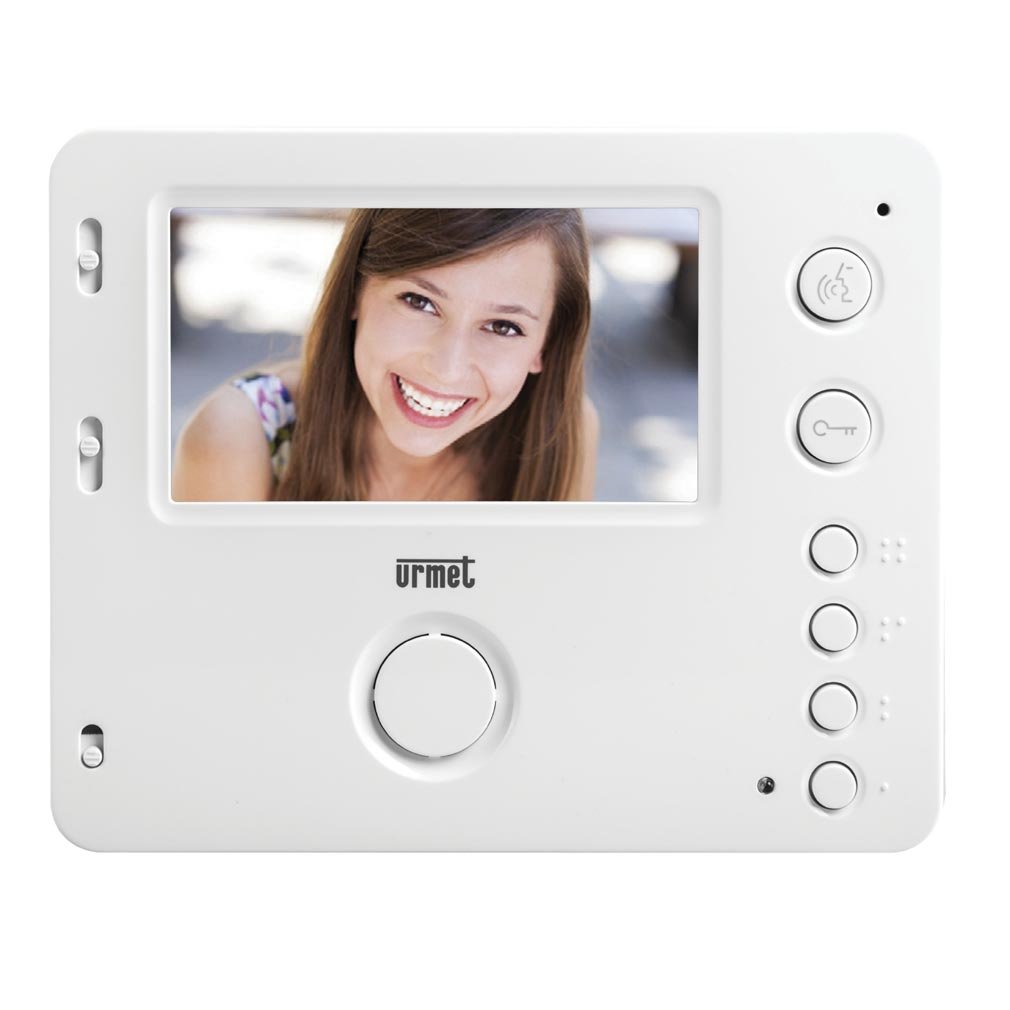
Figura 1: Quddiem view of the Urmet 1750/4 Mirro Color Monitor. This image shows the display screen and control buttons, illustrating the sleek design and user interface.
5. Istruzzjonijiet Operattivi
The Urmet 1750/4 Mirro Color Monitor offers straightforward operation for daily use.
5.1 Funzjonijiet Bażiċi
- Tweġiba għal Sejħa: When a visitor presses the call button on the outdoor unit, the monitor will ring and display the visitor's image. Press the Tweġiba button (typically marked with a telephone icon) to establish communication.
- Niftaħ il-Bieb: Waqt sejħa, agħfas Rilaxx tal-Bieb button (typically marked with a key icon) to unlock the entrance.
- Monitoraġġ: Agħfas il- Monitor button (typically marked with a camera icon) to view the outdoor camera feed without an incoming call.
5.2 Adjusting Display and Ringtones
The monitor features scroll wheels, usually located on the side or bottom edge, for adjusting settings:
- Volum tat-Telefon: Use the dedicated scroll wheel to increase or decrease the ringtone volume.
- Kuntrast: Adjust the contrast scroll wheel to modify the difference between light and dark areas on the screen.
- Luminożità: Adjust the brightness scroll wheel to control the overall luminance of the display.
5.3 Yokis Radio Series Integration (Optional)
The Urmet 1750/4 monitor is compatible with products from the Yokis radio series. By adding a wireless e4bpp transmitter (sold separately), you can initiate home automation commands directly from the monitor.
- e4bpp Transmitter: Connect the e4bpp transmitter according to its specific installation guide.
- Command Buttons: Once integrated, two separate buttons on the monitor can be configured to trigger specific Yokis scenarios, such as turning lights on/off or activating a central control for home entry/exit. Refer to the e4bpp transmitter manual for configuration details.
6. Manutenzjoni
Regular maintenance ensures the longevity and optimal performance of your Urmet 1750/4 Mirro Color Monitor.
- Tindif tal-Iskrin: Imsaħ l-iskrin bil-mod b'ċarruta ratba u mingħajr suf. Għal marki persistenti, nixxef ftit.ampen the cloth with water. Do not spray cleaning solutions directly onto the screen.
- Tindif tas-Casing: Uża drapp artab u niexef biex tnaddaf il-monitor casing. Evita li tuża kimiċi ħarxa jew materjali li joborxu.
- Ventilazzjoni: Ensure that the ventilation openings on the monitor (if any) are not blocked to prevent overheating.
7 Issolvi l-problemi
Jekk tiltaqa' ma' problemi bil-monitor tiegħek, irreferi għall-problemi u s-soluzzjonijiet komuni li ġejjin:
| Problema | Kawża Possibbli | Soluzzjoni |
|---|---|---|
| L-ebda immaġni fuq l-iskrin | No power; loose video cable; outdoor unit not functioning. | Check power supply; ensure video cable is securely connected; check outdoor unit. |
| No sound during call | Loose audio cable; speaker/microphone issue; volume too low. | Check audio cable connections; adjust volume scroll wheel; contact support if issue persists. |
| Kwalità ta 'immaġni fqira | Incorrect brightness/contrast settings; dirty camera lens (outdoor unit); faulty cable. | Adjust brightness and contrast scroll wheels; clean outdoor camera lens; check video cable integrity. |
| Il-ftuħ tal-bieb mhux qed jaħdem | Faulty wiring to door lock; door release mechanism issue. | Verify wiring to the door lock; test the door release mechanism independently; consult an electrician. |
If the problem persists after attempting these solutions, please contact Urmet technical support or a qualified service technician.
8. Speċifikazzjonijiet
Below are the technical specifications for the Urmet 1750/4 Mirro Color Monitor:
- Ditta: Urmet
- Numru tal-Mudell: 1750/4
- Daqs tal-iskrin: 4.3 Pulzier
- Display Surface Description: Tleqq
- Rata ta' Aġġornar: 120 Hz
- Karatteristiċi Speċjali: Home automation integration, high refresh rate
- Teknoloġija tal-Konnettività: HDMI (Note: This might refer to internal components or specific system connections, not necessarily a user-facing HDMI port for external devices.)
- Numru ta' Portijiet HDMI: 1
- Interface tal-ħardwer: HDMI
- Display bil-kulur: Iva
- Piż tal-oġġett: 330.69 Pounds (Note: This weight seems unusually high for a monitor. Please verify product specifications if this is critical. It might be a data entry error.)
9. Garanzija u Appoġġ
Urmet products are manufactured to high-quality standards and are covered by a limited warranty. For specific warranty terms and conditions, please refer to the warranty card included with your product or visit the official Urmet websit.
For technical assistance, troubleshooting, or service inquiries, please contact Urmet customer support. Contact information can typically be found on the Urmet webis-sit jew fuq l-imballaġġ tal-prodott tiegħek.
Urmet Official Websit: www.urmet.com