
LyxPro SPA-5.5
LyxPro SPA-5.5 Small PA Speaker Monitor Instruction Manual
Model: SPA-5.5
1. Introduzzjoni
This manual provides detailed instructions for the proper setup, operation, and maintenance of your LyxPro SPA-5.5 Small PA Speaker Monitor. Please read this manual thoroughly before using the device to ensure optimal performance and safety.
The LyxPro SPA-5.5 is a compact and powerful active speaker system featuring a Class-D amplifier, a 3-channel mixer, and a 3-band equalizer. It is designed for various applications including vocal and instrument monitoring, public address, and as a guitar amplifier or karaoke system.
2. Istruzzjonijiet tas-Sigurtà
- Sors tal-Enerġija: Connect the unit only to the specified power supply (100V – 240V AC). Ensure the power cord is not damaged or pinched.
- Ventilazzjoni: Timblokkax il-fetħiet tal-ventilazzjoni. Kun żgur li jkun hemm fluss tal-arja adegwat madwar l-unità biex tevita li tisħon iżżejjed.
- Ilma u Umdità: Tesponix l-unità għax-xita, l-umdità, jew xi likwidi. Tpoġġix oġġetti mimlija b'likwidi fuq l-unità.
- Sorsi tas-Sħana: Żomm l-unità 'l bogħod minn sorsi tas-sħana bħal radjaturi, reġistri tas-sħana, stufi, jew apparati oħra li jipproduċu s-sħana.
- Tindif: Naddaf biss b'ċarruta niexfa. Skonnettja mill-provvista tal-elettriku qabel it-tindif.
- Servizzi: Tippruvax isservi dan il-prodott int stess. Irreferi l-manutenzjoni kollha lil persunal tas-servizz kwalifikat.
- Pjazzament: Place the unit on a stable surface. If mounting on a microphone stand, ensure the stand is stable and capable of supporting the unit's weight.
3. Kontenut tal-Pakkett
Ivverifika li l-oġġetti kollha huma preżenti fil-pakkett:
- LyxPro SPA-5.5 Speaker Monitor
- Kejbil tal-Enerġija
- Microphone Stand Mounting Hardware
- Manwal għall-Utent (dan id-dokument)
4. Karatteristiċi tal-prodott
- 125W RMS / 150W Peak Class-D Ampaktar ħaj
- Integrated 3-Channel Mixer
- 3-Band Equalizer (Bass, Mid, Treble)
- +48V Phantom Power Supply for Condenser Microphones
- Multiple Inputs: XLR, 1/4" (6.35mm), RCA, and 3.5mm (1/8") Aux
- Instrument Switch for Direct Instrument Connection
- XLR Thru Connection for Daisy-Chaining
- Kontroll tal-Echo
- Konnettività Bluetooth integrata
- Kompatibilità tal-Kard SD
- Mounts on Standard Microphone Stands
- Durable and Compact Design
5. Kontrolli u Konnessjonijiet
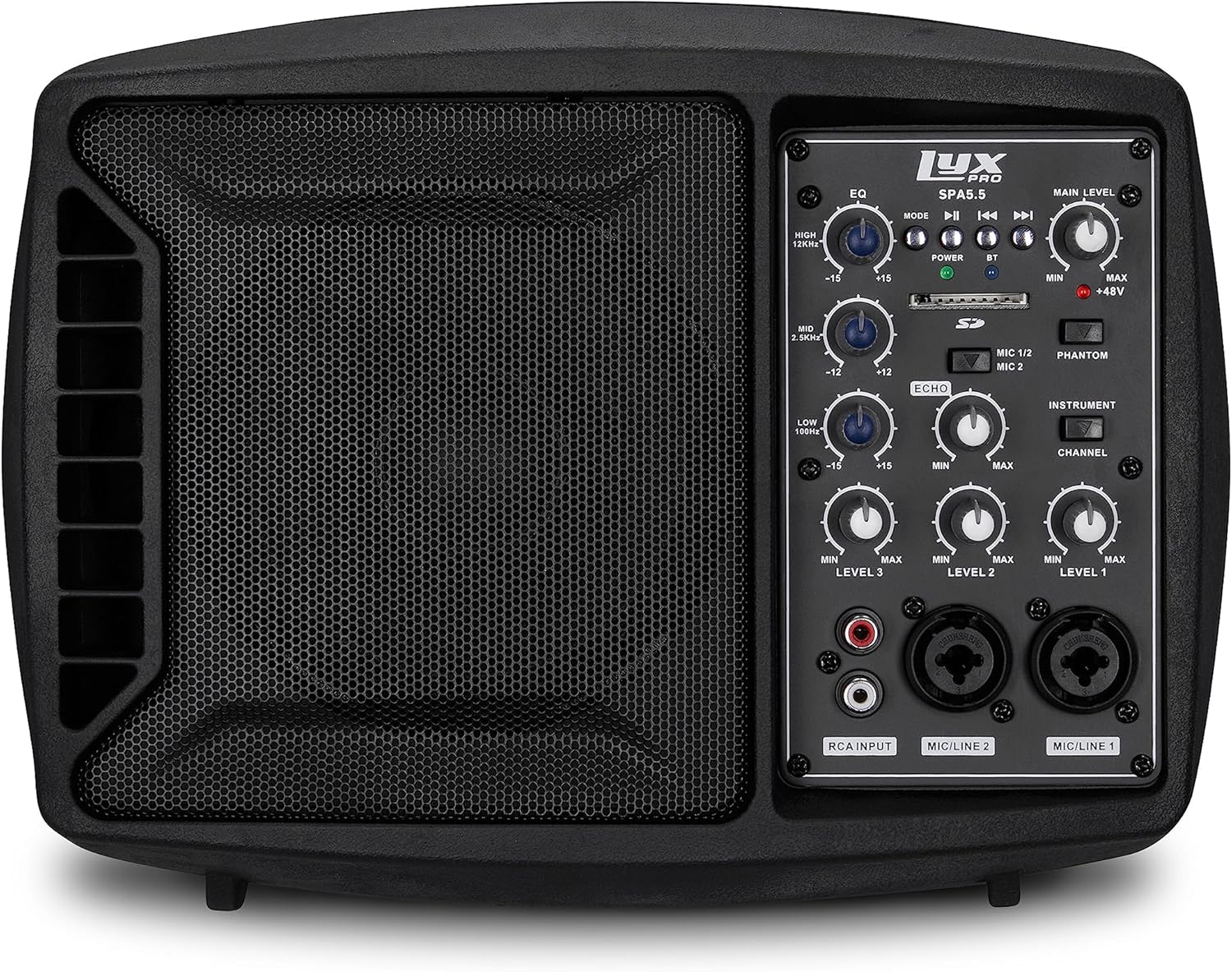
Figura 5.1: Quddiem view of the LyxPro SPA-5.5 speaker monitor, showing the speaker grille and control panel.
5.1 Kontrolli ta' Front Panel

Figure 5.2: Detailed diagram of the LyxPro SPA-5.5 front control panel with labeled components.
- Ekwalizzatur (EQ):
- HIGH (12kHz): Adjusts high frequencies. Range: ±15dB.
- MID (2.5kHz): Adjusts mid frequencies. Range: ±15dB.
- LOW (80Hz): Adjusts low frequencies. Range: ±15dB.
- Livell Prinċipali: Jikkontrolla l-volum ġenerali tal-ħruġ tal-ispiker.
- Dawl tal-Qawwa: Jindika meta l-unità tkun mixgħula.
- BT (Bluetooth) Light: Jindika l-istatus tal-konnessjoni Bluetooth.
- Slot tal-Kard SD: Għad-daqq tal-awdjo files minn karta SD.
- Phantom Power Switch (+48V): Activates +48V phantom power for condenser microphones connected to MIC 1 or MIC 2.
- MIC 1/2 Switch: Selects between MIC 1 and MIC 2 inputs for Channel 1.
- Instrument Switch: Optimizes input impedance for direct connection of instruments (e.g., guitar) to Channel 1.
- Kontroll tal-Eku: Adjusts the level of echo effect applied to microphone inputs.
- Channel Level Controls (LEVEL 1, LEVEL 2, LEVEL 3): Adjusts the individual volume for each input channel.
- RCA Input (LINE 3): Stereo RCA inputs for connecting devices like CD players, MP3 players, or keyboards.
- Input tal-MIC/LINE 2: Combo XLR/1/4" (6.35mm) input for microphones or line-level devices.
- Input tal-MIC/LINE 1: Combo XLR/1/4" (6.35mm) input for microphones or line-level devices.
5.2 Konnessjonijiet tal-Panew ta' wara

Figure 5.3: Detailed diagram of the LyxPro SPA-5.5 rear panel with labeled connections.
- MAIN IN (XLR): Main input for connecting external audio sources.
- MIC/LINE Level Switch: Selects between microphone or line level for the MAIN IN.
- THRU (XLR): XLR output for daisy-chaining to other speakers or sending the mixed signal to another device.
- Swiċċ tal-Enerġija: Ixgħel jew jitfi l-unità.
- DĦUL AC: Power connector for the included AC power cable (100V – 240V AC).
6. Setup
6.1 Qawwa Inizjali
- Ensure all level controls (Main Level, Channel Levels) are set to minimum.
- Connect the provided AC power cable to the AC INPUT on the rear panel and then to a suitable power outlet.
- Flip the Power Switch on the rear panel to the "ON" position. The Power Light on the front panel will illuminate.
6.2 Għażliet ta 'Immuntar
The SPA-5.5 can be used in various configurations:
- Monitor tal-art: Place the unit on the floor in front of the performer, angled upwards.
- Mejda: Pożizzjoni fuq wiċċ ċatt u stabbli.
- Microphone Stand Mounting: The unit includes hardware to mount it directly onto a standard microphone stand.

Figure 6.1: The LyxPro SPA-5.5 speaker monitor positioned on a microphone stand, demonstrating its use as a personal monitor for a musician.

Figure 6.2: A band performing outdoors, utilizing the compact LyxPro SPA-5.5 speaker for sound reinforcement.
7. Istruzzjonijiet Operattivi
7.1 Konnessjoni ta' Mikrofoni u Strumenti
- Mikrofoni: Connect dynamic or condenser microphones to the MIC/LINE 1 or MIC/LINE 2 inputs using XLR cables. If using a condenser microphone, activate the +48V Phantom Power Switch. Adjust the corresponding Channel Level control.
- Strumenti: Connect instruments (e.g., guitar, bass) directly to MIC/LINE 1 or MIC/LINE 2 using a 1/4" (6.35mm) cable. Engage the Instrument Switch for optimal impedance matching. Adjust the corresponding Channel Level control.
- Apparati fil-Livell tal-Linja: Connect devices like keyboards or audio interfaces to MIC/LINE 1 or MIC/LINE 2 using 1/4" (6.35mm) cables. Ensure the Instrument Switch is disengaged. Adjust the corresponding Channel Level control.
- Stereo Audio Sources: Connect CD players, MP3 players, or other stereo sources to the RCA Input (LINE 3). Adjust LEVEL 3.
7.2 Aġġustament tal-Ħoss
- Livelli tal-Kanal: Use the LEVEL 1, LEVEL 2, and LEVEL 3 controls to balance the volume of individual inputs.
- Livell Prinċipali: Adjust the Main Level knob to control the overall output volume of the speaker.
- Ekwalizzatur (EQ): Use the HIGH, MID, and LOW knobs to shape the tone of your sound.
- Increase HIGH for brighter sound.
- Adjust MID for vocal clarity or instrument presence.
- Increase LOW for more bass.
- Kontroll tal-Eku: Turn the Echo knob to add a reverberation effect to the microphone inputs.
7.3 Media Playback (SD Card & Bluetooth)

Figure 7.1: Icons indicating SD card compatibility and built-in Bluetooth functionality on the LyxPro SPA-5.5.
- Karta SD: Insert an SD card containing audio files into the SD Card Slot. The unit will automatically detect and begin playback. Use the built-in controls (Mode, Play/Pause, Skip) to manage playback.
- Bluetooth:
- Kun żgur li l-unità tkun mixgħula.
- Attiva l-Bluetooth fuq it-tagħmir mobbli tiegħek.
- Fittex għal "LyxPro SPA-5.5" in your device's Bluetooth settings and pair. The BT light on the unit will indicate a successful connection.
- Play audio from your device. Adjust volume using both your device and the SPA-5.5's Main Level control.

Figure 7.2: A musician utilizing the LyxPro SPA-5.5 as a personal monitor in a studio environment.
8. Manutenzjoni
- Tindif: Uża drapp artab u niexef biex tnaddaf il-barra tal-unità. Tużax prodotti tat-tindif likwidi jew aerosols.
- Ħażna: Meta ma tkunx qed tużaha għal perjodi twal, aħżen l-unità f'post frisk u niexef, 'il bogħod mix-xemx diretta u minn temperaturi estremi.
- Sostituzzjoni tal-fjus: If the unit does not power on, check the fuse located near the AC input. Replace with a fuse of the same type and rating (T 3.15 A H 250V). Refer to qualified personnel if unsure.
9 Issolvi l-problemi
| Problema | Kawża Possibbli | Soluzzjoni |
|---|---|---|
| Ebda qawwa | Kejbil tal-enerġija skonnettjat; Swiċċ tal-enerġija mitfi; Fjus maħruq | Check power cable connection; Turn power switch on; Replace fuse (refer to Maintenance section) |
| Ebda output tal-ħoss | Main Level or Channel Levels too low; Input device not connected or muted; Incorrect input selected | Increase Main Level and Channel Levels; Check input device connection and volume; Verify correct input is used |
| Ħoss distort | Input signal too high; Main Level too high; EQ settings incorrect | Reduce input device volume; Lower Main Level; Adjust EQ settings |
| Microphone not working (condenser mic) | Phantom power not enabled | Activate the +48V Phantom Power Switch |
| Il-Bluetooth mhux qed jgħaqqad | L-unità mhix fil-modalità ta' tqabbil; L-apparat huwa 'l bogħod wisq; L-apparat mhux korrett magħżul | Ensure Bluetooth is active on SPA-5.5 and device; Move device closer; Select "LyxPro SPA-5.5" from device list |
10. Speċifikazzjonijiet

Figure 10.1: Diagram illustrating the compact dimensions of the LyxPro SPA-5.5 speaker monitor.
| Karatteristika | Dettall |
|---|---|
| Output ta 'Qawwa | 125W RMS / 150W Peak |
| Daqs tal-Kelliem | 5 pulzieri |
| Ampitwal Tip | Klassi D |
| Rispons tal-Frekwenza (-10dB) | 80Hz - 14kHz |
| Rispons tal-Frekwenza (-3dB) | 100Hz - 10kHz |
| Massimu SPL | 114dB SPL @ 1M |
| Qawwa Phantom | +48V |
| Impedenza tad-dħul | 20K Ω |
| EQ High (12kHz) | ± 15dB |
| EQ Mid (2.5kHz) | ± 15dB |
| EQ Low (80Hz) | ± 15dB |
| Input Voltage | 100V – 240V AC |
| Konsum tal-Enerġija | 180W massimu |
| Dimensjonijiet (L x W x H) | 13.5" x 9" x 11.8" (34.3 ċm x 22.9 ċm x 30 ċm) |
| Piż | 6.1 lbs (2.77 kg) |
11. Garanzija u Appoġġ
For warranty information and technical support, please refer to the warranty card included with your product or visit the official LyxPro websit. Żomm l-irċevuta tax-xiri tiegħek bħala prova tax-xiri.
For further assistance, contact LyxPro customer support.
Ask a question about this manual
Ask about setup, troubleshooting, compatibility, parts, safety, or missing instructions. Manuals+ will review the question and use this page’s manual context to help answer it.