
Introduzzjoni
Thank you for choosing the Kaiser MSA-6515BT Amplified Speaker System. This manual provides essential information for the safe and efficient operation of your device. Please read it thoroughly before use and retain it for future reference.
Istruzzjonijiet tas-Sigurtà
Biex tiżgura tħaddim sikur u tevita ħsara, jekk jogħġbok osserva l-prekawzjonijiet li ġejjin:
- Tesponix l-ispiker għax-xita jew għall-umdità biex tevita xokk elettriku jew nar.
- Timblokkax il-fetħiet tal-ventilazzjoni. Kun żgur li jkun hemm fluss tal-arja adegwat madwar l-unità.
- Poġġi l-ispiker fuq wiċċ stabbli u ċatt biex tevita li jaqa'.
- Skonnettja l-korda tal-enerġija waqt maltempati bis-sajjetti jew meta ma tużax għal perjodi twal.
- Tippruvax tagħmel manutenzjoni fuq l-unità int stess. Irreferi għal kull manutenzjoni f'idejn persunal kwalifikat.
- Żomm l-ispiker 'il bogħod minn sorsi ta' sħana bħal radjaturi, reġistri tas-sħana, stufi, jew apparat ieħor li jipproduċi sħana.
- Uża biss aċċessorji/aċċessorji speċifikati mill-manifattur.
- Avoid placing heavy objects on the power cord or speaker.
Kontenut tal-Pakkett
Ivverifika li l-oġġetti kollha huma preżenti fil-pakkett:
- Kaiser MSA-6515BT AmpSpeaker kwalifikat
- Stand tal-Ispeaker aġġustabbli
- Mikrofonu bil-fili
- Kontroll mill-bogħod
- Kejbil tal-Enerġija
- Kejbil tal-Iċċarġjar tal-Batterija
Prodott Overview
Quddiem View

Figura 1: Quddiem view of the Kaiser MSA-6515BT amplified speaker, featuring the main speaker grille and the KSR brand logo at the bottom.
Ġenb View and Portability Features

Figura 2: Ġenb view of the speaker, illustrating the robust side handle and the wheels located at the bottom for convenient portability.
Panel ta 'wara u Kontrolli
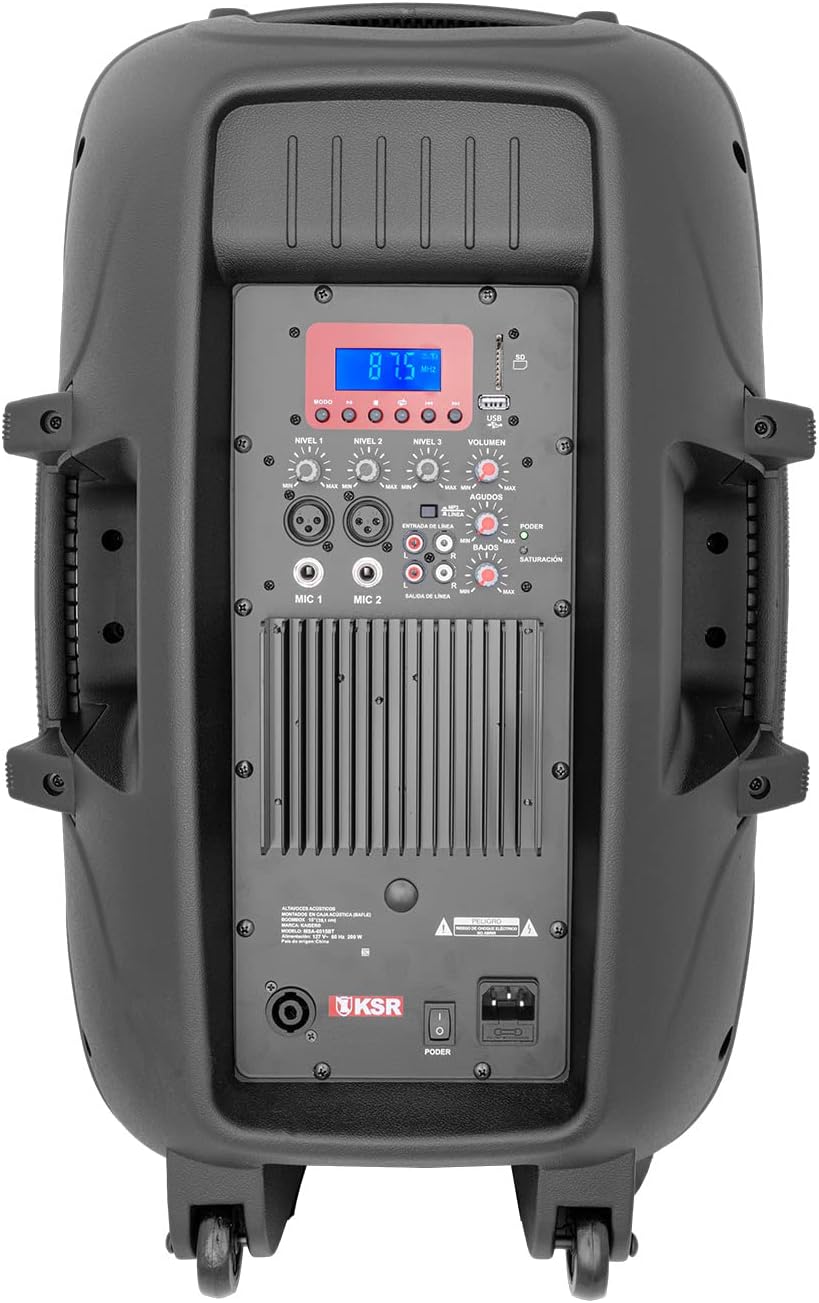
Figura 3: Dettaljat view of the rear control panel, including the digital display, various input/output jacks, and independent volume and tone controls.
The rear panel houses all essential controls and connection ports. Familiarize yourself with these components:
- Wirja Diġitali: Juri l-modalità attwali, l-informazzjoni dwar it-trakka, jew il-frekwenza tal-FM.
- USB/SD Card Slots: Għad-daqq tal-awdjo files from memory devices.
- Kontrolli tal-daqq: Play/Pause, Skip Forward/Backward, Mode selection.
- Inputs tal-Mikrofonu (MIC 1, MIC 2): XLR (Cannon) and 6.3mm (1/4 inch) jacks for connecting microphones.
- Input tal-Linja (RCA): For connecting external audio devices like CD players or mixers.
- Ħruġ tal-Linja (RCA): For connecting to another amplifier jew kelliem.
- Speakon Output: For connecting to a passive speaker.
- Kontrolli tal-Volum: Independent knobs for Master Volume, Microphone Volume, Line Input Volume, Bass, and Treble.
- Power Switch and AC Input: Għall-konnessjoni tal-kejbil tal-enerġija u biex tixgħel/titfi l-unità.
Setup
Spakkjar u Tqegħid
- Neħħi l-ispiker u l-aċċessorji kollha mill-imballaġġ bir-reqqa.
- Place the speaker on a stable, level surface. For optimal sound projection, use the included adjustable speaker stand.
- Ensure there is adequate space around the speaker for ventilation.
Qawwa tal-Konnessjoni
- Kun żgur li s-swiċċ tal-qawwa tal-ispiker ikun fil-pożizzjoni OFF.
- Qabbad il-kejbil tal-enerġija inkluż mal-input tal-AC fuq il-pannell ta' wara tal-ispiker.
- Ipplaggja t-tarf l-ieħor tal-kejbil tal-enerġija f'sokit elettriku standard.
Istruzzjonijiet Operattivi
Tixgħel/Jitfi
- To turn on the speaker, flip the power switch on the rear panel to the ON position. The digital display will illuminate.
- To turn off the speaker, flip the power switch to the OFF position.
Konnettività Bluetooth
- Ixgħel il-kelliem.
- Press the "Mode" button on the rear panel or remote control until "Bluetooth" appears on the display.
- Fuq it-tagħmir tiegħek li jaħdem bil-Bluetooth (smartphone, tablet, laptop), attiva l-Bluetooth u fittex tagħmir disponibbli.
- Select "MSA-6515BT" from the list of devices. Once paired, a confirmation sound will be heard.
- You can now play audio from your device through the speaker. Optimal range is up to 2 meters.
Operazzjoni tar-Radju FM
- Agħfas il-buttuna "Mode" sakemm tidher "FM" fuq id-displej.
- Press the Play/Pause button to initiate an automatic scan for FM stations. The speaker will save all found stations.
- Use the Skip Forward/Backward buttons to navigate between saved stations.
Daqq tal-Kard USB/SD
- Insert a USB flash drive or SD card (with audio files) into the corresponding slot on the rear panel.
- The speaker should automatically switch to USB/SD mode and begin playback. If not, press the "Mode" button to select USB/SD.
- Use the playback controls (Play/Pause, Skip Forward/Backward) to manage your audio.
Microphone and Line Inputs
- Mikrofonu: Connect the wired microphone to either the XLR (Cannon) or 6.3mm (1/4 inch) MIC input. Adjust the "MIC Volume" knob to control the microphone's level.
- Input tal-Linja: Connect external audio sources (e.g., mixer, CD player) to the RCA Line Input. Adjust the "Line Volume" knob.
- Kontroll tat-Tone: Use the "Bass" and "Treble" knobs to adjust the overall sound characteristics.
- Volum Master: Adjust the "Master Volume" knob for the overall output level of the speaker.
Connecting Additional Speakers
- Output RCA: Use the RCA Line Output to send the audio signal to another amplified speaker or an external ampaktar ħaj.
- Speakon Output: Connect a passive speaker to the Speakon output for expanded sound coverage. Ensure the passive speaker's impedance matches the MSA-6515BT's output requirements (8 ohms).
Manutenzjoni
- Tindif: Uża drapp artab u niexef biex tnaddaf il-barra tal-ispiker. Tużax prodotti tat-tindif jew solventi li joborxu.
- Ħażna: Meta ma tkunx qed tuża l-ispiker, aħżenh f'post frisk u niexef, 'il bogħod mix-xemx diretta u minn temperaturi estremi.
- Ventilazzjoni: Regularly check that the ventilation grilles are free from dust and debris.
Issolvi l-problemi
| Problema | Kawża Possibbli | Soluzzjoni |
|---|---|---|
| Ebda qawwa | Power cable not connected; Power switch off; Outlet malfunction. | Ensure power cable is securely connected. Turn power switch ON. Test outlet with another device. |
| Ebda output tal-ħoss | Volum baxx wisq; Mod ta' input mhux korrett magħżul; Apparat mhux imqabbad sew. | Increase Master Volume. Select correct input mode (Bluetooth, USB, FM, Line). Check all cable connections. |
| Nuqqas ta' pairing Bluetooth | Device too far; Bluetooth not enabled on source device; Speaker not in pairing mode. | Move device closer to speaker. Ensure Bluetooth is enabled on your device. Select Bluetooth mode on speaker. |
| Mikrofonu mhux qed jaħdem | Microphone volume low; Microphone not connected; Faulty microphone. | Increase MIC Volume. Ensure microphone is securely connected. Test with another microphone if available. |
| Problemi ta' daqq bil-USB/SD | Mhux appoġġjat file format; Korrott files; Il-karta USB/SD mhux imdaħħla sew. | Żgura l-awdjo files are in a supported format (e.g., MP3). Reinsert USB/SD card. Try a different USB/SD card. |
Speċifikazzjonijiet
| Isem tal-Mudell | MSA-6515BT |
| Tip ta' Kelliem | Professjonali AmpSpeaker kwalifikat |
| Daqs tal-Kelliem | 15 Pulzier |
| Audio Output Power | 33W PMPO / 2W RMS |
| Impedenza | 8 ohms |
| Teknoloġija tal-Konnettività | Bluetooth, RCA, USB, SD |
| Medda Bluetooth | Up to 2 meters (optimal link) |
| Inputs | RCA (audio), 6.3mm (microphone), Cannon (microphone), USB, SD |
| Outputs | RCA (amplifier), Speakon (passive speaker) |
| Sors tal-Enerġija | Kejbil Elettriku |
| Average Battery Duration | 5 Sigħat |
| Dimensjonijiet (D x W x H) | 40 ċm x 49 ċm x 75.5 ċm |
| Piż | 21 Kilogrammi |
| Komponenti Inklużi | Amplified speaker, wired microphone, remote control, adjustable stand, power cable, battery charging cable. |

Figure 4: Dimensions of the Kaiser MSA-6515BT speaker.
Garanzija u Appoġġ
This Kaiser MSA-6515BT Amplified Speaker System comes with a limited warranty. Please refer to the warranty card included in your package for specific terms and conditions.
For technical support, service, or warranty claims, please contact Kaiser customer service through their official channels. Keep your purchase receipt as proof of purchase.