
1. Introduzzjoni
The Rain Bird XC-801I-E is an advanced indoor electric irrigation programmer designed for efficient residential watering systems. This unit provides simple, reliable control for up to 8 irrigation stations. It features three independent programs, each capable of four daily start times, offering flexible scheduling options. The XC-801I-E is engineered for compatibility with the intelligent Solar Sync sensor, allowing for automatic adjustments to irrigation schedules based on local climate conditions, thereby optimizing water usage. Additionally, it supports connection with other sensors for enhanced control. This manual provides essential information for the installation, operation, and maintenance of your irrigation programmer.
2. Informazzjoni dwar is-Sigurtà
Please read all safety instructions before installing or operating the Rain Bird XC-801I-E irrigation programmer. Failure to follow these instructions may result in electric shock, fire, or damage to the product.
- Sigurtà Elettrika: This device operates on 24 Volts. Ensure the power supply is disconnected before performing any wiring or maintenance. Only use the provided external transformer. Do not expose the unit to water or extreme moisture.
- Installazzjoni: Install the programmer indoors, away from direct sunlight, rain, or excessive humidity. Ensure proper ventilation around the unit.
- Tfal: Żomm l-apparat fejn ma jintlaħaqx mit-tfal.
- Manutenzjoni: Refer to the maintenance section for cleaning and care instructions. Do not attempt to repair the unit yourself; contact qualified service personnel.
3. Kontenut tal-Pakkett
Ivverifika li l-komponenti kollha huma preżenti fil-pakkett:
- Rain Bird XC-801I-E Indoor Irrigation Programmer
- External Transformer (Power Supply)
- Manwal għall-Utent (dan id-dokument)
- Ħardwer tal-Immuntar (viti, ankri)
4. Setup u Installazzjoni
Follow these steps for proper installation of your irrigation programmer.
4.1 Immuntar tal-Kontrollur
- Choose an indoor location near a standard electrical outlet, protected from extreme temperatures and moisture.
- Use the provided mounting hardware to securely attach the controller to a wall. Ensure it is at a convenient height for programming and viewing.
4.2 Il-Wajers tal-Valvijiet
The XC-801I-E supports up to 8 irrigation zones and operates with 24V solenoid valves.
- Skonnettja l-Enerġija: Ensure the external transformer is unplugged from the electrical outlet.
- Connect Common Wire: Connect one common wire from all your solenoid valves to the 'COMMON' terminal on the controller.
- Connect Zone Wires: Connect the individual control wire from each solenoid valve to its corresponding station terminal (e.g., Station 1, Station 2, etc.) on the controller.
4.3 Sensor Connection (Optional)
The controller allows for the installation of a sensor, such as the Rain Bird Solar Sync or other compatible sensors.
- Refer to your sensor's instruction manual for specific wiring details.
- Connect the sensor wires to the designated sensor terminals on the XC-801I-E controller.
4.4 Konnessjoni tal-Enerġija
- Plug the external transformer into a standard 230V AC electrical outlet.
- Connect the transformer's output cable to the power input port on the XC-801I-E controller.
- The controller display should illuminate, indicating power is supplied.
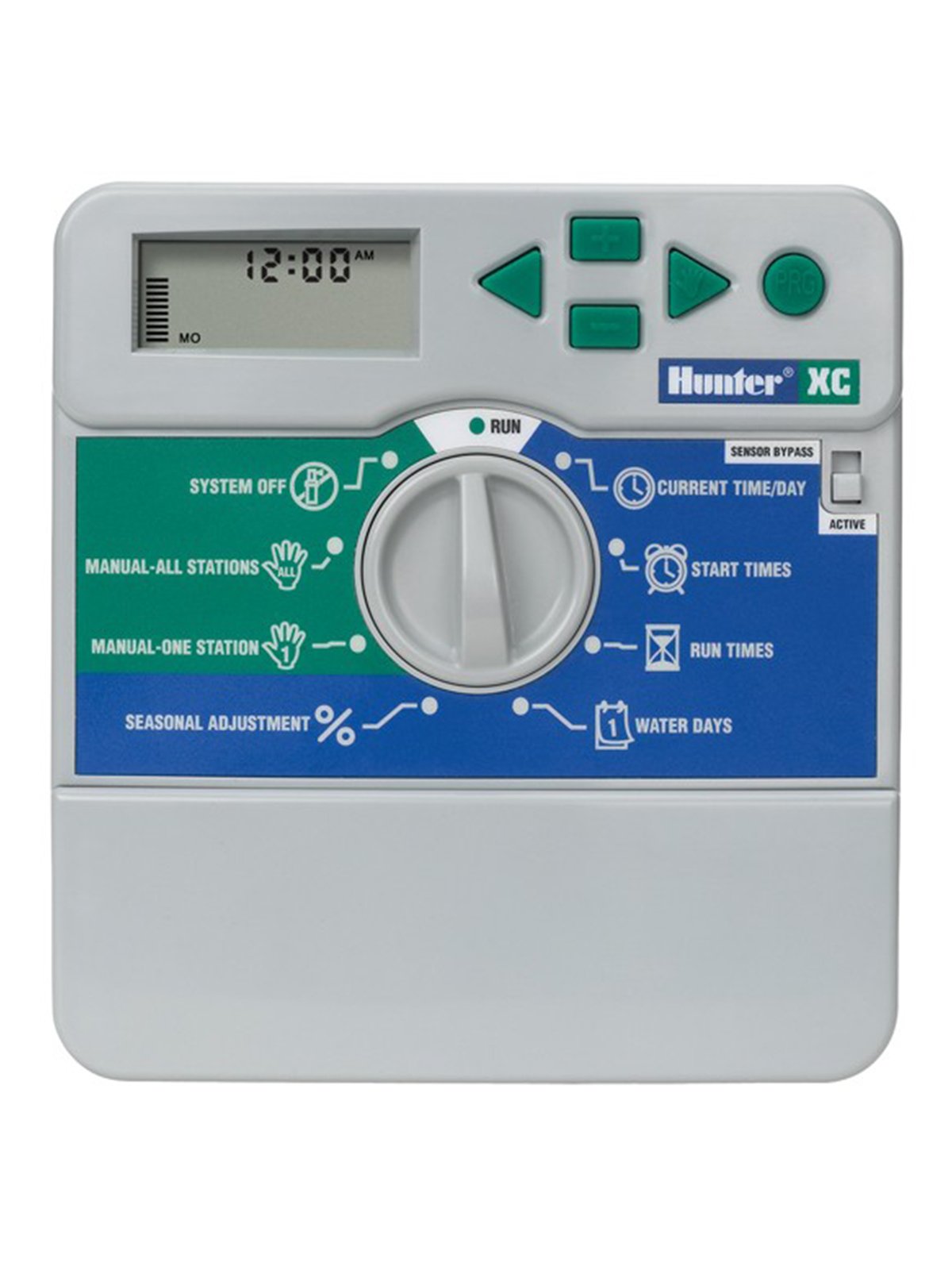
Figura 1: Quddiem view of the Rain Bird XC-801I-E Indoor Electric Irrigation Programmer. This image shows the display, programming buttons, and the dial for mode selection.
5. Istruzzjonijiet Operattivi
The XC-801I-E features a user-friendly interface for programming your irrigation schedules.
5.1 Issettjar tal-Ħin u d-Data Kurrenti
- Turn the dial to the 'SET TIME/DATE' position.
- Use the arrow buttons to adjust the current time and date.
- Press the 'NEXT' button to move between settings (hour, minute, day, month, year).
5.2 Programmazzjoni tal-Iskedi tal-Irrigazzjoni
The controller offers three independent programs (A, B, C) and four start times per program.
- Agħżel il-Programm: Turn the dial to 'PROGRAMS'. Use the 'PROGRAM' button to select Program A, B, or C.
- Issettja l-Ħinijiet tal-Bidu: For the selected program, use the arrow buttons to set up to four start times. Each start time initiates the watering sequence for all zones assigned to that program.
- Ħinijiet ta' Tħaddim taż-Żona Issettjati: Turn the dial to 'RUN TIMES'. Select the desired program and then use the arrow buttons to set the watering duration for each individual station (zone).
- Issettja l-Jiem tat-Tisqija: Turn the dial to 'WATER DAYS'. Select the desired program and then choose the specific days of the week for irrigation, or select an interval schedule (e.g., every 2 days).
5.3 Operazzjoni manwali
To manually operate a single station or all stations:
- Single Station: Turn the dial to 'MANUAL SINGLE STATION'. Use the arrow buttons to select the station and set its run time. Press 'START'.
- L-istazzjonijiet kollha: Turn the dial to 'MANUAL ALL STATIONS'. Set the run time for each station sequentially. Press 'START'.
5.4 System Off / Rain Delay
To temporarily suspend irrigation:
- Sistema Mitfija: Turn the dial to 'SYSTEM OFF' to halt all automatic irrigation.
- Dewmien tax-xita: Turn the dial to 'RAIN DELAY'. Use the arrow buttons to set the number of days for the delay. Irrigation will resume automatically after the set period.
6. Manutenzjoni
Regular maintenance ensures the longevity and optimal performance of your irrigation programmer.
- Tindif: Wipe the controller's exterior with a soft, damp drapp. Tużax tindif jew solventi li joborxu.
- Konnessjonijiet: Iċċekkja l-konnessjonijiet tal-wajers kollha perjodikament biex tiżgura li huma sikuri u ħielsa mill-korrużjoni.
- Winterization: In regions with freezing temperatures, it is recommended to disconnect the controller and store it indoors during winter months to prevent damage. Drain all water from the irrigation system.
- Batterija (jekk applikabbli): If your model includes a backup battery for settings retention during power outages, check and replace it as recommended by the manufacturer (typically every 1-2 years).
7 Issolvi l-problemi
If you encounter issues with your Rain Bird XC-801I-E, refer to the following common problems and solutions:
| Problema | Kawża Possibbli | Soluzzjoni |
|---|---|---|
| Id-displej tal-kontrollur huwa vojt | No power; faulty transformer; internal fuse (if applicable) | Check power outlet; ensure transformer is securely connected; test transformer output; consult a technician if fuse is suspected. |
| Zones not watering | Rain delay active; system off; faulty wiring; valve issues; low water pressure | Check rain delay/system off settings; inspect wiring connections; manually test valves; check water supply. |
| Incorrect watering times | Incorrect programming; sensor interference | Review program start times, run times, and water days; check sensor operation and settings. |
| Messaġġ ta' żball fuq il-wiri | Wiring fault; sensor fault; internal error | Note the error code and refer to the full product manual or contact support. Check wiring for shorts. |
Jekk il-problema tippersisti wara li tipprova dawn is-soluzzjonijiet, jekk jogħġbok ikkuntattja l-appoġġ għall-klijenti.
8. Speċifikazzjonijiet
| Karatteristika | Speċifikazzjoni |
|---|---|
| Mudell | XC-801I-E |
| Brand | Kaċċatur |
| Manifattur | Rain Bird |
| Numru ta' Żoni | 8 |
| Programmi | 3 (A, B, C) |
| Ħinijiet tal-Bidu għal kull Programm | 4 |
| Vol Operattivtage | 24 Volts AC |
| Materjal | Plastik |
| Kulur | Griż |
| Piż tal-oġġett | 1.57 Kilogrammi |
| Temperatura operattiva | 20 Grad Celsius |
| Kompatibilità tad-Dar Intelliġenti | Compatible with smart home systems (via sensor integration) |
9. Garanzija u Appoġġ
Għal informazzjoni dwar il-garanzija, appoġġ tekniku, jew mistoqsijiet dwar is-servizz, jekk jogħġbok ikkuntattja lin-negozjant awtorizzat tiegħek jew direttament lill-manifattur. Żomm l-irċevuta tax-xiri tiegħek bħala prova tax-xiri.
Manifattur: Rain Bird
Ditta: Kaċċatur
For further assistance, visit the official Rain Bird webis-sit jew ikkonsulta d-distributur lokali tiegħek.