
1. Introduzzjoni
The Lenovo ThinkPad X1 Tablet is a versatile device designed for mobile professionals, combining the functionality of a tablet, laptop, and optional projector. This manual provides essential information for setting up, operating, maintaining, and troubleshooting your ThinkPad X1 Tablet, Model 20GG0032US.

Figure 1: Lenovo ThinkPad X1 Tablet in use for a video conference.
2. Setup
2.1 Qawwa Inizjali
- Connect the power adapter to the tablet and a power outlet.
- Press the power button located on the side of the tablet.
- Follow the on-screen prompts to complete the initial Windows 10 Pro setup, including language, region, network connection, and user account creation.
2.2 Twaħħil tat-Tastiera li Tinqala'
Align the magnetic connectors on the detachable keyboard with the corresponding ports on the bottom edge of the tablet. The keyboard will snap into place securely. This transforms your tablet into a laptop-like experience.

Figura 2: Ġenb view of the ThinkPad X1 Tablet with the detachable keyboard connected.
2.3 Using the Active Pen
The Active Pen allows for precise input on the touchscreen. It can be used for writing, drawing, and navigating the interface. Ensure the pen has a charged battery if applicable (refer to pen-specific instructions for battery replacement).
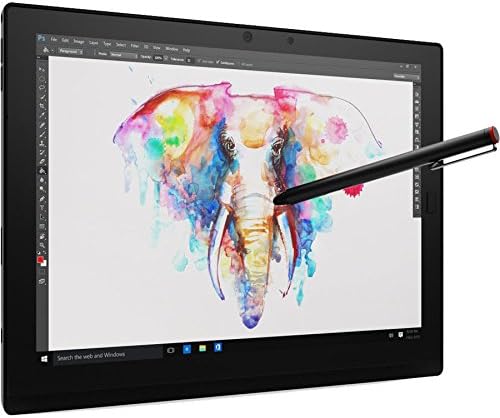
Figure 3: Using the Active Pen for creative tasks on the ThinkPad X1 Tablet.
2.4 Moduli Fakultattivi
The ThinkPad X1 Tablet supports various optional modules, such as the Presenter Module (with integrated projector) or Productivity Module (for additional ports and battery boost). To attach a module, align it with the bottom edge of the tablet and secure it according to the module's specific instructions.

Figure 4: ThinkPad X1 Tablet with the optional Presenter Module, featuring an integrated projector.
3. Istruzzjonijiet Operattivi
3.1 Display and Kickstand
The 12-inch 2K (2160 x 1440) IPS touchscreen provides a clear and vibrant viewing experience. The integrated, adjustable kickstand allows for multiple viewing angles, enhancing comfort for both work and entertainment.

Figura 5: Wara view of the ThinkPad X1 Tablet, illustrating the adjustable kickstand.
3.2 Tastiera u Input
When the detachable keyboard is connected, you can utilize the full ThinkPad keyboard experience, including the integrated TrackPoint and trackpad for precise cursor control. The touchscreen also supports multi-touch gestures for intuitive navigation.
3.3 Awdjo u Multimedia
The X1 Tablet features integrated speakers with Dolby surround sound technology, providing an enhanced audio experience for videos, music, and calls.
3.4 Konnettività
The device supports 802.11ac Wi-Fi for high-speed wireless internet access and Bluetooth for connecting to peripherals such as headphones or external mice.
3.5 Karatteristiċi tas-Sigurtà
For enhanced security, the X1 Tablet includes a Touch-Sensor Fingerprint Reader for biometric authentication and a Discrete Trusted Platform Module (dTPM) for hardware-based encryption. Remote manageability features like Intel vPro and Active Management Technology (AMT) are also available for enterprise environments.

Figure 6: ThinkPad X1 Tablet displaying a business presentation, showcasing its professional utility.
4. Manutenzjoni
4.1 Tindif tal-Apparat
- Uża drapp ratba u mingħajr ħelu ftit dampened with water or a screen cleaner specifically designed for electronics to clean the display.
- For the body and keyboard, use a soft, dry cloth. Avoid harsh chemicals or abrasive materials.
4.2 Kura tal-Batterija
The integrated lithium-polymer battery provides an average life of 10 hours. To maximize battery lifespan, avoid extreme temperatures and allow the battery to discharge partially before recharging. For optimal performance, occasionally allow the battery to fully discharge and then fully recharge.
4.3 Aġġornamenti tas-Software
Regularly update your Windows 10 Pro operating system and device drivers to ensure optimal performance, security, and compatibility. These updates are typically managed through Windows Update.
4.4 Ġestjoni tal-Ħażna
The device comes with a 256GB M.2 Solid State Drive. You can expand storage using the microSD card slot, which supports up to 64GB.
5 Issolvi l-problemi
This section addresses common issues you might encounter with your ThinkPad X1 Tablet.
5.1 Kwistjonijiet tal-Enerġija
- L-apparat ma jixgħelx: Ensure the power adapter is securely connected and the outlet is functional. Try holding the power button for 10-15 seconds to perform a hard reset.
- Il-batterija mhix qed tiċċarġja: Iċċekkja li l-adapter tal-enerġija u l-kejbil mhumiex imħassra. Ipprova sokit tal-enerġija differenti.
5.2 Problemi tal-Wiri
- L-iskrin huwa vojt: Ensure the device is powered on. Connect an external monitor to check if the issue is with the tablet's display.
- L-iskrin tattili ma jirrispondix: Erġa' ibda l-apparat. Kun żgur li l-iskrin ikun nadif u ħieles minn debris.
5.3 Keyboard/Pen Issues
- Detachable keyboard not working: Ensure the keyboard is properly aligned and securely connected to the tablet. Restart the tablet.
- Active Pen not responding: Check the pen's battery. Ensure Bluetooth is enabled on the tablet if the pen connects wirelessly.
For more complex issues or if the problem persists, please refer to the Lenovo support websit jew ikkuntattja lis-servizz tal-konsumatur.
6. Speċifikazzjonijiet
Below are the technical specifications for the Lenovo ThinkPad X1 Tablet (Model 20GG0032US).
| Karatteristika | Speċifikazzjoni |
|---|---|
| Proċessur | Intel Core m7-6Y75 (1.2 GHz, Burst up to 3.1 GHz) |
| RAM | 16 GB LPDDR3 (1866 MHz) |
| Ħażna | 256 GB M.2 Solid State Drive |
| Wiri | 12-inch Full-HD+ IPS Touchscreen (2160 x 1440 pixels) |
| Koproċessur tal-Grafika | Intel HD Graphics integrata 515 |
| Sistema Operattiva | Windows 10 Professjonali |
| Tip bla fili | 802.11ac, Bluetooth |
| Ħajja Medja tal-Batterija | 10 Sigħat |
| Piż tal-oġġett | 3 liri (madwar 1.36 kg) |
| Dimensjonijiet tal-Prodott | 14.7 x 4.2 x 11.4 pulzieri (madwar 37.3 x 10.7 x 29 ċm) |
| Slott tal-Karta MicroSD | Jappoġġja sa 64GB |
7. Garanzija u Appoġġ
7.1 Informazzjoni dwar Garanzija
The Lenovo ThinkPad X1 Tablet comes with a 1 Year Lenovo Warranty. Please retain your proof of purchase for warranty claims. This product is not eligible for AppleCare Warranty upgrades.
7.2 Appoġġ għall-Klijent
Għal assistenza teknika, downloads ta' sewwieqa, jew aktar informazzjoni, jekk jogħġbok żur is-sit uffiċjali tal-Appoġġ Lenovo website. You can typically find support resources by searching for your product model (20GG0032US) on their site.