
1. Introduzzjoni
Grazzi tax-xiriasing the Forever BS600 Bluetooth Speaker. This portable wireless speaker combines powerful audio with versatile playback options, including Bluetooth, FM radio, USB, and SD card support. It also features a built-in microphone for hands-free calling. Please read this manual carefully to ensure proper use and maintenance of your device.
Komponenti Inklużi:
- Forever BS600 Bluetooth Speaker
- 3.5mm Jack Cable
- Cable tal-Iċċarġjar tal-USB
- Lithium Battery (pre-installed)

Image 1.1: Forever BS600 speaker with its accompanying 3.5mm audio cable and USB charging cable.
2. Informazzjoni dwar is-Sigurtà
To ensure safe and optimal operation, please observe the following precautions:
- Tesponix l-apparat għal temperaturi estremi, dawl tax-xemx dirett, jew umdità għolja.
- Evita li twaqqa’ jew tissuġġetta lill-kelliem għal impatti qawwija.
- Tiżżarmax, issewwiex, jew timmodifikax l-apparat int stess. Irreferi kull manutenzjoni lil persunal kwalifikat.
- Żomm l-ispiker 'il bogħod mill-ilma u likwidi oħra. Mhuwiex reżistenti għall-ilma.
- Use only the provided or approved charging cables.
- Armi l-batteriji skont ir-regolamenti lokali. Tesponix il-batteriji għal sħana eċċessiva.
3. Prodott Aktarview
Iffamiljarizza ruħek mal-kontrolli u l-portijiet tal-ispiker:
Buttuni tal-Kontroll:
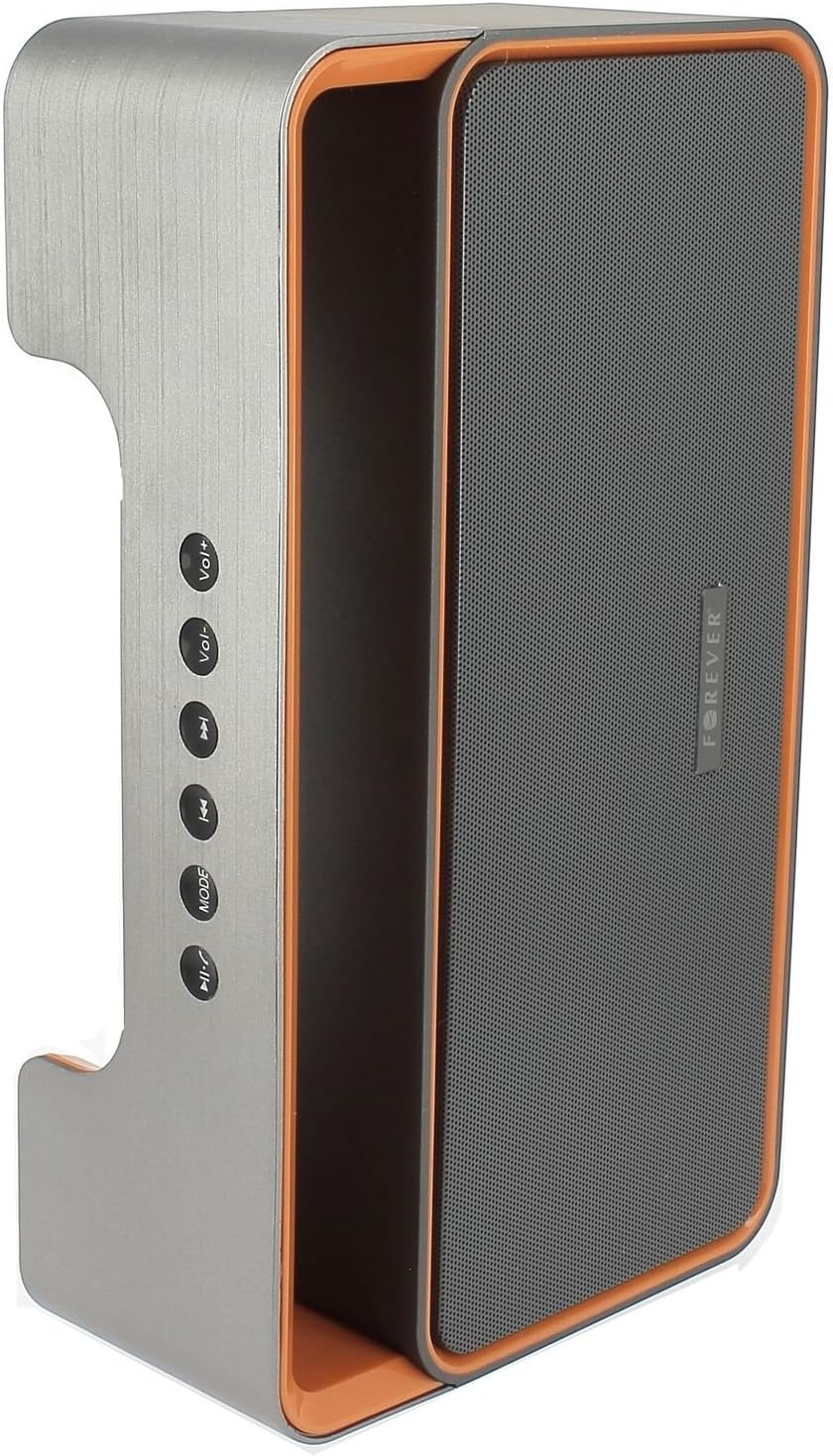
Image 3.1: Side panel with control buttons.
- Vol+ / Vol-: Aġġusta l-volum.
- Track preċedenti / Track li jmiss: Navigate between tracks in playback modes or stations in FM mode.
- MODALITÀ: Switch between Bluetooth, FM Radio, USB, SD Card, and AUX modes.
- Play/Pawsa: Play or pause audio. Answer or end calls.
Portijiet u Konnetturi:

Image 3.2: Rear panel with ports and power switch.
- Input AUXGħall-konnessjoni ta' apparati awdjo esterni permezz ta' kejbil ta' 3.5mm.
- Slot tal-Kard Mikro SD: For playing music from a Micro SD card.
- Port USB: For playing music from a USB flash drive.
- Mikro USB Charging PortGħall-iċċarġjar tal-batterija interna tal-ispiker.
- Swiċċ ON/OFF: To power the speaker on or off.
4. Setup
4.1 Iċċarġjar tal-Ispeaker
- Connect the small end of the USB charging cable to the Micro USB port on the back of the speaker.
- Qabbad it-tarf l-akbar tal-kejbil USB ma' adapter tal-enerġija USB (mhux inkluż) jew mal-port USB tal-kompjuter.
- Id-dawl indikatur tal-iċċarġjar se jixgħel (il-kulur jista' jvarja) biex juri li l-ispiker qed jiċċarġja.
- Ladarba jkun iċċarġjat kompletament, id-dawl indikatur jinbidel jew jintefa. Skonnettja l-kejbil tal-iċċarġjar.
Note: For first-time use, fully charge the speaker for approximately 3-4 hours.
4.2 Tixgħel/Jitfi
- To power on, slide the ON/OFF switch on the rear panel to the 'ON' position. You will hear an audible prompt.
- Biex titfi, żżerżaq is-swiċċ ON/OFF għall-pożizzjoni 'OFF'.
5. Istruzzjonijiet Operattivi
5.1 Għażla tal-Modalità
Agħfas il- MODALITÀ button repeatedly to cycle through the available modes: Bluetooth, FM Radio, USB, SD Card, and AUX.
5.2 Tqabbil tal-Bluetooth
- Ixgħel l-ispiker. Dan jidħol awtomatikament fil-modalità ta' tqabbil Bluetooth, indikat minn dawl LED li jteptep u sinjal li jinstema'.
- Ippermetti l-Bluetooth fuq l-apparat mobbli tiegħek (smartphone, tablet, kompjuter).
- Fittex għal available Bluetooth devices. You should find "BS600" in the list.
- Select "BS600" to connect. Once paired, the LED light will stop flashing, and you will hear a confirmation sound.
- Issa tista' ddoqq l-awdjo mit-tagħmir tiegħek permezz tal-ispiker.
5.3 Modalità tar-Radju FM
- Switch the speaker to FM Radio mode using the MODALITÀ buttuna.
- Agħfas u żomm il- Play/Pawsa button to initiate an automatic scan for FM stations. The speaker will save all found stations.
- Uża l- Track Preċedenti u Track li jmiss buttuni biex tinnaviga bejn l-istazzjonijiet salvati.
5.4 Daqq tal-Karta USB/SD
- Daħħal USB flash drive jew Micro SD card (b'awdjo MP3) files) into the corresponding port on the rear panel.
- The speaker will automatically switch to USB or SD card mode and begin playing music. If not, press the MODALITÀ buttuna biex tagħżel il-modalità korretta.
- Uża l- Track Preċedenti, Track li jmiss, u Play/Pawsa buttuni biex jikkontrollaw daqq.
5.5 Modalità AUX
- Qabbad tarf wieħed tal-kejbil tal-awdjo ta' 3.5mm mal-port tad-dħul AUX fuq l-ispiker.
- Connect the other end of the cable to the headphone jack of your external audio device.
- Switch the speaker to AUX mode using the MODALITÀ buttuna.
- Control playback from your external audio device.
5.6 Call Handling (Bluetooth Mode)
- Wieġeb Sejħa: When a call comes in during Bluetooth mode, press the Play/Pawsa agħfas il-buttuna darba biex twieġeb.
- Tmiem Sejħa: During a call, press the Play/Pawsa Agħfas il-buttuna darba biex ittemm is-sejħa.
- Irrifjuta Sejħa: When a call comes in, press and hold the Play/Pawsa buttuna biex tirrifjuta s-sejħa.
5.7 Kontroll tal-Volum
Agħfas il- Vol+ buttuna biex iżżid il-volum u l- Vol- buttuna biex tnaqqas il-volum.
6. Manutenzjoni
6.1 Tindif
- Kun żgur li l-ispiker ikun mitfi u skonnettjat minn kwalunkwe sors ta' enerġija qabel ma tnaddaf.
- Uża drapp artab, niexef u mingħajr suf biex timsaħ l-uċuħ ta’ barra tal-ispiker.
- Tużax prodotti tat-tindif li joborxu, solventi, jew sprejs kimiċi, għax dawn jistgħu jagħmlu ħsara lill-finitura jew lill-komponenti interni.
6.2 Ħażna
- Meta ma tkunx qed tużah għal perjodi twal, aħżen l-ispiker f'post frisk u niexef, 'il bogħod mix-xemx diretta u minn temperaturi estremi.
- It is recommended to charge the battery at least once every three months to maintain its lifespan.
7 Issolvi l-problemi
| Problema | Kawża Possibbli | Soluzzjoni |
|---|---|---|
| L-ispiker ma jixgħelx. | Il-batterija hija eżawrita. | Iċċarġja l-ispiker billi tuża l-kejbil USB. |
| L-ebda ħoss. | Il-volum huwa baxx wisq; intgħażlet modalità mhux korretta; apparat mhux imqabbad. | Increase volume; press MODE button to select correct source; ensure Bluetooth/AUX connection is active. |
| Tqabbil Bluetooth ifalli. | Speaker not in pairing mode; device too far; Bluetooth not enabled on source. | Ensure speaker is in Bluetooth mode and flashing; move device closer; enable Bluetooth on your device. |
| Riċeviment ħażin tar-radju FM. | Sinjal dgħajjef; interferenza ambjentali. | Irriloka l-ispiker f'żona b'riċeviment aħjar. |
| Il-karta USB/SD mhux qed tilgħab. | Skorretta file ifformattjar; il-kard/drajv mhux imdaħħal sew; midja korrotta. | Tiżgura files are MP3 format; reinsert media; try a different USB drive/SD card. |
8. Speċifikazzjonijiet
| Isem tal-Mudell | BS600 |
| Brand | Għal dejjem |
| Teknoloġija tal-Konnettività | Bluetooth, Awżiljarju, USB |
| Tip ta' Kelliem | Speaker Bluetooth portabbli |
| Karatteristiċi Speċjali | FM Radio, USB Reader, SD Card Reader |
| Qawwa massima tal-Ħruġ | 10 Watts (2 x 5W) |
| Modalità tal-Ħruġ tal-Awdjo | Mono |
| Sors tal-Enerġija | Imħaddem bil-batterija (jone tal-litju) |
| Metodu ta' Kontroll | Tactile Buttons |
| Dimensjonijiet (madwar) | Għoli: 13 ċm, Wisa': 24 ċm |
| Kulur | Grey / Orange |
| Waterproof | Nru |
9. Informazzjoni dwar Garanzija
The Forever BS600 Bluetooth Speaker comes with a limited warranty. Please refer to the warranty card included with your purchase or contact your retailer for specific terms and conditions. This warranty typically covers manufacturing defects but does not cover damage caused by misuse, accidents, unauthorized modifications, or normal wear and tear.
10. Appoġġ
If you encounter any issues not covered in the troubleshooting section or require further assistance, please contact the retailer where you purchased the product or visit the official Forever website for support resources. Please have your product model (BS600) and purchase details ready when seeking support.