
1. Introduzzjoni
Grazzi tax-xiriasing the Silverlit Xion FPV Camera Drone 84765. This drone is designed for outdoor use and offers an exciting First-Person View (FPV) flying experience with its integrated camera. Please read this manual thoroughly before operating the drone to ensure safe and optimal performance. Keep this manual for future reference.

Image 1.1: The Silverlit Xion FPV Camera Drone 84765.
2. Informazzjoni dwar is-Sigurtà
WARNING: Failure to follow these instructions may result in injury or damage to the product.
- Always operate the drone in open, clear areas, away from people, animals, buildings, and power lines.
- Ittirx f'riħ qawwi jew f'kundizzjonijiet ħżiena tat-temp.
- Żomm idejk, wiċċek, u ħwejjeġ maħlula 'l bogħod mill-iskrejjen li jduru.
- Ensure the drone battery and remote control batteries are fully charged before each flight.
- Qatt tħalli batteriji li jiċċarġjaw waħedhom.
- This product is intended for children. Adult supervision is recommended.
- Do not modify or disassemble the drone or its components.
- Always turn off the drone and remote control when not in use.
3. Kontenut tal-Pakkett
Ivverifika li l-oġġetti kollha huma preżenti fil-pakkett:
- Silverlit Xion FPV Camera Drone 84765
- Kontroll mill-bogħod
- Nuċċalijiet FPV
- Rechargeable Drone Battery
- Kejbil tal-Iċċarġjar USB (għall-batterija tad-drone)
- Skrejjen żejda
- Manwal għall-Utent

Image 3.1: The Silverlit Xion FPV Drone product box, showing the drone and FPV goggles.
4. Setup
4.1. Installazzjoni tal-Batterija tal-Kontroll mill-bogħod
- Iftaħ il-kompartiment tal-batterija fuq wara tal-kontroll remot.
- Insert the required batteries (not included) according to the polarity indicators.
- Agħlaq il-kompartiment tal-batterija sew.
4.2. Drone Battery Installation
- Kun żgur li d-drone huwa mitfi.
- Sib il-kompartiment tal-batterija fuq id-drone.
- Carefully insert the charged drone battery, ensuring it is properly seated and connected.
- Agħlaq l-għatu tal-kompartiment tal-batterija.
4.3. Installazzjoni tal-Propeller (jekk meħtieġ)
If propellers are not pre-installed, attach them according to the markings (e.g., A and B) on the propellers and motor shafts. Ensure they are securely fastened.
4.4. Remote Control and Drone Pairing
- Poġġi d-drone fuq wiċċ ċatt u livell.
- Ixgħel id-drone. Id-dwal indikatur se jteptipu.
- Ixgħel il-kontroll mill-bogħod.
- Move the left joystick (throttle) fully up, then fully down. The drone's indicator lights will become solid, indicating successful pairing.
4.5. FPV Goggle Setup
Connect the FPV goggles to your smartphone (if applicable) or power them on as per their specific instructions. Ensure a stable connection for live video feed.

Image 4.1: The remote control and FPV goggles for the Silverlit Xion Drone.
5. Iċċarġjar tal-Batterija tad-Drone
The drone's battery requires charging before use. A USB charging cable is included, but a compatible USB power adapter (not included) is required.
- Qabbad il-kejbil tal-iċċarġjar USB mal-batterija tad-drone.
- Plug the other end of the USB cable into a suitable USB power adapter (e.g., a smartphone charger or computer USB port).
- The charging indicator light will show the charging status (refer to the cable's specific instructions for light behavior).
- Charging typically takes 80-100 minutes for a full charge.
- After a flight, allow the battery to cool down for 10-15 minutes before recharging to prolong battery life.
Note: A fully charged battery provides approximately 4-5 minutes of flight time.
6. It-Tħaddim tad-Drone
6.1. Lista ta' Kontroll ta' Qabel it-Titjira
- Kun żgur li l-batteriji tad-drone u tal-kontroll remot ikunu ċċarġjati kompletament.
- Iċċekkja li l-iskrejjen huma mwaħħlin sew u bla ħsara.
- Verify the flight area is clear of obstacles, people, and animals.
- Confirm successful pairing between the drone and remote control.
6.2. Tluq u Inżul
- Poġġi d-drone fuq wiċċ ċatt u livell.
- Slowly push the left joystick (throttle) upwards to make the drone ascend.
- To land, slowly pull the left joystick (throttle) downwards until the drone gently touches the ground.
6.3. Kontrolli Bażiċi tat-Titjira
- Joystick tax-Xellug (Throttle): Up/Down for altitude control.
- Left Joystick (Yaw): Left/Right for rotating the drone horizontally.
- Joystick tal-Lemin (Pitch/Roll): Up/Down for moving forward/backward; Left/Right for moving left/right (sideways).
6.4. Tħaddim tal-Kamera u FPV
The drone features a 1080p video recording capability and 0.3 MP effective still resolution. Refer to the remote control diagram for specific camera buttons.
- Reġistrazzjoni tal-vidjo: Press the designated video button on the remote control to start/stop recording.
- Qbid tar-Ritratti: Press the designated photo button to take a still image.
- FPV Live Feed: Once the FPV goggles are set up and connected, you will see the live video feed from the drone's camera, enhancing your flying experience.
7. Manutenzjoni
- Tindif: Uża drapp artab u niexef biex tnaddaf id-drone u l-kontroll remot. Tużax kimiċi jew solventi ħarxa.
- Spezzjoni tal-Iskrun: Regularly check propellers for cracks, bends, or damage. Replace any damaged propellers with spare parts provided.
- Ħażna: Store the drone and its components in a cool, dry place, away from direct sunlight and extreme temperatures. Remove batteries from the remote control if storing for extended periods.
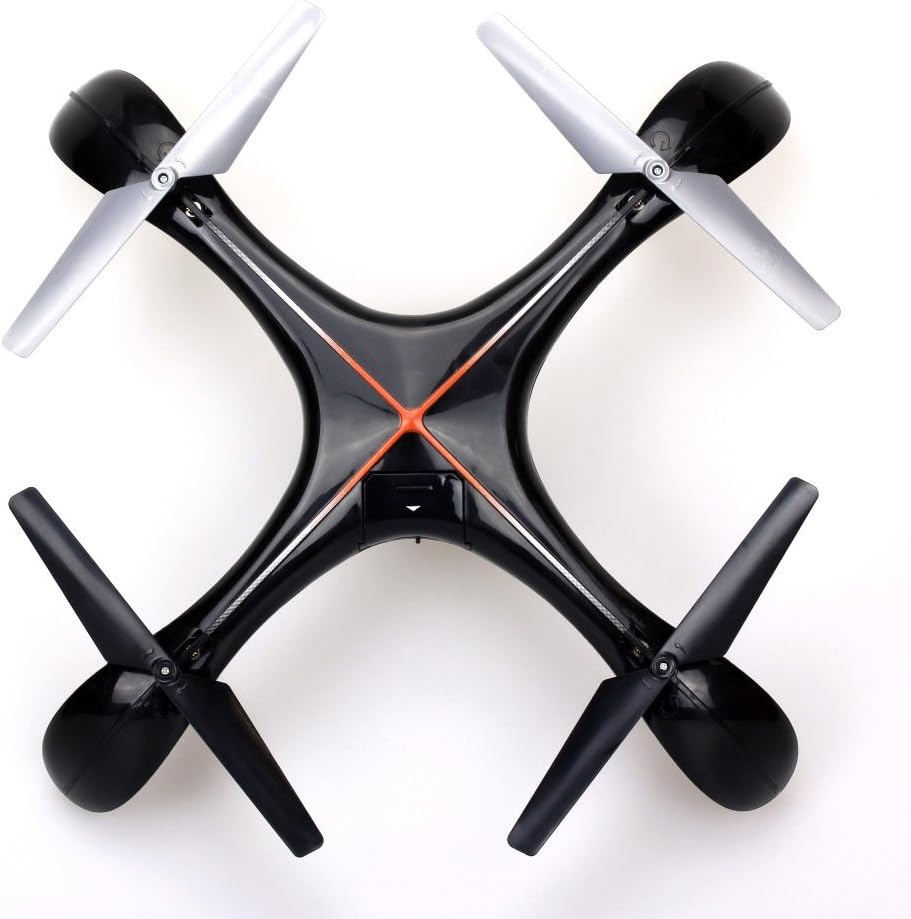
Immaġni 7.1: Fuq view of the Silverlit Xion FPV Drone, showing propeller orientation.
8 Issolvi l-problemi
| Problema | Kawża Possibbli | Soluzzjoni |
|---|---|---|
| Id-drone ma jirrispondix għall-kontroll remot. | Low battery in drone or remote; not paired correctly. | Charge drone battery, replace remote control batteries, re-attempt pairing process. |
| Id-drone jtir b'mod erratiku jew jitbiegħed mid-drift. | Drone not calibrated on a flat surface; damaged propeller. | Ensure drone is placed on a level surface during pairing/initialization. Check and replace damaged propellers. Refer to manual for calibration steps if available. |
| Poor video quality or no FPV feed. | Weak signal; FPV goggles not connected properly. | Ensure drone is within range. Check FPV goggle connection and battery. |
| Ħin qasir tat-titjira. | Il-batterija mhix iċċarġjata għalkollox; batterija qadima. | Ensure battery is fully charged (80-100 minutes). Consider replacing the battery if it's old and performance has degraded. |
9. Speċifikazzjonijiet
- Ditta: Silverlit
- Isem tal-Mudell: 84765
- Medda ta' Età: Tifel
- Riżoluzzjoni tar-Reġistrazzjoni tal-Vidjo: 1080p
- Riżoluzzjoni Still effettiva: 0.3 MP
- Livell ta 'Ħiliet: Professional (Note: This may refer to advanced features, but basic operation is suitable for children with supervision)
- Tip ta' Kontroll: Kontroll mill-bogħod
- Batteriji Inklużi: No (for remote control)
- Kontroll mill-bogħod Inkluż: Iva
- Piż tal-Prodott: 1.5 Kilogrammi
10. Garanzija u Appoġġ
For warranty information or technical support, please refer to the documentation provided with your purchase or contact Silverlit customer service. Keep your proof of purchase for any warranty claims.


