
1. Introduzzjoni
Thank you for choosing the Kaiser MSS-8915 Audio System. This professional 15-inch speaker is designed to deliver powerful and clear audio for various applications, including events, parties, and professional use. This manual provides essential information for safe and efficient operation, setup, maintenance, and troubleshooting.
2. Istruzzjonijiet Importanti dwar is-Sigurtà
Jekk jogħġbok aqra u ifhem l-istruzzjonijiet kollha tas-sigurtà qabel ma tħaddem dan l-apparat. Żomm dan il-manwal għal referenza futura.
- Sors tal-Enerġija: Qabbad l-unità biss mal-provvista tal-enerġija speċifikata voltage. Ensure the power cable is not damaged.
- Ventilazzjoni: Timblokkax il-fetħiet tal-ventilazzjoni. Kun żgur li jkun hemm fluss tal-arja adegwat madwar l-unità.
- Ilma u Umdità: Tesponix l-unità għax-xita, umdità, jew umdità eċċessiva. Tpoġġix oġġetti mimlija b'likwidi fuq l-unità.
- Sħana: Żomm l-unità 'l bogħod minn sorsi ta' sħana bħal radjaturi, reġistri tas-sħana, stufi, jew apparat ieħor li jipproduċi sħana.
- Tindif: Skonnettja l-unità mill-iżbokk tal-enerġija qabel ma tnaddafha. Uża drapp niexef għat-tindif.
- Servizzi: Tippruvax isservi dan il-prodott int stess. Irreferi l-manutenzjoni kollha lil persunal tas-servizz kwalifikat.
- Pjazzament: Ensure the unit is placed on a stable surface or securely mounted on a stand to prevent tipping.
- Tfal: Żomm l-unità u l-aċċessorji tagħha fejn ma jintlaħqux mit-tfal.
3. Kontenut tal-Pakkett
Ivverifika li l-oġġetti kollha huma preżenti fil-pakkett:
- Kaiser MSS-8915 Audio System Unit
- Kejbil tal-Enerġija
- Manwal għall-Utent (dan id-dokument)
4. Prodott Aktarview
Familiarize yourself with the components and features of your Kaiser MSS-8915 Audio System.
4.1 Quddiem View
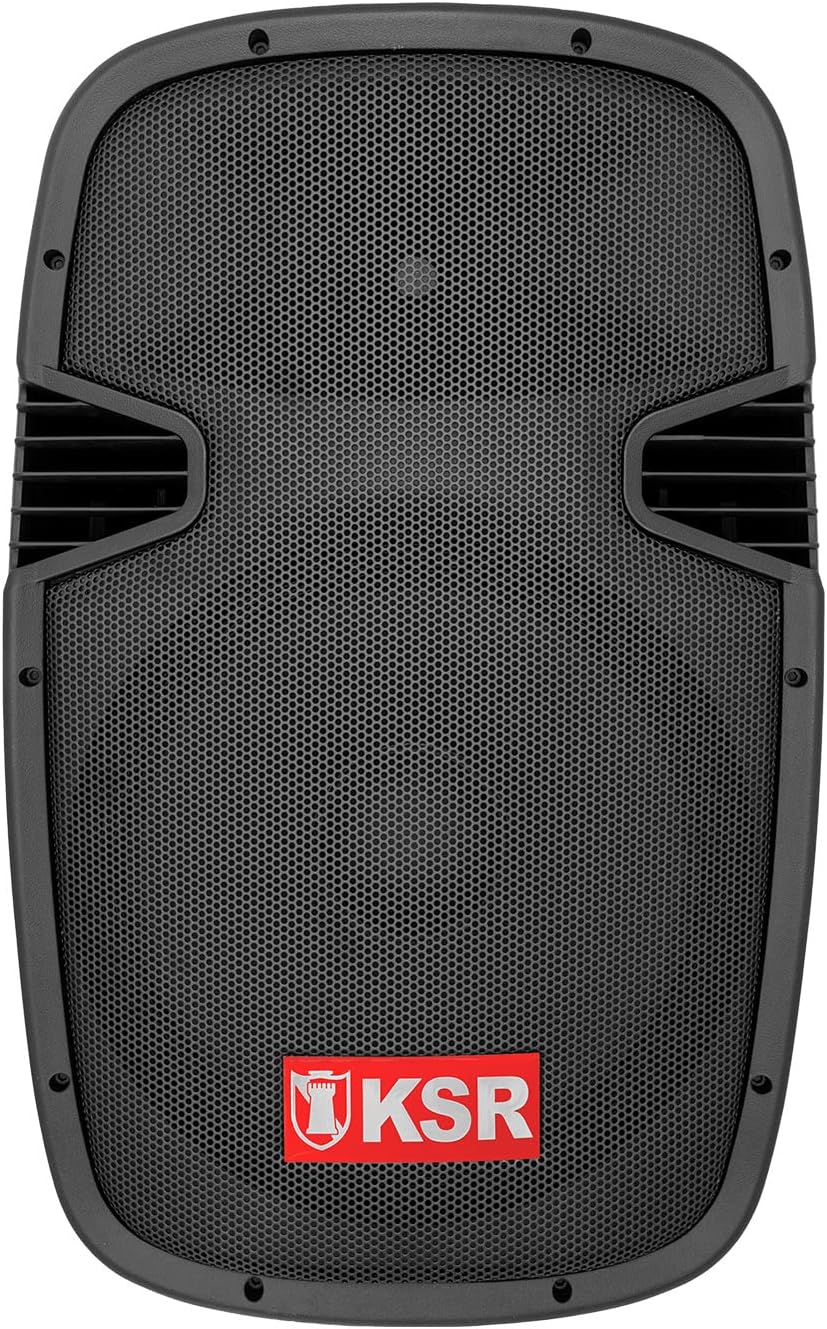
Figura 4.1: Quddiem view of the Kaiser MSS-8915 speaker, showing the protective grille and the KSR logo.
4.2 Il-Pannell ta' Wara u l-Konnessjonijiet

Figura 4.2: Rear panel of the Kaiser MSS-8915, featuring Speakon quick connections for audio input/output and the Kaiser branding plate.
- Konnetturi Speakon: For secure and reliable audio input and daisy-chaining to other speakers.
- Input ta' Enerġija: Konnessjoni għall-kejbil prinċipali tal-enerġija.
- Panel tal-Kontroll: (If applicable, for Bluetooth, USB, and SD features).
4.3 Transport and Mounting Features

Figura 4.3: Ġenb view illustrating the integrated side handle for easy transport.

Figura 4.4: Qiegħ view of the speaker, highlighting the integrated wheels for convenient mobility.
- Side and Top Handles: Ergonomically designed for comfortable lifting and carrying.
- Roti: Integrated at the bottom for effortless transportation.
- Stand Mount: A rear knob and socket allow for secure mounting on a speaker stand.
5. Istruzzjonijiet ta' Setup
Follow these steps to set up your Kaiser MSS-8915 Audio System.
5.1 Tqegħid
- Choose a stable, flat surface for the speaker.
- For optimal sound dispersion, consider placing the speaker on a compatible stand using the rear mounting socket.
- Ensure there is adequate space around the speaker for ventilation.
5.2 Konnessjoni tal-Enerġija
- Ensure the speaker's power switch (if present) is in the OFF position.
- Connect the provided power cable to the power input on the rear panel of the speaker.
- Ipplaggja t-tarf l-ieħor tal-kejbil tal-enerġija f'sokit elettriku adattat.
5.3 Konnessjonijiet tal-Awdjo
The MSS-8915 uses Speakon connectors for audio input and output.
- Connect your audio source (e.g., mixer, amplifier) to the Speakon input connector on the rear panel using a compatible Speakon cable.
- To daisy-chain multiple MSS-8915 speakers, connect a Speakon cable from the output of the first speaker to the input of the next speaker.
6. Istruzzjonijiet Operattivi
This section details how to operate your audio system. Note: While the product description mentions a "passive speaker," the product title and specifications indicate integrated Bluetooth, USB, and SD functionality, suggesting an active component. These instructions assume the presence of such active features.
6.1 Tixgħel/Jitfi
- Wara li jsiru l-konnessjonijiet kollha, aqleb il-buttuna tal-qawwa għall-pożizzjoni ON.
- To power off, switch the power button to the OFF position and then unplug the power cable from the outlet.
6.2 Konnettività Bluetooth
- Kun żgur li l-kelliem ikun mixgħul.
- Attiva l-Bluetooth fuq l-apparat mobbli tiegħek (smartphone, tablet, eċċ.).
- Fittex għal available Bluetooth devices and select "Kaiser MSS-8915" (or similar name).
- Ladarba jkun imqabbad, tista' tixxandar l-awdjo mingħajr fili mit-tagħmir tiegħek għall-ispiker.
6.3 Daqq tal-USB u tal-Karta SD
- Insert a USB flash drive or SD card into the respective port on the speaker's control panel.
- The speaker should automatically detect the media and begin playback.
- Use the control panel buttons (Play/Pause, Next/Previous Track, Volume) to manage playback.
6.4 Kontroll tal-Volum
Adjust the master volume using the dedicated volume control knob on the speaker's control panel. Start with a low volume and gradually increase it to your desired level.
7. Manutenzjoni
Proper maintenance ensures the longevity and optimal performance of your audio system.
7.1 Tindif
- Always unplug the speaker before cleaning.
- Uża drapp artab u niexef biex timsaħ l-uċuħ ta’ barra.
- Tużax prodotti tat-tindif, xama', jew solventi li joborxu għax jistgħu jagħmlu ħsara lill-finitura.
- For the speaker grille, use a soft brush or vacuum cleaner with a brush attachment to remove dust.
7.2 Ħażna
- Meta ma tkunx qed tużah għal perjodi twal, aħżen l-ispiker f'post frisk u niexef, 'il bogħod mix-xemx diretta u minn temperaturi estremi.
- Jekk possibbli, uża l-imballaġġ oriġinali jew għata protettiva biex tevita l-akkumulazzjoni tat-trab u l-ħsara fiżika.
8 Issolvi l-problemi
If you encounter issues with your Kaiser MSS-8915, refer to the following common problems and solutions.
| Problema | Kawża Possibbli | Soluzzjoni |
|---|---|---|
| Ebda qawwa | Power cable not connected; Power outlet not working; Speaker power switch off. | Ensure power cable is securely connected. Test the outlet with another device. Turn the speaker power switch ON. |
| Ebda output tal-ħoss | Volume too low; Incorrect audio input connection; Audio source issue; Damaged cable. | Increase volume. Check Speakon cable connections. Verify audio source is playing. Try a different audio cable. |
| Nuqqas ta' pairing Bluetooth | L-ispiker mhux fil-modalità ta' tqabbil; L-apparat wisq 'il bogħod; Interferenza. | Ensure speaker is discoverable. Move device closer to speaker. Avoid other wireless devices. |
| Il-plejbek tal-USB/SD mhux qed jaħdem | Mhux appoġġjat file format; Corrupted media; Incorrect insertion. | Tiżgura files are in a supported format (e.g., MP3). Try a different USB drive/SD card. Reinsert media correctly. |
| Ħoss distort | Volume too high; Input signal too strong; Damaged speaker component. | Reduce volume on speaker and audio source. Check input levels. If problem persists, contact support. |
9. Speċifikazzjonijiet
Technical specifications for the Kaiser MSS-8915 Audio System.

Figura 9.1: Wara view of the Kaiser MSS-8915, including key dimensions for reference.
| Isem tal-Mudell | MSS-8915 |
| Tip ta' Kelliem | Professional Passive Speaker, 2-way, Surround Sound |
| Daqs tal-Woofer | 15 pulzieri (38.1 ċm) |
| Sewwieq | Titanium Driver |
| Audio Power (PMPO) | 4000 W PMPO |
| Audio Power (RMS) | 150 W RMS |
| Impedenza | 8 Ohm |
| Teknoloġija tal-Konnettività | Bluetooth, USB, SD (for active system features) |
| Komunikazzjoni bla fili | Bluetooth |
| Metodu ta' Kontroll | Tactile (for integrated audio system controls) |
| Sors tal-Enerġija | Corded Elettriku |
| Dimensjonijiet (L x W x H) | 49 x 42 x 76 ċm |
| Piż | 15 kg |
| Komponenti Inklużi | Kejbil tal-enerġija |
| Tip ta 'Immuntar | Mount Mount |
10. Garanzija u Appoġġ
Kaiser products are manufactured to high-quality standards. For warranty information and technical support, please refer to the warranty card included with your product or visit the official Kaiser websit.
- Perjodu ta' Garanzija: Please consult your purchase documentation or the manufacturer's websit għal termini speċifiċi tal-garanzija.
- Appoġġ Tekniku: For assistance with setup, troubleshooting, or product inquiries, contact Kaiser customer service.
- Riżorsi onlajn: Żur il- Kaiser Brand Store on Amazon għal informazzjoni u appoġġ addizzjonali dwar il-prodott.