
1. Introduzzjoni
This manual provides essential information for the installation, operation, and maintenance of your Genuine Ford ET4Z-19G490-A Rear View Camera Assembly. This component is an Original Equipment Manufacturer (OEM) part, designed and manufactured to Ford standards for specific vehicle models. Please read this manual thoroughly before proceeding with installation or use.
2. Informazzjoni dwar is-Sigurtà
- Always disconnect the vehicle's battery before beginning any electrical work to prevent electrical shock or damage to vehicle systems.
- Kun żgur li l-konnessjonijiet kollha huma siguri u iżolati sew biex tevita short circuits.
- Irreferi għall-manwal tas-servizz tal-vettura tiegħek għal dijagrammi speċifiċi tal-wajers u l-postijiet tal-komponenti.
- If you are not comfortable performing the installation, seek assistance from a qualified automotive technician.
- In-naħa ta’ wara view camera is an aid and does not replace the driver's responsibility to check surroundings and mirrors before backing up.
3. Kontenut tal-Pakkett
Iċċekkja li l-komponenti kollha huma preżenti qabel tibda l-installazzjoni:
- 1x Ford ET4Z-19G490-A Camera Assembly
If any parts are missing or damaged, do not proceed with installation. Contact your supplier for assistance.
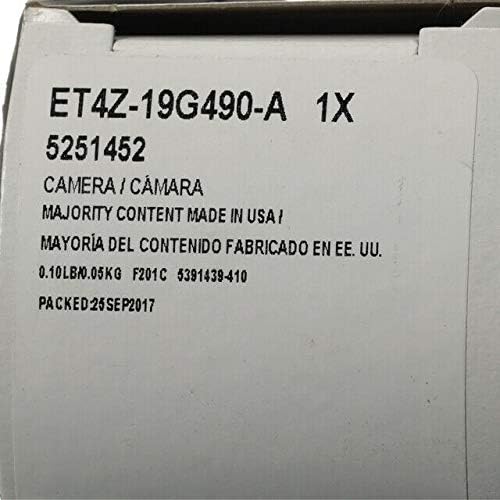
Figure 3.1: Packaging label indicating the ET4Z-19G490-A camera assembly.
4. Installazzjoni
Installation of the Ford ET4Z-19G490-A camera assembly typically involves replacing an existing camera unit. Due to variations in vehicle models and trim levels, specific installation steps may differ. It is highly recommended to consult your vehicle's official service manual or reputable online resources for detailed, vehicle-specific instructions.
Passi Ġenerali ta' Installazzjoni:
- Preparazzjoni: Park the vehicle on a level surface, engage the parking brake, and turn off the ignition. Disconnect the negative terminal of the vehicle's battery.
- Aċċess: Gain access to the existing camera assembly. This often requires removing interior trim panels, tailgate components, or exterior emblems, depending on your vehicle model.
- Disconnect Old Camera: Carefully disconnect the electrical connector and any mounting hardware securing the old camera.
- Install New Camera: Position the new Ford ET4Z-19G490-A camera assembly into the mounting location. Ensure proper orientation (lens facing outwards and downwards for rear view). Secure it with the appropriate mounting hardware.
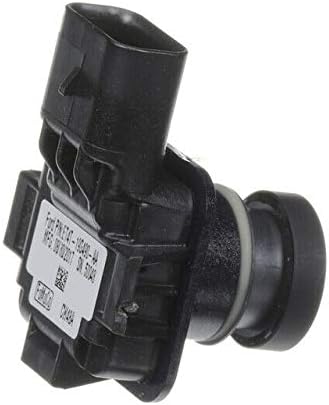
Figura 4.1: Ġenb view of the camera assembly, highlighting the connector.
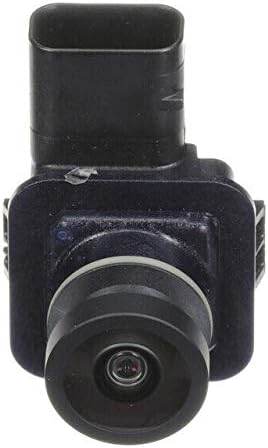
Figura 4.2: Quddiem view tal-lenti tal-kamera.

Figura 4.3: Wara view of the camera assembly with identification label.
- Qabbad il-Wiring: Connect the vehicle's wiring harness to the camera's RCA connector. Ensure the connection is firm.
- Funzjonalità tat-Test: Before reassembling all trim, reconnect the vehicle's battery. Turn the ignition to the 'ON' position (without starting the engine) and shift the transmission into 'REVERSE'. Verify that the camera image appears correctly on your vehicle's display monitor.
- Assemblaġġ mill-ġdid: Once functionality is confirmed, reassemble all removed trim panels and components.
5. Istruzzjonijiet Operattivi
The Ford ET4Z-19G490-A Rear View Camera Assembly operates automatically in conjunction with your vehicle's transmission system.
- When the vehicle's transmission is shifted into 'REVERSE', the camera will activate.
- The live video feed from the camera will be displayed on your vehicle's compatible monitor.
- Depending on your vehicle's configuration, dynamic or static guidance lines may appear on the display to assist with parking and maneuvering.
- The camera will deactivate when the transmission is shifted out of 'REVERSE'.
6. Manutenzjoni
To ensure optimal performance and longevity of your rear view camera, follow these simple maintenance guidelines:
- Tindif tal-Lenti: Naddaf il-lenti tal-kamera perjodikament b'drapp artab u dryer.amp cloth to remove dirt, dust, and debris. Avoid abrasive cleaners or materials that could scratch the lens.
- Kontroll tal-Konnessjoni: If accessible, occasionally check the electrical connections to ensure they remain secure and free from corrosion.
- Fatturi Ambjentali: Extreme temperatures, heavy rain, or snow can temporarily affect camera performance. Ensure the lens is clear of ice or snow before use.
7 Issolvi l-problemi
If you experience issues with your Ford ET4Z-19G490-A Rear View Camera, refer to the following troubleshooting guide:
| Problema | Kawża Possibbli | Soluzzjoni |
|---|---|---|
| L-ebda immaġni ma tintwera meta tkun bil-maqlub. | Konnessjoni elettrika maħlula. Fjus minfuħ. Faulty camera unit. | Check all electrical connections to the camera and display. Inspect vehicle's fuse box for a blown fuse related to the camera or display. If connections and fuses are good, the camera may require replacement. |
| L-immaġni hija mċajpra jew distorta. | Lenti tal-kamera maħmuġa. Umdità ġewwa l-lenti. Damaged camera unit. | Naddaf il-lenti tal-kamera b'drapp artab u damp drapp. Allow time for any condensation to dissipate. If persistent, the seal may be compromised. If cleaning does not resolve the issue, the camera may be damaged. |
| Image is upside down or incorrect orientation. | Incorrect camera model for vehicle. Installazzjoni ħażina. | Verify that the ET4Z-19G490-A is the correct part number for your specific vehicle model and year. Ensure the camera is installed with the correct orientation as per vehicle service manual. |
If troubleshooting steps do not resolve the issue, it is recommended to consult a qualified automotive technician or contact Ford customer support.
8. Speċifikazzjonijiet
| Karatteristika | Dettall |
|---|---|
| Numru tal-Mudell | ET4Z-19G490-A |
| Manifattur | Ford |
| Isem tat-Tip ta' Oġġett | CAMERA ASY |
| Apparati Kompatibbli | Monitor |
| Tip ta' Installazzjoni | Immonta fil-wiċċ |
| Teknoloġija tas-Sensor Ottiku | CMOS |
| Tip ta' Lenti | Angolu Wiesa', Fiss |
| Tip ta' Konnettur | RCA |
| Format tal-Qbid tal-Vidjo | MP4 |
| Riżoluzzjoni tal-Qbid tal-Vidjo | 720p |
| Piż tal-oġġett | 16-il uqija (madwar 0.45 kg) |
9. Garanzija u Appoġġ
This Genuine Ford Part is covered by a limited warranty. For specific details regarding the warranty period, coverage, and claims process, please refer to the warranty documentation provided with your vehicle or contact an authorized Ford dealership or Ford customer service.
For technical support, installation assistance, or warranty inquiries, please contact your local authorized Ford dealership or visit the official Ford websit għal riżorsi ta' appoġġ għall-klijenti.