
Coby CBC-52-WHT
Coby Retro LCD Alarm Clock
Model: CBC-52-WHT
Introduzzjoni
Thank you for choosing the Coby Retro LCD Alarm Clock, model CBC-52-WHT. This user manual provides essential information for setting up, operating, and maintaining your new alarm clock. Designed for clear and precise visibility, this clock features a sleek 3.5" LCD screen that displays time, date, and indoor temperature.
Karatteristiċi ewlenin:
- Perpetual Calendar Display: Always know the current date.
- On-The-Hour Chime: Optional audible chime for every hour.
- LCD Time and Temperature Display: Clear digital readout of time and indoor temperature.
- Alarm & 10 Minute Snooze Function: Reliable alarm with a convenient snooze option.
- Imħaddma bil-batterija: Portable design, requires 2 AAA batteries (not included).
Kontenut tal-Pakkett
Jekk jogħġbok iċċekkja l-pakkett bir-reqqa biex tiżgura li l-oġġetti kollha huma preżenti u f'kundizzjoni tajba.
- 1 x Coby Retro LCD Alarm Clock (CBC-52-WHT)
- 1 x Manwal tal-Utent (dan id-dokument)
Nota: Hemm bżonn ta' żewġ batteriji AAA għall-operazzjoni u mhumiex inklużi fil-pakkett.
Prodott Overview u Kontrolli

Figura 1: Quddiem view of the Coby Retro LCD Alarm Clock, highlighting the digital display and control buttons.
Elementi tal-wiri:
- Wiri tal-Ħin: Shows current time (AM/PM indicator).
- Wiri tal-Ħin tal-Allarm: Shows the set alarm time.
- Wiri tax-Xahar/Data: Shows the current month and day.
- Wiri tat-Temperatura: Juri t-temperatura ta' ġewwa f'Celsius jew Fahrenheit.
- Ikona tal-allarm: Indicates when the alarm is active.
- Chime Icon: Indicates when the hourlIl-ħoss tal-ħoss y huwa attiv.
Control Buttons (Front Panel):
- ĦIN IPPOST: Used to enter time/date setting mode.
- 'L isfel: Decreases values during setting, or navigates options.
- UP/°C/°F: Increases values during setting, navigates options, or switches temperature unit.
- SET TA 'ALLARM: Użat biex tidħol fil-modalità tal-issettjar tal-allarm.
- ALLARM ON / OFF: Jixgħel jew jitfi l-funzjoni tal-allarm.
Buttuna ta' Fuq:
- SNOOZE / DAWL: Activates snooze during an alarm, or temporarily illuminates the display backlight.
Setup
1. Installazzjoni tal-batterija
- Sib l-għatu tal-kompartiment tal-batterija fuq wara tal-arloġġ tal-allarm.
- Żerżaq l-għatu 'l isfel biex tiftaħu.
- Daħħal żewġ (2) batteriji AAA ġodda, waqt li tiżgura l-polarità korretta (+ u -) kif indikat ġewwa l-kompartiment.
- Erġa’ poġġi l-għatu tal-kompartiment tal-batterija billi żżerżaqha lura f’postu sakemm tikklikkja.
Note: The clock will power on automatically once batteries are inserted. The display may show default values or "12:00 AM".
Istruzzjonijiet Operattivi
1. L-issettjar tal-Ħin u d-Data
- Agħfas u żomm il- IL-ĦIN IPPOST Agħfas il-buttuna għal madwar 3 sekondi sakemm iċ-ċifri tas-sigħat jibdew jteptep.
- Uża l- UP/°C/°F or 'L isfel buttuni biex taġġusta s-siegħa. Oqgħod attent għall-indikatur AM/PM.
- Agħfas IL-ĦIN IPPOST again to move to the minute setting. Use UP/°C/°F or 'L isfel biex taġġusta l-minuti.
- Agħfas IL-ĦIN IPPOST again to move to the year setting. Adjust with UP/°C/°F or 'L isfel.
- Agħfas IL-ĦIN IPPOST again to move to the month setting. Adjust with UP/°C/°F or 'L isfel.
- Agħfas IL-ĦIN IPPOST again to move to the date setting. Adjust with UP/°C/°F or 'L isfel.
- Agħfas IL-ĦIN IPPOST one last time to exit the setting mode. The display will stop flashing.
2. Issettjar tal-Allarm
- Agħfas u żomm il- SET TA 'ALLARM button for approximately 3 seconds until the alarm hour digits begin to flash.
- Uża l- UP/°C/°F or 'L isfel buttons to adjust the alarm hour. Observe the AM/PM indicator for the alarm.
- Agħfas SET TA 'ALLARM again to move to the alarm minute setting. Use UP/°C/°F or 'L isfel biex taġġusta l-minuti tal-allarm.
- Agħfas SET TA 'ALLARM one last time to exit the alarm setting mode. The alarm time will stop flashing.
3. Attivazzjoni/Diżattivazzjoni tal-Allarm
- Biex tixgħel l-allarm ON: Agħfas il- ALLARM ON / OFF button once. An alarm icon (bell symbol) will appear on the display, indicating the alarm is active.
- Biex tixgħel l-allarm OFF: Agħfas il- ALLARM ON / OFF button again. The alarm icon will disappear from the display.
4. Funzjoni Snooze
- Meta jdoqq l-allarm, agħfas il-buttuna l-kbira SNOOZE / DAWL button on top of the clock. The alarm will temporarily stop and sound again after approximately 10 minutes.
- To cancel the snooze and turn off the alarm completely, press any other button on the front panel (e.g., ALLARM ON / OFF).
5. Display Backlight
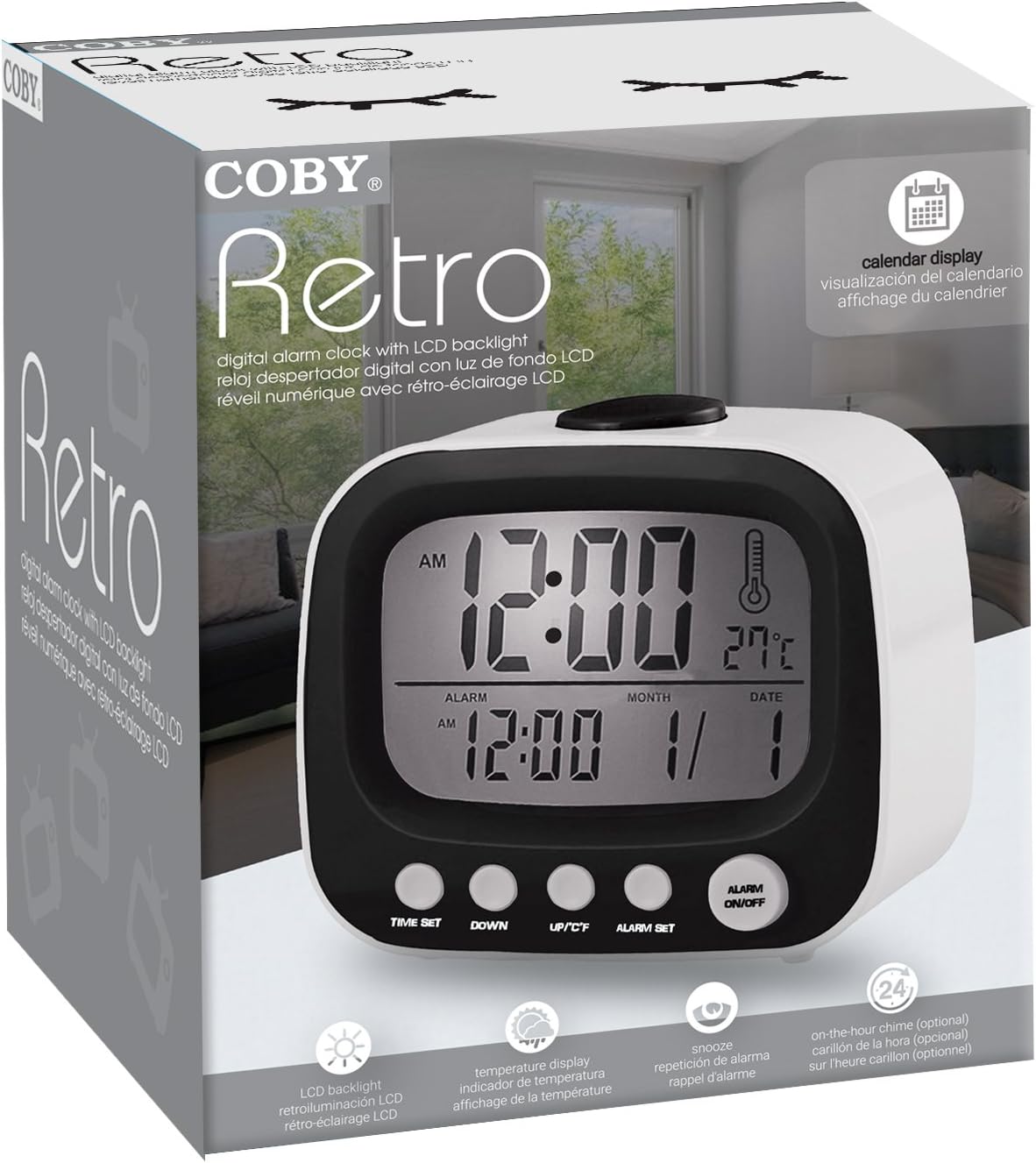
Figura 2: The Coby Retro LCD Alarm Clock with its backlight activated, providing visibility in low-light conditions.
- To temporarily illuminate the display, press the large SNOOZE / DAWL button on top of the clock. The backlight will stay on for a few seconds.
6. Tibdil fl-Unità tat-Temperatura (°C/°F)
- Fil-modalità tal-wiri tal-ħin normali, agħfas il- UP/°C/°F button once to toggle between Celsius (°C) and Fahrenheit (°F) temperature readings.
7. On-The-Hour Chime
This model features an optional on-the-hour chime. The method to activate/deactivate this feature is typically integrated with the time setting or a dedicated button. If a chime icon is visible on the display, it indicates the chime is active. Consult the quick start guide if provided, or experiment with pressing the UP/°C/°F or 'L isfel buttons in normal mode to see if a chime icon appears/disappears.
Manutenzjoni
Tindif:
- Imsaħ il-wiċċ tal-arloġġ b'ċarruta ratba u niexfa.
- Tużax prodotti tat-tindif, xama', jew solventi li joborxu għax jistgħu jagħmlu ħsara lill-finitura.
- Avoid exposing the clock to excessive moisture or submerging it in water.
Sostituzzjoni tal-batterija:
- When the display becomes dim or the clock functions erratically, it's time to replace the batteries.
- Follow the "Battery Installation" steps in the Setup section to replace the two AAA batteries.
- Always use new batteries of the same type.
- Armi batteriji qodma b'mod responsabbli skont ir-regolamenti lokali.
Issolvi l-problemi
| Problema | Kawża Possibbli | Soluzzjoni |
|---|---|---|
| Id-displej huwa vojt jew mudlam. | Il-batteriji huma mejta jew imdaħħla ħażin. | Ibdel il-batteriji b'oħrajn ġodda, filwaqt li tiżgura polarità korretta. |
| L-allarm ma jdoqqx. | Alarm function is not activated, or alarm time is incorrect. | Ensure the alarm icon is visible on the display. Re-check alarm time setting. |
| Il-Ħin/Data mhumiex korretti. | Time/Date was not set correctly or batteries were removed. | Follow the "Setting the Time and Date" instructions to reset. |
| Il-qari tat-temperatura jidher li mhux preċiż. | L-arloġġ jitqiegħed ħdejn sors ta' sħana jew ventilazzjoni. | Mexxi l-arloġġ f'post b'temperatura ambjentali stabbli. |
Speċifikazzjonijiet
| Ditta: | Coby |
| Numru tal-Mudell: | CBC-52-WHT |
| Kulur: | Abjad |
| Tip ta' wiri: | LCD diġitali |
| Sors tal-Enerġija: | 2 x Batteriji AAA (mhux inklużi) |
| Dimensjonijiet tal-Prodott: | 20.32 x 7.62 x 10.16 ċm (8 x 3 x 4 pulzieri) |
| Piż tal-oġġett: | 249.47 g (0.55 lbs) |
| Karatteristiċi Speċjali: | Alarm, Calendar Display, Snooze, Temperature Display, On-The-Hour Chime |
| Manifattur: | Summit Electronics, US |
Garanzija u Appoġġ
Coby products are designed for reliability and performance. For information regarding warranty coverage, technical support, or service inquiries, please refer to the warranty card included with your purchase or visit the official Coby websit. Jekk jogħġbok żomm il-prova tax-xiri tiegħek għal talbiet ta' garanzija.
For further assistance, you may contact Coby customer support through their official channels. Always provide your product model number (CBC-52-WHT) when seeking support.