
Introduzzjoni
This manual provides instructions for the safe and effective use of your Clatronic AT 3605 Alcohol Tester. Please read this manual thoroughly before operating the device and keep it for future reference. This device is designed for personal use as a preliminary indicator of alcohol presence and should not be used as a basis for legal decisions or official measurements.
Informazzjoni Importanti dwar is-Sigurtà
- This device is intended for personal use as a preliminary indicator of alcohol presence. It is not a substitute for official breathalyzer tests or legal evidence.
- Do not operate the device while driving or performing other activities that require full attention.
- Żomm fejn ma jintlaħaqx mit-tfal.
- Tesponix l-apparat għal temperaturi estremi, dawl tax-xemx dirett, jew umdità.
- Uża biss it-tip ta' batterija speċifikat (2 x AAA).
- Armi l-batteriji u l-apparat skont ir-regolamenti lokali.
- Wait at least 20 minutes after consuming alcohol before performing a test to ensure accurate readings.
Prodott Overview
The Clatronic AT 3605 is a compact alcohol tester designed for personal use. It features a dual LCD display and provides optical warnings at specific alcohol levels.
Komponenti tal-Apparat
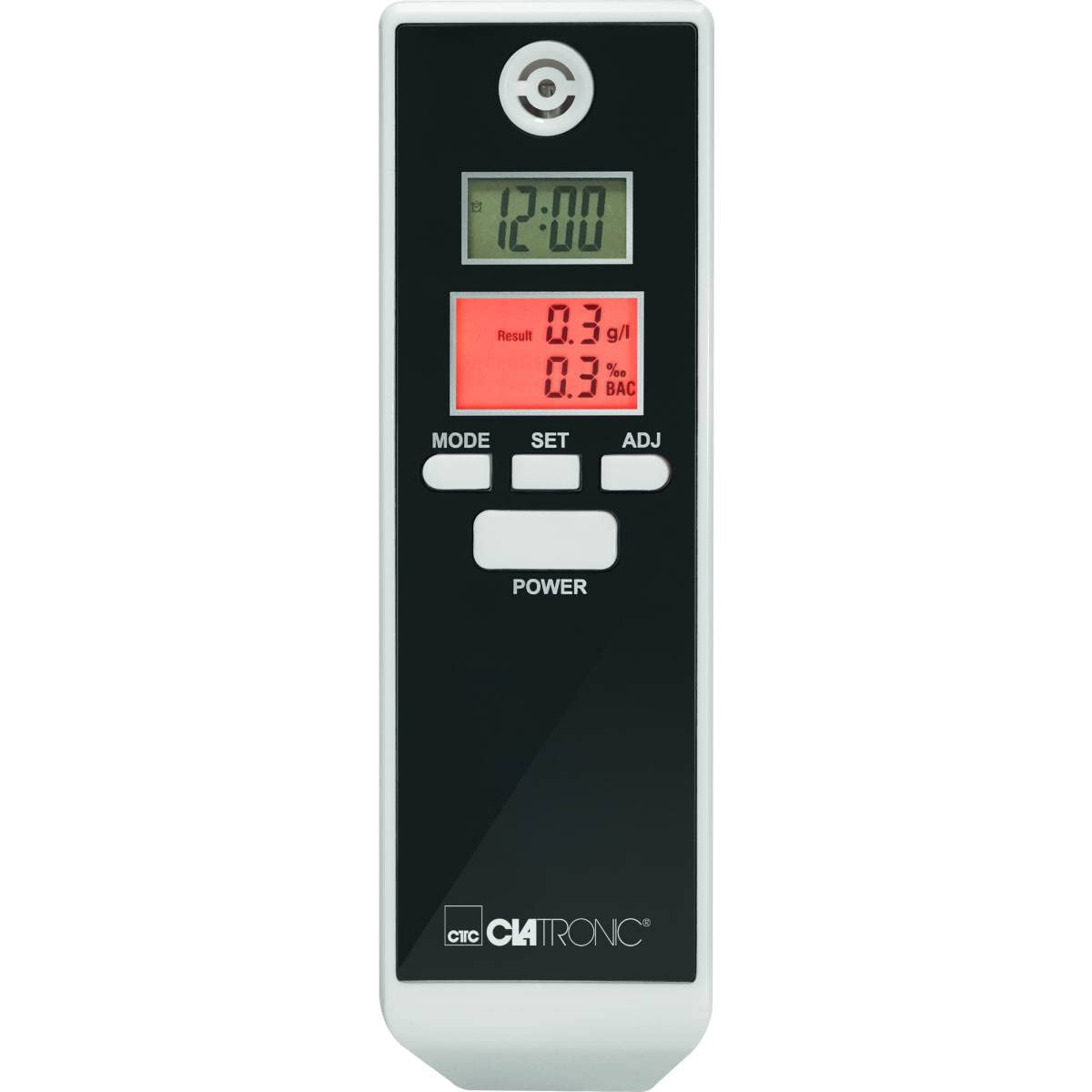
Stampa 1: Quddiem view of the Clatronic AT 3605 Alcohol Tester. The device features a black face with a white casing. It has two digital LCD screens, one for time (12:00) and another for alcohol test results (e.g., 0.3 g/l and 0.3% BAC). Below the screens are three control buttons: MODE, SET, and ADJ. A larger POWER button is located further down. The Clatronic logo is visible at the bottom.
Kontrolli u Wiri
- Buttuna POWER: Ixgħel/itfi l-apparat.
- Buttuna MODE: Switches between different display modes (e.g., time display, alarm setting).
- Buttuna SET: Confirms selections or enters setting modes.
- Buttuna ADJ: Adjusts values during settings.
- Upper LCD Display: Shows current time (12/24 hour format).
- Lower LCD Display: Shows alcohol test results in g/l and % BAC. Features red backlighting for results and optical warnings.
- Mouthpiece Opening: Located at the top for breath samplipp.
Setup
Installazzjoni tal-batterija
- Sib l-għatu tal-kompartiment tal-batterija fuq wara tal-apparat.
- Slide or open the cover.
- Daħħal 2 batteriji AAA, waqt li tiżgura l-polarità korretta (+/-).
- Agħlaq l-għatu tal-kompartiment tal-batterija sew.
Nota: The device requires 2 AAA batteries. Ensure fresh batteries are used for accurate readings.
Issettjar tal-Ħin Inizjali
Upon first use or after battery replacement, you may need to set the time. Refer to the 'Operating Instructions' for time adjustment.
Istruzzjonijiet Operattivi
Performing an Alcohol Test
- Agħfas il- QAWWA button to turn on the device. The device will perform a brief self-check.
- Wait for the device to display "WAIT" or a similar indicator, followed by "BLOW" or a countdown.
- When prompted, take a deep breath and blow steadily into the mouthpiece opening for approximately 5 seconds. Ensure a continuous breath sample.
- The device will process the sample and display the results on the lower LCD screen in g/l and % BAC. The display will be red.
- Optical Warning: The device provides an optical warning at 0.2‰ and 0.5‰. If your result is at or above these levels, the display will flash.
- The device will automatically shut off after a period of inactivity to conserve battery life.
Setting Time and Alarm (if applicable)
- Bl-apparat mixgħul, agħfas il-buttuna MODALITÀ button to cycle through display modes until the time setting mode is reached.
- Agħfas il- SET button to enter the time adjustment. The hour digit will flash.
- Uża l- AĠĠ button to change the hour.
- Agħfas SET again to move to the minute digit and adjust with AĠĠ.
- Continue this process for 12/24 hour format or alarm settings if available.
- Agħfas MODALITÀ biex toħroġ mill-modalità ta' l-issettjar.
Manutenzjoni
Tindif
- Wipe the device exterior with a soft, dry cloth.
- Tużax tindif jew solventi li joborxu.
- Tgħaddix l-apparat fl-ilma jew f'xi likwidu ieħor.
Ħażna
- Aħżen l-apparat f'post frisk u niexef 'il bogħod mix-xemx diretta.
- Jekk taħżen għal perjodu estiż, neħħi l-batteriji biex tevita t-tnixxija.
Issolvi l-problemi
| Problema | Kawża Possibbli | Soluzzjoni |
|---|---|---|
| L-apparat ma jixgħelx. | Batteriji mejta jew imdaħħla ħażin. | Ibdel il-batteriji b'batteriji AAA ġodda, filwaqt li tiżgura l-polarità korretta. |
| Qari mhux preċiż jew inkonsistenti. | Nifs insuffiċjenti sample; device not calibrated; recent alcohol consumption. | Ensure a strong, continuous breath sample. Wait at least 20 minutes after consuming alcohol before testing. If issues persist, contact customer support. |
| Id-displej juri messaġġ ta' żball. | Device malfunction or sensor issue. | Itfi l-apparat u erġa' ixgħelu. Jekk l-iżball jippersisti, ikkuntattja l-appoġġ għall-klijenti. |
| Time display is incorrect. | Time not set or batteries removed. | Refer to "Setting Time and Alarm" section to adjust the time. |
Speċifikazzjonijiet
| Karatteristika | Dettall |
|---|---|
| Numru tal-Mudell | AT 3605 (Article Model: 271704) |
| Sors tal-Enerġija | 2 x Batteriji AAA |
| Medda ta' Kejl | 0.0 to 1.9‰ (g/l) / 0.0 to 1.9% BAC |
| Wiri | 2 Digital LCDs (one with red backlight for results) |
| Karatteristiċi Speċjali | Time display (12/24 hours), Automatic shut-off, Optical warning at 0.2‰ and 0.5‰ |
| Dimensjonijiet (L x W x H) | 30L x 40W x 120H mm |
| Materjal | Plastik |
| Kulur | Iswed/Abjad |
Garanzija u Appoġġ
For warranty information or technical support, please refer to the warranty card included with your product or visit the official Clatronic website. Keep your purchase receipt as proof of purchase. Spare parts availability is typically 1 year from purchase date.