
Introduzzjoni
This manual provides detailed instructions for the setup, operation, and maintenance of your A4tech Bloody Light Strike B314 Gaming Keyboard. Please read this manual thoroughly before using the product to ensure optimal performance and longevity.
Karatteristiċi Ewlenin
- Bloody 4 Light Strike Mechanical Switches: Experience ultra-fast response times of 0.2ms with infrared optic switches, providing a competitive edge in gaming.
- Durabilità Mtejba: Designed for intensive use, featuring A,S,D,W silicon keys with a convex shape for improved control and longevity.
- Neon Glare System LED Backlighting: Customize your gaming environment with vibrant LED backlighting, making keys easy to locate in low-light conditions.
- 9 Ċwievet Programmabbli: Personalize your gaming experience by assigning custom functions to 9 individually programmable keys.
- Double Secure Water-Resistance: The keyboard is electronically sealed with a water drain hole, protecting it from accidental spills and extending its lifespan.
Kontenut tal-Pakkett
Ivverifika li l-oġġetti kollha huma preżenti fil-pakkett:
- Bloody Light Strike B314 Gaming Keyboard
- Manwal għall-Utent (dan id-dokument)

Image: The retail packaging for the Bloody Light Strike B314 Gaming Keyboard, showing the keyboard with LED backlighting and key features highlighted.
Gwida ta' Setup
- Qabbad it-Tastiera: Ipplaggja l-konnettur USB tat-tastiera ma' port USB disponibbli fuq il-kompjuter tiegħek.
- Installazzjoni tas-sewwieq: The keyboard is typically plug-and-play. Your operating system should automatically detect and install the necessary drivers. If prompted, follow the on-screen instructions.
- Installazzjoni tas-Softwer (Mhux obbligatorja): For advanced customization, including programming keys and managing backlighting, download and install the official Bloody software from the A4tech websit.
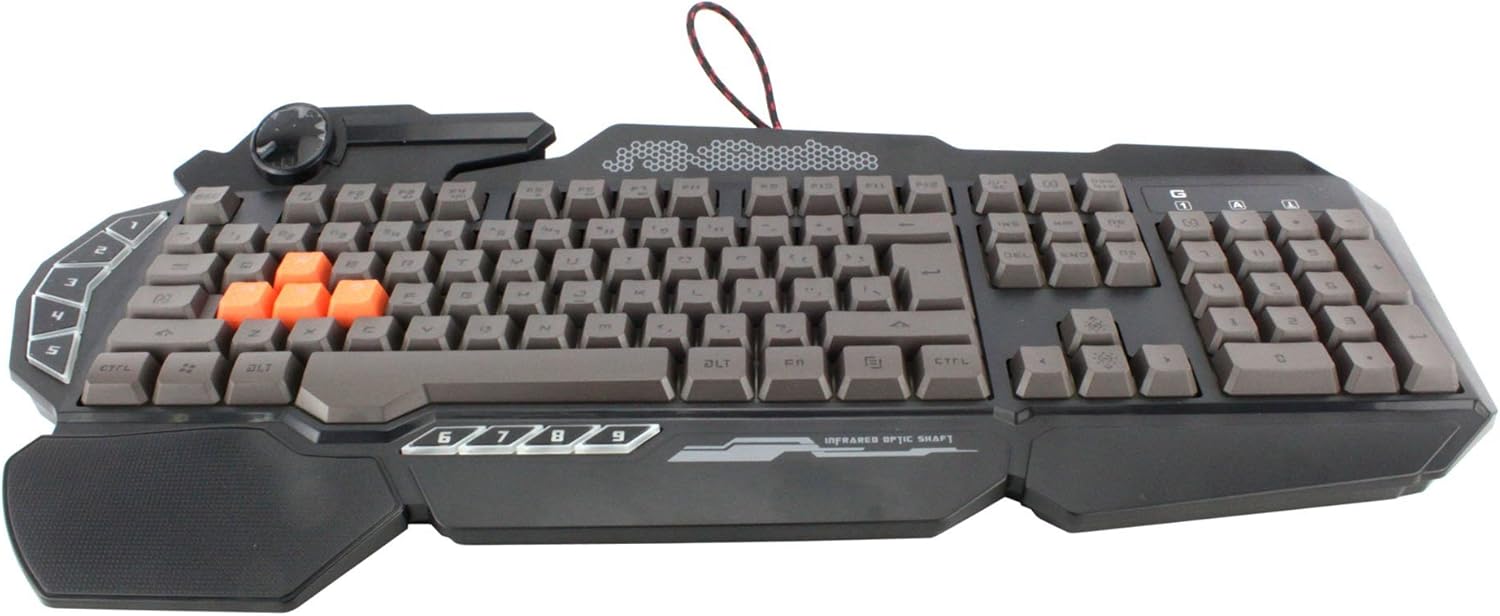
Immaġni: Minn fuq għal isfel view of the Bloody Light Strike B314 Gaming Keyboard, showcasing the full QWERTY layout with orange WASD keys and dedicated macro keys on the left.
Istruzzjonijiet Operattivi
Użu Bażiku
The Bloody B314 functions as a standard QWERTY keyboard for everyday typing and gaming. Its infrared mechanical switches provide a fast and responsive typing experience.
Ċwievet programmabbli
The keyboard features 9 programmable keys, typically located on the left side. To customize these keys:
- Install the official Bloody software from the A4tech websit.
- Launch the software and navigate to the key customization section.
- Select the desired programmable key (e.g., G1-G9 or similar).
- Assign macros, key functions, or multimedia controls as needed.
- Salva l-pro tiegħekfile biex tapplika l-bidliet.
LED Backlighting Control
The Neon Glare System LED backlighting can be adjusted using function key combinations:
- Fn+F12: Cycle through different backlighting modes (e.g., static, breathing, off).
- Fn + Vleġġa 'l fuq/'l isfel: Aġġusta l-luminożità tad-dawl ta 'wara.
- Fn + Left/Right Arrow: Adjust backlight speed or direction (if applicable to the mode).
Mod tal-Logħba
Activate Game Mode to disable the Windows key and prevent accidental interruptions during gameplay.
- Fn+F8: Toggle Game Mode mixgħul / mitfi.

Immaġni: Angolata view of the Bloody Light Strike B314 Gaming Keyboard, highlighting the ergonomic wrist rest and the distinct orange WASD keys.
Manutenzjoni
Tindif
- Skonnettja t-tastiera mill-kompjuter tiegħek qabel ma tnaddafha.
- Uża artab, damp drapp biex timsaħ il-wiċċ tat-tastiera. Evita kimiċi ħarxa jew materjali li joborxu.
- Għat-trab u l-fdalijiet bejn iċ-ċwievet, uża arja kkompressata.
- The water-resistant design helps protect against spills, but it is still recommended to clean up liquids promptly.
Ħażna
Aħżen it-tastiera f'post frisk u niexef 'il bogħod mix-xemx diretta u minn temperaturi estremi meta ma tkunx qed tużaha għal perjodi twal.
Issolvi l-problemi
It-Tastiera Mhux Tirrispondi
- Kun żgur li l-kejbil USB huwa mdaħħal sew kemm fit-tastiera kif ukoll fil-kompjuter.
- Ipprova qabbad it-tastiera ma' port USB differenti.
- Ibda mill-ġdid il-kompjuter tiegħek.
- Check if the keyboard is recognized in your computer's Device Manager (Windows) or System Information (macOS).
Id-Dawl ta' Wara Mhux Jaħdem
- Ensure the backlighting is not turned off using the Fn + F12 combination.
- Adjust brightness using Fn + Up Arrow.
- Jekk qed tuża pro appostafiles, ensure the backlighting settings are correctly configured in the Bloody software.
Ċwievet Programmabbli Mhux Jaħdmu
- Verify that the Bloody software is installed and running.
- Ensure your custom profiles are loaded and active within the software.
- Check for any software updates for the Bloody keyboard utility.
Speċifikazzjonijiet
| Karatteristika | Dettall |
|---|---|
| Brand | A4tech |
| Numru tal-Mudell | A4TKLA45173 |
| Teknoloġija tal-Konnettività | Infra-aħmar |
| Deskrizzjoni tat-Tastiera | Mekkaniċi |
| Tip ta' Swiċċ | Mechanical (Light Strike Optic) |
| Karatteristika Speċjali | Backlit, Programmable Keys, Water Resistant |
| Kulur | Iswed |
| Appoġġ tal-Kulur tal-Backlighting tat-Tastiera | RGB (Neon Glare System) |
| Numru ta' Ċwievet | 104 |
| Buttuni programmabbli | 9 |
| Livell ta 'Reżistenza għall-Ilma | Reżistenti għall-Ilma |
| Piż tal-oġġett | 2.9 Liri |
Garanzija u Appoġġ
For warranty information and technical support, please refer to the official A4tech webis-sit jew ikkuntattja lis-servizz tal-konsumatur tagħhom direttament. Żomm l-irċevuta tax-xiri tiegħek bħala prova tax-xiri għal talbiet ta' garanzija.
Official A4tech Websit: www.a4tech.com