
1. Introduzzjoni
Welcome to the user manual for your Lenovo ThinkCentre M700 Tiny Desktop. This document provides essential information for setting up, operating, maintaining, and troubleshooting your device. Please read this manual thoroughly to ensure proper use and to maximize the performance and longevity of your desktop.

Figure 1: Lenovo ThinkCentre M700 Tiny Desktop
The Lenovo ThinkCentre M700 Tiny Desktop is a compact and powerful computing solution designed for efficiency and reliability in various environments.
2. Prodott Aktarview
2.1 Karatteristiċi ewlenin
- Powered by an Intel Core i3-6100T Dual-Core 3.2GHz processor for efficient performance.
- Equipped with 4GB DDR4 memory, expandable up to 32GB for enhanced multitasking.
- Features a 128GB Solid State Drive (SSD) for significantly improved system responsiveness and faster boot times.
- Integrated Intel HD Graphics 530 for clear visual output.
- Compact and space-saving design, ideal for various setups.
- Includes 802.11ac Wi-Fi and Bluetooth for versatile connectivity.

Figure 2: Compact size of the ThinkCentre M700 Tiny Desktop
3. Istruzzjonijiet ta' Setup
3.1 Disimballaġġ
Carefully remove all components from the packaging. Verify that all items listed in the packing list are present and undamaged. Retain the packaging for future transport or service needs.
3.2 Konnessjoni tal-Periferali
Connect your monitor, keyboard, and mouse to the appropriate ports on the desktop.
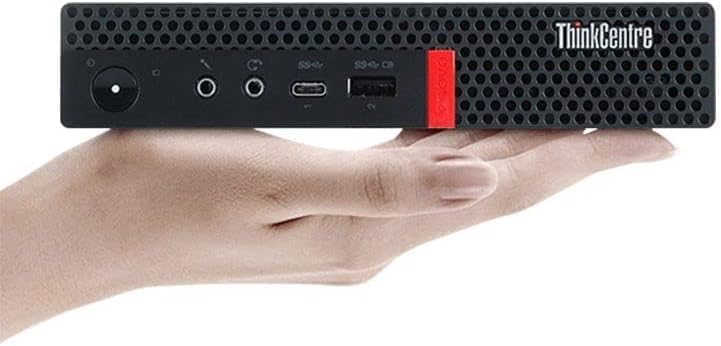
Figure 3: Front Panel Ports
- Buttuna tal-Qawwa: Użat biex jixgħel jew jitfi l-apparat.
- Microphone/Headphone Combo Jack: For connecting headsets or external microphones/headphones.
- Port USB tat-Tip Ċ: Għall-konnessjoni ta' apparati USB-C kompatibbli.
- Portijiet USB 3.1 Ġen 1: Għall-konnessjoni ta' apparati USB bħal tastieri, ġurdien, jew ħażna esterna.
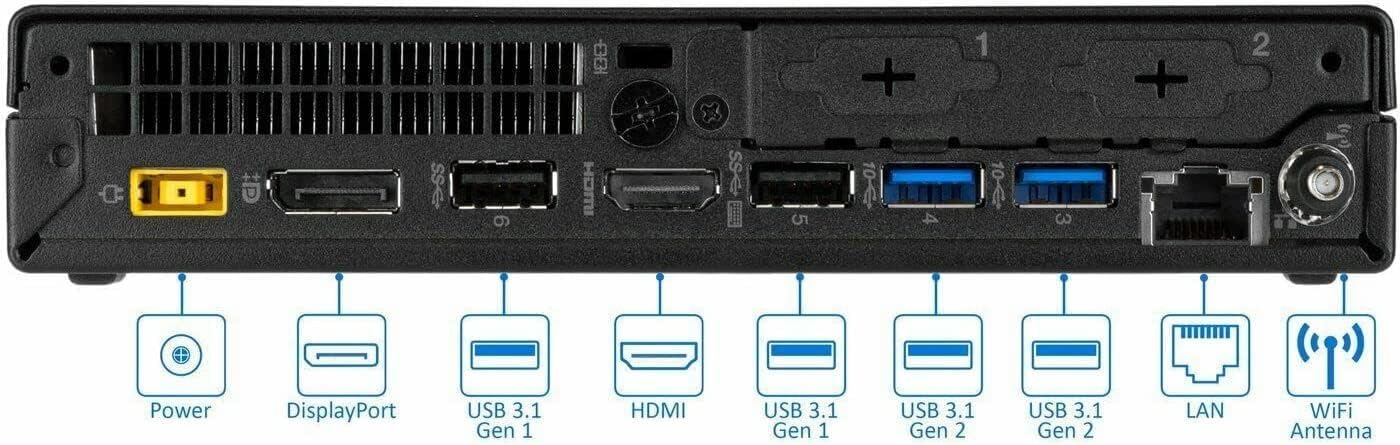
Figura 4: Portijiet tal-Panel ta' Wara
- Konnettur tal-Qawwa: Qabbad l-adapter tal-enerġija hawn.
- DisplayPort: For connecting monitors with DisplayPort input.
- Port HDMI: For connecting monitors or TVs with HDMI input.
- USB 3.1 Gen 1 & Gen 2 Ports: Għall-konnessjoni ta' diversi apparati USB.
- Port tal-LAN (Ethernet): Għal konnessjoni ta' netwerk bil-fili.
- Konnettur tal-Antenna WiFi: Attach the provided WiFi antenna for wireless connectivity.
3.3 Tixgħel
Connect the power adapter to the desktop's power connector and then to a power outlet. Press the power button on the front panel to turn on the device.
4. Operating System and Initial Configuration
Your ThinkCentre M700 Tiny Desktop comes pre-installed with Windows 10 Pro.
4.1 L-Ewwel Boot
Upon first powering on, follow the on-screen instructions to complete the initial Windows 10 Pro setup. This typically includes selecting your language and region, accepting license agreements, connecting to a network, and creating a user account.
4.2 Konnessjoni tan-Netwerk
The device supports both wired (Ethernet) and wireless (802.11ac) connections.
- Konnessjoni bil-fili: Connect an Ethernet cable from your router or network switch to the LAN port on the rear of the device.
- Konnessjoni bla fili: Ensure the WiFi antenna is securely attached to the rear panel. In Windows, click the network icon in the taskbar, select your preferred wireless network, and enter the password if prompted.
5. Manutenzjoni
5.1 Tindif
Use a soft, dry, lint-free cloth to clean the exterior surfaces of the desktop. For stubborn marks, lightly dampen the cloth with water. Avoid spraying liquid cleaners directly onto the device or using harsh chemicals.
5.2 Aġġornamenti tas-Software
Regularly update your operating system, drivers, and applications to ensure optimal performance, security, and compatibility. Windows Update can be configured to automatically download and install updates.
5.3 Ventilazzjoni
Ensure the desktop has adequate airflow. Do not block the air vents located on the chassis. Position the device in a well-ventilated area to prevent overheating.

Figura 5: Fuq view li turi l-ventilazzjoni
6. Issolvi l-problemi ta' Kwistjonijiet Komuni
6.1 Ebda Qawwa
- Verify the power adapter is securely connected to both the desktop and a working electrical outlet.
- Iċċekkja jekk is-sokit tal-enerġija hux qed jaħdem billi tqabbad apparat ieħor.
- Kun żgur li l-buttuna tal-qawwa hija ppressata sew.
6.2 Ebda Display
- Confirm the monitor is powered on and set to the correct input source (e.g., DisplayPort, HDMI).
- Ensure the video cable (DisplayPort or HDMI) is securely connected to both the desktop and the monitor.
- Try connecting to a different display or using a different video cable if available to rule out a faulty component.
6.3 Kwistjonijiet ta' Konnettività tan-Netwerk
- Konnessjoni bil-fili: Check the Ethernet cable for damage and ensure it is properly connected. Verify your router or modem is functioning correctly.
- Konnessjoni bla fili: Ensure the WiFi antenna is attached. Confirm the device is connected to the correct wireless network and that the network password is entered correctly. Restarting your router or modem may resolve some issues.
6.4 System Unresponsive
If the system becomes unresponsive, press and hold the power button for approximately 10 seconds until the device shuts down. Wait a few moments, then power it back on. If the issue persists, consult Lenovo support.
7. Speċifikazzjonijiet Tekniċi
| Karatteristika | Dettall |
|---|---|
| Mudell | ThinkCentre M700 (10HY001TUS) |
| Proċessur | Intel Core i3-6100T Dual-Core 3.2GHz |
| RAM | 4GB DDR4 (Espansibbli sa 32GB) |
| Ħażna | 128GB SSD |
| Grafika | Intel HD Graphics integrata 530 |
| Sistema Operattiva | Windows 10 Pro |
| Konnettività bla fili | 802.11ac, Bluetooth |
| Portijiet (ta' Quddiem) | 1x USB Type-C, 2x USB 3.1 Gen 1, Microphone/Headphone Combo Jack |
| Portijiet (ta' wara) | 2x DisplayPort, 1x HDMI, 2x USB 3.1 Gen 1, 2x USB 3.1 Gen 2, 1x LAN (Ethernet) |
| Dimensjonijiet (LxWxH) | 9 x 15 x 3 pulzieri |
| Piż | 2.87 liri |
| Kulur | Iswed |

Figura 6: Quddiem view of the ThinkCentre M700 Tiny Desktop
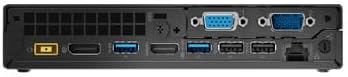
Figura 7: Wara view of the ThinkCentre M700 Tiny Desktop
8. Garanzija u Appoġġ
8.1 Informazzjoni dwar Garanzija
This Lenovo ThinkCentre M700 Tiny Desktop typically includes a 3-year on-site warranty. Please refer to your purchase documentation or contact your vendor for specific warranty terms, conditions, and registration details. Warranty coverage may vary by region and retailer.
8.2 Appoġġ Tekniku
For technical assistance, driver downloads, software updates, or further support, please visit the official Lenovo support website or contact Lenovo customer service. Have your product model and serial number ready when seeking support.