
EASY KARAOKE EKS213
EKS213 CDG Karaoke Player with LED Lighting and Tablet Stand
Manwal ta' Istruzzjoni
Brand: EASY KARAOKE | Model: EKS213
Prodott Overview
The Easy Karaoke EKS213 CDG Karaoke Player is designed for both solo practice and group entertainment. It features a top-loading CD player, a standard tablet stand, and an integrated speaker system. Enhance your performance with bright colored LED effect lights.
Karatteristiċi ewlenin:
- Supplied with 1 microphone with an approximately 2.5m cable.
- Generic tablet stand (tablet not included) for easy viewing of lyrics or content.
- Integrated speaker system for clear audio output.
- MP3 player input line for connecting external audio devices.
- Colored LED light effects to create a dynamic performance atmosphere.
- CDG (Compact Disc + Graphics) compatible for on-screen lyrics.
Gwida ta' Setup
Follow these steps to set up your EKS213 Karaoke Player for the first time.
1. Spakkjar u Tqegħid:
Carefully remove all components from the packaging. Place the karaoke machine on a stable, flat surface. Ensure there is adequate ventilation around the unit.
2. Konnessjoni tal-Enerġija:
Connect the AC power adapter to the DC IN jack on the back of the unit. Plug the other end of the adapter into a standard wall outlet.
3. Konnessjoni tal-Mikrofonu:
Plug the microphone cable into the MIC 1 or MIC 2 input jack on the back of the unit. The unit comes with one microphone, but supports two for duets.
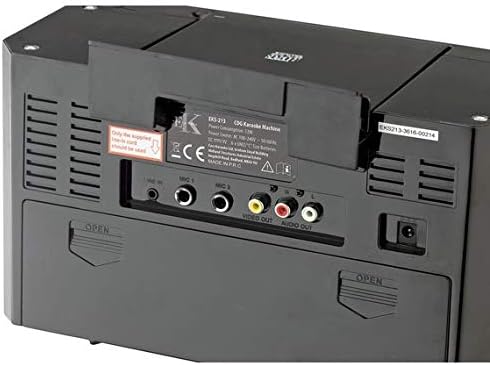
Image: Rear panel of the EKS213 Karaoke Player, illustrating the various input and output ports including MIC 1, MIC 2, Video Out, and Audio Out.
4. Connecting to External Devices (Optional):
- For TV/Monitor (Video Out): To display CDG lyrics on a TV or monitor, connect an RCA video cable (yellow connector) from the VIDEO OUT jack on the karaoke machine to the video input jack on your TV.
- For External Audio System (Audio Out): Biex tikkonnettja ma 'barra amplifier or speaker system, use RCA audio cables (red and white connectors) from the AUDIO OUT jacks on the karaoke machine to the audio input jacks on your external system.
- For MP3 Player/Tablet (Auxiliary In): To play music from an external audio device like an MP3 player or tablet, connect a 3.5mm audio cable from the headphone jack of your device to the AUX IN jack on the karaoke machine.

Image: The EKS213 Karaoke Player in use, demonstrating a tablet placed in its stand and a connection to an external television displaying song lyrics.
5. Placing a Tablet:
Open the tablet stand located on the top of the unit. Carefully place your tablet (e.g., iPad) into the stand. This allows you to view lyrics or other content while performing.

Immaġni: Minn fuq għal isfel view of the EKS213 Karaoke Player, showing the open tablet stand and the top-loading CD compartment with a disc partially inserted.
Istruzzjonijiet Operattivi
1. Tixgħel/Jitfi:
Agħfas il- QAWWA button located on the front panel to turn the unit on or off. The LED display will illuminate when the unit is on.
2. Daqq tas-CD:
- Open the CD compartment lid on the top of the unit.
- Place a CDG or standard audio CD onto the spindle, label side up. Gently close the lid.
- Agħfas il- DĦABBA/PAWŻA buttuna biex tibda d-daqq. In-numru tat-trakka se jidher fuq id-displej LED.
- Agħfas DĦABBA/PAWŻA again to pause, and press it once more to resume.
- Uża l- SKIP buttuni (forward/backward arrows) biex tinnaviga bejn it-traċċi.
- Agħfas il- STOP buttuna biex twaqqaf il-plejbek.
- Funzjoni tal-Programm: To program a sequence of songs, press the PROGRAMM button while the CD is stopped. Use the SKIP buttons to select tracks, then press PROGRAMM to add them to the sequence. Press DĦABBA/PAWŻA to start the programmed sequence.
- Irrepeti Funzjoni: Agħfas il- IRREpeti button to repeat the current track (REPEAT 1) or all tracks on the CD (REPEAT ALL). Press again to cancel.

Immaġni: Dettaljata view of the EKS213 Karaoke Player's top-loading CD drive, showing a karaoke CD placed inside the compartment.
3. Microphone and Audio Controls:

Image: Front panel of the EKS213 Karaoke Player, highlighting the control knobs for volume, echo, and balance, along with the integrated LED light strips.
- VOLUM MASTER: Adjusts the overall volume of the music and microphone output.
- VOLUM MIK: Controls the volume of the connected microphones independently of the music.
- ECHO: Adds an echo effect to your voice through the microphones. Turn the knob clockwise to increase the effect.
- BILANĊ: Adjusts the balance between the vocal track on the CDG disc and the background music. Turn clockwise to reduce the original vocal track, allowing you to sing along.
4. LED Light Effects:
Agħfas il- DAWL button to turn the colorful LED effect lights on or off. These lights are located on the sides of the unit and add a dynamic visual element to your performance.
Manutenzjoni
Proper care and maintenance will ensure the longevity and optimal performance of your EKS213 Karaoke Player.
1. Tindif:
- Dejjem aqla 'l-unità mill-iżbokk tad-dawl qabel it-tindif.
- Uża drapp artab u niexef biex timsaħ l-uċuħ ta’ barra tal-unità.
- Għal marki iebsa, d ftitampAħsel id-drapp bl-ilma, imbagħad nixxef minnufih.
- Tużax prodotti tat-tindif, xama', jew solventi li joborxu għax jistgħu jagħmlu ħsara lill-finitura.
- Keep the CD compartment free of dust and debris. Use a soft brush or compressed air if necessary.
2. Ħażna:
When not in use for extended periods, store the karaoke machine in a cool, dry place, away from direct sunlight and extreme temperatures. It is recommended to keep it in its original packaging to protect it from dust and impacts.
3. Microphone Care:
Handle microphones with care. Avoid dropping them or exposing them to moisture. Store them properly to prevent tangling or damage to the cables.
Issolvi l-problemi
If you encounter any issues with your EKS213 Karaoke Player, refer to the following common problems and their solutions.
| Problema | Kawża Possibbli | Soluzzjoni |
|---|---|---|
| Ebda qawwa. | L-adapter tal-enerġija mhux imqabbad jew is-sokit mhux qed jaħdem. | Kun żgur li l-adapter tal-enerġija huwa pplaggjat sew fl-unità u f'sokit tal-ħajt li jaħdem. Ipprova sokit differenti. |
| L-ebda ħoss mill-kelliema. | Master Volume is too low or muted. External audio system not connected correctly. | Increase the MASTER VOLUME. Check connections to external audio systems if used. Ensure the correct input source is selected on external devices. |
| Il-mikrofonu mhux qed jaħdem. | Microphone not plugged in correctly, MIC VOLUME too low, or microphone faulty. | Ensure the microphone is fully plugged into MIC 1 or MIC 2. Increase the MIC VOLUME. Try another microphone if available to rule out a faulty microphone. |
| CD not playing or skipping. | CD is dirty, scratched, or inserted incorrectly. CD compartment lid not fully closed. | Clean the CD with a soft, lint-free cloth. Check for scratches. Ensure the CD is placed correctly and the lid is fully closed. |
| Lyrics not appearing on TV. | Video cable not connected, TV input not selected, or not a CDG disc. | Ensure the VIDEO OUT cable is securely connected to both the karaoke machine and the TV. Select the correct video input (e.g., AV1, Video) on your TV. Confirm you are playing a CDG disc. |
| Id-dwal LED mhux qed jaħdmu. | LIGHT button is off. | Press the LIGHT button to turn the LED lights on. |
Speċifikazzjonijiet
| Karatteristika | Dettall |
|---|---|
| Brand | EASY KARAOKE |
| Numru tal-Mudell | EKS213 |
| Kulur | Iswed |
| Konnessjonijiet | Auxiliary (Input), Video Out, Audio Out, Microphone In (x2) |
| Kompatibilità tad-Diska | CD, CDG |
| Microphones Included | 1 (with approx. 2.5m cable) |
| Stand tal-Pillola | Integrated (tablet not included) |
| Dawl | Colored LED effect lights |
| Kelliema Integrati | Iva |
| Manifattur | Easy Karaoke |
Garanzija u Appoġġ
For product support, technical assistance, or warranty inquiries, please contact Easy Karaoke customer service. Refer to the product packaging or the manufacturer's official webis-sit għall-aktar informazzjoni ta' kuntatt aġġornata.
Please note that spare parts availability and software updates information are not provided in the product details. Keep your purchase receipt as proof of purchase for any warranty claims.
Ask a question about this manual
Ask about setup, troubleshooting, compatibility, parts, safety, or missing instructions. Manuals+ will review the question and use this page’s manual context to help answer it.