
1. Introduzzjoni
Grazzi tax-xiriasing the ipega PG-9057 Wireless Game Controller. This manual provides detailed instructions for setting up, operating, and maintaining your device. Please read this manual carefully before use to ensure optimal performance and longevity of your controller.
2. Karatteristiċi tal-prodott
- Konnettività Wireless: Enjoy gaming freedom with wireless connection technology.
- Kompatibilità Multi-Pjattaforma: Supports Android devices (smartphones, tablets, TV boxes) and Windows PCs.
- High Durability Buttons: Equipped with high-quality, durable buttons for extended gaming sessions.
- Kontrolli ta' Preċiżjoni: Features a D-pad with pressure sensitivity and a 360-degree joystick with no dead zone for accurate input.
- Disinn Ergonomiku: Designed for comfortable grip and prolonged use.
- Detentur tat-Telefown Integrat: Conveniently mount your smartphone for mobile gaming.
3. Kontenut tal-Pakkett
Jekk jogħġbok iċċekkja l-kontenut tal-pakkett meta tiftaħ il-kaxxa:
- Ipega PG-9057 Wireless Game Controller
- Cable tal-Iċċarġjar tal-USB
- Manwal tal-Utent (verżjoni Ġappuniża inkluża)
4. Setup
4.1. Iċċarġjar tal-Kontrollur
Before first use, fully charge the controller using the provided USB cable. Connect the small end of the USB cable to the controller's charging port and the other end to a USB power source (e.g., PC, USB wall adapter).
4.2. Kompatibilità tal-Apparat Fuqview
The ipega PG-9057 controller supports various devices and connection methods as shown below:

This image displays the ipega PG-9057 Wireless Game Controller, highlighting its compatibility with various devices including smartphones, tablets, personal computers, and VR headsets.
4.3. Connection Methods and System Environment
The controller offers multiple connection options depending on your device and operating system. Refer to the table below for detailed compatibility.

This table outlines the system requirements and connection methods for the ipega PG-9057 controller, detailing compatibility with Android smartphones, tablets, and TV boxes via Bluetooth 4.0 or USB, and PCs via USB.
4.3.1. Bluetooth Connection (Android Devices)
- Kun żgur li l-kontrollur ikun iċċarġjat.
- Agħfas u żomm il- HOME buttuna u l- A button simultaneously until the indicator light flashes rapidly. This puts the controller into pairing mode.
- On your Android device, go to Bluetooth settings and turn Bluetooth on.
- Fittex għal available devices and select "ipega PG-9057" (or similar name) from the list.
- Ladarba jkun imqabbad, id-dawl indikatur fuq il-kontrollur jibqa' mixgħul.
4.3.2. USB Wired Connection (Windows PC / Android Devices)
- Connect the controller to your Windows PC or Android device using the USB cable.
- The device should automatically recognize the controller. No special drivers are usually required for basic functionality.
5. Istruzzjonijiet Operattivi
5.1. Kontrolli Bażiċi
The ipega PG-9057 features standard gamepad controls for intuitive gaming.

A dettaljata view of the ipega PG-9057 controller's D-pad, joystick, and A/B/X/Y buttons, illustrating their high sensitivity and precise input capabilities.
- D-Pad: For directional input, offering pressure sensitivity.
- Joysticks tax-Xellug/Lemin: 360-degree movement with no dead zone for precise control.
- Buttuni A/B/X/Y: Standard action buttons with zero delay response.
- L1/R1, L2/R2 Triggers: Buttuni fuq l-ispalla u triggers għal diversi azzjonijiet fil-logħba.
- Buttuni AGĦŻEL/BIDU: For in-game menu navigation and actions.
- Buttuna HOME: To power on/off the controller or return to the main menu.
5.2. L-użu ma' Smartphone
The controller includes an integrated holder for smartphones, allowing for a portable gaming experience.
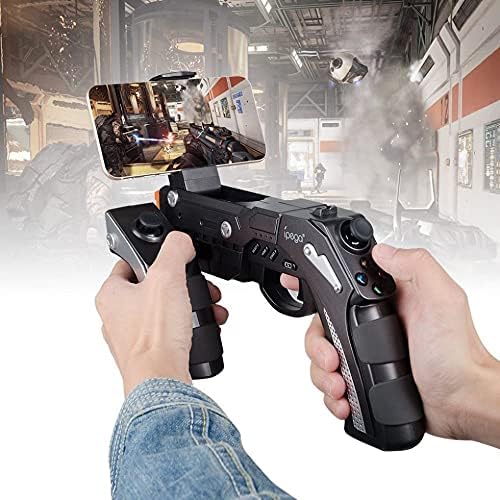
A user is shown holding the ipega PG-9057 Wireless Game Controller with a smartphone securely attached, actively engaged in mobile gaming.
- Extend the phone holder located on the top of the controller.
- Poġġi l-ismartphone tiegħek fil-holder bir-reqqa, waqt li tiżgura li jkun maqbud sew.
- Connect the controller to your smartphone via Bluetooth as described in Section 4.3.1.
- Launch your desired game and configure controller settings if necessary.
6. Manutenzjoni
To ensure the longevity and optimal performance of your ipega PG-9057 controller, follow these maintenance guidelines:
- Tindif: Uża drapp artab u niexef biex timsaħ il-wiċċ tal-kontrollur. Tużax kimiċi ħarxa jew prodotti tat-tindif li joborxu.
- Ħażna: Aħżen il-kontrollur f'post frisk u niexef 'il bogħod mix-xemx diretta u minn temperaturi estremi.
- Evita Qtar: Protect the controller from drops and impacts, as this can damage internal components.
- Iċċarġjar: Do not overcharge the battery. Disconnect the charging cable once the controller is fully charged.

The ipega PG-9057 Wireless Game Controller is shown, emphasizing its construction from high-quality, durable ABS material.
7 Issolvi l-problemi
If you encounter issues with your controller, please refer to the following common solutions:
- Il-kontrollur mhux qed jikkonnettja:
- Kun żgur li l-kontrollur huwa ċċarġjat kompletament.
- Ivverifika li l-Bluetooth huwa attivat fuq l-apparat tiegħek u li l-kontrollur jinsab fil-modalità ta' tqabbil.
- Ipprova erġa' ibda kemm il-kontrollur kif ukoll l-apparat tiegħek.
- If using USB, ensure the cable is securely connected and try a different USB port.
- Buttuni jew joysticks ma jirrispondux:
- Iċċekkja jekk il-kontrollur huwiex imqabbad sew mat-tagħmir tiegħek.
- Restart the controller and reconnect.
- Kun żgur li l-logħba li qed tilgħab tappoġġja kontrolluri esterni.
- Dewmien jew dewmien fl-input:
- Ensure there are no obstructions or excessive distance between the controller and your device.
- Imminimizza l-interferenza minn apparati oħra mingħajr fili.
- For critical gaming, consider using a wired USB connection if supported by your device.
8. Speċifikazzjonijiet
| Speċifikazzjoni | Valur |
|---|---|
| Brand | ipega |
| Mudell | PG-9057 |
| Apparati Kompatibbli | Android, Windows |
| Tip ta' Kontrollur | Game Pad |
| Teknoloġija tal-Konnessjoni | Wireless |
| Karatteristiċi | Wireless |
| Oġġetti Kompatibbli | Android, Windows |
| Metodu ta' Konnessjoni | Wireless |
| Karatteristiċi Speċjali | Wireless |
| Pjattaforma tal-Ħardwer | Set-top box |
| Sors tal-Enerġija | Mħaddma bil-batterija |
| Number of Package Items | 1 |
| UPC | 602747571722 |
| ASIN | B018TSBFE4 |
| GTIN | 602747571722 |
9. Garanzija u Appoġġ
For warranty information and customer support, please refer to the documentation provided with your purchase or visit the official ipega websit. Żomm il-prova tax-xiri tiegħek għal kwalunkwe talba ta' garanzija.