
Introduzzjoni
This manual provides comprehensive instructions for the setup, operation, and maintenance of your Zelotes T90 Professional 9200 DPI High Precision USB Wired Gaming Mouse. Please read this manual thoroughly before using the product to ensure optimal performance and longevity.

Figure 1: Zelotes T90 Professional Gaming Mouse, showcasing its ergonomic design and LED lighting.
Kontenut tal-Pakkett
- 1 x Zelotes T90 Gaming Mouse
- 1 x Manwal tal-Istruzzjonijiet (dan id-dokument)
Setup
Rekwiżiti tas-Sistema
- Operating System: Windows 98/ 2000/ ME/ NT / XP/ win 7/ win 8/ win 10/ Mac OS and other OS
- Interface: USB Port
Installazzjoni
- Oħroġ il-Maws mill-pakkett: Oħroġ bir-reqqa l-Zelotes T90 Gaming Mouse mill-imballaġġ tiegħu.
- Neħħi Film Protettiv: Before use, please remove the foot pad protective film located on the underside of the mouse.
- Qabbad mal-Kompjuter: Plug the USB connector of the mouse into an available USB port on your computer. The mouse is plug-and-play and does not require additional driver installation for basic functionality.
Istruzzjonijiet Operattivi
Funzjonijiet tal-buttuna
The Zelotes T90 mouse features 8 programmable buttons designed for enhanced gaming and productivity.
- Ikklikkja fuq il-buttuna tax-xellug
- Ikklikkja lemin Buttuna
- Middle Button / Scroll Wheel
- Buttuna 'l quddiem: Quick forward function when browsing the web or navigating folders.
- Buttuna b'lura: Quick backward function when browsing the web or navigating folders.
- Buttuna DPI: Jaġġusta s-sensittività tal-maws (DPI).
- Ċavetta tan-Nar: Configurable for rapid actions.
- Swiċċ tal-Modalità tad-Dawl: Jikkontrolla l-effetti tad-dawl LED.
Aġġustament tad-DPI (Sensittività)
The mouse supports 6-speed DPI adjustment, allowing you to customize sensitivity for different tasks or games. Press the buttuna DPI biex tiċċikla bejn is-settings li ġejjin:
- 1000 DPI: Indicated by red light flashing 3 times.
- 1600 DPI: Indicated by orange light.
- 2400 DPI: Indicated by green light.
- 3200 DPI: Indicated by light blue light.
- 5500 DPI: Indicated by blue light.
- 9200 DPI: Indicated by purple light.

Figure 2: Location of DPI and Fire Key buttons on the Zelotes T90 mouse.
Fire Key Function
- Stampa qasira: Performs a double click.
- Agħfas fit-tul (aktar minn 2 sekondi): Switches to triple click mode. The light will flash 3 times to confirm the successful switch.
Swiċċ tal-Modalità Dawl
The Zelotes T90 features various LED lighting modes:
- Stampa qasira: Cycles through 7-color breathing, 6 single-color breathing, and 6 single-color constant light modes (13 modes total).
- Agħfas fit-tul (aktar minn 2 sekondi): Itfi d-dwal LED.

Figure 3: The Zelotes T90 mouse showcasing its 7-color cycle breathing and single-color lighting options.
Sistema ta' Sintonizzazzjoni tal-Piż
The mouse includes 8 removable 2.5-gram weights, allowing you to customize the mouse's weight and balance for improved stability and control, especially during fast movements.
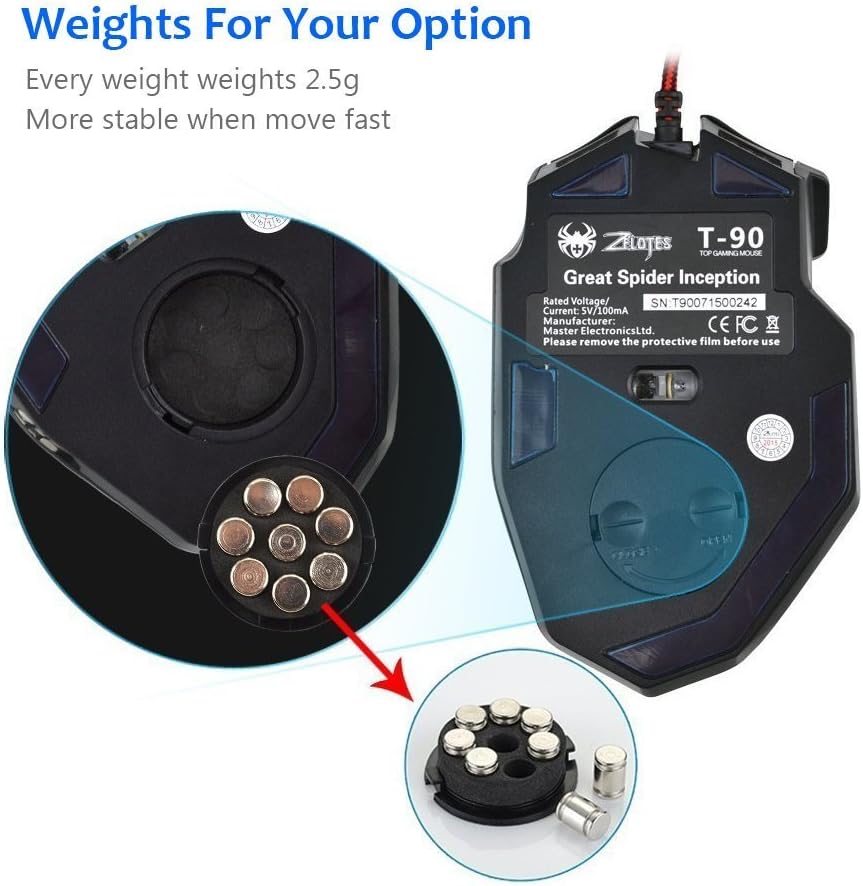
Figure 4: Location of the weight tuning system on the underside of the Zelotes T90 mouse.
Manutenzjoni
Tindif
- Uża drapp ratba u niexfa biex tnaddaf il-wiċċ tal-maws.
- Għal ħmieġ iebes, neħħi ftitampLaħlaħ id-drapp bl-ilma jew b'soluzzjoni ħafifa tat-tindif. Evita kimiċi ħarxa.
- Tgħaddasx il-maws fl-ilma jew fi kwalunkwe likwidu.
Ħażna
Aħżen il-maws f'post frisk u niexef 'il bogħod mix-xemx diretta u minn temperaturi estremi meta ma jkunx qed jintuża għal perjodi twal.
Issolvi l-problemi
| Problema | Kawża Possibbli | Soluzzjoni |
|---|---|---|
| Il-ġurdien ma jirrispondix | Loose USB connection, faulty USB port, system error. | Ensure the USB cable is securely plugged into the computer. Try a different USB port. Restart your computer. |
| Dwal LED ma jaħdmux | Lights turned off, software issue. | Short press the Light Mode Switch button to cycle through modes. Long press the Light Mode Switch button for more than 2 seconds to turn lights on if they were off. |
| L-issettjar tad-DPI mhux qed jinbidel | Il-buttuna DPI mhux ippressata sew. | Ensure you are pressing the dedicated DPI button. Observe the light flashes to confirm DPI changes. |
| Mouse cursor erratic or jumpy | Sensor ottiku maħmuġ, wiċċ tal-maws pad mhux adattat. | Clean the optical sensor on the underside of the mouse. Use a clean, uniform mouse pad surface. |
| Mouse settings reset | Accidental factory reset. | Press the left and right buttons simultaneously for more than 2 seconds to restore factory settings. If settings are reset, reconfigure them as desired. |
Speċifikazzjonijiet
| Mudell | T90 |
| Dimensjonijiet (LxWxH) | 130mm x 81mm x 40mm (5.12 x 3.19 x 1.57 pulzieri) |
| Piż | 145g ± 5g (excluding cable) |
| Kontrapiż | 8 x 2.5 Gram tuning weights |
| Settings DPI | 1000/1600/2400/3200/5500/9200 DPI |
| FPS | 6666 |
| Aċċelerazzjoni | 23G |
| Ir-Rata tal-Votazzjoni | 500Hz |
| Aqleb il-Ħajja | 800 miljun darba |
| Buttuni | 8 |
| Tul tal-Cable USB | 1.8M braided-fiber cable |
| Interface | USB |
| Tip Ottiku | Red wave |
| Kompatibilità | Windows 98/ 2000/ ME/ NT / XP/ win 7/ win 8/ win 10/ Mac OS and other OS |
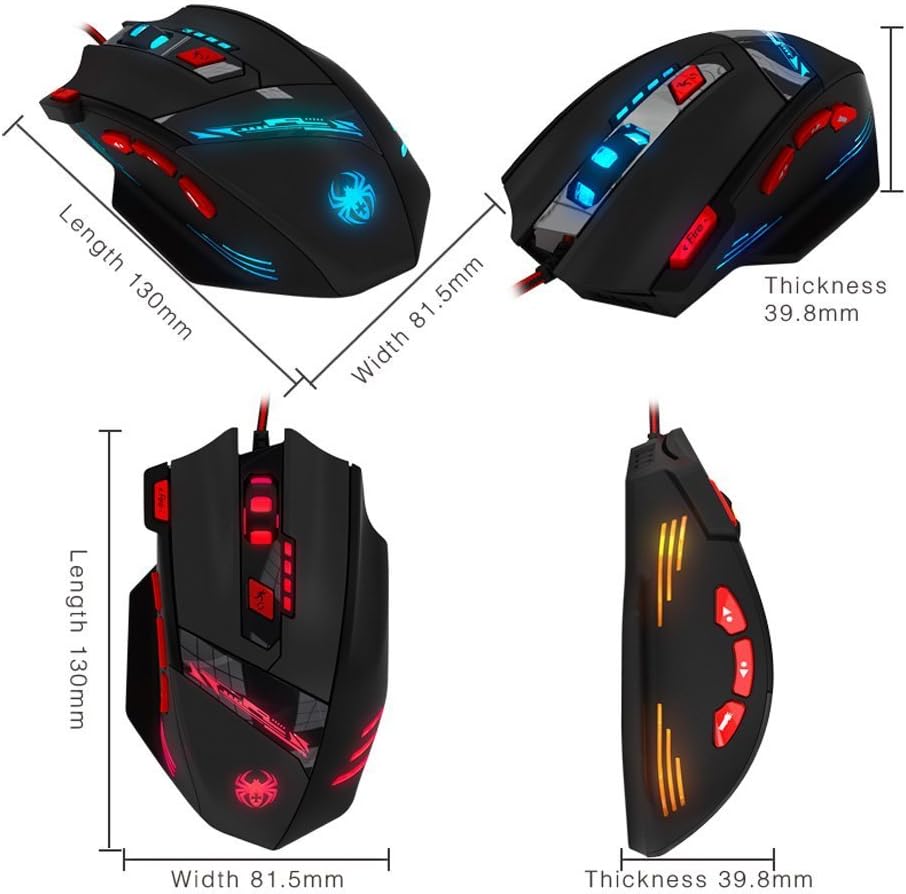
Figure 5: Detailed dimensions of the Zelotes T90 Professional Gaming Mouse.
Disinn Ergonomiku
The Zelotes T90 mouse is designed with ergonomics in mind, providing a comfortable fit for both fingertip and claw-style grips. This design aims to reduce fatigue during long periods of use.

Figure 6: Ergonomic design of the Zelotes T90 mouse, showing a comfortable hand grip.
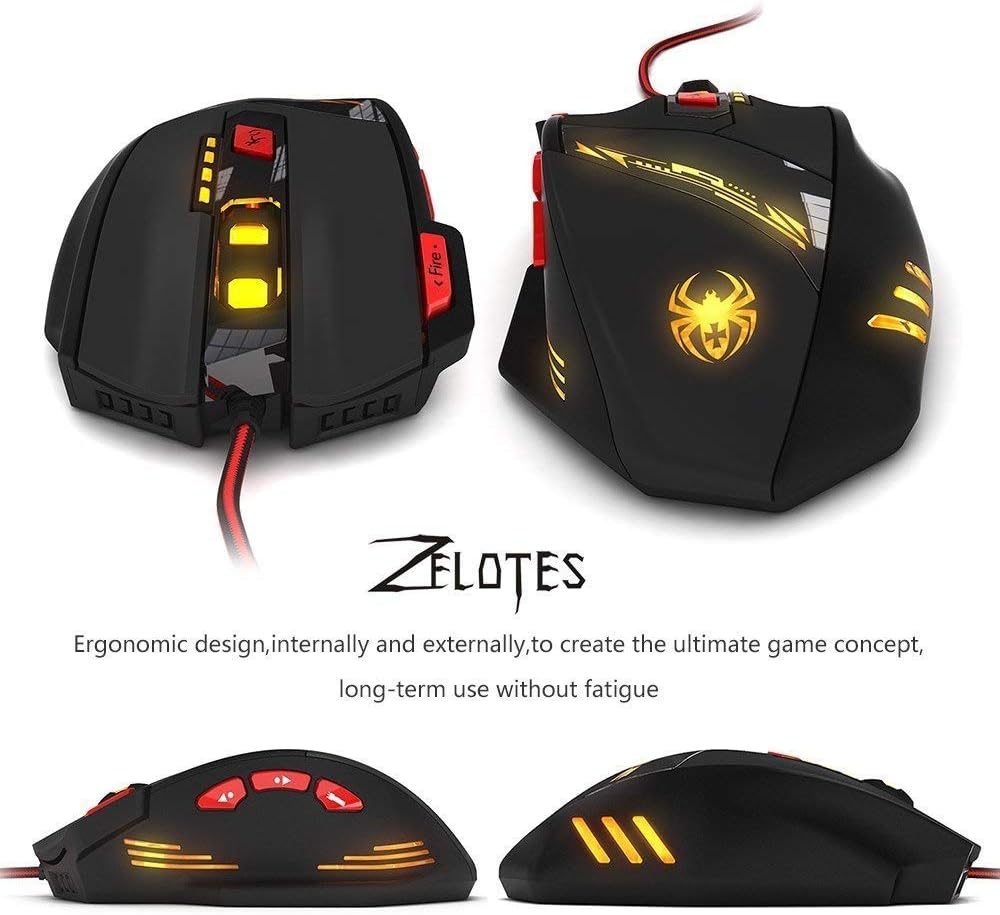
Figura 7: Diversi views highlighting the ergonomic contours of the Zelotes T90 mouse.
Noti Importanti
- Always remove the foot pad protective film before using the mouse.
- To restore the mouse to factory settings, press and hold the left and right mouse buttons simultaneously for more than 2 seconds.