
1. Introduzzjoni
The Youshiko YC9350 Wireless Weather Station provides accurate indoor and outdoor temperature and humidity readings, a radio-controlled clock, and a weather forecast display. This manual will guide you through the setup, operation, and maintenance of your device to ensure optimal performance.
2. Kontenut tal-Pakkett
Jekk jogħġbok ivverifika li l-oġġetti kollha huma preżenti fil-pakkett tiegħek:
- 1 x YC9350 Main Weather Station Unit
- 1 x YC9311 Wireless Outdoor Sensor (Splash-proof)
- 1 x Manwal ta 'Istruzzjoni
3. Prodott Aktarview
Familiarize yourself with the main unit and wireless sensor components.

Figura 3.1: Quddiem view of the YC9350 Main Unit display.

Figura 3.2: YC9350 Main Unit with blue backlight and YC9311 Wireless Sensor.
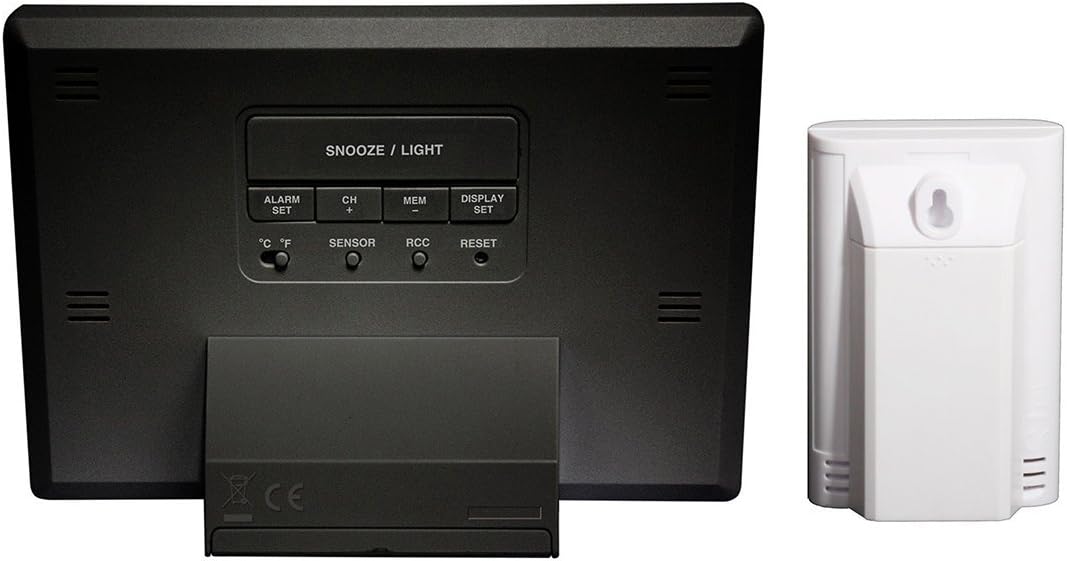
Figura 3.3: Wara view of the Main Unit and Wireless Sensor, showing buttons and battery compartments.
3.1 Main Unit (YC9350)
- Wiri: Shows time, indoor/outdoor temperature, indoor/outdoor humidity, and weather forecast icons.
- Buttons (Rear): ALARM/SET, CH/+, MEM, DISPLAY/SET, °C/°F, SENSOR, RCC, RESET.
- Buttuna SNOOZE/DAWL (Fuq): Activates backlight and snooze function.
- Kompartiment tal-batterija: Located on the rear.
3.2 Wireless Outdoor Sensor (YC9311)
- Wiri: Shows current channel, temperature, and humidity.
- Toqba tal-Immuntar: Għall-immuntar mal-ħajt.
- Kompartiment tal-batterija: Located on the rear.
- Buttuna RESET: For re-synchronization.
4. Setup
4.1 Installazzjoni tal-batterija
- Unità Prinċipali: Open the battery compartment on the rear. Insert 2 x AA batteries (not included), observing the correct polarity (+/-). Close the compartment.
- Sensor bla fili: Open the battery compartment on the rear. Insert 2 x AA batteries (not included), observing the correct polarity (+/-). Close the compartment.
Nota: It is recommended to insert batteries into the main unit first, then the sensor.
4.2 Sinkronizzazzjoni Inizjali
After battery installation, the main unit will automatically attempt to connect with the wireless sensor. This process may take a few minutes. Ensure the sensor is within range (up to 50 meters / 160 feet in open air) of the main unit.
- If the connection is not established, press the RESET button on both the main unit and the sensor (main unit first, then sensor).
- The main unit can support up to 3 wireless sensors. Press the SENSOR button to cycle through channels if you have multiple sensors.
4.3 Wireless Sensor Placement
For accurate outdoor readings, place the wireless sensor in a sheltered location, away from direct sunlight and heavy rain. While the sensor is splash-proof, it is not fully waterproof. Consider mounting it on a north-facing wall or under an overhang. The sensor can be wall-mounted using the integrated hole or placed on a flat surface.

Figura 4.1: Quddiem view of the YC9311 Wireless Sensor.

Figura 4.2: Wara view of the YC9311 Wireless Sensor with mounting option.
4.4 Radio Controlled Clock (RCC) Setup
The YC9350 features a Radio Controlled Clock (RCC) that automatically synchronizes with the MSF signal from Cumbria, UK, ensuring precise timekeeping. The clock will automatically adjust for British Summer Time (BST) changes.
- After initial power-up, the unit will automatically search for the MSF signal. A signal tower icon will flash on the display.
- Once the signal is received, the time will set automatically, and the signal tower icon will become solid. This process may take several minutes or hours depending on location and interference.
- If the signal is not received, try placing the unit near a window or in a location with less interference.
- To manually initiate an RCC search, press and hold the RCC button on the rear of the main unit.

Figura 4.3: Information on Radio Control Systems (MSF for UK).
5. Operazzjoni
5.1 Wiri Informazzjoni
Id-displej tal-unità prinċipali huwa maqsum f'diversi sezzjonijiet:
- Ħin: Displays the current time (12/24 hour format).
- Temperatura u Umdità ta' ġewwa: Qari mill-unità prinċipali.
- Temperatura u Umdità ta' Barra: Qari mis-sensor mingħajr fili.
- Tbassir tat-Temp: Animated icons indicating predicted weather trends (sunny, partly cloudy, cloudy, rainy, snowy).
- Twissija dwar is-Silġ: An icon will appear when outdoor temperature approaches freezing.
- RCC Signal Indicator: Shows the status of the radio-controlled clock signal.
- Indikatur tal-Batterija Baxxa: Appears when batteries need replacement for either the main unit or sensor.
5.2 Għażla tal-Unità tat-Temperatura (°C/°F)
Agħfas il- ° C / ° F button on the rear of the main unit to switch between Celsius and Fahrenheit temperature display.
5.3 ViewQari Minimu/Massimu
Agħfas il- MEM button repeatedly to cycle through current, maximum (MAX), and minimum (MIN) recorded indoor and outdoor temperature and humidity values. The readings reset automatically every 24 hours or can be manually cleared by holding the MEM buttuna.
5.4 Issettjar tal-Allarm
- Agħfas il- ALARM/SET Agħfas il-buttuna darba biex turi l-ħin tal-allarm.
- Agħfas u żomm il- ALARM/SET button until the hour digit flashes. Use the CH/+ buttuna biex taġġusta s-siegħa.
- Agħfas ALARM/SET again, and the minute digit will flash. Use the CH/+ buttuna biex taġġusta l-minuti.
- Agħfas ALARM/SET biex tikkonferma.
- Biex tattiva/tiddiżattiva l-allarm, agħfas il-buttuna ALARM/SET button once to display the alarm time, then press CH/+ to toggle the alarm on/off (an alarm icon will appear/disappear).
5.5 Snooze Function and Backlight
- Meta l-allarm jinstema ', agħfas il-buttuna SNOOZE / DAWL button on top of the unit to activate the snooze function. The alarm will sound again after approximately 5 minutes.
- Press any other button to stop the alarm for 24 hours.
- Agħfas il- SNOOZE / DAWL button at any time to activate the blue backlight for a few seconds.
5.6 Tbassir tat-Temp
The weather station predicts weather trends for the next 12-24 hours based on atmospheric pressure changes. The accuracy is approximately 70-75%. The forecast icons include:
- Xemxija
- Parzjalment imsaħħab
- Imsaħħab
- Xita
- Snowy (indicated by a snowflake icon when temperature is low)
6. Manutenzjoni
6.1 Sostituzzjoni tal-batterija
When the low battery indicator appears on the display, replace the batteries in the respective unit (main unit or sensor) with new AA batteries. Always replace all batteries in a unit at the same time.
6.2 Tindif
Naddaf l-unità u s-sensor b'ċarruta ratba u driegħ.amp drapp. Tużax prodotti tat-tindif jew solventi li joborxu, għax dawn jistgħu jagħmlu ħsara lid-displej jew liċ-ċasing.
6.3 Kura tas-Sensur
Ensure the wireless sensor remains in a sheltered location to protect it from extreme weather conditions, especially heavy rain, to prolong its lifespan and maintain accuracy.
7 Issolvi l-problemi
| Problema | Kawża Possibbli | Soluzzjoni |
|---|---|---|
| L-ebda qari tat-temperatura/umdità ta' barra | Sensor out of range, low sensor battery, interference, sensor not synchronized. | Move sensor closer to main unit. Replace sensor batteries. Press RESET on both units (main first, then sensor). Avoid placing near electronic devices. |
| Wirja mhux korretta tal-ħin | RCC signal not received, manual time setting error. | Ensure unit is in a location with good MSF signal reception. Manually initiate RCC search by holding the RCC button. Check time zone setting if applicable. |
| Il-wiri huwa dgħajjef jew vojt | Batterija baxxa tal-unità prinċipali. | Ibdel il-batteriji tal-unità prinċipali. |
| Weather forecast seems inaccurate | Weather forecast is a prediction based on pressure changes and has inherent limitations. | This is normal. The forecast provides a general trend, not a precise prediction. |
8. Speċifikazzjonijiet
- Mudell: YC9350
- Ditta: Youshiko
- Main Unit Dimensions (H x L x W): 100 x 140 x 47 mm
- Wireless Sensor Dimensions (H x L x W): 100 x 65 x 35 mm
- Firxa tat-Temperatura fuq ġewwa: -9.9°C sa +50°C (14.2°F sa 122°F)
- Firxa ta' Temperatura ta' Barra: -40°C sa +70°C (-40°F sa 158°F)
- Preċiżjoni tat-Temperatura: ±1°C
- Firxa ta 'l-Umdità: 20% sa 90% RH
- Konnettività: Mingħajr fili (433MHz)
- Medda bla fili: Sa 50 metru (160 pied) fl-arja aperta
- Sors tal-Enerġija (Unità Prinċipali): 2 x batteriji AA (mhux inklużi)
- Power Source (Sensor): 2 x batteriji AA (mhux inklużi)
- Karatteristiċi Speċjali: Radio Controlled Clock (MSF - UK Version), Alarm with Snooze, LED Backlight, Ice Alert, Min/Max Temperature/Humidity Display, Multi-sensor capability (up to 3).
- Kulur: Iswed
9. Garanzija u Appoġġ
For warranty information and technical support, please refer to the contact details provided with your purchase documentation or visit the official Youshiko websit. Żomm il-prova tax-xiri tiegħek għal kwalunkwe talba ta' garanzija.