
Introduzzjoni
This manual provides comprehensive instructions for the setup, operation, and maintenance of your Infomir MAG 254/255 Remote Control. This remote is designed as a multipurpose replacement part for Linux System OTT IPTV Set Top Boxes, specifically compatible with MAG 250, MAG 254, MAG 255, MAG 260, MAG 265, 270, and 275 models.

Figura 1: Quddiem view of the Infomir MAG 254/255 Remote Control, showcasing its button layout.
Setup
1. Installazzjoni tal-batterija
The Infomir MAG 254/255 Remote Control requires two (2) AA batteries for operation. Batteries are not included with the remote control.
- Sib il-kompartiment tal-batterija fuq wara tal-kontroll remot.
- Żerżaq l-għatu tal-kompartiment tal-batterija 'l isfel jew fid-direzzjoni indikata minn vleġġa biex tiftaħu.
- Daħħal żewġ batteriji AA, waqt li tiżgura li t-terminali pożittivi (+) u negattivi (-) ikunu allinjati sew mal-marki ġewwa l-kompartiment.
- Erġa’ poġġi l-għatu tal-kompartiment tal-batterija billi tiżżerżaqha lura f’postu sakemm tikklikkja sew.
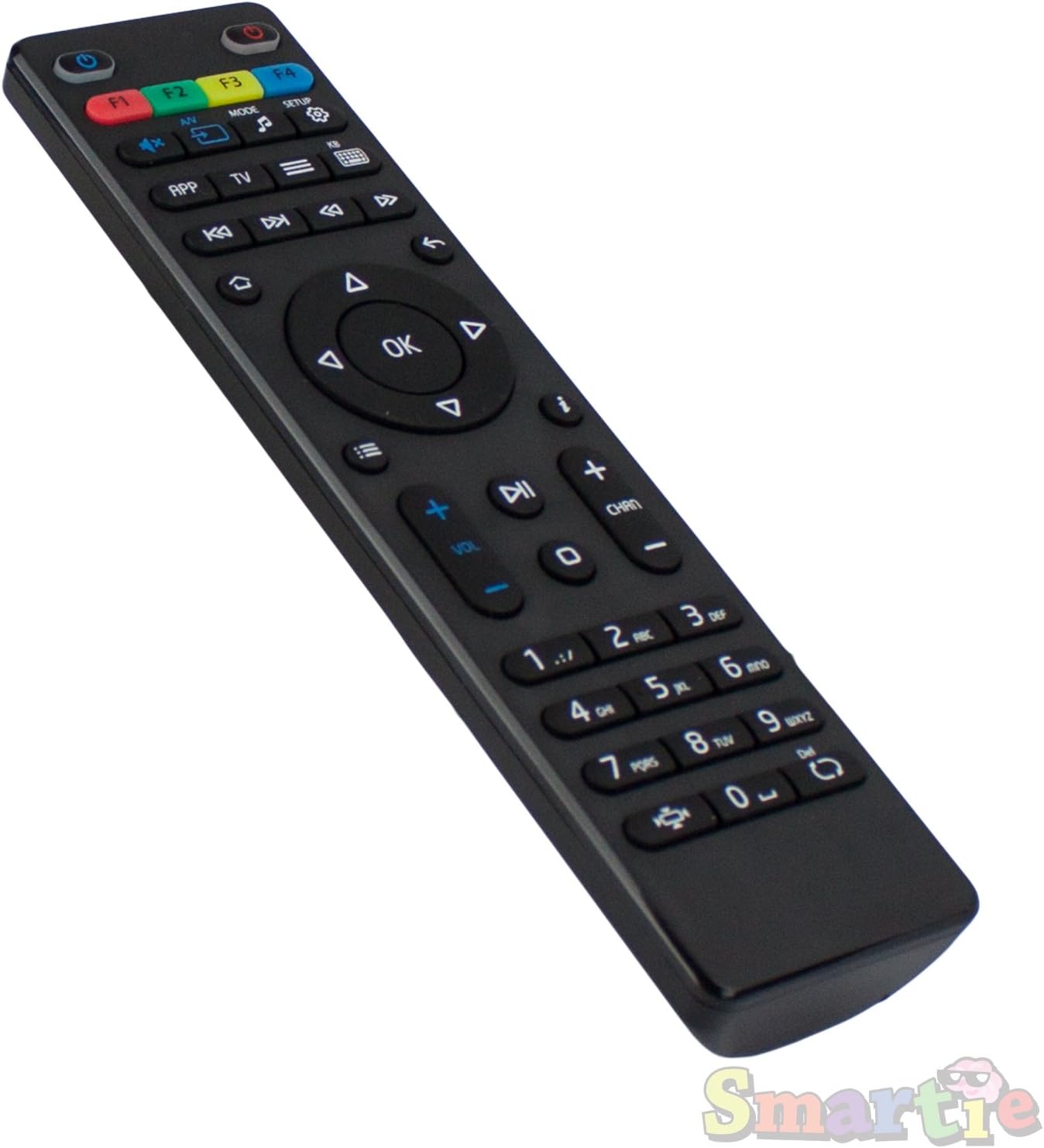
Figura 2: Angolat view of the remote control, showing its ergonomic design and button arrangement.
2. Konnessjoni Inizjali
This remote control is designed to work immediately with compatible Infomir MAG Set Top Boxes (models 250, 254, 255, 260, 265, 270, 275) without requiring any special configuration or pairing. Once batteries are installed, point the remote control towards your Set Top Box and begin operation.
Istruzzjonijiet Operattivi
The remote control features a standard layout for navigating your IPTV Set Top Box. Below is a general overview tal-funzjonijiet tal-buttuni ewlenin:
- Buttuna tal-Qawwa (●): Located at the top right, used to power on/off the Set Top Box.
- Buttuni F1-F4: Programmable function keys, typically used for quick access to specific features or applications.
- A/V, Mode, Setup Buttons: For adjusting audio/video settings, changing input modes, or accessing system setup menus.
- Pad tan-Navigazzjoni ('Il fuq, 'l isfel, Xellug, Lemin, OK): Used for menu navigation and selection. The OK Il-buttuna tikkonferma l-għażliet.
- Back/Return Button (↶): Terġa' lura għall-iskrin jew il-menu preċedenti.
- Volum 'il fuq/Niżżel (VOL +/-): Jaġġusta l-volum tal-awdjo.
- Channel Up/Down (CHAN +/-): Tibdel l-istazzjon televiżiv.
- Tastiera numerika (0-9): For direct channel entry or inputting numbers.
- Buttuna Mute (🔇): Issikket jew jitneħħa l-awdjo.
- Buttuni tal-Kontroll tal-Midja (Daqq, Pawża, Waqfien, Rewind, Avvanza Mgħaġġel, Aqbeż): Għall-kontroll tal-plejbek tal-midja.
Refer to your Infomir MAG Set Top Box's user manual for specific functions and customization options related to these buttons.
Manutenzjoni
Manutenzjoni xierqa tiżgura l-lonġevità u l-prestazzjoni ottimali tal-kontroll remot tiegħek.
- Tindif: Use a soft, dry cloth to clean the surface of the remote control. Do not use liquid cleaners, aerosols, or abrasive materials, as these can damage the remote.
- Sostituzzjoni tal-batterija: Replace batteries when the remote control's responsiveness decreases or it stops functioning. Always replace both batteries simultaneously with new AA batteries.
- Ħażna: Aħżen il-kontroll remot f'post frisk u niexef 'il bogħod mix-xemx diretta u minn temperaturi estremi. Jekk taħżnu għal perjodu estiż, neħħi l-batteriji biex tevita t-tnixxija.
- Immaniġġjar: Avoid dropping the remote control or subjecting it to strong impacts, which can damage internal components.
Issolvi l-problemi
If you encounter issues with your Infomir MAG 254/255 Remote Control, refer to the following common troubleshooting steps:
| Problema | Kawża Possibbli | Soluzzjoni |
|---|---|---|
| Il-kontroll remot mhux qed jirrispondi. | Batteriji mejta jew installati ħażin. | Ibdel il-batteriji b'batteriji AA ġodda, filwaqt li tiżgura l-polarità korretta. |
| Remote control works intermittently. | Low battery power; Obstruction between remote and Set Top Box; Remote control too far from Set Top Box. | Replace batteries. Ensure a clear line of sight to the Set Top Box. Move closer to the Set Top Box. |
| Ċerti buttuni ma jaħdmux. | Button stuck or damaged; Internal circuit issue. | Gently press the button multiple times. If the issue persists, the remote may require replacement. |
| Remote control interferes with other devices. | Infrared interference. | Ensure other infrared devices are not pointing at the Set Top Box. |
If these steps do not resolve the issue, contact customer support for further assistance.
Speċifikazzjonijiet
- Ditta: MAG
- Manifattur: Infomir
- Numru tal-Mudell: LYSB016APRQIM-ELECTRNCS
- Apparati Kompatibbli: Infomir MAG 250, 254, 255, 260, 265, 270, 275 Linux IPTV Set Top Boxes
- Sors tal-Enerġija: 2 x Batteriji AA (mhux inklużi)
- Dimensjonijiet tal-Prodott: 6.7 x 2 x 0.6 pulzieri (bejn wieħed u ieħor)
- Piż tal-oġġett: 2 uqija (madwar)
- Kulur: Iswed
- Karatteristika Speċjali: Disinn ergonomiku
Garanzija u Appoġġ
Informazzjoni dwar Garanzija
Specific warranty details for this replacement remote control may vary depending on the retailer and region of purchase. Please refer to your purchase receipt or contact the seller directly for information regarding warranty coverage and terms.
Appoġġ għall-Klijent
For technical assistance, troubleshooting beyond this manual, or inquiries regarding your Infomir MAG 254/255 Remote Control, please contact the manufacturer, Infomir, or the authorized reseller from whom you purchased the product. Contact information can typically be found on the product packaging or the seller's websit.
Tista' wkoll iżżur l-uffiċjal Ħanut MAG fuq Amazon għal aktar informazzjoni dwar il-prodott u riżorsi ta' appoġġ.