
LyxPro SPA10
LyxPro SPA-10 Portable PA Speaker System User Manual
Brand: LyxPro | Model: SPA10
1. Introduzzjoni
Thank you for choosing the LyxPro SPA-10 Portable PA Speaker System. This active 10-inch speaker is designed for clear sound and performance, suitable for various occasions from personal use to small gatherings. Its compact and lightweight design ensures easy portability, while multiple input options provide versatile connectivity. This manual provides essential information for the proper setup, operation, and maintenance of your device.
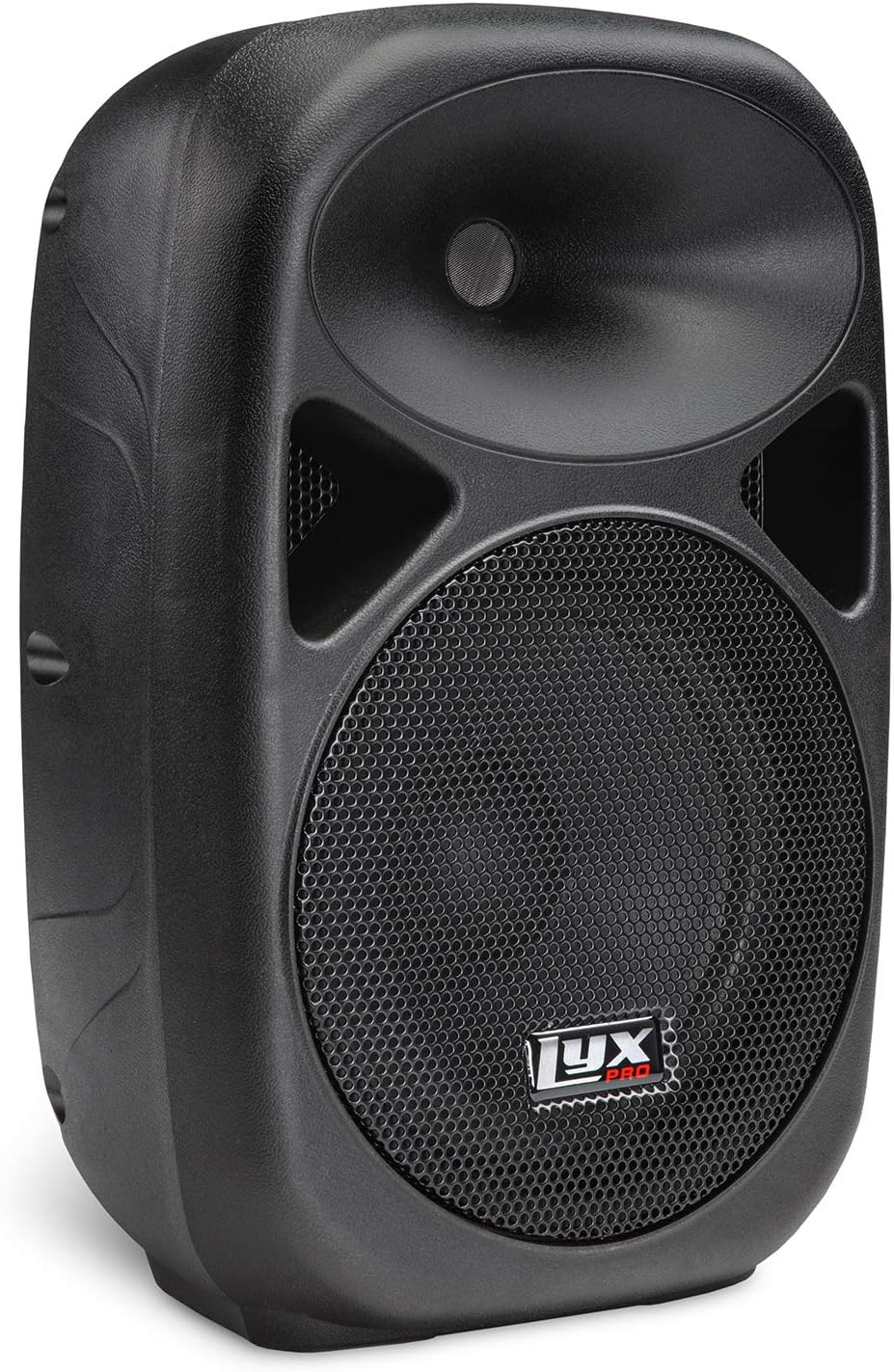
Figura 1: Quddiem view of the LyxPro SPA-10 Portable PA Speaker.
2. Kontenut tal-Pakkett
Jekk jogħġbok ivverifika li l-oġġetti kollha elenkati hawn taħt huma inklużi fil-pakkett tiegħek:
- LyxPro SPA-10 10" Inch Portable PA Speaker
- Korda tal-enerġija
- Kontroll mill-bogħod (jekk applikabbli)
- Various cables for input connections (if applicable)

Figure 2: Included accessories: power cord and remote control.
3. Karatteristiċi tal-prodott
- Perfect Clear Sound and Performance: Professional powered 10" active PA system, compact and lightweight for easy transport (approx. 21 pounds).
- Great for Any Occasion and Location: Ideal for musical performances (guitar, piano, drums), indoor/outdoor parties, or public speaking.
- Multiple Easy Connections: Built-in Bluetooth for wireless streaming, MP3 EQ control section, SD Card Slot & USB Input, R/L RCA Inputs with Per-Input Level Knobs, XLR 1/4" Inputs with Mic/Line switch.
- Link Multiple Speakers at Once: Daisy chain multiple active speakers using a simple XLR cable for expanded sound coverage.

Figure 3: Integrated carry handle for easy portability.

Figure 4: Universal connectivity options including SD card, USB, and Bluetooth.
4. Setup
Follow these steps to set up your LyxPro SPA-10 speaker:
- Pjazzament: Position the speaker on a stable, flat surface or mount it on a compatible speaker stand. The bottom of the speaker features a standard 35mm pole mount with a tightening screw for secure installation.
- Konnessjoni tal-Enerġija: Ensure the speaker's power switch is in the OFF position. Connect the provided power cord to the speaker's power input and then to a suitable electrical outlet.
- Qawwa Inizjali Mixgħula: Flip the power switch to the ON position. The 'Power' indicator light should illuminate.
- Konnessjoni tas-Sors Awdjo: Connect your desired audio source using one of the available inputs on the rear panel:
- Microphone/Line Input (XLR or 1/4"): For microphones or line-level instruments. Adjust the 'Volume 1' knob.
- Line Input (RCA or 3.5mm AUX): For connecting devices like MP3 players, phones, or mixers. Adjust the 'Volume 2' knob.
- Bluetooth: Activate Bluetooth on your device and pair with 'LyxPro SPA-10'.
- Karta USB/SD: Insert a USB drive or SD card into the respective slot for MP3/WMA playback.
- Daisy Chaining (Mhux obbligatorju): To connect multiple active speakers, use an XLR cable from the 'Mix Out' port of the first speaker to an input on the next active speaker.

Figure 5: Rear panel showing various inputs, outputs, and controls.

Figure 6: Speaker mounted on a stand, demonstrating the pole mount feature.
5. Istruzzjonijiet Operattivi
Once set up, operate your LyxPro SPA-10 using the following guidelines:
- Kontroll tal-Volum: Use 'Volume 1' for Mic/Line Input and 'Volume 2' for Line Input (RCA/AUX). The 'MP3 Volume' knob controls the volume for Bluetooth, USB, and SD card playback.
- Equalizer: Adjust the 'Treble' and 'Bass' knobs in the 'Equalizer' section to fine-tune the sound to your preference.
- Operazzjoni Bluetooth:
- Kun żgur li l-kelliem ikun mixgħul.
- Select 'Bluetooth' mode using the 'MODE' button on the MP3 player section. The display will show 'BT'.
- On your device (smartphone, tablet, etc.), search for Bluetooth devices and select 'LyxPro SPA-10' to pair.
- Once paired, you can stream audio wirelessly.
- Daqq tal-Kard USB/SD:
- Insert a USB flash drive or SD card containing MP3/WMA files fis-slot korrispondenti.
- The speaker should automatically switch to USB or SD mode. If not, press the 'MODE' button.
- Use the playback controls (Play/Pause, Next/Previous Track) on the MP3 player section to manage your music.
- Indikatur tal-Klip: The 'Clip' LED illuminates when the input signal is too high, indicating potential distortion. Reduce the input volume to prevent clipping.

Figure 7: Detail of equalizer and volume controls.
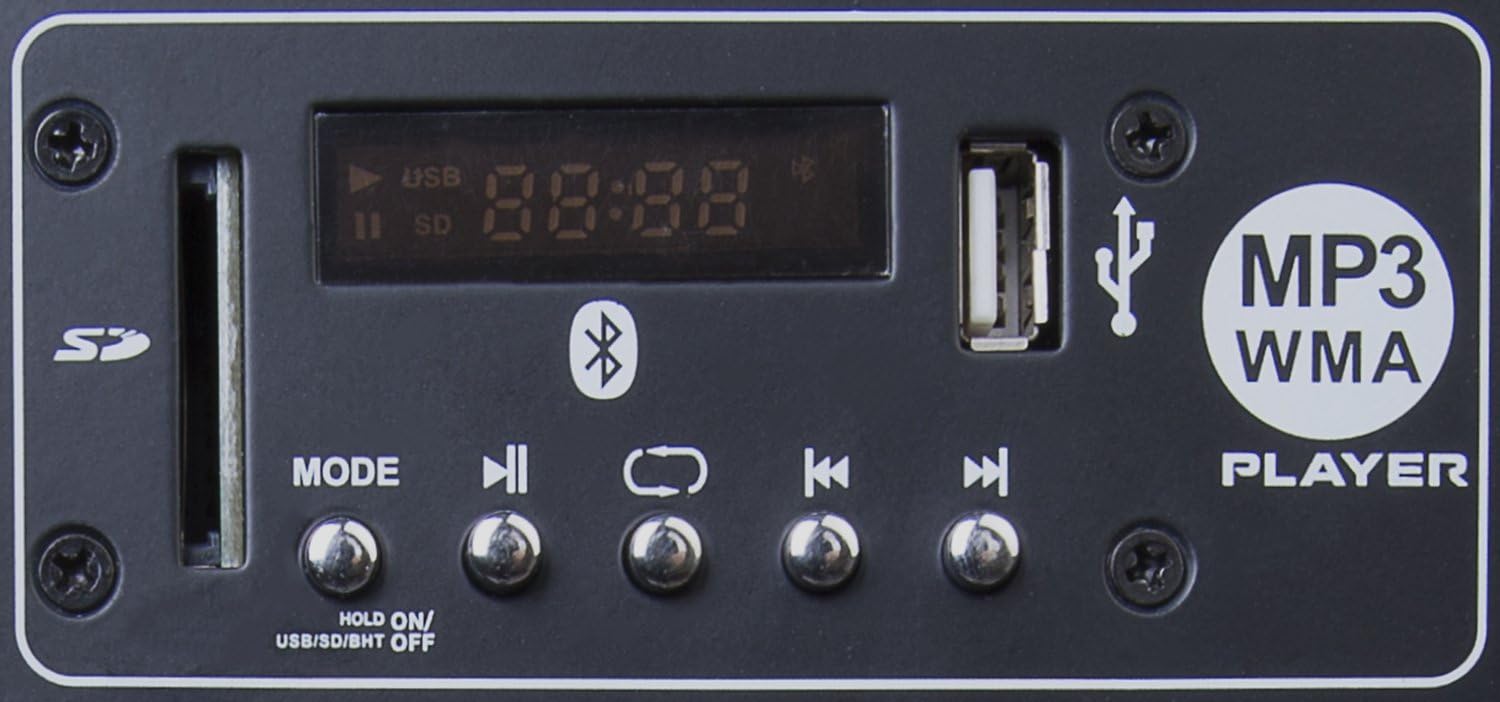
Figure 8: MP3 player section with SD card slot, USB port, and playback controls.
6. Manutenzjoni
To ensure the longevity and optimal performance of your LyxPro SPA-10 speaker, follow these maintenance tips:
- Tindif: Use a soft, dry cloth to clean the exterior of the speaker. Avoid using abrasive cleaners, solvents, or strong chemicals, as they may damage the finish.
- Ħażna: When not in use, store the speaker in a cool, dry place away from direct sunlight, extreme temperatures, and excessive dust.
- Immaniġġjar: Always use the integrated handle when moving the speaker. Avoid dropping or subjecting the speaker to strong impacts.
- Ventilazzjoni: Ensure proper ventilation around the speaker to prevent overheating. Do not block the ventilation openings.
7 Issolvi l-problemi
If you encounter issues with your LyxPro SPA-10 speaker, refer to the following common problems and solutions:
| Problema | Kawża Possibbli | Soluzzjoni |
|---|---|---|
| Ebda qawwa | Power cord not connected; Power switch off; Outlet malfunction | Ensure power cord is securely plugged in; Turn power switch ON; Try a different power outlet. |
| Ebda output tal-ħoss | Volume too low; Incorrect input selected; Audio source issue; Cables not connected properly | Increase master volume and individual input volumes; Verify correct input mode; Check audio source (e.g., phone volume); Re-connect all audio cables securely. |
| Ħoss distort | Input signal too high (clipping); Equalizer settings incorrect; Speaker overloaded | Reduce input volume until 'Clip' LED is off; Adjust equalizer settings; Ensure speaker is not being driven beyond its capacity. |
| Kwistjonijiet ta 'konnessjoni Bluetooth | Speaker not in Bluetooth mode; Device not paired; Interference | Select Bluetooth mode on speaker; Ensure device is discoverable and pair again; Move closer to speaker; Disconnect other Bluetooth devices. Note: Some users report needing to 'forget' the device on their phone before re-pairing if issues persist. |
| Il-karta USB/SD mhux qed tilgħab | Skorretta file format; Card/drive corrupted; Not in correct mode | Tiżgura files are MP3/WMA format; Try a different USB/SD card; Select USB/SD mode using the 'MODE' button. |
8. Speċifikazzjonijiet
| Karatteristika | Dettall |
|---|---|
| Brand | LyxPro |
| Isem tal-Mudell | 10 Inch (SPA10) |
| Tip ta' Kelliem | Barra, Woofer |
| Karatteristika Speċjali | Mp3 Section w, Bluetooth, SD Card Slot, Stereo pairing |
| Użi Rakkomandati Għall-Prodott | Għal Plejers tal-Mużika |
| Apparati Kompatibbli | Piano, MP3 Player, Guitars, Keyboard, Electronic Drum |
| Dijametru tas-Subwoofer | 10 Pulzier |
| Għadd ta' Unitajiet | 1 Għadd |
| Tip ta' Kontrollur | Buttuna |
| Kulur | Iswed |
| Dimensjonijiet tal-Prodott | 10"D x 12.5"W x 19.5"H |
| Impedenza | 4 Ohm |
| Huwa Waterproof | FALZ |
| Ħin tal-Iċċarġjar | 10 Sigħat |
| Teknoloġija tal-Komunikazzjoni mingħajr Fili | Bluetooth |
| Daqs tal-Kelliem | 10 Pulzier |
| Sors tal-Enerġija | Corded Elettriku |
| Tip ta' Sewwieq Awdjo | Sewwieq Dinamika |
| Numru ta' Mikrofoni | 1 |
| Teknoloġija tal-Konnettività tas-Subwoofer | Bil-fili |
| Protokoll tal-Konnettività | Bluetooth, USB |
| Jinkludi MP3 player? | Iva |
| Numru ta' Ċirkwiti | 1 |
| Numru ta 'Livelli ta' Qawwa | 1 |
| Numru ta 'USB 2 Ports | 1 |
| Użi Speċifiċi Għall-Prodott | Live performances, presentations, educational settings |
| Manifattur | LyxPro |
| Piż tal-oġġett | 17.36 liri |
| Qawwa tal-Ħruġ Massimu tal-Ispeaker | 110 Watts |
| Teknoloġija tal-Konnettività | XLR , 1/4 |
| Modalità tal-Ħruġ tal-Awdjo | Stereo, possibly others |
| Tip ta 'Immuntar | Freestanding,Inside Mount,Outside Mount,Plug Mount |
9. Garanzija u Appoġġ
The LyxPro SPA-10 comes with a Garanzija Limitata. For specific details regarding warranty coverage, duration, and terms, please refer to the warranty card included with your product or contact LyxPro customer support directly.
For technical assistance, troubleshooting beyond this manual, or service inquiries, please visit the official LyxPro website or contact their customer support team. Keep your purchase receipt as proof of purchase for any warranty claims.
Ask a question about this manual
Ask about setup, troubleshooting, compatibility, parts, safety, or missing instructions. Manuals+ will review the question and use this page’s manual context to help answer it.