
1. Introduzzjoni
This manual provides detailed instructions for the installation, operation, and maintenance of your ASUS B150M-A Micro ATX Motherboard. The B150M-A supports 6th Generation Intel Processors and DDR4 memory, featuring advanced hardware safeguards with 5X Protection II, an intuitive UEFI BIOS, and Fan Xpert 2+ for optimized cooling. This motherboard is designed for reliable performance in various computing environments.
Karatteristiċi ewlenin:
- Protezzjoni 5X II: Advanced hardware safeguards for comprehensive system protection.
- DDR4 Memory Compatibility: Supports high-speed DDR4 memory modules.
- UEFI BIOS with EZ Flash 3: User-friendly graphical BIOS interface with easy update functionality.
- Fan Xpert 2+: Advanced fan controls for optimal cooling and quiet operation.
- Gaming-Grade Audio: Enhanced audio experience with LED-illuminated shielding.
2. Informazzjoni dwar is-Sigurtà
Always observe the following safety precautions when handling and installing the motherboard:
- Elettriku Statiku: Ilbes ċinga tal-polz anti-statika jew tmiss spiss oġġett ertjat biex teħles mill-elettriku statiku qabel ma timmaniġġja l-komponenti.
- Itfi: Kun żgur li l-provvista tal-enerġija hija skonnettjata mis-sokit tal-ħajt qabel ma tinstalla jew tneħħi xi komponenti.
- Immaniġġjar tal-komponenti: Hold components by their edges, avoiding contact with pins, circuits, or connectors.
- Ventilazzjoni: Ensure adequate ventilation within the computer case to prevent overheating.
- Installazzjoni professjonali: Jekk m'intix ċert dwar xi passi tal-installazzjoni, ikkonsulta tekniku kwalifikat.
3. Kontenut tal-Pakkett
Verify that all items are present in your motherboard package. If any item is damaged or missing, contact your retailer.

Immaġni: Contents of the ASUS B150M-A motherboard retail box. This includes the motherboard, a rear I/O panel shield, a user guide, a support DVD, and two SATA data cables.
- ASUS B150M-A Motherboard
- Tarka tal-Panel I/O ta 'wara
- Gwida għall-Utent
- DVD ta' appoġġ (li fih sewwieqa u utilitajiet)
- SATA 6Gb/s Data Cables (x2)
4. Setup u Installazzjoni
4.1 Layout tal-Motherboard
Iffamiljarizza ruħek mad-diversi komponenti u konnetturi fuq il-motherboard qabel l-installazzjoni.

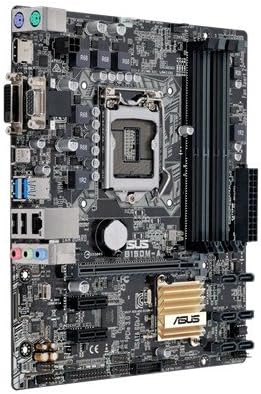
Immaġni: Fuqview of the ASUS B150M-A motherboard. Key areas include the LGA1151 CPU socket, four DDR4 DIMM slots, PCIe x16 and x1 slots, SATA ports, and various headers.

Immaġni: Angled perspective of the ASUS B150M-A motherboard, providing a clearer view of the heatsink over the B150 chipset and the layout of the expansion slots.
4.2 Installazzjoni tas-CPU (LGA1151)
- Sib is-sokit LGA1151 fuq il-motherboard.
- Push the load lever down and away from the socket to open the retention frame.
- Allinja s-CPU mas-sokit bir-reqqa, filwaqt li tiżgura li t-trijangolu tad-deheb fuq is-CPU jaqbel mat-trijangolu fuq is-sokit. Tisforzax is-CPU fis-sokit.
- Lower the CPU gently into the socket.
- Close the retention frame and push the load lever back into place until it clicks.
- Installa l-cooler tas-CPU skont l-istruzzjonijiet tal-manifattur tiegħu.
4.3 Memory Installation (DDR4)
The B150M-A motherboard has four DDR4 DIMM slots. For optimal performance, install memory modules in pairs.
- Iftaħ il-klipps fiż-żewġt itruf tas-slott tad-DIMM.
- Allinja l-modulu tal-memorja mas-slott, filwaqt li tiżgura li l-islott fuq il-modulu taqbel maċ-ċavetta fis-slott.
- Agħfas sew 'l isfel fuq iż-żewġt itruf tal-modulu tal-memorja sakemm il-klipps jidħlu f'posthom.
- Verify that both clips are securely closed.
4.4 Installazzjoni tal-Karta tal-Espansjoni
The motherboard features PCIe x16 and PCIe x1 slots for graphics cards and other expansion cards.
- Locate an available expansion slot.
- Neħħi l-għatu tal-islott tal-metall korrispondenti mill-kaxxa tal-kompjuter tiegħek.
- Allinja l-kard tal-espansjoni mas-slott u agħfas 'l isfel sew sakemm tkun f'postha għalkollox.
- Waħħal il-kard b'kamin jew bil-mekkaniżmu ta' żamma tal-kaxxa.
4.5 Storage Device Installation (SATA)
Connect your SATA hard drives or SSDs to the SATA 6Gb/s ports on the motherboard.
- Qabbad tarf wieħed ta' kejbil tad-dejta SATA ma' port SATA fuq il-motherboard.
- Qabbad it-tarf l-ieħor tal-kejbil tad-dejta SATA mat-tagħmir tal-ħażna tiegħek.
- Qabbad kejbil tal-enerġija SATA mill-provvista tal-enerġija tiegħek mat-tagħmir tal-ħażna.
4.6 Front Panel Connectors
Connect the cables from your computer case's front panel (power button, reset button, USB ports, audio jacks, etc.) to the corresponding headers on the motherboard. Refer to the motherboard layout diagram for header locations.
4.7 Konnessjonijiet tal-Enerġija
Ensure all necessary power cables from your power supply are connected to the motherboard and components.
- Konnettur tal-Enerġija ATX ta' 24-pin: Connect the main 24-pin power cable from the PSU to the motherboard.
- 8-pin (or 4-pin) ATX 12V Power Connector: Connect the CPU power cable to the corresponding header near the CPU socket.
5. Istruzzjonijiet Operattivi
5.1 L-Ewwel Boot u s-Setup tal-BIOS
Wara li tiġbor is-sistema tiegħek, qabbad monitor, tastiera, u maws. Ixgħel is-sistema.
- Agħfas il- DEL key during startup to enter the UEFI BIOS Utility.
- The UEFI BIOS provides a graphical interface for configuring system settings, boot order, and hardware monitoring.
- Use the EZ Mode for basic settings or switch to Advanced Mode for more detailed configurations.
5.2 Installazzjoni tas-sewwieq
After installing your operating system, install the necessary drivers for the motherboard components. These can be found on the included Support DVD or downloaded from the official ASUS websit.
- Install chipset drivers.
- Install LAN drivers for network connectivity.
- Install audio drivers for sound functionality.
- Install any other relevant utility drivers.
5.3 Fan Control with Fan Xpert 2+
The Fan Xpert 2+ utility allows for advanced control over system fans, optimizing cooling performance and reducing noise levels. This utility can be accessed through the ASUS AI Suite software or directly within the UEFI BIOS.
6. Manutenzjoni
6.1 Tindif
Naddaf l-intern tal-kompjuter tiegħek regolarment biex tevita l-akkumulazzjoni tat-trab, li jista' jwassal għal sħana żejda u ħsara fil-komponenti. Uża arja kkompressata biex tneħħi t-trab mill-fannijiet, is-sinkijiet tas-sħana, u komponenti oħra. Kun żgur li s-sistema tkun mitfija u skonnettjata qabel ma tnaddafha.
6.2 Aġġornamenti tal-BIOS
Iċċekkja l-appoġġ tal-ASUS perjodikament website for updated BIOS versions. BIOS updates can improve system stability, add support for new hardware, or fix bugs. Use the EZ Flash 3 utility within the BIOS to safely update the firmware, typically via a USB flash drive.
7 Issolvi l-problemi
Jekk tiltaqa' ma' problemi bil-motherboard tiegħek, ikkunsidra l-passi komuni li ġejjin għas-soluzzjoni tal-problemi:
- Ebda Qawwa/Ebda POST:
- Ivverifika li l-kejbils tal-enerġija kollha (24-pin ATX, 8-pin CPU) huma konnessi sew.
- Kun żgur li s-CPU u r-RAM huma mqiegħda sew.
- Try booting with only one RAM stick installed, testing each slot and module.
- Clear the CMOS (Complementary Metal-Oxide-Semiconductor) by removing the CMOS battery for a few minutes or using the clear CMOS jumper.
- Kwistjonijiet tal-Wiri:
- Ensure the monitor cable is connected to the correct port (integrated graphics or discrete graphics card).
- Reseat the graphics card if applicable.
- Ittestja b'monitor jew kejbil differenti.
- Is-Sistema Operattiva Mhux Tibbutja:
- Check boot order in BIOS.
- Verify storage device connections.
- Run a diagnostic tool on your storage drive.
- Kwistjonijiet Periferali (USB, Awdjo, LAN):
- Kun żgur li d-drajvers huma installati b'mod korrett.
- Iċċekkja l-konnessjonijiet fiżiċi.
- Ittestja b'periferali differenti.
For more advanced troubleshooting or persistent issues, refer to the comprehensive user manual on the ASUS support webis-sit jew ikkuntattja l-appoġġ tekniku tal-ASUS.
8. Speċifikazzjonijiet
| Karatteristika | Dettall |
|---|---|
| Isem tal-Mudell | B150M-A |
| Socket tas-CPU | LGA 1151 |
| Proċessuri Kompatibbli | Intel Core i5-6600K, Intel Core i7-6700K, Intel Core i5-7600K, Intel Core i7-7700K (and other 6th/7th Gen Intel Core processors with BIOS update) |
| Chipset | Intel B150 |
| Teknoloġija tal-Memorja RAM | DDR4 |
| Slots tal-Memorja | 4 x DIMM |
| Daqs tal-Memorja Max | 64 GB |
| Veloċità tal-Arloġġ tal-Memorja | 2133 MHz |
| Interface tal-Kard Grafika | Integrated (requires CPU with integrated graphics) |
| Total PCIe Ports | 1 x PCIe 3.0/2.0 x16, 2 x PCIe 3.0/2.0 x1 |
| Portijiet SATA Totali | 6 x SATA 6Gb/s |
| Portijiet USB | Total 5 (USB 3.0, USB 2.0) + Internal Headers |
| Output tal-vidjo | HDMI, DVI-D, VGA (D-Sub) |
| Awdjo | Realtek ALC887 CODEC tal-Awdjo b'Definizzjoni Għolja bi 8 Kanali |
| LAN | Realtek RTL8111H Gigabit LAN Kontrollur |
| Fattur tal-Formola | Micro ATX (9.2 inch x 7.3 inch) |
| Piż tal-oġġett | 1.9 Liri |
Immaġni: The rear input/output panel of the ASUS B150M-A motherboard, featuring legacy PS/2 ports, VGA, DVI-D, HDMI for video output, USB 3.0 and USB 2.0 ports, a Gigabit Ethernet port, and 3.5mm audio jacks.
9. Informazzjoni dwar Garanzija
ASUS products are manufactured to the highest quality standards. This motherboard is covered by a limited warranty provided by ASUS. The specific terms and duration of the warranty may vary by region and retailer. Please retain your proof of purchase for warranty claims.
For detailed warranty information, please visit the official ASUS support website or consult the warranty card included with your product.
10. Appoġġ Tekniku
If you require further assistance or encounter issues not covered in this manual, please contact ASUS technical support. You can find support resources, FAQs, driver downloads, and contact information on the official ASUS websit:
When contacting support, please have your motherboard model (B150M-A) and serial number ready.